react-test-renderer review
react-test-renderer is React's deprecated renderer for turning a component tree into JavaScript objects without creating DOM or native host nodes. Tests can snapshot `toJSON()`, inspect component types and props through `root`, replace props with `update()`, or provide fake host instances for refs. React now describes this environment as contrived because its queries expose implementation structure that may change without notice. Version 19.2.8 matches the React 19.2.8 peer line; its release notes contain a Server Components decoding improvement rather than a test-renderer feature. The package README says it is unmaintained, will be removed in a future version, and warns on `create()` under React 19.
Do not install react-test-renderer for a new suite. Keep 19.2.8 only as temporary support for old object-tree tests, then move web and native assertions to the testing libraries React itself recommends.
We installed it
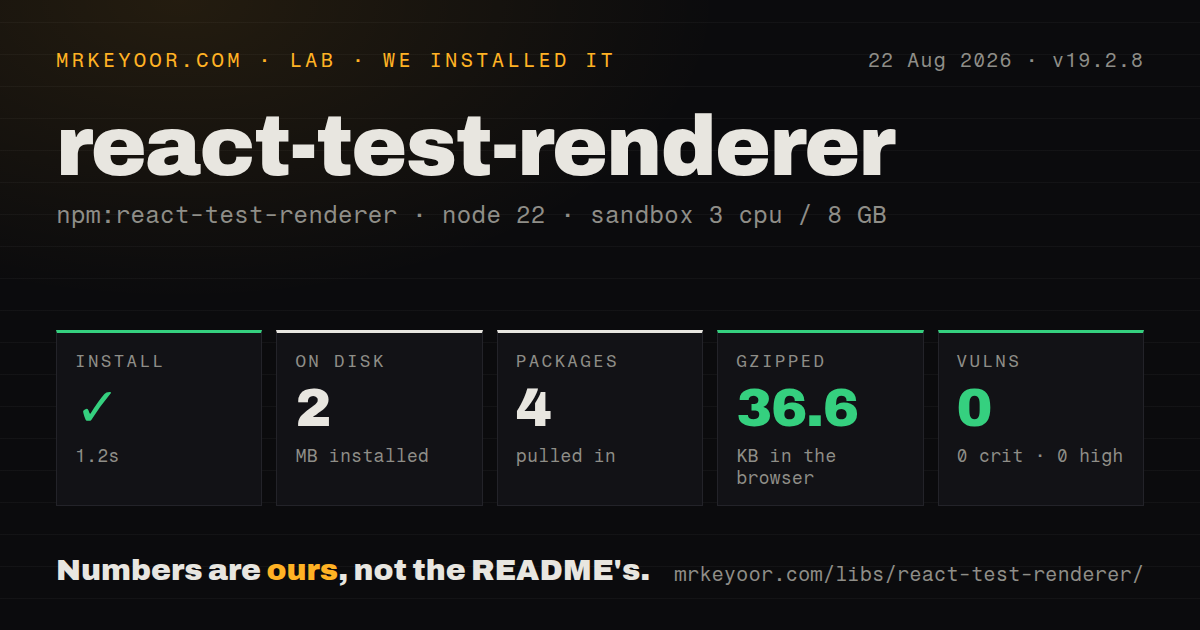
| Install | ✓ · 1.2s | 4 packages on disk · 2 MB |
| Import | ✓ | ESM import works · require() works · CommonJS package |
| Browser | 36.6 KB | gzipped (122.1 KB minified), bundled with esbuild |
| Types | — | no TypeScript types found |
| Known vulns | 0 | 0 critical · 0 high · 0 moderate · 0 low (npm audit) |
Answers from our run
Does react-test-renderer install cleanly?
Yes. In a fresh container with an empty cache, npm install react-test-renderer finished in 1 seconds, leaving 4 packages and 2 MB on disk. npm audit reported no known vulnerabilities.
How much does react-test-renderer add to a browser bundle?
36.6 KB gzipped (122.1 KB minified) when the whole package is bundled for the browser with esbuild. Importing only part of it is usually smaller.
Does react-test-renderer work with both ESM and CommonJS?
Yes. Both import 'react-test-renderer' and require('react-test-renderer') worked in Node 22 in our run. The package is published as CommonJS.
Does react-test-renderer include TypeScript types?
No type declarations were found in our install, so TypeScript users need their own declarations.
react-test-renderer or @testing-library/react: which should you use?
@testing-library/react: Use it for web integration tests built around DOM roles, labels, text, and user-visible behavior. Do not install react-test-renderer for a new suite.
When should you not use react-test-renderer?
You are writing a new React test. The package README marks the renderer deprecated, unmaintained, and scheduled for removal.
Use it if
- An existing snapshot suite already depends on its JSON shape and needs a short maintenance window before migration.
- A custom renderer test genuinely needs React component nodes rather than browser roles, events, focus, or accessibility behavior.
- Legacy tests call class component instances or search by component type and cannot all be replaced in the current change.
- A migration needs side-by-side old snapshots and new Testing Library assertions to verify behavior during conversion.
- You are writing a new React test. The package README marks the renderer deprecated, unmaintained, and scheduled for removal.
- The assertion concerns clicks, keyboard input, focus, form behavior, accessible names, or browser APIs. This renderer has no DOM event system or layout environment.
- The suite runs React 19 without warning suppression. Each `ReactTestRenderer.create()` call logs the official deprecation warning.
- Tests should survive refactoring a component into hooks or different child components. `root`, `toTree()`, props, and class instances couple assertions to implementation structure.
- TypeScript support must come from the installed package. Our check found no bundled declarations, so projects rely on a separate community types package if they keep using it.
Setup reality
We installed react-test-renderer 19.2.8 in a fresh Node 22 Bookworm container. npm finished in 1.2 seconds, left 4 packages, and used 2 MB on disk. The package is 992 KB unpacked, has 2 direct dependencies and one peer dependency, and carries an MIT license. npm audit found zero known vulnerabilities. Both CommonJS require and ESM import worked, but the package contains no TypeScript declarations.
Match the renderer to React exactly enough to satisfy its peer range: 19.2.8 declares react ^19.2.8. Calling create() on React 19 writes a deprecation warning, by design. Do not hide all console errors to quiet it; broad filtering can erase missing-act and rendering warnings. If temporary suppression is unavoidable, match the one message and attach a removal ticket to the setup code.
There is no DOM. Test instances expose React types and props, and calling an event prop directly does not simulate bubbling, default prevention, disabled controls, focus, or browser input behavior. Host refs receive null unless createNodeMock returns a fake node. Any component that measures, focuses, observes, or calls browser methods needs a hand-built mock, which can make the test validate the mock rather than user behavior.
Updates and async work belong inside act imported from React. Unmount roots so effect cleanup runs and subscriptions do not leak between tests. Our browser bundle measured 122.1 KB minified and 36.6 KB gzipped, even though this is test-only code; keep it out of production dependencies and client builds. Plan migration to @testing-library/react for web or its React Native counterpart before a future React version removes the renderer.
Patterns
Capture the legacy JSON tree snapshot-json-tree
import TestRenderer from 'react-test-renderer';
import { act } from 'react';

let renderer;
await act(async () => {
  renderer = TestRenderer.create(
    <Link href='/account'>Account</Link>
  );
});
expect(renderer.toJSON()).toMatchSnapshot();
React 19 logs a deprecation warning when create() runs. Keep this pattern only while migrating an existing snapshot.
Locate one component instance find-component-type
const button = renderer.root.findByType(Button);
expect(button.props.disabled).toBe(true);
findByType throws unless exactly one node matches. The assertion knows the component implementation, which is the coupling React warns against.
Collect nodes with matching props find-nodes-by-props
const rows = renderer.root.findAllByProps({
  kind: 'invoice-row',
});
expect(rows).toHaveLength(3);
These are React props rather than resolved DOM attributes or accessibility semantics.
Call a handler directly invoke-event-prop
const button = renderer.root.findByType(Button);
await act(async () => {
  button.props.onClick();
});
Direct invocation skips event propagation, default actions, focus changes, and disabled-element behavior.
Render the root with new input update-root-props
await act(async () => {
  renderer.update(<Counter count={2} />);
});
expect(renderer.toJSON()).toMatchSnapshot();
update preserves state when React reconciles the new root with the old one. It is not a fresh mount.
Supply a fake node for refs mock-host-reference
const focus = jest.fn();
let renderer;
await act(async () => {
  renderer = TestRenderer.create(<SearchInput />, {
    createNodeMock(element) {
      return element.type === 'input' ? { focus } : null;
    },
  });
});
expect(focus).toHaveBeenCalled();
The object is your mock, not a real input. Browser layout, selection, and focus state remain untested.
Read the internal rendered tree inspect-component-tree
const tree = renderer.toTree();
console.log(tree.type);
console.log(tree.props);
console.log(tree.rendered);
toTree() includes user components that toJSON() leaves out. It is the most implementation-sensitive representation in this package.
Access a legacy class root read-class-instance
const instance = renderer.getInstance();
expect(instance.state.open).toBe(false);
Function components return null. Reaching into instance state is a migration candidate for a behavior-level assertion.
Run effect cleanup unmount-test-root
await act(async () => {
  renderer.unmount();
});
expect(unsubscribe).toHaveBeenCalled();
Unmount each retained root, preferably in test cleanup, so subscriptions and timers cannot escape into another case.
Replace a type query with a role query migrate-role-query
import { render, screen } from '@testing-library/react';
import userEvent from '@testing-library/user-event';

const user = userEvent.setup();
render(<SaveButton />);
await user.click(screen.getByRole('button', { name: 'Save' }));
expect(save).toHaveBeenCalled();
The new assertion observes an accessible button and a user interaction instead of the component name and raw prop.
Replace a broad snapshot with visible output migrate-snapshot-text
import { render, screen } from '@testing-library/react';

render(<Invoice total='$42.00' />);
expect(screen.getByText('$42.00')).toBeVisible();
Targeted assertions usually survive wrapper and component refactors that rewrite object snapshots without changing behavior.
Quarantine one deprecation message limit-warning-suppression
const originalError = console.error;
beforeAll(() => {
  jest.spyOn(console, 'error').mockImplementation((message, ...args) => {
    if (String(message).includes('react-test-renderer is deprecated')) return;
    originalError(message, ...args);
  });
});
afterAll(() => console.error.mockRestore());
Treat this as short-lived migration code. A blanket console.error mock hides other React warnings and real failures.
Alternatives
| Package | Registry | Pick it when |
|---|---|---|
| @testing-library/react | npm | Use it for web integration tests built around DOM roles, labels, text, and user-visible behavior. |
| @testing-library/react-native | npm | Use it for React Native integration tests; the React package README names it as the replacement. |
| jsdom | npm | Use it as a DOM environment when plain browser-like APIs and your own assertion layer are enough. |
| react-shallow-renderer | npm | Use only for a legacy shallow-rendering migration where moving to behavior tests cannot happen in the same release. |
More testing guides
pytest · chai · vitest · playwright · jsdom · axe-core · the whole shelf →
How this guide is made: grounded in the library's documentation, release notes, changelog, and issue history, on a fixed rubric — not a hands-on install of every release. The 50 most-downloaded entries are additionally install-verified in clean containers. Corrections: contact the desk.