react-pdf review
React-PDF 10.5.0 displays existing PDF files inside React through `Document`, `Page`, `Thumbnail`, and `Outline` components backed by Mozilla PDF.js. Sources can be URLs, uploaded files, byte arrays, or PDF.js parameter objects. A page can render a canvas, selectable text, and interactive annotations, while your application supplies navigation, zoom controls, virtualization, and error UI. This package does not create PDFs; the similarly named `@react-pdf/renderer` handles that separate task.
React-PDF 10.5.0 produced a 125.8 KB gzipped browser bundle in our test, while both bare Node 22.23.2 entry checks failed. Install it for a client-only custom viewer whose team will manage the worker and PDF.js assets; choose a full viewer package when controls and virtualization should arrive together.
We installed it
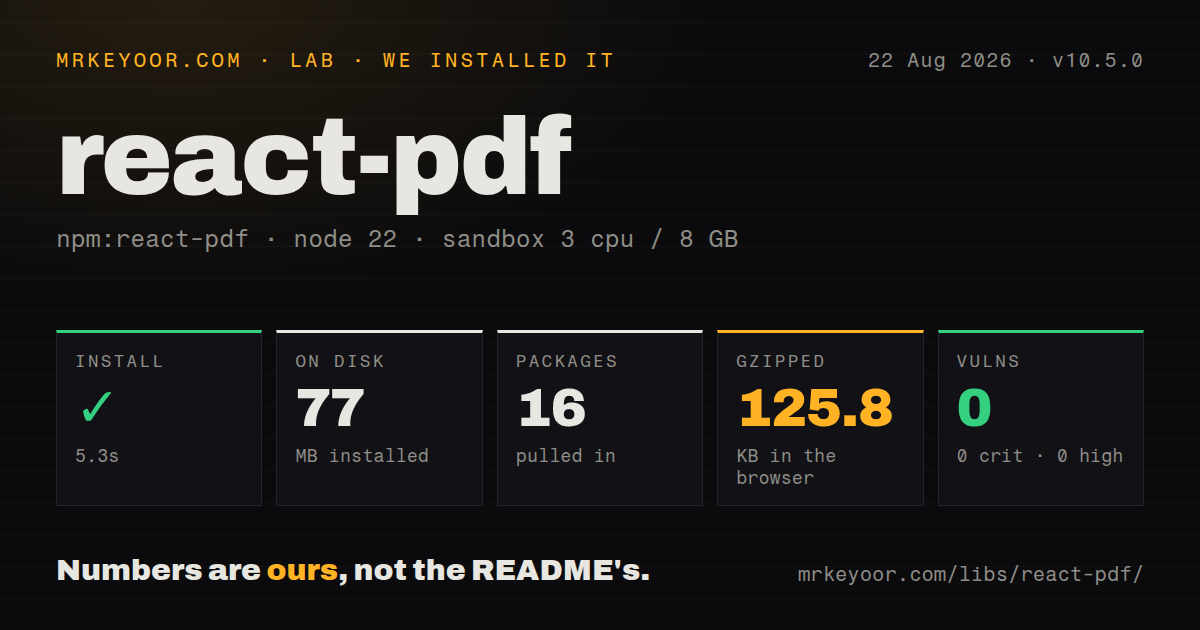
| Install | ✓ · 5.3s | 16 packages on disk · 77 MB |
| Import | ✗ | ESM import fails · require() fails · ESM package with exports map |
| Browser | 125.8 KB | gzipped (424.4 KB minified), bundled with esbuild |
| Types | ✓ | TypeScript types bundled |
| Known vulns | 0 | 0 critical · 0 high · 0 moderate · 0 low (npm audit) |
Answers from our run
Does react-pdf install cleanly?
Yes. In a fresh container with an empty cache, npm install react-pdf finished in 5 seconds, leaving 16 packages and 77 MB on disk. npm audit reported no known vulnerabilities.
How much does react-pdf add to a browser bundle?
125.8 KB gzipped (424.4 KB minified) when the whole package is bundled for the browser with esbuild. Importing only part of it is usually smaller.
Does react-pdf work with both ESM and CommonJS?
Neither plain import nor require succeeded in our sandbox, so it needs a bundler or extra setup.
Does react-pdf include TypeScript types?
Yes, type declarations ship inside the package, so no @types install is needed.
react-pdf or pdfjs-dist: which should you use?
pdfjs-dist: Choose direct PDF.js when you want full control and will write the React lifecycle yourself. React-PDF 10.5.0 produced a 125.8 KB gzipped browser bundle in our test, while both bare Node 22.23.2 entry checks failed.
When should you not use react-pdf?
You need to generate a PDF. The project README sends that use case to @react-pdf/renderer.
Use it if
- A React product needs to show an existing PDF while controlling its own viewer chrome and navigation.
- Pages need selectable text, links, thumbnails, or an outline exposed through React components.
- The source may be a public URL, authenticated request, browser `File`, or `Uint8Array`.
- The build can own the PDF.js worker plus CMap, standard-font, and WebAssembly assets required by its documents.
- You need to generate a PDF. The project README sends that use case to `@react-pdf/renderer`.
- A ready-to-use viewer with search, virtualization, print, zoom controls, and polished mobile behavior is expected. React-PDF supplies the rendering pieces.
- Server rendering is mandatory. The README instructs Next.js users to load the viewer with SSR disabled.
- Older browsers or older iOS must work without extra effort. Compatibility follows PDF.js, and the legacy worker can still need polyfills and transpilation.
- The product cannot publish matching CMaps, standard fonts, or WebAssembly files. Some non-Latin text, older font references, and JPEG 2000 images depend on them.
- A 125.8 KB gzipped viewer dependency is too much for the route. That is the bundle we measured before application UI, worker, and optional static assets.
Setup reality
We installed React-PDF 10.5.0 in a clean Node 22 Bookworm sandbox. npm took 5.3 seconds, left 16 packages consuming 77 MB, and reported 0 vulnerabilities across all audit severities. The package declares 8 direct dependencies and 3 peers, with 624 KB unpacked. Its TypeScript declarations are bundled.
The package is ESM and has an exports map, yet both our CommonJS require() check and ESM import check failed under Node 22.23.2. That makes a bare server-side load a bad smoke test for this browser viewer and supports the README's instruction to disable SSR in Next.js. A browser esbuild run succeeded at 424.4 KB minified and 125.8 KB gzipped.
PDF.js still needs a worker URL. The recommended v10 code sets pdfjs.GlobalWorkerOptions.workerSrc with new URL(..., import.meta.url) in the same module that renders Document or Page; a separate bootstrap module can lose the assignment through execution order. pnpm layouts may need pdfjs-dist hoisting, and Parcel uses an npm: URL prefix.
Import the supplied text-layer and annotation-layer CSS when those layers are enabled. Copy version-matched CMaps, standard fonts, and WASM when your PDFs require them, then keep the Document options object stable. Browser CORS applies to remote PDFs, and authenticated source objects should be memoized. Long documents need pagination or visibility-based mounting because every rendered page creates canvas and PDF.js work.
Patterns
Point PDF.js at its worker configure-worker
import { Document, Page, pdfjs } from 'react-pdf';

pdfjs.GlobalWorkerOptions.workerSrc = new URL(
  'pdfjs-dist/build/pdf.worker.min.mjs',
  import.meta.url,
).toString();
Keep this assignment in the component module. Another import order can replace a worker value set in a distant bootstrap file.
Display the first loaded page render-one-page
import { useState } from 'react';
import { Document, Page } from 'react-pdf';

export function Viewer() {
  const [pages, setPages] = useState(0);
  return (
    <Document file='/manual.pdf' onLoadSuccess={({ numPages }) => setPages(numPages)}>
      <Page pageNumber={1} />
      <p>{pages ? `1 of ${pages}` : 'Loading...'}</p>
    </Document>
  );
}
Page numbering begins at 1. Nest `Page` inside `Document` unless an already-loaded PDF object is passed directly.
Mount all pages of a short PDF render-all-pages
const [numPages, setNumPages] = useState(0);

<Document file={file} onLoadSuccess={({ numPages }) => setNumPages(numPages)}>
  {Array.from({ length: numPages }, (_, index) => (
    <Page key={index + 1} pageNumber={index + 1} />
  ))}
</Document>
For long files, paginate or mount only visible pages so dozens of large canvases do not render together.
Load the text and annotation styles enable-text-links
import 'react-pdf/dist/Page/TextLayer.css';
import 'react-pdf/dist/Page/AnnotationLayer.css';

<Page
  pageNumber={pageNumber}
  renderTextLayer
  renderAnnotationLayer
  externalLinkTarget='_blank'
/>
Both layers need their package CSS for correct positioning. External links should keep an appropriate `rel` policy.
Fetch a protected PDF source load-authenticated-url
const source = useMemo(() => ({
  url: 'https://api.example.com/files/report.pdf',
  httpHeaders: { Authorization: `Bearer ${token}` },
  withCredentials: true,
}), [token]);

<Document file={source} />
Memoize object-valued `file` props. The remote origin must allow the browser request and its credentials through CORS.
Preview a browser File load-uploaded-file
const [file, setFile] = useState(null);

<input
  type='file'
  accept='application/pdf'
  onChange={(event) => setFile(event.target.files?.[0] ?? null)}
/>
{file && <Document file={file}><Page pageNumber={1} /></Document>}
A selected `File` is accepted directly. Clear both input and viewer state when the user removes it.
Render bytes returned by an API load-byte-array
const response = await fetch('/api/report');
if (!response.ok) throw new Error(`PDF request failed: ${response.status}`);
const bytes = new Uint8Array(await response.arrayBuffer());
setSource({ data: bytes });

<Document file={source} />
Use `Uint8Array` and keep its wrapper object stable; changing identity can trigger a complete document reload.
Tie page width to its container responsive-page
const [width, setWidth] = useState(600);

<ResizeObserverBox onWidth={setWidth}>
  <Page pageNumber={pageNumber} width={Math.min(width, 900)} />
</ResizeObserverBox>
Supplying both `width` and `scale` multiplies the effective size, while `height` is ignored when width is present.
Publish PDF.js support assets configure-font-assets
const options = {
  cMapUrl: '/pdf-assets/cmaps/',
  standardFontDataUrl: '/pdf-assets/standard_fonts/',
  wasmUrl: '/pdf-assets/wasm/',
};

<Document file={file} options={options} />
Copy directories from the exact installed `pdfjs-dist` version and memoize the options object passed to `Document`.
Request an encrypted document password handle-password
<Document
  file={file}
  onPassword={(callback, reason) => {
    const password = window.prompt(reason === 1 ? 'Password required' : 'Incorrect password, try again');
    callback(password ?? '');
  }}
/>
Always invoke the callback. Replace `window.prompt` with an accessible dialog and a clear retry state.
Build a thumbnail rail render-thumbnails
import { Document, Thumbnail } from 'react-pdf';

<Document file={file} onLoadSuccess={({ numPages }) => setNumPages(numPages)}>
  <div className='thumbnails'>
    {Array.from({ length: numPages }, (_, i) => (
      <button key={i} onClick={() => setPageNumber(i + 1)}>
        <Thumbnail pageNumber={i + 1} width={120} />
      </button>
    ))}
  </div>
</Document>
A thumbnail skips text and annotation layers but still performs PDF rendering for each mounted page.
Separate load and render failures handle-load-errors
<Document
  file={file}
  loading={<p>Loading PDF...</p>}
  error={<p>Could not load this PDF.</p>}
  onLoadError={(error) => reportError(error)}
>
  <Page
    pageNumber={pageNumber}
    onRenderError={(error) => reportError(error)}
  />
</Document>
Document parsing and page canvas rendering fail at different stages, so observability should record both callbacks.
Alternatives
| Package | Registry | Pick it when |
|---|---|---|
| pdfjs-dist | npm | Choose direct PDF.js when you want full control and will write the React lifecycle yourself. |
| @react-pdf-viewer/core | npm | Choose it for a plugin-based viewer with packaged navigation and controls. |
| @pdfslick/react | npm | Choose it for a PDF.js React viewer whose scope includes virtualization and more of the shell. |
More web frontend guides
postcss · react · react-dom · tailwindcss · htmlparser2 · tailwind-merge · the whole shelf →
How this guide is made: grounded in the library's documentation, release notes, changelog, and issue history, on a fixed rubric — not a hands-on install of every release. The 50 most-downloaded entries are additionally install-verified in clean containers. Corrections: contact the desk.