react-number-format review
react-number-format 5.4.5 is a React input formatter with caret management. `NumericFormat` handles grouping, decimal scales, prefixes, suffixes, and numeric-string state; `PatternFormat` places digits into fixed masks; `NumberFormatBase` supports custom formatting rules. It can also render formatted text, but its harder job is keeping selection and deletion sensible while a user edits punctuation around digits. The 5.4.5 release fixes `defaultValue` changes failing to call `onValueChange` and deletion of a negative sign when a prefix has more than 1 character. It formats and restricts input; it does not verify money, phone numbers, or card data.
Our react-number-format 5.4.5 install took 1.2 seconds, produced a 9.7 KB gzipped browser bundle, and had no audit findings. Install it when caret-correct React editing is the requirement; use `Intl.NumberFormat` for display and a domain validator for the meaning of the digits.
We installed it
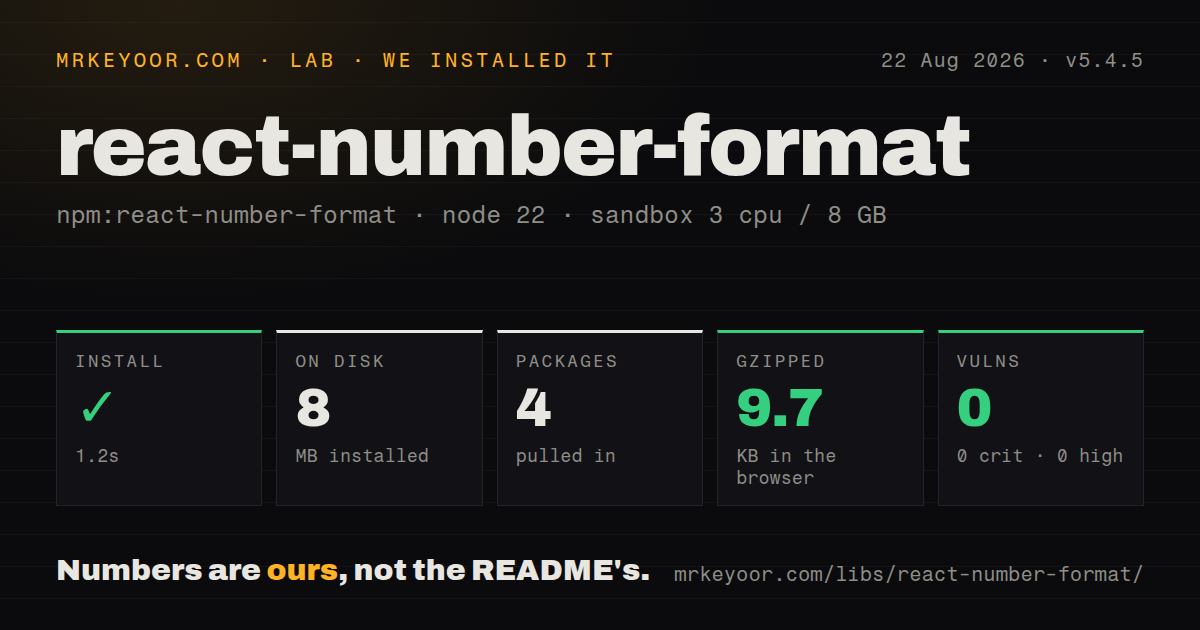
| Install | ✓ · 1.2s | 4 packages on disk · 8 MB |
| Import | ✓ | ESM import works · require() works · CommonJS package |
| Browser | 9.7 KB | gzipped (26.4 KB minified), bundled with esbuild |
| Types | ✓ | TypeScript types bundled |
| Known vulns | 0 | 0 critical · 0 high · 0 moderate · 0 low (npm audit) |
Answers from our run
Does react-number-format install cleanly?
Yes. In a fresh container with an empty cache, npm install react-number-format finished in 1 seconds, leaving 4 packages and 8 MB on disk. npm audit reported no known vulnerabilities.
How much does react-number-format add to a browser bundle?
9.7 KB gzipped (26.4 KB minified) when the whole package is bundled for the browser with esbuild. Importing only part of it is usually smaller.
Does react-number-format work with both ESM and CommonJS?
Yes. Both import 'react-number-format' and require('react-number-format') worked in Node 22 in our run. The package is published as CommonJS.
Does react-number-format include TypeScript types?
Yes, type declarations ship inside the package, so no @types install is needed.
react-number-format or react-imask: which should you use?
react-imask: Choose react-imask when one masking system must cover dates, text patterns, numbers, and custom mask definitions. Our react-number-format 5.4.5 install took 1.2 seconds, produced a 9.7 KB gzipped browser bundle, and had no audit findings.
When should you not use react-number-format?
You only display numbers: Intl.NumberFormat handles locale-aware output without a React input dependency or caret engine
Use it if
- A React field must insert grouping or a fixed digit pattern without throwing the caret to the end on each edit
- You want to keep an unformatted numeric string in controlled state while showing prefixes, suffixes, separators, or fixed decimals
- Your form needs `isAllowed` to reject an edit before the displayed value changes
- A design-system input can be passed as a stable `customInput` component reference
- You only display numbers: `Intl.NumberFormat` handles locale-aware output without a React input dependency or caret engine
- You need semantic validation: `PatternFormat` can shape phone or card digits, but it does not check country numbering plans, Luhn validity, account existence, or business rules
- You require a package with an exports map: version 5.4.5 publishes CommonJS `main` and ESM `module` fields but no `exports` field
- Your input must derive every locale rule automatically: separators, grouping style, prefix, and accepted decimal keys are props you choose, and they are not currency conversion or locale data
- You cannot regression-test IME, paste, selection, mobile keyboard, and form-library behavior: caret correction is the product's difficult surface, and GitHub reports 229 open issues and pull requests across those edge cases
Setup reality
We installed react-number-format 5.4.5 in 1.2 seconds. The install left 4 packages using 8 MB on disk; the package itself was 280 KB unpacked, with 0 direct dependencies, 2 peer dependencies, bundled TypeScript declarations, and no npm audit findings. require() and ESM import both worked on Node 22.
The 2 peers are React and React DOM, accepted from React 0.14 through 19. The package is CommonJS-first, also publishes an ESM build, and has no exports map. Our full browser import built to 26.4 KB minified and 9.7 KB gzipped. There are no credentials, config files, or native builds.
Controlled fields should usually store the value string from onValueChange and pass valueIsNumericString. The callback also supplies formattedValue, floatValue, and a source of event or prop; it can run after a prop update or blur, so it is not a renamed native onChange. Large or exact decimals should stay as strings because floatValue can lose precision or use exponential notation.
Formatting happens after native input length checks, which is why the docs say minLength and maxLength do not impose the expected digit limit. Use isAllowed, allow an empty value so deletion still works, and test paste plus caret movement. For mobile fixed patterns, the docs recommend type="tel"; decimal input usually needs type="text" so the keyboard can expose a separator.
Patterns
Store currency digits as a string edit-currency-value
import {NumericFormat} from 'react-number-format';

<NumericFormat
  value={amount}
  valueIsNumericString
  onValueChange={({value}) => setAmount(value)}
  thousandSeparator=","
  decimalScale={2}
  fixedDecimalScale
  prefix="$"
/>
The prefix labels the field but does not select a currency or perform conversion. Keep the unformatted string when decimal precision matters.
Read all three value representations inspect-value-forms
<NumericFormat
  onValueChange={({formattedValue, value, floatValue}, sourceInfo) => {
    console.log({formattedValue, value, floatValue, source: sourceInfo.source});
  }}
/>
`floatValue` can lose precision or use exponential notation. `value` is the safer state form for long identifiers and exact decimal input.
Accept comma decimal input format-european-decimals
<NumericFormat
  value={amount}
  valueIsNumericString
  thousandSeparator="."
  decimalSeparator=","
  allowedDecimalSeparators={[',', '.']}
  onValueChange={({value}) => setAmount(value)}
/>
Set `valueIsNumericString` when an unformatted string is paired with `.` as the grouping separator, or digits in format props can be misread.
Reject an edit above a limit limit-numeric-range
<NumericFormat
  value={quantity}
  decimalScale={0}
  allowNegative={false}
  isAllowed={({floatValue}) => floatValue == null || floatValue <= 1000}
  onValueChange={({value}) => setQuantity(value)}
/>
Allow `floatValue == null` so the user can clear the input. Returning false blocks both the edit and its value callback.
Place phone digits into a fixed pattern format-phone-pattern
import {PatternFormat} from 'react-number-format';

<PatternFormat
  format="+1 (###) ###-####"
  mask="_"
  type="tel"
  value={phoneDigits}
  valueIsNumericString
  onValueChange={({value}) => setPhoneDigits(value)}
/>
This pattern restricts positions and formats digits. It does not prove that the number exists or validate a country numbering plan.
Group a 16-digit card input mask-card-digits
<PatternFormat
  format="#### #### #### ####"
  mask="_"
  type="tel"
  value={cardDigits}
  valueIsNumericString
  onValueChange={({value}) => setCardDigits(value)}
/>
The 16-place mask excludes other card lengths and performs no Luhn check. Payment data also needs the controls required by your processor and compliance scope.
Render a read-only formatted amount render-formatted-text
<NumericFormat
  value="1234567.5"
  valueIsNumericString
  displayType="text"
  thousandSeparator
  prefix="$"
  decimalScale={2}
  fixedDecimalScale
/>
For display-only locale output, `Intl.NumberFormat` avoids the 9.7 KB gzipped input package and handles currency conventions by locale.
Use a Material UI text field wrap-design-system-input
import {TextField} from '@mui/material';

<NumericFormat
  customInput={TextField}
  label="Budget"
  value={budget}
  valueIsNumericString
  thousandSeparator
  onValueChange={({value}) => setBudget(value)}
/>
`customInput` expects a component reference. The props guide says an inline function such as `() => <TextField />` will not work.
Capture the underlying input reference focus-formatted-input
const inputRef = useRef(null);

<NumericFormat
  getInputRef={(element) => { inputRef.current = element; }}
  thousandSeparator
/>

inputRef.current?.focus();
With `customInput`, the referenced value depends on that component's ref contract and may not be a native HTML input.
Separate user edits from prop updates filter-prop-updates
<NumericFormat
  value={amount}
  valueIsNumericString
  onValueChange={({value}, {source}) => {
    if (source === 'event') setAmount(value);
  }}
/>
Since 5.4.0, `onValueChange` fires for prop-driven changes too. Its source is `event` or `prop`, and the callback can also run on blur.
Format a numeric string without rendering format-outside-jsx
import {numericFormatter} from 'react-number-format';

const label = numericFormatter('1234567.5', {
  thousandSeparator: ',',
  decimalScale: 2,
  fixedDecimalScale: true,
  prefix: '$',
});
Pass unformatted digits as the first argument. Use `Intl.NumberFormat` when the locale, rather than input editing rules, should choose the output.
Block decimal and negative input accept-whole-numbers
<NumericFormat
  value={count}
  valueIsNumericString
  decimalScale={0}
  allowNegative={false}
  onValueChange={({value}) => setCount(value)}
/>
The quirks guide recommends `decimalScale={0}` for whole numbers. Native `maxLength` does not reliably limit digits after formatting, so use `isAllowed`.
Alternatives
| Package | Registry | Pick it when |
|---|---|---|
| react-imask | npm | Choose react-imask when one masking system must cover dates, text patterns, numbers, and custom mask definitions. |
| react-currency-input-field | npm | Choose react-currency-input-field for a narrower currency input with abbreviations and fewer low-level caret APIs. |
| cleave.js | npm | Choose Cleave.js when formatting must work outside React and its predefined credit-card, phone, date, and numeral blocks cover the field. |
| numeral | npm | Choose numeral for parsing and display formatting in non-input code, after checking whether its older release cadence fits the project. |
More web frontend guides
postcss · react · react-dom · tailwindcss · clsx · htmlparser2 · the whole shelf →
How this guide is made: grounded in the library's documentation, release notes, changelog, and issue history, on a fixed rubric — not a hands-on install of every release. The 50 most-downloaded entries are additionally install-verified in clean containers. Corrections: contact the desk.