@react-leaflet/core review
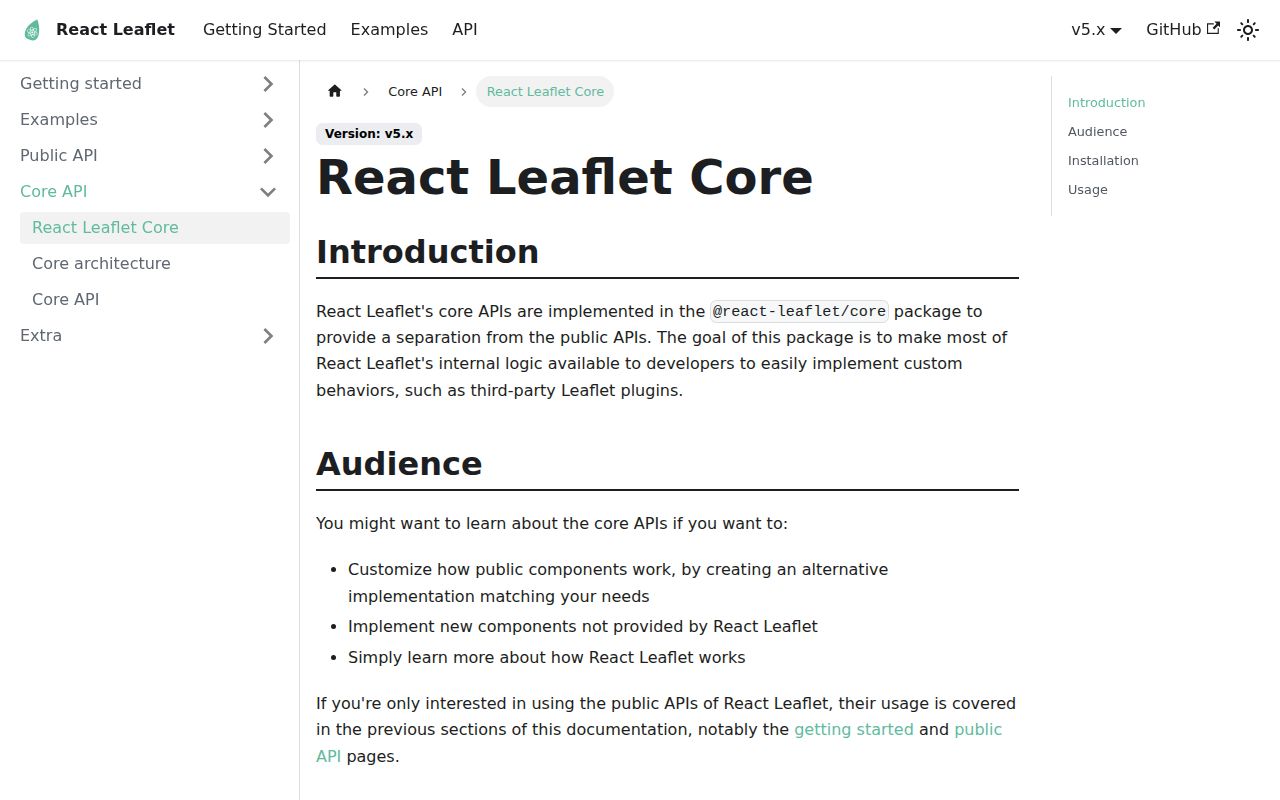
Our sandbox exposed @react-leaflet/core 3.0.0 as an adapter toolkit, not the package most map screens should import. It provides context, lifecycle hooks, update helpers, and factories that turn Leaflet classes or plugins into React 19 components. Adapter authors use it to create, attach, update, and remove layers, paths, controls, and overlays under MapContainer. Ordinary markers, tiles, popups, and shapes already belong to react-leaflet's public API.
@react-leaflet/core 3.0.0 installed in 2 seconds, but both direct import probes failed under Node 22.23.2 and the esbuild probe reached 163.2 KB minified in our sandbox. Use it for React 19 Leaflet adapter packages, while ordinary applications should install react-leaflet.
We installed it
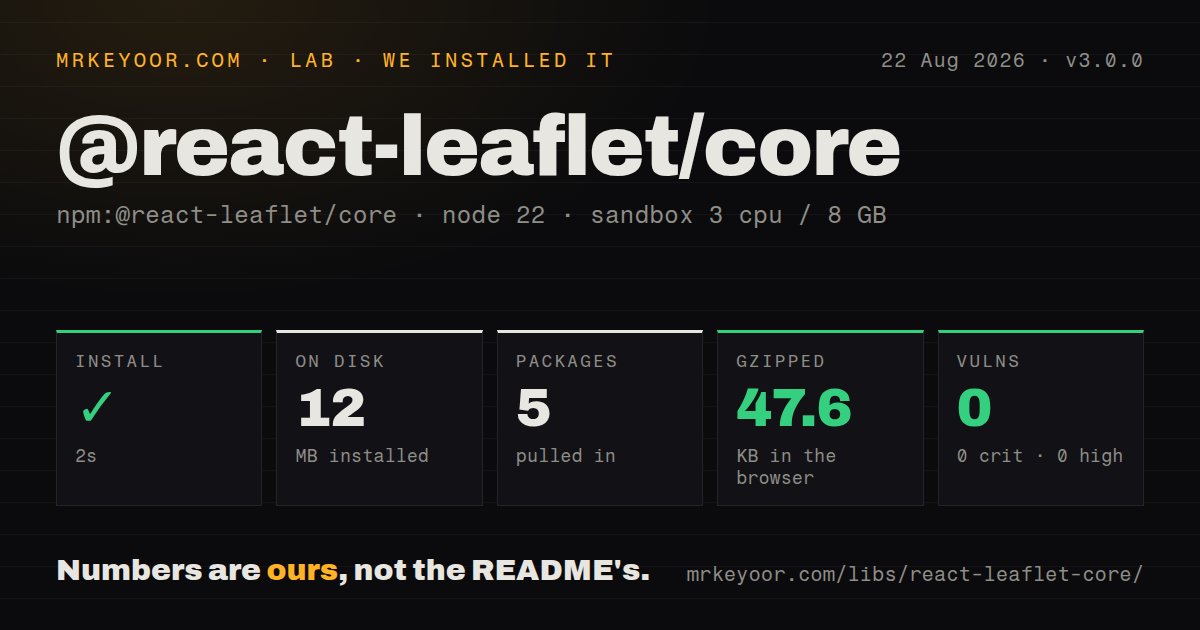
| Install | ✓ · 2s | 5 packages on disk · 12 MB |
| Import | ✗ | ESM import fails · require() fails · ESM package with exports map |
| Browser | 47.6 KB | gzipped (163.2 KB minified), bundled with esbuild |
| Types | ✓ | TypeScript types bundled |
| Known vulns | 0 | 0 critical · 0 high · 0 moderate · 0 low (npm audit) |
Answers from our run
Does @react-leaflet/core install cleanly?
Yes. In a fresh container with an empty cache, npm install @react-leaflet/core finished in 2 seconds, leaving 5 packages and 12 MB on disk. npm audit reported no known vulnerabilities.
How much does @react-leaflet/core add to a browser bundle?
47.6 KB gzipped (163.2 KB minified) when the whole package is bundled for the browser with esbuild. Importing only part of it is usually smaller.
Does @react-leaflet/core work with both ESM and CommonJS?
Neither plain import nor require succeeded in our sandbox, so it needs a bundler or extra setup.
Does @react-leaflet/core include TypeScript types?
Yes, type declarations ship inside the package, so no @types install is needed.
@react-leaflet/core or react-leaflet: which should you use?
react-leaflet: Use it for supported map components in application code. @react-leaflet/core 3.0.0 installed in 2 seconds, but both direct import probes failed under Node 22.23.2 and the esbuild probe reached 163.2 KB minified in our sandbox.
When should you not use @react-leaflet/core?
You only need a normal map UI; react-leaflet already exposes components for common layers, controls, popups, and shapes
Use it if
- You publish a React wrapper around a third-party Leaflet layer or control
- A custom Leaflet object must follow the same lifecycle as built-in React Leaflet components
- The component library already targets React 19, React DOM 19, and Leaflet 1.9
- Code needs map, pane, layer-container, or overlay context below MapContainer
- You only need a normal map UI; react-leaflet already exposes components for common layers, controls, popups, and shapes
- The application is on React 18: core 3.0.0 declares React and React DOM ^19.0.0 peers
- CommonJS is required: the package declares type: module and our Node 22.23.2 require probe failed
- Your legal policy accepts only permissive OSI licenses; this package uses Hippocratic License 2.1 with use conditions
- The team cannot own plugin cleanup and mutable-prop rules; factories do not decide those plugin-specific behaviors
Setup reality
Our fresh sandbox installed @react-leaflet/core 3.0.0 in 2 seconds. It left 5 packages and 12 MB on disk, with no direct dependencies and 3 peers. npm audit found 0 known vulnerabilities. The package is 156 KB unpacked, ships TypeScript declarations, declares ESM through type: module, and has an exports map. Both require() and ESM import failed under Node.js 22.23.2 in our probe, so a successful npm install did not prove the entry could execute by itself.
The three peers are React ^19, React DOM ^19, and Leaflet ^1.9. Install compatible versions before debugging an adapter. Core declarations refer to Leaflet types, while Leaflet itself commonly needs @types/leaflet in TypeScript projects. Browser map code should sit behind the framework's client boundary. The surrounding application still needs Leaflet CSS and an explicit height on the map container.
Our esbuild whole-package import measured 163.2 KB minified and 47.6 KB gzipped. That probe followed peer imports, so it is a warning against treating core as a tiny isolated helper, not a claim about an optimized application's final route chunk. useLeafletContext() throws outside React Leaflet context, and importing DOM-oriented Leaflet code during server rendering can fail before a component mounts.
Factories create the Leaflet instance once. A prop changes only if the wrapper supplies an update function that calls the correct Leaflet setter. Standard helpers cover lifecycle, events, paths, panes, overlays, and forwarded instance refs; plugin-owned workers, listeners, canvases, or DOM nodes still need explicit cleanup. Review Hippocratic 2.1 before distribution because its approval profile differs from Leaflet's BSD license.
Patterns
Build the wrap leaflet control adapter wrap-leaflet-control
import { createControlComponent } from '@react-leaflet/core';
import { Control } from 'leaflet';

export const ZoomControl = createControlComponent<
  Control.Zoom,
  Control.ZoomOptions
>((props) => new Control.Zoom(props));
This wrap leaflet control pattern targets core 3.0.0 under MapContainer context. The wrapper must update mutable props and release plugin-owned resources explicitly.
Build the wrap custom path adapter wrap-custom-path
import { createElementObject, createPathComponent, type PathProps } from '@react-leaflet/core';
import { Rectangle, latLng, type LatLngExpression } from 'leaflet';

type SquareProps = PathProps & { center: LatLngExpression; size: number };
const bounds = (p: SquareProps) => latLng(p.center).toBounds(p.size);

export const Square = createPathComponent<Rectangle, SquareProps>(
  (props, context) => createElementObject(
    new Rectangle(bounds(props), props.pathOptions), context
  ),
  (layer, props, prev) => {
    if (props.center !== prev.center || props.size !== prev.size) {
      layer.setBounds(bounds(props));
    }
  }
);
This wrap custom path pattern targets core 3.0.0 under MapContainer context. The wrapper must update mutable props and release plugin-owned resources explicitly.
Build the wrap tile layer adapter wrap-tile-layer
import { createElementObject, createTileLayerComponent, updateGridLayer, type LayerProps } from '@react-leaflet/core';
import { TileLayer, type TileLayerOptions } from 'leaflet';

type Props = LayerProps & TileLayerOptions & { url: string };
export const CustomTiles = createTileLayerComponent<TileLayer, Props>(
  ({ url, eventHandlers, ...options }, context) =>
    createElementObject(new TileLayer(url, options), context),
  (layer, props, prev) => {
    updateGridLayer(layer, props, prev);
    if (props.url !== prev.url) layer.setUrl(props.url);
  }
);
This wrap tile layer pattern targets core 3.0.0 under MapContainer context. The wrapper must update mutable props and release plugin-owned resources explicitly.
Build the read map context adapter read-map-context
import { useLeafletContext } from '@react-leaflet/core';
import { useEffect } from 'react';

export function useFitOnLoad() {
  const { map } = useLeafletContext();
  useEffect(() => {
    map.fitBounds([[40.70, -74.02], [40.88, -73.90]]);
  }, [map]);
}
This read map context pattern targets core 3.0.0 under MapContainer context. The wrapper must update mutable props and release plugin-owned resources explicitly.
Build the manage layer lifecycle adapter manage-layer-lifecycle
import { createElementHook, createElementObject, useLayerLifecycle, useLeafletContext } from '@react-leaflet/core';
import { Marker, type LatLngExpression } from 'leaflet';

const useMarkerElement = createElementHook(
  ({ position }: { position: LatLngExpression }, context) =>
    createElementObject(new Marker(position), context),
  (marker, props, prev) => {
    if (props.position !== prev.position) marker.setLatLng(props.position);
  }
);

export function BareMarker(props: { position: LatLngExpression }) {
  const context = useLeafletContext();
  const element = useMarkerElement(props, context);
  useLayerLifecycle(element.current, context);
  return null;
}
This manage layer lifecycle pattern targets core 3.0.0 under MapContainer context. The wrapper must update mutable props and release plugin-owned resources explicitly.
Build the forward layer ref adapter forward-layer-ref
import { useEffect, useRef } from 'react';
import type { Rectangle } from 'leaflet';

function Selection() {
  const rectangleRef = useRef<Rectangle>(null);
  useEffect(() => {
    rectangleRef.current?.bringToFront();
  }, []);
  return <Square ref={rectangleRef} center={[51.5, -0.09]} size={500} />;
}
This forward layer ref pattern targets core 3.0.0 under MapContainer context. The wrapper must update mutable props and release plugin-owned resources explicitly.
Build the handle layer events adapter handle-layer-events
<Square
  center={[51.5, -0.09]}
  size={500}
  pathOptions={{ color: 'tomato' }}
  eventHandlers={{
    click: (event) => console.log(event.latlng),
    mouseover: (event) => event.target.setStyle({ weight: 6 }),
  }}
/>
This handle layer events pattern targets core 3.0.0 under MapContainer context. The wrapper must update mutable props and release plugin-owned resources explicitly.
Build the provide child container adapter provide-child-container
import { createElementObject, createLayerComponent, extendContext, type LayerProps } from '@react-leaflet/core';
import { FeatureGroup } from 'leaflet';
import type { PropsWithChildren } from 'react';

type GroupProps = LayerProps & PropsWithChildren;
export const PluginGroup = createLayerComponent<FeatureGroup, GroupProps>(
  (props, context) => {
    const group = new FeatureGroup();
    return createElementObject(
      group,
      extendContext(context, { layerContainer: group })
    );
  }
);
This provide child container pattern targets core 3.0.0 under MapContainer context. The wrapper must update mutable props and release plugin-owned resources explicitly.
Build the update media overlay adapter update-media-overlay
import { createElementObject, createLayerComponent, updateMediaOverlay, type MediaOverlayProps } from '@react-leaflet/core';
import { ImageOverlay } from 'leaflet';

type Props = MediaOverlayProps & { url: string };
export const PhotoOverlay = createLayerComponent<ImageOverlay, Props>(
  ({ url, bounds, eventHandlers, children, ...options }, context) =>
    createElementObject(new ImageOverlay(url, bounds, options), context),
  (overlay, props, prev) => {
    updateMediaOverlay(overlay, props, prev);
    if (props.url !== prev.url) overlay.setUrl(props.url);
  }
);
This update media overlay pattern targets core 3.0.0 under MapContainer context. The wrapper must update mutable props and release plugin-owned resources explicitly.
Build the update control classes adapter update-control-classes
import { updateClassName } from '@react-leaflet/core';

function syncControlTheme(
  container: HTMLElement,
  previousTheme?: string,
  nextTheme?: string
) {
  updateClassName(container, previousTheme, nextTheme);
}
This update control classes pattern targets core 3.0.0 under MapContainer context. The wrapper must update mutable props and release plugin-owned resources explicitly.
Alternatives
| Package | Registry | Pick it when |
|---|---|---|
| react-leaflet | npm | Use it for supported map components in application code |
| react-map-gl | npm | Use it for React bindings around Mapbox GL or MapLibre vector maps |
| @react-google-maps/api | npm | Use it when the product is committed to Google Maps services |
More web frontend guides
postcss · react · react-dom · tailwindcss · clsx · htmlparser2 · the whole shelf →
How this guide is made: grounded in the library's documentation, release notes, changelog, and issue history, on a fixed rubric — not a hands-on install of every release. The 50 most-downloaded entries are additionally install-verified in clean containers. Corrections: contact the desk.