react-hotkeys-hook review
react-hotkeys-hook 5.3.3 binds keyboard combinations and ordered sequences to React components. useHotkeys manages listener cleanup, callback dependencies, keydown or keyup selection, physical-code versus produced-character matching, and restrictions for focus, forms, editable elements, or a supplied Document. HotkeysProvider adds named application scopes and exposes registered descriptions; useRecordHotkeys captures user-defined bindings. Version 5 is ESM-only, while our Node 22 checks still loaded it through both import and require. The package handles event wiring, but shortcut discovery, conflict policy, and accessible alternatives remain UI responsibilities.
react-hotkeys-hook 5.3.3 installed in 1.3 seconds with 0 audit findings, and our all-exports bundle measured 6.2 KB gzipped. It fits React apps that need lifecycle-bound shortcuts and scopes, provided the product still owns discoverability, conflicts, and accessible alternatives.
We installed it
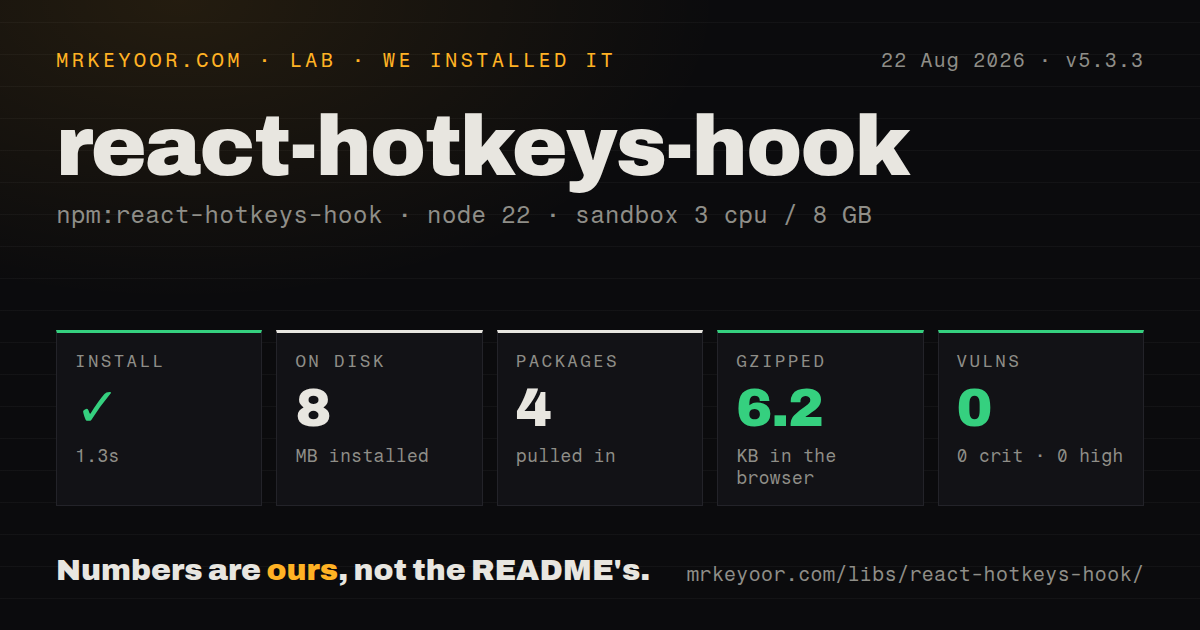
| Install | ✓ · 1.3s | 4 packages on disk · 8 MB |
| Import | ✓ | ESM import works · require() works · ESM package |
| Browser | 6.2 KB | gzipped (16.8 KB minified), bundled with esbuild |
| Types | ✓ | TypeScript types bundled |
| Known vulns | 0 | 0 critical · 0 high · 0 moderate · 0 low (npm audit) |
Answers from our run
Does react-hotkeys-hook install cleanly?
Yes. In a fresh container with an empty cache, npm install react-hotkeys-hook finished in 1 seconds, leaving 4 packages and 8 MB on disk. npm audit reported no known vulnerabilities.
How much does react-hotkeys-hook add to a browser bundle?
6.2 KB gzipped (16.8 KB minified) when the whole package is bundled for the browser with esbuild. Importing only part of it is usually smaller.
Does react-hotkeys-hook work with both ESM and CommonJS?
Yes. Both import 'react-hotkeys-hook' and require('react-hotkeys-hook') worked in Node 22 in our run. The package is published as ESM.
Does react-hotkeys-hook include TypeScript types?
Yes, type declarations ship inside the package, so no @types install is needed.
react-hotkeys-hook or hotkeys-js: which should you use?
hotkeys-js: Use it for imperative shortcuts outside React when your code can own binding and unbinding. react-hotkeys-hook 5.3.3 installed in 1.3 seconds with 0 audit findings, and our all-exports bundle measured 6.2 KB gzipped.
When should you not use react-hotkeys-hook?
Your application is not React. The public API is hooks plus context and declares React and ReactDOM as peers; hotkeys-js or tinykeys is a closer fit.
Use it if
- React components need local shortcut listeners that follow mount and unmount and have bundled TypeScript types.
- Dialogs, editors, and routes need named scopes so one key can be reused without every handler firing.
- The product uses sequences, keyup handling, focus-bound bindings, iframe documents, or recorded user shortcuts.
- A shortcut-help panel should read descriptions from the same registrations that power the handlers.
- Your application is not React. The public API is hooks plus context and declares React and ReactDOM as peers; hotkeys-js or tinykeys is a closer fit.
- Production tooling requires a supported CommonJS distribution. The version 5 changelog says ESM-only, despite require() succeeding through interoperability in our Node sandbox.
- A sequence includes modifiers, such as Ctrl+K followed by Ctrl+S. The hook source still carries a TODO stating that modifiers do not work with sequences.
- Every operating-system or browser binding must be replaceable. preventDefault is opt-in, and protected combinations such as Meta+W cannot be intercepted.
- The dependency is expected to solve shortcut accessibility. It records descriptions, but your application must display help, resolve collisions, provide non-keyboard actions, and test assistive technology.
Setup reality
We installed react-hotkeys-hook 5.3.3 in 1.3 seconds in a fresh Node 22 Bookworm container. Four packages occupied 8 MB, and npm audit found 0 known vulnerabilities. The package lists no direct dependencies and 2 peers, React and ReactDOM >=16.8, with 56 KB unpacked and an MIT license. It ships types and declares ESM without an exports map. Both require() and ESM import worked in our test. The all-exports browser bundle was 16.8 KB minified and 6.2 KB gzipped.
A basic useHotkeys() call needs no provider. HotkeysProvider becomes necessary for named scopes or for reading registered shortcut descriptions. In React Server Components, the hook belongs in a client component. Listeners default to document; an iframe needs its own Document option. The focus-bound overload returns a callback ref, and the target must accept focus, often through tabIndex.
Inputs, textareas, selects, and contenteditable regions are ignored by default. That prevents shortcuts firing while someone types, but it also disables expected commands inside editors and search boxes until enableOnFormTags or enableOnContentEditable is set narrowly. Matching uses KeyboardEvent.code unless useKey is true. The mod alias means Command on macOS and Control elsewhere. preventDefault remains false by default and cannot cancel protected system shortcuts.
Sequences use > and expire after 1000 ms unless sequenceTimeoutMs changes. Current source notes that modifiers do not work inside sequences. Scopes control registration groups, not focus, so route and modal transitions must activate and deactivate them correctly. Keep handler dependencies current, render a visible shortcut reference, and provide clickable equivalents for users who cannot use the binding.
Patterns
Register a portable shortcut bind-basic-hotkey
import { useHotkeys } from 'react-hotkeys-hook';

export function SearchButton() {
  const [open, setOpen] = useState(false);
  useHotkeys('mod+k', () => setOpen(true));
  return <button onClick={() => setOpen(true)}>Search</button>;
}
`mod` resolves to Control on Windows and Linux and Meta on macOS. Mounting and unmounting the component controls listener lifetime.
Replace the browser Save action override-save-shortcut
useHotkeys(
  'mod+s',
  (event) => saveDocument(),
  { preventDefault: true, description: 'Save document' }
);
preventDefault starts false. Browsers and operating systems reserve some combinations, and the README names Meta+W as one that cannot be replaced.
Gate a handler on component state enable-conditionally
useHotkeys(
  'delete',
  () => deleteSelectedItem(selectedId),
  { enabled: Boolean(selectedId) },
  [selectedId]
);
Captured values follow useCallback dependency rules. enabled may also be a function that decides after inspecting the current keyboard event.
Assign alternatives to one action bind-multiple-hotkeys
useHotkeys('mod+enter, shift+enter', (event, hotkey) => {
  submit({ newWindow: hotkey.shift === true });
});
A comma separates alternatives and `+` joins keys by default. Change delimiter or splitKey when either character is itself part of a binding.
Allow commands while typing allow-form-shortcut
useHotkeys(
  'escape',
  () => clearSearch(),
  { enableOnFormTags: ['input', 'searchbox'] }
);
The hook ignores form controls initially. Opt in by tag or supported ARIA role, and enable contenteditable through its separate option.
Switch active shortcut groups control-hotkey-scopes
import { HotkeysProvider, useHotkeys, useHotkeysContext } from 'react-hotkeys-hook';

function Editor() {
  const { toggleScope } = useHotkeysContext();
  useHotkeys('mod+k', openCommandMenu, { scopes: ['editor'] });
  return <button onClick={() => toggleScope('editor')}>Toggle editor keys</button>;
}

export function App() {
  return <HotkeysProvider initiallyActiveScopes={['editor']}><Editor /></HotkeysProvider>;
}
HotkeysProvider is required for these controls. Activating a named scope replaces the wildcard scope instead of running alongside it.
Bind only inside a focused panel bind-to-focused-region
const ref = useHotkeys<HTMLDivElement>('mod+a', selectAllCards);

return (
  <div ref={ref} tabIndex={0} aria-label="Card grid">
    {cards.map(renderCard)}
  </div>
);
Attach the returned callback ref to the region. It must be focusable, and users need a visible indication of where keyboard focus currently sits.
Match a two-step sequence bind-key-sequence
useHotkeys('g>g', () => scrollToTop(), {
  sequenceTimeoutMs: 750,
  description: 'Go to top',
});
`>` separates steps and the window defaults to 1000 ms. The current implementation does not handle modifier keys within a sequence.
Fire after a key is released handle-key-release
useHotkeys(
  'space',
  () => setPanning(false),
  { keydown: false, keyup: true }
);
keydown is true and keyup is false by default. Enabling both allows calls in both phases, with the hook still applying its repeat handling.
Follow the active keyboard layout match-produced-character
useHotkeys('z', undo, { useKey: true });Default matching uses physical KeyboardEvent.code. useKey switches to KeyboardEvent.key, which changes with layout, Shift, and some input methods.
Attach handlers to an iframe bind-iframe-document
const frameDocument = iframeRef.current?.contentDocument;

useHotkeys('mod+b', toggleBold, {
  document: frameDocument,
  enableOnContentEditable: true,
});
Browser policy permits contentDocument only for a same-origin frame. Wait for the frame to load before passing its Document to the hook.
Capture a custom binding record-user-hotkey
import { useRecordHotkeys } from 'react-hotkeys-hook';

const [keys, { start, stop, resetKeys, isRecording }] = useRecordHotkeys(false, ['escape']);

return (
  <>
    <button onClick={isRecording ? stop : start}>
      {isRecording ? 'Finish' : 'Record shortcut'}
    </button>
    <button onClick={resetKeys}>Clear</button>
    <output>{[...keys].join('+')}</output>
  </>
);
The recorder listens for document keydown and cancels defaults for accepted keys. Blacklisted keys retain their browser behavior and stay out of the result.
Alternatives
| Package | Registry | Pick it when |
|---|---|---|
| hotkeys-js | npm | Use it for imperative shortcuts outside React when your code can own binding and unbinding. |
| tinykeys | npm | Use it for a small DOM combination listener without React scopes, providers, or recording hooks. |
| @mantine/hooks | npm | Use it when Mantine is already installed and its simpler hook covers the required key combinations. |
More web frontend guides
postcss · react · react-dom · tailwindcss · clsx · htmlparser2 · the whole shelf →
How this guide is made: grounded in the library's documentation, release notes, changelog, and issue history, on a fixed rubric — not a hands-on install of every release. The 50 most-downloaded entries are additionally install-verified in clean containers. Corrections: contact the desk.