react-dropzone review
react-dropzone 20.1.1 is a headless React hook and render-prop component for choosing local files through drag and drop, a native file dialog, or clipboard paste. `useDropzone()` returns prop getters, refs, accepted files, rejected files, and states for active, acceptable, rejected, unknown, and processing drags. It validates type, extension, size, count, and custom rules, but it does not upload, retry, chunk, or persist a file. Version 20.1 exposes file rejections while the drag is still active; 20.1.1 only repairs the documentation build. The current major also requires Node 22 for tooling and React 18 as a peer.
react-dropzone 20.1.1 is a strong selection layer for a custom React upload UI, especially when drag-time rejection details and async validation matter. Do not mistake it for an upload client, and verify Node 22, React 18, focus behavior, cleanup, and server validation before adopting it.
We installed it
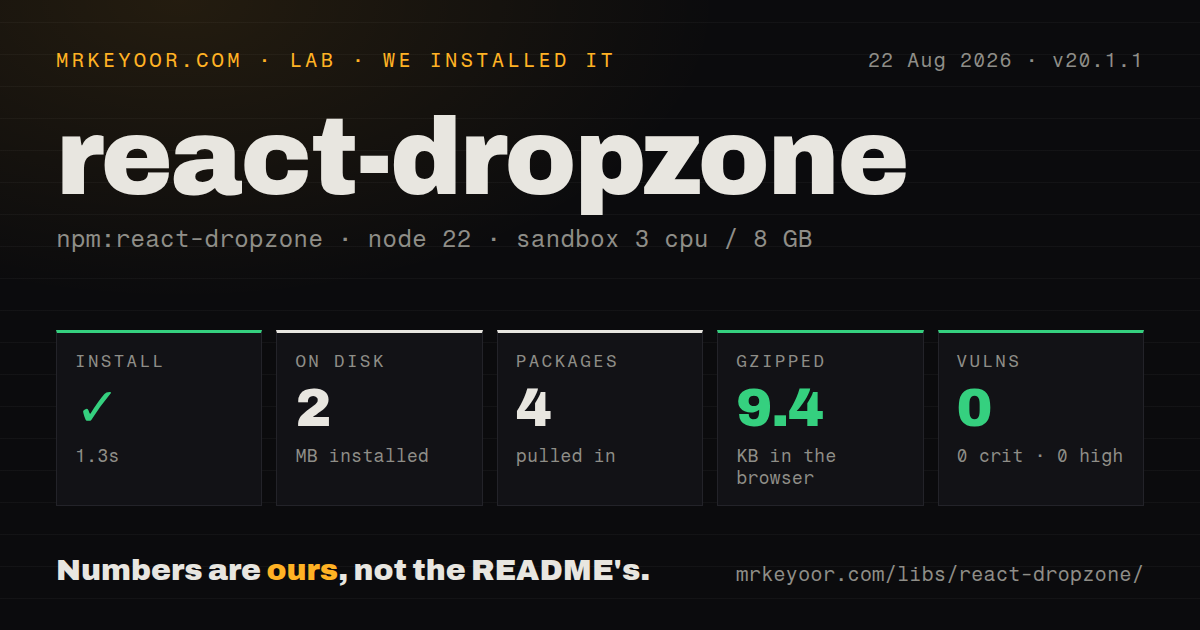
| Install | ✓ · 1.3s | 4 packages on disk · 2 MB |
| Import | ✓ | ESM import works · require() works · ESM package with exports map |
| Browser | 9.4 KB | gzipped (25.9 KB minified), bundled with esbuild |
| Types | ✓ | TypeScript types bundled |
| Known vulns | 0 | 0 critical · 0 high · 0 moderate · 0 low (npm audit) |
Answers from our run
Does react-dropzone install cleanly?
Yes. In a fresh container with an empty cache, npm install react-dropzone finished in 1 seconds, leaving 4 packages and 2 MB on disk. npm audit reported no known vulnerabilities.
How much does react-dropzone add to a browser bundle?
9.4 KB gzipped (25.9 KB minified) when the whole package is bundled for the browser with esbuild. Importing only part of it is usually smaller.
Does react-dropzone work with both ESM and CommonJS?
Yes. Both import 'react-dropzone' and require('react-dropzone') worked in Node 22 in our run. The package is published as ESM with an exports map.
Does react-dropzone include TypeScript types?
Yes, type declarations ship inside the package, so no @types install is needed.
react-dropzone or uppy: which should you use?
uppy: Use it when upload progress, retries, resumable protocols, multipart storage, webcam input, or remote sources belong in the client package. react-dropzone 20.1.1 is a strong selection layer for a custom React upload UI, especially when drag-time rejection details and async validation matter.
When should you not use react-dropzone?
You need an uploader rather than a selector. The README says this package makes no HTTP requests and provides no progress, retry, chunking, or resume support.
Use it if
- A React 18 interface needs drag, click, keyboard, and paste file selection while keeping its own markup and styling.
- Files must be screened by MIME type, extension, size, count, or a synchronous or asynchronous custom validator before upload.
- Your app already owns HTTP upload, progress, retry, storage credentials, and server-side validation, and only needs browser selection behavior.
- The UI should respond during a drag with accepted, rejected, or unknown state, including the rejection details added in 20.1.
- You need an uploader rather than a selector. The README says this package makes no HTTP requests and provides no progress, retry, chunking, or resume support.
- Node 20 must remain in the build environment. Version 20 raises `engines.node` to 22 or newer, so strict engine settings reject the install.
- A native desktop shell needs absolute paths from dropped files. Browser File objects have no `path` or `fullPath`, and Tauri may intercept drops before the webview receives them.
- File-dialog cancellation must be exact across browsers. The fallback uses a focus timing heuristic; the File System Access path is more accurate but needs a secure context and browser support.
- A finished upload UI with previews, remote sources, resumable transfer, and accessibility decisions should arrive prebuilt. Uppy or FilePond owns more of that workflow.
Setup reality
We installed react-dropzone 20.1.1 in a fresh unprivileged Node 22 Bookworm container. npm finished in 1.3 seconds, leaving 4 packages and 2 MB on disk. The package has 2 direct dependencies, 2 peer dependencies, and 364 KB unpacked. npm audit reported 0 known vulnerabilities at every severity. TypeScript declarations are bundled, and package metadata requires Node 22 or newer.
The package is ESM with an exports map; both CommonJS require() and ESM import worked in our checks. A browser build importing the package measured 25.9 KB minified and 9.4 KB gzipped. React 18 or newer is a peer. Render the <input> returned by getInputProps() even when CSS hides it; without that input, dropping may work while click-to-browse does nothing. Pass custom handlers and attributes into getRootProps() so they compose with the library's event handlers.
Selection stops at File objects. Your code must upload them, handle credentials or signed URLs, report progress, retry, cancel network work, and validate content on the server. MIME types and extensions from the browser are hints, not a security boundary. Object URLs used for image previews hold memory until URL.revokeObjectURL() runs. File readers and async validators also need error handling and UI state through isProcessing.
Browser behavior varies. Pasted files are received only while the zone or a child has focus. The File System Access picker needs a secure context and cannot replace every native-input capability. A label root can trigger two dialogs unless click behavior is controlled. Tauri requires native drag handling to be disabled if the webview should receive browser drop events. Tests must await asynchronous callbacks and build a realistic dataTransfer; the README recommends Testing Library and does not support Enzyme.
Patterns
Build an accessible selection surface create-dropzone
import { useCallback } from 'react';
import { useDropzone } from 'react-dropzone';

function Picker() {
  const onDrop = useCallback((accepted, rejected) => save(accepted, rejected), []);
  const { getRootProps, getInputProps, isDragActive } = useDropzone({ onDrop });
  return <div {...getRootProps({ 'aria-label': 'Choose files' })}>
    <input {...getInputProps()} />
    <p>{isDragActive ? 'Release files' : 'Drop or choose files'}</p>
  </div>;
}
Keep the input in the tree. The root handles drop behavior, while the input enables the file dialog and native accessibility.
Match MIME types and file extensions restrict-file-types
const dropzone = useDropzone({
  accept: {
    'image/jpeg': ['.jpg', '.jpeg'],
    'image/png': ['.png'],
    'application/pdf': ['.pdf'],
  },
  onDrop,
});
Both MIME and extension information can be missing or misleading. Repeat validation after upload on trusted server bytes.
Limit count and size limit-file-batch
const { acceptedFiles, fileRejections, ...props } = useDropzone({
  multiple: true,
  maxFiles: 5,
  minSize: 1_024,
  maxSize: 10 * 1024 * 1024,
});
Current versions can accept files within the limit and reject the rest. Do not assume one rejected file invalidates the whole batch.
Show stable rejection codes render-rejections
const problems = fileRejections.flatMap(({ file, errors }) =>
  errors.map((error) => (
    <li key={`${file.name}:${error.code}`}>
      {file.name}: {error.message}
    </li>
  ))
);
Branch on error.code when behavior depends on the reason. Human-readable messages can change or be localized.
Check image dimensions asynchronously validate-image-async
const { isProcessing, ...dropzone } = useDropzone({
  validator: async (file) => {
    const bitmap = await createImageBitmap(file);
    try {
      return bitmap.width < 1200
        ? { code: 'image-too-narrow', message: 'Image must be at least 1200 px wide' }
        : null;
    } finally {
      bitmap.close();
    }
  },
});
Disable submission while isProcessing is true. Dimension checks cannot be trusted from drag metadata before the file is read.
Open the picker from a separate button open-custom-button
const { getRootProps, getInputProps, open } = useDropzone({ noClick: true });
return <div {...getRootProps()}>
  <input {...getInputProps()} />
  <button type='button' onClick={open}>Choose files</button>
</div>;
noClick prevents the button event from bubbling to the root and opening the dialog twice.
Distinguish accepted and rejected drags style-drag-state
const { getRootProps, getInputProps, isDragAccept, isDragReject, isDragUnknown } = useDropzone(options);
const state = isDragReject ? 'reject' : isDragAccept ? 'accept' : isDragUnknown ? 'unknown' : 'idle';
return <div {...getRootProps({ className: `dropzone ${state}` })}>
  <input {...getInputProps()} />
</div>;
Unknown means the browser did not expose enough file data during drag. Do not present it as a confirmed rejection.
Release image preview object URLs preview-images
const [previews, setPreviews] = useState([]);
const onDrop = useCallback((files) => {
  setPreviews((old) => {
    old.forEach((item) => URL.revokeObjectURL(item.url));
    return files.map((file) => ({ file, url: URL.createObjectURL(file) }));
  });
}, []);
useEffect(() => () => previews.forEach((item) => URL.revokeObjectURL(item.url)), [previews]);
Each object URL retains its File data. Revoke replaced previews and all remaining URLs on unmount.
Send selected files with your own request upload-form-data
async function upload(files, signal) {
  const body = new FormData();
  for (const file of files) body.append('files', file);
  const response = await fetch('/api/uploads', { method: 'POST', body, signal });
  if (!response.ok) throw new Error(`upload failed: ${response.status}`);
}
Do not set multipart Content-Type manually because the browser adds its boundary. fetch does not expose upload progress events.
Receive clipboard images while focused accept-pasted-files
const dropzone = useDropzone({
  autoFocus: true,
  accept: { 'image/*': [] },
  onDrop,
});

// Set noPaste: true when a focused text editor should own every paste.
Clipboard files pass through the same validation callbacks. Plain text paste remains untouched.
Request the File System Access picker use-fs-picker
const dropzone = useDropzone({
  useFsAccessApi: true,
  accept: [{
    description: 'Images',
    accept: { 'image/png': ['.png'], 'image/jpeg': ['.jpg', '.jpeg'] },
  }],
});
This path needs HTTPS or localhost and cannot select directories. Keep getInputProps rendered for native fallback behavior.
Await an asynchronous drop callback test-file-drop
const file = new File(['hello'], 'note.txt', { type: 'text/plain' });
const transfer = {
  dataTransfer: {
    files: [file],
    items: [{ kind: 'file', type: file.type, getAsFile: () => file }],
    types: ['Files'],
  },
};
await act(async () => fireEvent.drop(screen.getByLabelText('Choose files'), transfer));
expect(onDrop).toHaveBeenCalled();
Build both files and items in the mock, and await the event because file extraction and validators may resolve asynchronously.
Alternatives
| Package | Registry | Pick it when |
|---|---|---|
| uppy | npm | Use it when upload progress, retries, resumable protocols, multipart storage, webcam input, or remote sources belong in the client package. |
| filepond | npm | Use it for a styled file queue with previews, processing states, and upload-oriented plugins. |
| use-file-picker | npm | Use it for a hook centered on the native picker when drag-and-drop surface behavior is unnecessary. |
More web frontend guides
postcss · react · react-dom · tailwindcss · clsx · htmlparser2 · the whole shelf →
How this guide is made: grounded in the library's documentation, release notes, changelog, and issue history, on a fixed rubric — not a hands-on install of every release. The 50 most-downloaded entries are additionally install-verified in clean containers. Corrections: contact the desk.