rate-limiter-flexible review
rate-limiter-flexible 11.2.0 gives Node.js applications atomic point counters backed by memory, clusters, Redis or Valkey, MongoDB, DynamoDB, SQL stores, Prisma, Drizzle, or Memcached. Each key consumes points during a flexible fixed window and receives `remainingPoints` plus `msBeforeNext`; wrappers add queues, combined limits, blocks, penalties, rewards, local shielding, and outage insurance. The current release documents Node 20 or newer and Valkey clients. Our install had no runtime dependencies and bundled types, but production correctness still depends on the store and failure policy you choose.
Our rate-limiter-flexible 11.2.0 install took 0.6 seconds, had 0 dependencies and 0 audit findings, and included types, but store choice and outage behavior remain application work. Install it for shared atomic policies across backends; choose express-rate-limit for a basic single-framework endpoint limit.
We installed it
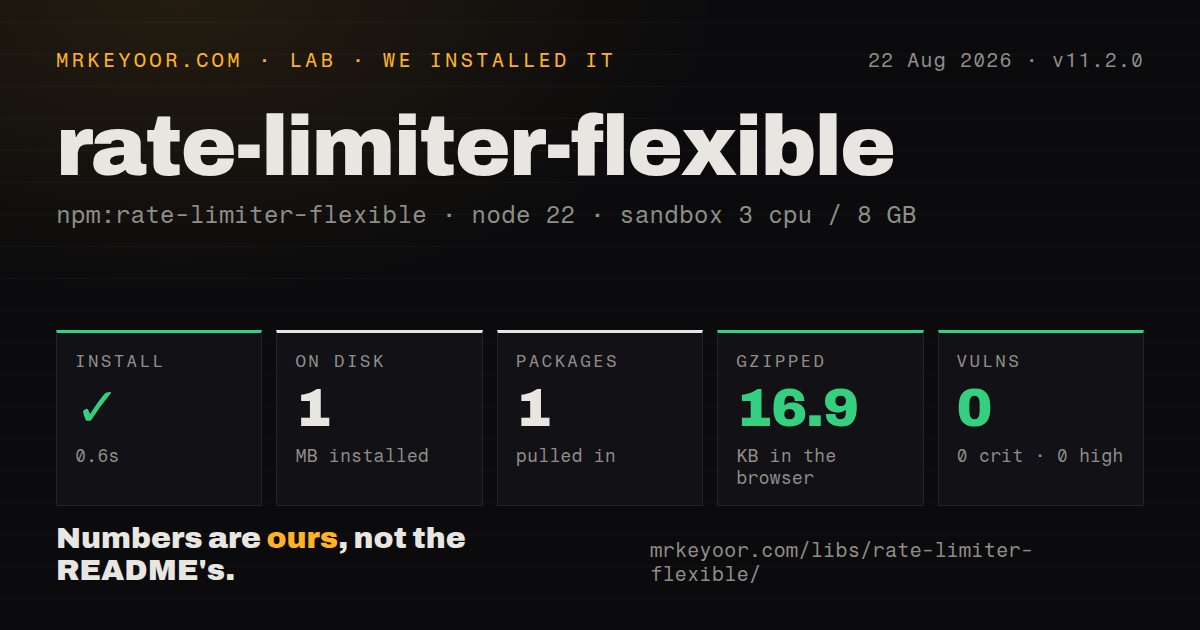
| Install | ✓ · 0.6s | 1 package on disk · 1 MB |
| Import | ✓ | ESM import works · require() works · CommonJS package |
| Browser | 16.9 KB | gzipped (71 KB minified), bundled with esbuild |
| Types | ✓ | TypeScript types bundled |
| Known vulns | 0 | 0 critical · 0 high · 0 moderate · 0 low (npm audit) |
Answers from our run
Does rate-limiter-flexible install cleanly?
Yes. In a fresh container with an empty cache, npm install rate-limiter-flexible finished in 0.6s, leaving 1 package and 1 MB on disk. npm audit reported no known vulnerabilities.
How much does rate-limiter-flexible add to a browser bundle?
16.9 KB gzipped (71 KB minified) when the whole package is bundled for the browser with esbuild. Importing only part of it is usually smaller.
Does rate-limiter-flexible work with both ESM and CommonJS?
Yes. Both import 'rate-limiter-flexible' and require('rate-limiter-flexible') worked in Node 22 in our run. The package is published as CommonJS.
Does rate-limiter-flexible include TypeScript types?
Yes, type declarations ship inside the package, so no @types install is needed.
rate-limiter-flexible or express-rate-limit: which should you use?
express-rate-limit: Use it for straightforward Express middleware and standard HTTP limit headers. Our rate-limiter-flexible 11.2.0 install took 0.6 seconds, had 0 dependencies and 0 audit findings, and included types, but store choice and outage behavior remain application work.
When should you not use rate-limiter-flexible?
A ready Express middleware with proxy parsing and standard headers is the whole need; express-rate-limit is simpler.
Use it if
- The same limiter API must move from one process to Redis, SQL, MongoDB, DynamoDB, or a cluster.
- Login, API, or websocket actions need weighted points, blocks, penalties, rewards, or combined policies.
- Atomic store increments and a per-key `msBeforeNext` value are required.
- You can design and test explicit behavior for backing-store outages.
- A ready Express middleware with proxy parsing and standard headers is the whole need; express-rate-limit is simpler.
- Several processes will use `RateLimiterMemory`; each process grants its own allowance and loses it on restart.
- No one owns store-failure behavior; errors reject without insurance, while memory insurance can temporarily permit extra work.
- A sliding-window or token-bucket algorithm is mandatory; the default is a flexible fixed window.
- IP-only limiting is expected to stop distributed abuse; spoofed forwarding headers and botnets defeat that assumption.
Setup reality
Our rate-limiter-flexible 11.2.0 install completed in 0.6 seconds and left 1 package using 1 MB on disk. The package is 344 KB unpacked, declares 0 direct and 0 peer dependencies, bundles TypeScript declarations, and produced 0 npm audit findings. No native build runs.
The package is CommonJS without an exports map; require() and ESM import both worked on Node 22. Store clients are deliberately absent, so install and operate Redis, Valkey, MongoDB, PostgreSQL, Prisma, or another adapter yourself. Give unrelated policies different keyPrefix values or their counters can collide.
Redis scripts need command permission for reads, writes, EVAL, and EVALSHA. The wiki recommends disabling ioredis's offline queue so outage traffic is not replayed later. SQL and DynamoDB adapters may create tables unless you provision them and set the corresponding option; serverless SQL also needs an explicit expired-row cleanup plan.
Choose fail closed, fail open, or insuranceLimiter before launch. Insurance state is per process and is not reconciled into the recovered store. Normalize IPv6 and trusted proxy addresses, qualify keys by route or action, and derive Retry-After from msBeforeNext. Our broad browser import measured 71 KB minified and 16.9 KB gzipped, but most distributed adapters are server concerns.
Patterns
Limit actions in one process limit-in-memory
import { RateLimiterMemory } from 'rate-limiter-flexible';

const limiter = new RateLimiterMemory({
  points: 10,
  duration: 60,
  keyPrefix: 'api-minute',
});

await limiter.consume(userId);
Memory state is not shared across workers or servers and disappears on restart, so this is only a global limit in a single process.
Return 429 and rate-limit headers from Express express-middleware
app.use(async (req, res, next) => {
  try {
    const result = await limiter.consume(req.ip);
    res.set('X-RateLimit-Remaining', String(result.remainingPoints));
    next();
  } catch (rejection) {
    if (rejection instanceof Error) return next(rejection);
    const seconds = Math.max(1, Math.ceil(rejection.msBeforeNext / 1000));
    res.set('Retry-After', String(seconds));
    res.status(429).send('Too Many Requests');
  }
});
Configure Express trust proxy to specific proxies or hop counts; trusting arbitrary X-Forwarded-For input lets callers choose the key.
Share atomic limits through ioredis share-with-redis
import Redis from 'ioredis';
import { RateLimiterRedis } from 'rate-limiter-flexible';

const redis = new Redis(process.env.REDIS_URL, { enableOfflineQueue: false });
redis.on('error', (error) => console.error('Redis', error));

const limiter = new RateLimiterRedis({
  storeClient: redis,
  keyPrefix: 'login-ip',
  points: 20,
  duration: 60,
  blockDuration: 300,
});
Redis must permit read and write commands plus EVAL and EVALSHA. Disabling the offline queue avoids replaying a backlog after recovery.
Use the node-redis client use-node-redis
import { createClient } from 'redis';
import { RateLimiterRedis } from 'rate-limiter-flexible';

const redis = createClient({ url: process.env.REDIS_URL });
redis.on('error', console.error);
await redis.connect();

const limiter = new RateLimiterRedis({
  storeClient: redis,
  useRedisPackage: true,
  points: 100,
  duration: 60,
  keyPrefix: 'public-api',
});
The useRedisPackage flag is for node-redis 4+. The project wiki says node-redis 4.7.0 cluster mode is incompatible and recommends v5 where that client issue is fixed.
Charge different point costs weight-expensive-actions
const cost = operation === 'export-report' ? 10 : 1;

try {
  await limiter.consume(`${userId}:${operation}`, cost);
  await runOperation();
} catch (rejection) {
  if (rejection instanceof Error) throw rejection;
  throw new TooManyRequestsError(rejection.msBeforeNext);
}
The second consume argument is points, not seconds. A route-qualified key isolates budgets; remove the operation suffix if actions should share one pool.
Block and later clear a key temporary-block
await limiter.block(`account:${accountId}`, 15 * 60);

// Administrative unblock or successful recovery flow
await limiter.delete(`account:${accountId}`);
A block duration of 0 means the key never expires. delete removes all counter data for the key, not only a separate block flag.
Penalize failures and reward success penalize-and-reward
const key = `login:${accountId}`;

if (passwordIsWrong) {
  await limiter.penalty(key, 2);
} else {
  await limiter.reward(key, 1);
}
Penalty and reward adjust the current counter and can spill across durations depending on timing; delete is clearer when success should reset the whole key.
Use a local insurance limiter during Redis errors fallback-on-store-error
import { RateLimiterMemory, RateLimiterRedis } from 'rate-limiter-flexible';

const insuranceLimiter = new RateLimiterMemory({ points: 20, duration: 60 });
const limiter = new RateLimiterRedis({
  storeClient: redis,
  keyPrefix: 'api',
  points: 20,
  duration: 60,
  rejectIfRedisNotReady: true,
  insuranceLimiter,
});
Insurance counts are per process and are never copied back to Redis, so an outage can grant more actions than the nominal distributed limit.
Stop repeatedly hitting Redis for an exhausted key shield-remote-store
const limiter = new RateLimiterRedis({
  storeClient: redis,
  keyPrefix: 'login',
  points: 5,
  duration: 60,
  blockDuration: 300,
  inMemoryBlockOnConsumed: 5,
  inMemoryBlockDuration: 300,
});
The local block applies only to consume calls in the current process. Matching the distributed block duration keeps worker behavior less surprising.
Require both IP and account budgets combine-ip-and-account
import { RateLimiterMemory, RateLimiterUnion } from 'rate-limiter-flexible';

const perIp = new RateLimiterMemory({ points: 100, duration: 60, keyPrefix: 'ip' });
const perAccount = new RateLimiterMemory({ points: 20, duration: 60, keyPrefix: 'account' });
const union = new RateLimiterUnion(perIp, perAccount);

await union.consume(`${req.ip}:${accountId}`);
RateLimiterUnion passes the same key to every limiter. Use separate consume calls if the IP and account components must be counted independently across different pairings.
Queue instead of rejecting outbound calls queue-outbound-work
import { RateLimiterMemory, RateLimiterQueue } from 'rate-limiter-flexible';

const rate = new RateLimiterMemory({ points: 5, duration: 1 });
const queue = new RateLimiterQueue(rate, { maxQueueSize: 100 });

await queue.removeTokens(1);
await callThirdPartyApi();
Queueing holds callers and can exhaust memory under overload; set maxQueueSize and handle rejection rather than allowing an unbounded backlog.
Inspect and reset the current counter inspect-limit-state
const state = await limiter.get(userId);
if (state) {
  console.log({
    consumed: state.consumedPoints,
    remaining: state.remainingPoints,
    resetsInMs: state.msBeforeNext,
  });
}

await limiter.delete(userId);
get returns null for a missing or expired key. Exposing this state in an admin endpoint can reveal user identifiers, so protect and audit that endpoint.
Alternatives
| Package | Registry | Pick it when |
|---|---|---|
| express-rate-limit | npm | Use it for straightforward Express middleware and standard HTTP limit headers. |
| bottleneck | npm | Use it to schedule and throttle outgoing jobs with concurrency control. |
| p-limit | npm | Use it only to cap concurrent promises inside one process, without time-window counters. |
More security guides
cryptography · jose · pyjwt · dompurify · jsonwebtoken · oauthlib · the whole shelf →
How this guide is made: grounded in the library's documentation, release notes, changelog, and issue history, on a fixed rubric — not a hands-on install of every release. The 50 most-downloaded entries are additionally install-verified in clean containers. Corrections: contact the desk.