express-rate-limit review
express-rate-limit 8.6.2 is Express middleware that increments a counter for each client key and answers with status 429 after that key consumes its allowance. It supports the draft 6, 7, and 8 RateLimit headers, asynchronous limits and identifiers, route skips, custom handlers, and shared stores. IP address is the default identity. The current patch corrects IPv4-mapped IPv6 classification in `ipKeyGenerator()`. Our browser bundle attempt failed because this package depends on Node and Express behavior.
express-rate-limit 8.6.2 installed in 1.8 seconds with 67 packages and 5 MB on our box, showed zero audit findings, and failed browser bundling as Node middleware should. Use it when an Express service has a verified client key and shared store; keep volumetric abuse at the edge and choose another limiter for weighted costs.
We installed it
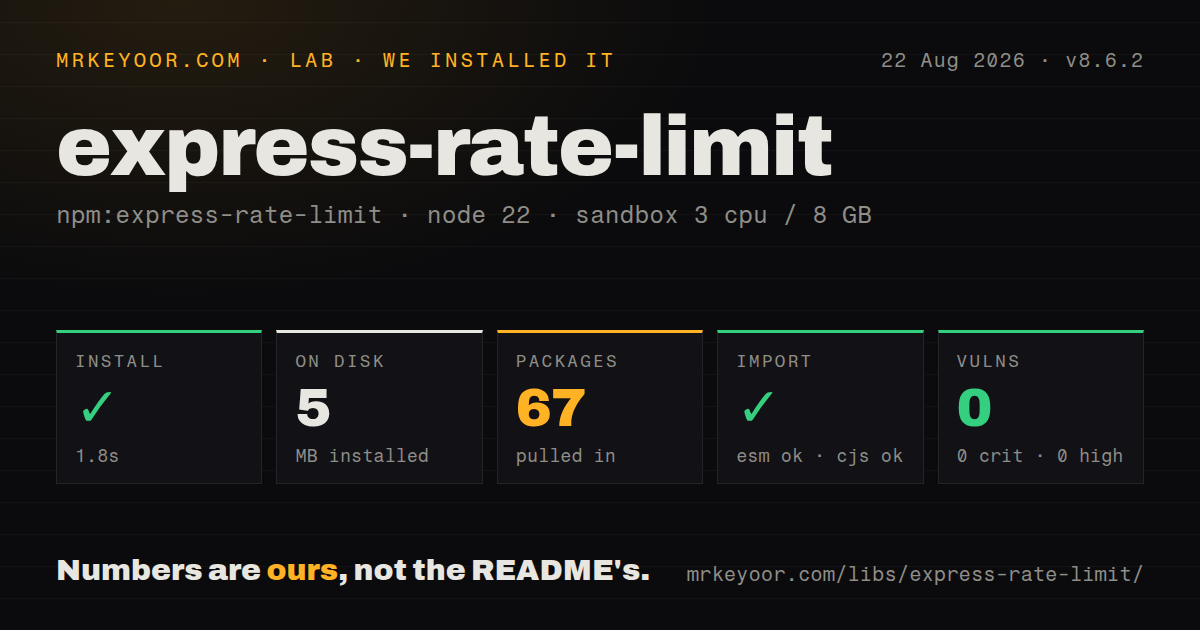
| Install | ✓ · 1.8s | 67 packages on disk · 5 MB |
| Import | ✓ | ESM import works · require() works · ESM package with exports map |
| Browser | n/a | could not be bundled for the browser (Node-only code, most likely) |
| Types | ✓ | TypeScript types bundled |
| Known vulns | 0 | 0 critical · 0 high · 0 moderate · 0 low (npm audit) |
Answers from our run
Does express-rate-limit install cleanly?
Yes. In a fresh container with an empty cache, npm install express-rate-limit finished in 2 seconds, leaving 67 packages and 5 MB on disk. npm audit reported no known vulnerabilities.
Can express-rate-limit run in a browser?
Not directly: esbuild could not bundle it for the browser in our run, which normally means it depends on Node built-ins. Use it on the server, or find a browser-targeted alternative.
Does express-rate-limit work with both ESM and CommonJS?
Yes. Both import 'express-rate-limit' and require('express-rate-limit') worked in Node 22 in our run. The package is published as ESM with an exports map.
Does express-rate-limit include TypeScript types?
Yes, type declarations ship inside the package, so no @types install is needed.
express-rate-limit or rate-limiter-flexible: which should you use?
rate-limiter-flexible: Use it for weighted points, penalties, block periods, multiple backends, or code that is not tied to Express. express-rate-limit 8.6.2 installed in 1.8 seconds with 67 packages and 5 MB on our box, showed zero audit findings, and failed browser bundling as Node middleware should.
When should you not use express-rate-limit?
Several workers will use the built-in MemoryStore; each process owns different counts and a restart erases them
Use it if
- An Express authentication or public API endpoint needs an IP or account quota before its main handler
- API consumers need a draft 6, 7, or 8 RateLimit header with policy and remaining-count information
- Every worker can reach one shared counter store and should enforce the same allowance
- Separate routes require independent windows, identity functions, limits, and 429 response bodies
- Several workers will use the built-in MemoryStore; each process owns different counts and a restart erases them
- Your edge gateway already blocks abusive traffic before Node; this middleware consumes application resources before it can answer
- The real proxy hop chain is unknown; an incorrect Express `trust proxy` value either merges clients or trusts spoofable forwarding data
- Quotas require weighted request costs, token refill, penalties, or insurance points; `rate-limiter-flexible` exposes those models
- The server is Fastify, Koa, or Hono; this middleware expects Express request, response, and mounting semantics
Setup reality
Our Node 22 sandbox installed express-rate-limit 8.6.2 in 1.8 seconds. The complete install left 67 packages and 5 MB on disk, while npm audit reported zero known vulnerabilities. This package is 180 KB unpacked and declares two direct dependencies plus one Express peer dependency. Node 16 or newer is required. It publishes ESM with an exports map and bundled TypeScript declarations; both require() and ESM import loaded. esbuild could not produce a browser bundle, which confirms that the code is server-only.
You supply the Express app because the peer dependency does not create one. The memory store needs no connection string, yet its counters belong to one process and vanish at restart. Any deployment with 2 or more workers needs an external store and adapter if the quota is meant to be global. Give separate limiter policies distinct key prefixes. Configure windowMs, limit, headers, and the response explicitly so an upgrade does not quietly redefine product behavior.
Client identity depends on the proxy chain. Express trust proxy must describe the actual trusted hops; too few can group all users under a load balancer, while overly broad trust accepts a caller-controlled forwarded address. Keep validation on during staging. A custom identity that falls back to an address should call ipKeyGenerator() so IPv6 ranges are grouped. Version 8.6.2 fixes the special case where an IPv4 address arrives encoded inside IPv6.
A shared-store failure blocks traffic by default because passOnStoreError is false. Changing it to true preserves availability but permits uncounted requests until recovery. Async functions for limit, identifier, or keyGenerator execute within the request path, so database reads there add latency. skipSuccessfulRequests and skipFailedRequests increment first, then undo the hit after the response outcome is known; concurrent requests can observe that temporary count.
Patterns
Apply one limit across the application limit-all-routes
import express from 'express';
import { rateLimit } from 'express-rate-limit';

const app = express();
const limiter = rateLimit({
  windowMs: 15 * 60 * 1000,
  limit: 100,
  standardHeaders: 'draft-8',
  legacyHeaders: false
});
app.use(limiter);
Set windowMs and limit rather than accepting defaults. A global instance gives every matching route one shared allowance per client key.
Give login attempts a separate counter protect-login
const loginLimit = rateLimit({
  windowMs: 60 * 60 * 1000,
  limit: 5,
  skipSuccessfulRequests: true,
  message: { error: 'Too many failed login attempts' }
});

app.post('/login', loginLimit, loginHandler);
skipSuccessfulRequests removes a successful response after completion. Concurrent requests may still see the temporary increment.
Store counts in Redis across Node processes share-redis-counters
import { RedisStore } from 'rate-limit-redis';
import { createClient } from 'redis';

const client = createClient({ url: process.env.REDIS_URL });
await client.connect();

const limiter = rateLimit({
  windowMs: 60_000,
  limit: 100,
  store: new RedisStore({
    sendCommand: (...args) => client.sendCommand(args),
    prefix: 'rl:api:'
  })
});
The Redis client and store adapter are separate installs. Use distinct prefixes when policies must not share keys.
Count the client behind one trusted proxy configure-proxy
app.set('trust proxy', 1);
app.use(rateLimit({ windowMs: 60_000, limit: 60 }));
The number is the trusted hop count for your deployment. Using true can trust forwarding data supplied by the caller.
Prefer an authenticated account key key-by-account
import { ipKeyGenerator } from 'express-rate-limit';

const limiter = rateLimit({
  windowMs: 60_000,
  limit: 120,
  keyGenerator: (req) => req.user?.id ?? ipKeyGenerator(req.ip)
});
Use ipKeyGenerator() for the fallback so one IPv6 customer cannot cycle through individual addresses inside an assigned subnet.
Calculate the allowance from the account plan vary-plan-limit
const limiter = rateLimit({
  windowMs: 60_000,
  limit: (req) => req.user?.plan === 'paid' ? 1000 : 60,
  identifier: (req) => req.user?.plan === 'paid' ? 'paid' : 'free'
});
Function options may be asynchronous. Slow account lookups add latency to every request that reaches this middleware.
Return an application-specific 429 body customize-response
const limiter = rateLimit({
  windowMs: 60_000,
  limit: 60,
  handler: (req, res) => {
    res.status(429).json({
      error: 'rate_limited',
      remaining: req.rateLimit.remaining,
      resetTime: req.rateLimit.resetTime
    });
  }
});
A custom handler replaces the normal message behavior. Keep standard headers enabled so clients can parse the policy without reading your JSON shape.
Exclude a health endpoint from counting skip-health-checks
const limiter = rateLimit({
  windowMs: 60_000,
  limit: 60,
  skip: (req) => req.path === '/healthz'
});
Do not exempt traffic based only on a header that an external caller can set.
Set behavior for a failed counter store choose-store-failure
const limiter = rateLimit({
  windowMs: 60_000,
  limit: 60,
  store: sharedStore,
  passOnStoreError: false
});
false blocks traffic when the store errors. true keeps serving requests but leaves them uncounted until the store returns.
Expose the remaining allowance to a handler read-request-state
app.use(limiter);
app.get('/quota', (req, res) => {
  const { limit, used, remaining, resetTime } = req.rateLimit;
  res.json({ limit, used, remaining, resetTime });
});
Set requestPropertyName when several limiters run on one request and each result must remain available.
Adjust IPv6 subnet grouping group-ipv6-subnets
const limiter = rateLimit({
  windowMs: 60_000,
  limit: 60,
  ipv6Subnet: 64
});
The default is 56. A larger prefix length groups fewer addresses and is less aggressive; validate the choice against your users' networks.
Turn off one understood validation check disable-one-validation
const limiter = rateLimit({
  windowMs: 60_000,
  limit: 60,
  keyGenerator: (req) => req.get('cf-connecting-ip'),
  validate: { ip: false }
});
Disable a named check only after another trusted component validates the value. validate: false removes warnings for unrelated mistakes too.
Alternatives
| Package | Registry | Pick it when |
|---|---|---|
| rate-limiter-flexible | npm | Use it for weighted points, penalties, block periods, multiple backends, or code that is not tied to Express. |
| express-slow-down | npm | Use it when progressively delaying repeat traffic is more suitable than returning 429 immediately. |
| @fastify/rate-limit | npm | Use it for Fastify so rate limiting follows that framework's plugin and request lifecycle. |
More web backend guides
ws · urllib3 · requests · undici · anyio · express · the whole shelf →
How this guide is made: grounded in the library's documentation, release notes, changelog, and issue history, on a fixed rubric — not a hands-on install of every release. The 50 most-downloaded entries are additionally install-verified in clean containers. Corrections: contact the desk.