query-string review
query-string 9.5.0 parses flat URL query text into a null-prototype object and serializes supported primitives back to encoded text. Its reason to exist beyond URLSearchParams is policy: repeated, bracketed, indexed, comma, and separator arrays; per-key types; optional number and boolean conversion; sorted output; fragments; and URL pick or exclude helpers. Nested objects remain unsupported. Version 9.5.0 only refreshes dependencies, while 9.4.1 fixed relative URLs containing fragments. Our complete browser import was 8.3 KB minified and 2.9 KB gzipped.
query-string 9.5.0 installed in 0.6 seconds as 4 packages and bundled to 2.9 KB gzipped in our sandbox, with 0 audit findings. Install it for typed fields, defined array syntax, or deterministic URL editing; use URLSearchParams for ordinary flat queries and qs for nested contracts.
We installed it
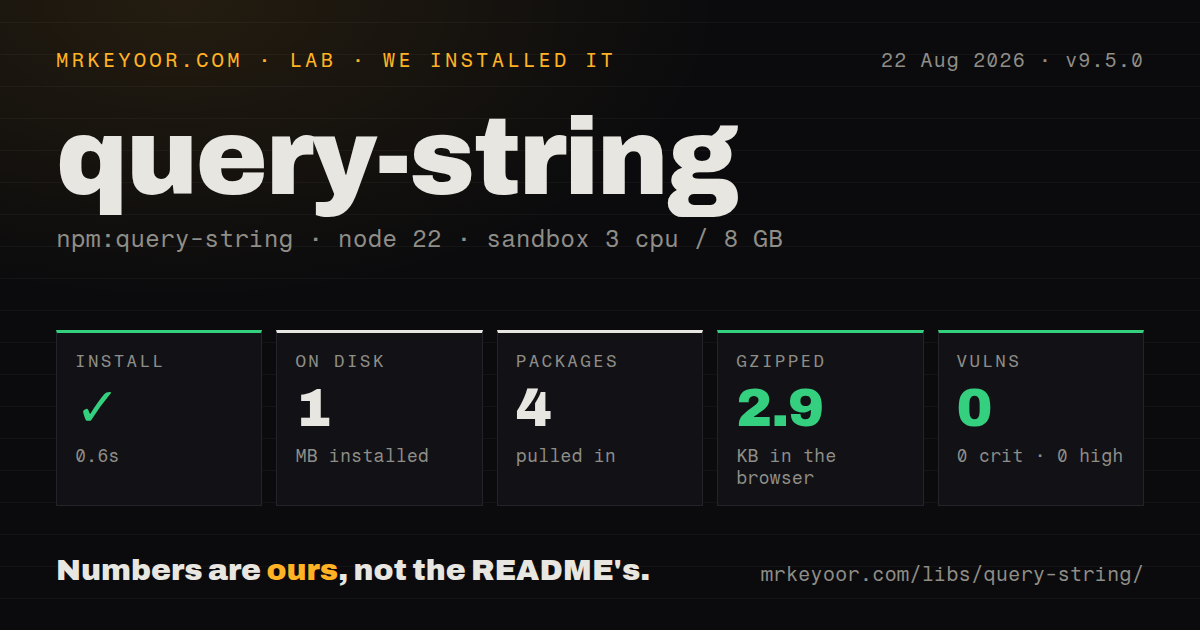
| Install | ✓ · 0.6s | 4 packages on disk · 1 MB |
| Import | ✓ | ESM import works · require() works · ESM package with exports map |
| Browser | 2.9 KB | gzipped (8.3 KB minified), bundled with esbuild |
| Types | ✓ | TypeScript types bundled |
| Known vulns | 0 | 0 critical · 0 high · 0 moderate · 0 low (npm audit) |
Answers from our run
Does query-string install cleanly?
Yes. In a fresh container with an empty cache, npm install query-string finished in 0.6s, leaving 4 packages and 1 MB on disk. npm audit reported no known vulnerabilities.
How much does query-string add to a browser bundle?
2.9 KB gzipped (8.3 KB minified) when the whole package is bundled for the browser with esbuild. Importing only part of it is usually smaller.
Does query-string work with both ESM and CommonJS?
Yes. Both import 'query-string' and require('query-string') worked in Node 22 in our run. The package is published as ESM with an exports map.
Does query-string include TypeScript types?
Yes, type declarations ship inside the package, so no @types install is needed.
query-string or qs: which should you use?
qs: Choose it when a server depends on nested bracket objects and depth controls. query-string 9.5.0 installed in 0.6 seconds as 4 packages and bundled to 2.9 KB gzipped in our sandbox, with 0 audit findings.
When should you not use query-string?
The application handles a few flat keys. URLSearchParams is native in current browsers and Node and needs no package.
Use it if
- A server contract requires bracket, indexed, repeated-key, comma, or custom-separator array parameters.
- Selected fields should parse as numbers, booleans, strings, or typed arrays while identifiers retain leading zeroes.
- Canonical URLs or cache keys depend on stable parameter sorting.
- Code must merge, filter, or replace URL parameters while preserving the path and optional fragment.
- The application handles a few flat keys. URLSearchParams is native in current browsers and Node and needs no package.
- The backend expects nested bracket objects such as filter[brand]=canon. query-string deliberately leaves nesting out.
- Client and server cannot agree on one arrayFormat. Different parse and stringify policies change both key syntax and result shape.
- Date instances or plain nested objects should serialize automatically. The package accepts listed primitives and arrays, and unsupported values throw unless replaced.
- Global parseNumbers would touch IDs, telephone numbers, or postal codes. Coercion can remove meaningful leading characters unless each field is typed.
Setup reality
We installed query-string 9.5.0 in a fresh Node 22 Bookworm sandbox. npm took 0.6 seconds and left 4 packages using 1 MB. The package was 80 KB unpacked with 3 direct dependencies and no peers. npm audit found 0 known vulnerabilities. It requires Node 18+, ships as ESM behind an exports map, bundles TypeScript declarations, and both require() and ESM import worked in our check.
No credentials or config files are involved. parse() removes a leading ? or # and returns Object.create(null), so parsed.hasOwnProperty is unavailable; use Object.hasOwn(). Values remain strings unless global coercion or the types map changes them. Per-key types override global parseNumbers and parseBooleans, which is the safe place to keep phone numbers, ZIP codes, and opaque IDs as strings.
Array encoding is part of the API contract. Use the same arrayFormat and separator on both sides. Repeated keys, brackets, indices, commas, and bracket separators differ around null and empty values. The package does not encode nested objects. If an endpoint explicitly accepts JSON inside one parameter, serialize that field yourself; otherwise use qs or the server's own convention.
stringify sorts keys by default and always omits undefined. Null and empty strings remain unless skipNull or skipEmptyString is set. parseUrl returns a fragment only with parseFragmentIdentifier, while stringifyUrl can set one. A raw + decodes as a space, so a literal plus must arrive as %2B. Our browser bundle was 8.3 KB minified and 2.9 KB gzipped. Version 9.5.0 has no new API behavior beyond dependency updates.
Patterns
Read flat parameters parse-flat-query
import queryString from 'query-string';

const params = queryString.parse('?q=paper&page=2');
console.log(params.q, params.page);
The result has a null prototype. Use Object.hasOwn(params, key), not params.hasOwnProperty(key).
Write sorted parameters serialize-stable-query
queryString.stringify({ q: 'paper', page: 2 });
queryString.stringify({ b: 1, a: 2 }, { sort: false });
Keys sort by default. sort: false retains insertion order for callers that require it.
Type specific query values parse-typed-fields
const params = queryString.parse('?age=20&id=0012&active=true', {
  parseNumbers: true,
  parseBooleans: true,
  types: { id: 'string' },
});
Per-key types outrank global coercion, preserving the leading zero in id.
Match bracket array syntax encode-bracket-array
const options = { arrayFormat: 'bracket' };
const text = queryString.stringify({ ids: [1, 2] }, options);
const back = queryString.parse(text, options);
Use one arrayFormat for writing and reading. A different format can change key names or array shape.
Write a comma-separated array encode-comma-array
const text = queryString.stringify(
  { tags: ['paper', 'ink'] },
  { arrayFormat: 'comma' },
);
Comma format is ambiguous when values themselves contain separators unless both sides apply matching encoding rules.
Parse a full URL split-url-and-query
const result = queryString.parseUrl(
  'https://example.com/search?q=paper#results',
  { parseFragmentIdentifier: true },
);
The fragmentIdentifier property appears only when parseFragmentIdentifier is enabled.
Replace parameters in a URL merge-url-query
const url = queryString.stringifyUrl({
  url: 'https://example.com/search?q=old&keep=yes',
  query: { q: 'new', page: 2 },
});
New values replace matching keys. Default sorting can reorder existing parameters.
Exclude matching parameters remove-tracking-keys
const clean = queryString.exclude(
  'https://example.com?id=7&utm_source=x&utm_medium=y',
  key => key.startsWith('utm_'),
);
exclude accepts a predicate or key list and preserves any URL fragment.
Skip null and blank filters omit-empty-filters
const text = queryString.stringify(
  { q: 'paper', brand: '', minPrice: null, page: 1 },
  { skipNull: true, skipEmptyString: true },
);
undefined is always omitted; null and empty strings require their separate skip options.
Convert unsupported values serialize-date-value
const text = queryString.stringify(
  { since: new Date('2026-01-15T10:30:00Z') },
  { replacer: (_key, value) => value instanceof Date ? value.toISOString() : value },
);
Date and plain object values are unsupported directly. A replacer must return a supported primitive or undefined.
Encode one explicit JSON field carry-json-parameter
const text = queryString.stringify({
  view: 'grid',
  filters: JSON.stringify({ brand: 'canon', inStock: true }),
});
const filters = JSON.parse(queryString.parse(text).filters);
This package has no nested query syntax. Use this only when the endpoint explicitly defines a JSON-valued parameter.
Encode a literal plus sign preserve-plus-character
const text = queryString.stringify({ phone: '+15551234567' });
const params = queryString.parse(text);
An unescaped + decodes as a space. stringify emits %2B so the round trip preserves the plus.
Alternatives
| Package | Registry | Pick it when |
|---|---|---|
| qs | npm | Choose it when a server depends on nested bracket objects and depth controls. |
| querystringify | npm | Choose it for a smaller flat parser with fewer array and type policies. |
| ufo | npm | Choose it when path joining, URL normalization, and queries belong in one utility. |
More web frontend guides
postcss · react · react-dom · tailwindcss · clsx · htmlparser2 · the whole shelf →
How this guide is made: grounded in the library's documentation, release notes, changelog, and issue history, on a fixed rubric — not a hands-on install of every release. The 50 most-downloaded entries are additionally install-verified in clean containers. Corrections: contact the desk.