qrcode review
qrcode 8.2 is a Python encoder for standard QR Codes. Give it text or bytes and it can produce a PNG through Pillow or PyPNG, an SVG document, terminal characters, or the underlying module matrix for your own renderer. It does not read codes from photos and it does not generate Micro QR. The 8.2 release makes color-mask processing faster and fixes the spelling of the `embedded_image` arguments. The older `embeded_*` spellings still work for compatibility.
qrcode 8.2 covers standard QR versions 1 through 40 and can emit PNG, SVG, terminal text, or a module matrix, but it cannot decode an image. Install an explicit renderer extra for ordinary QR generation, Segno for Micro QR, and pyzbar for scanning.
We installed it
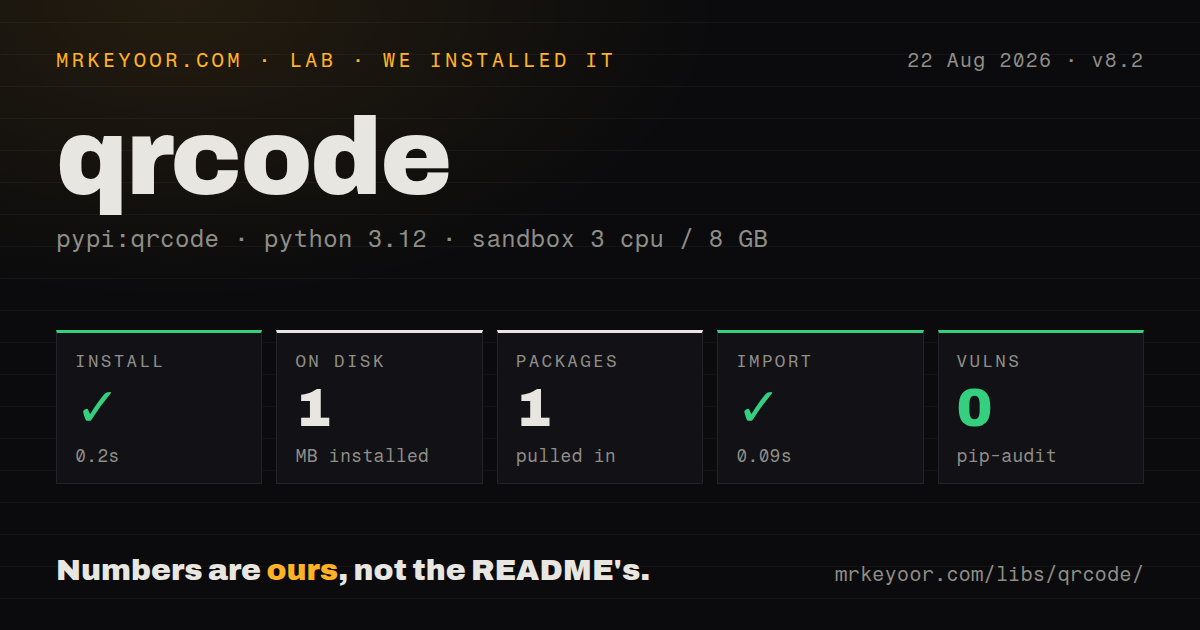
| Install | ✓ · 0.2s | 1 package on disk · 1 MB |
| Import | ✓ | import qrcode in 0.09s · pure Python · requires Python >=3.9,<4.0 |
| Known vulns | 0 | (pip-audit) |
Answers from our run
Does qrcode install cleanly?
Yes. In a fresh container with an empty cache, pip install qrcode finished in 0.2s, leaving 1 package and 1 MB on disk. pip-audit reported no known vulnerabilities.
What does qrcode need to run?
Python >=3.9,<4.0, and nothing compiled: it is pure Python. In our run import qrcode succeeded in 0.09s.
qrcode or segno: which should you use?
segno: Choose it when the same Python API must create both standard QR and Micro QR symbols. qrcode 8.2 covers standard QR versions 1 through 40 and can emit PNG, SVG, terminal text, or a module matrix, but it cannot decode an image.
When should you not use qrcode?
You need to decode a camera frame or uploaded image. qrcode has an encoding API only. pyzbar is built for reading QR Codes and barcodes.
Use it if
- A Python service needs to turn a URL, ticket token, Wi-Fi payload, or other short value into a standard QR Code.
- You want to choose the QR version, error-correction level, module size, border width, colors, and image renderer in code.
- The same payload must be available as PNG, SVG, terminal text, or a boolean matrix for a printer you already control.
- A logo or shaped modules are required, and you can test every decorated result with the actual phones and scanners your users carry.
- You need to decode a camera frame or uploaded image. qrcode has an encoding API only. pyzbar is built for reading QR Codes and barcodes.
- You need Micro QR, Aztec, Data Matrix, PDF417, or linear barcode output. This package implements standard QR versions 1 through 40.
- Your payload depends on QR Kanji-mode compression. The 8.2 `QRData` implementation says it does not handle Kanji mode and encodes general Unicode text as UTF-8 bytes.
- A styled code must scan everywhere without a device test. The README warns that custom module shapes, color masks, and center images are not guaranteed to work with every reader.
- You expect a bare install to make PNG backend selection predictable. The package metadata makes Pillow and PyPNG optional extras, while the 8.2 README describes PyPNG as part of a standard install.
Setup reality
We did not install qrcode 8.2 for this guide, so we have no lab figures for install time, disk use, dependency count, import behavior, or vulnerability findings. PyPI serves a 45,986-byte universal wheel and declares Python >=3.9,<4.0.
No account, secret, or configuration file is involved. Image output is the setup trap. PyPI puts Pillow behind qrcode[pil] and PyPNG behind qrcode[png], yet the 8.2 README says a standard install uses PyPNG. Choose the renderer in your dependency file and in code. qrcode[pil] is the straightforward choice for colors, shaped modules, and embedded images. qrcode[png] supplies the pure-Python PNG path.
Automatic sizing can search standard QR versions 1 through 40. Leave version=None and call make(fit=True) when payload length varies. A fixed version with fit=False raises DataOverflowError instead of silently growing. Keep the default 4-module border unless your output specification says otherwise. An embedded image requires ERROR_CORRECT_H in 8.2, and the library raises ValueError when a lower correction level is used.
Generation runs synchronously inside the Python process. For an HTTP response, save into BytesIO rather than a temporary file. For a label printer, read get_matrix() and preserve its border. Styled output needs a scanner test after resizing or print conversion. The 8.2 README explicitly warns that custom shapes and color masks can fail with some readers, so a successful save() call is not a readability test.
Patterns
Save a QR Code as PNG save-png
import qrcode

image = qrcode.make("https://example.com/check-in/A7C2")
image.save("check-in.png")
This call needs an image renderer. Install `qrcode[pil]` when the application expects Pillow's PNG writer.
Build PNG bytes for an HTTP response return-png-bytes
from io import BytesIO

import qrcode

stream = BytesIO()
image = qrcode.make(payment_url)
image.save(stream, format="PNG")
png_body = stream.getvalue()
`BytesIO` avoids a temporary file, but it does not remove the renderer dependency. This example still expects `qrcode[pil]`.
Pick the smallest version that fits fit-smallest-version
import qrcode
from qrcode.constants import ERROR_CORRECT_Q

qr = qrcode.QRCode(
    version=None,
    error_correction=ERROR_CORRECT_Q,
    box_size=8,
    border=4,
)
qr.add_data(invite_url)
qr.make(fit=True)
image = qr.make_image(fill_color="#14213d", back_color="white")
`fit=True` searches QR versions 1 through 40. The 4-module border matches the minimum stated in the README.
Reject data that exceeds a fixed version catch-version-overflow
import qrcode
from qrcode.exceptions import DataOverflowError

qr = qrcode.QRCode(version=2)
qr.add_data(payload)
try:
    qr.make(fit=False)
except DataOverflowError as exc:
    raise ValueError("payload does not fit QR version 2") from exc
`fit=False` preserves version 2 and raises when the selected correction level leaves too little capacity.
Create a path-based SVG render-svg-path
import qrcode
from qrcode.image.svg import SvgPathImage

image = qrcode.make(
    manual_url,
    image_factory=SvgPathImage,
)
svg_markup = image.to_string(encoding="unicode")
`SvgPathImage` joins dark modules into one path, which avoids thin white seams when an SVG viewer scales the image.
Add a white background to SVG output render-svg-with-background
import qrcode
from qrcode.image.svg import SvgPathFillImage

image = qrcode.make(
    document_url,
    image_factory=SvgPathFillImage,
)
image.save("document-code.svg")
`SvgPathFillImage` inserts a white rectangle behind the modules. `SvgPathImage` leaves that background unspecified.
Select the pure-Python PNG renderer use-pypng-renderer
import qrcode
from qrcode.image.pure import PyPNGImage

image = qrcode.make(
    shipping_label,
    image_factory=PyPNGImage,
)
image.save("shipping-code.png")
`PyPNGImage` requires the `pypng` distribution. PyPI exposes it through the `qrcode[png]` extra.
Capture a terminal-safe text rendering capture-terminal-output
from io import StringIO

import qrcode

qr = qrcode.QRCode()
qr.add_data("otpauth://totp/Example:dev")
output = StringIO()
qr.print_ascii(out=output, invert=True)
terminal_text = output.getvalue()
`print_ascii()` does not need Pillow or PyPNG. The `invert` flag swaps the text foreground and background.
Send the module matrix to a printer read-module-matrix
import qrcode

qr = qrcode.QRCode(border=4)
qr.add_data(label_payload)
qr.make(fit=True)

for row_index, row in enumerate(qr.get_matrix()):
    label_printer.draw_modules(row_index, row)
`get_matrix()` includes the configured border. Keep all 4 blank edge modules when the printer lays out the final symbol.
Draw rounded Pillow modules draw-rounded-modules
import qrcode
from qrcode.image.styledpil import StyledPilImage
from qrcode.image.styles.moduledrawers.pil import RoundedModuleDrawer

qr = qrcode.QRCode(error_correction=qrcode.constants.ERROR_CORRECT_Q)
qr.add_data(campaign_url)
qr.make(fit=True)
image = qr.make_image(
    image_factory=StyledPilImage,
    module_drawer=RoundedModuleDrawer(),
)
Rounded modules require Pillow and can reduce scanner tolerance. Test the exported size on the readers that matter.
Place a logo in the center embed-center-image
import qrcode
from qrcode.constants import ERROR_CORRECT_H
from qrcode.image.styledpil import StyledPilImage

qr = qrcode.QRCode(error_correction=ERROR_CORRECT_H)
qr.add_data(landing_url)
qr.make(fit=True)
image = qr.make_image(
    image_factory=StyledPilImage,
    embedded_image_path="logo.png",
)
Version 8.2 requires H correction for embedded images and accepts the correctly spelled `embedded_image_path` keyword.
Choose command-line output explicitly generate-from-cli
qr --output=asset.png "inventory:4821"
qr --factory=svg-path "https://example.com/help" > help.svg
qr --ascii "terminal value" > code.txt
The `qr` command can write PNG, SVG, or ASCII. Use `--output` for binary PNG on PowerShell instead of redirecting standard output.
Alternatives
| Package | Registry | Pick it when |
|---|---|---|
| segno | PyPI | Choose it when the same Python API must create both standard QR and Micro QR symbols. |
| qrcodegen | PyPI | Choose it for a compact QR encoder when you do not need qrcode's Pillow styling helpers. |
| treepoem | PyPI | Choose it when QR output belongs beside Aztec, PDF417, Code 128, and many other barcode formats. |
| pyzbar | PyPI | Choose it when the job is to read QR Codes and one-dimensional barcodes from images. |
More utils guides
lru-cache · type-fest · ajv · zod · p-limit · find-up · the whole shelf →
How this guide is made: grounded in the library's documentation, release notes, changelog, and issue history, on a fixed rubric — not a hands-on install of every release. The 50 most-downloaded entries are additionally install-verified in clean containers. Corrections: contact the desk.