pyright review
The PyPI package named pyright is an independent Python command wrapper around Microsoft's TypeScript-based Pyright type checker. It lets Python-only toolchains invoke pyright or python -m pyright, finds Node on PATH, and can build a cached Node environment and install the matching npm package when Node is absent. Version 1.1.411 tracks upstream Pyright 1.1.411, whose release fixes narrowing and reachability cases, recognizes dataclass KW_ONLY under any variable name, handles symlinked partial stubs, and updates typeshed.
pyright 1.1.411 installed in 1 second and occupied 39 MB across 3 packages in our sandbox; import worked and pip-audit found 0 known vulnerabilities, but we did not measure a checker run. Install this wrapper when Python tooling must own Pyright installation, and use the npm package directly when Node already owns the toolchain.
We installed it
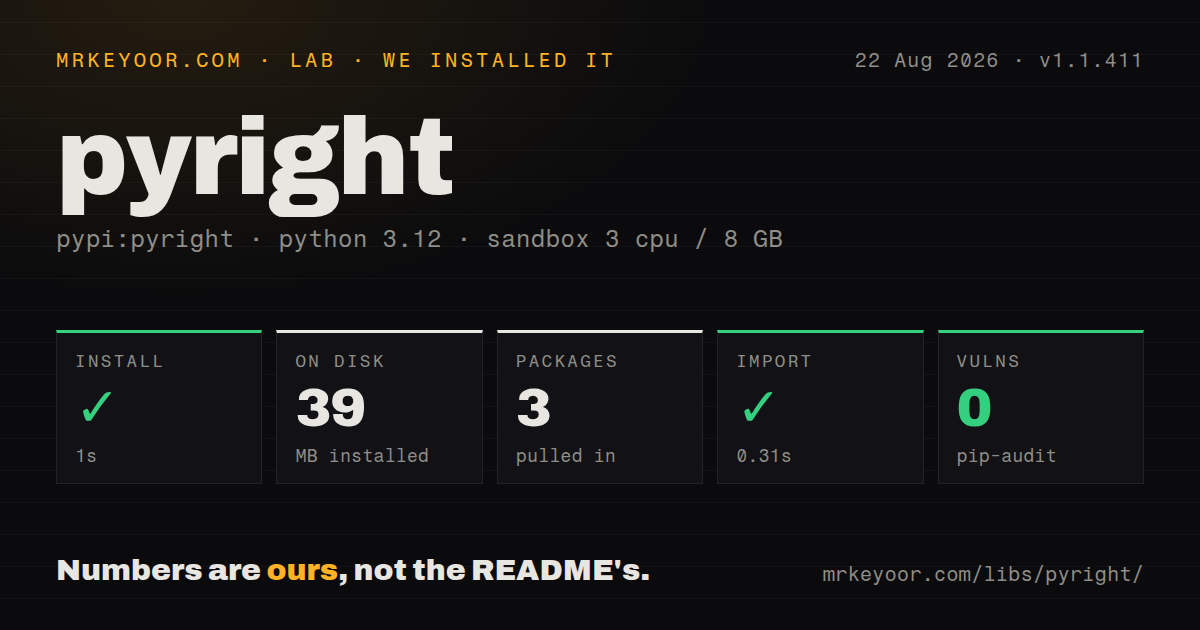
| Install | ✓ · 1s | 3 packages on disk · 39 MB |
| Import | ✓ | import pyright in 0.31s · pure Python · py.typed · requires Python >=3.7 |
| Known vulns | 0 | (pip-audit) |
Answers from our run
Does pyright install cleanly?
Yes. In a fresh container with an empty cache, pip install pyright finished in 1 seconds, leaving 3 packages and 39 MB on disk. pip-audit reported no known vulnerabilities.
What does pyright need to run?
Python >=3.7, and nothing compiled: it is pure Python. In our run import pyright succeeded in 0.31s, and the package ships py.typed for type checkers.
pyright or mypy: which should you use?
mypy: Choose it for a Python-native checker with a large plugin ecosystem and established gradual-typing workflows. pyright 1.1.411 installed in 1 second and occupied 39 MB across 3 packages in our sandbox; import worked and pip-audit found 0 known vulnerabilities, but we did not measure a checker run.
When should you not use pyright?
Your Node toolchain already installs microsoft/pyright from npm; this wrapper adds another version and cache layer around the same checker.
Use it if
- A Python requirements file, tox environment, or pre-commit hook must install the Pyright CLI without a separate npm step.
- You want the wrapper release pinned to the same numbered upstream Pyright release.
- The machine can use system Node or cache a wrapper-managed Node and npm installation.
- A pyproject.toml or pyrightconfig.json should hold strictness, include paths, exclusions, and virtual-environment discovery.
- Your Node toolchain already installs microsoft/pyright from npm; this wrapper adds another version and cache layer around the same checker.
- CI or production cannot make a first-run network request and no Node binary is preinstalled; the default wrapper can use nodeenv and npm at runtime.
- You mistake import pyright for the type checker itself; the heavy checker is JavaScript and the wrapper's Python module only orchestrates it.
- Pre-commit runs in an isolated environment and you will not configure venvPath, venv, or additional_dependencies; imports from the project environment may appear missing.
- Python 3.7 support in the wrapper matters more than checking modern language features; the wrapper runtime floor and the analyzed Python version are separate settings.
Setup reality
Our fresh Python 3.12 install of pyright 1.1.411 completed in 1 second and left 3 packages using 39 MB. import pyright worked in 0.31 seconds. The wrapper is pure Python, declares 6 direct dependencies, requires Python 3.7 or newer, and ships py.typed. Our pip-audit run found 0 known vulnerabilities. This measurement tested the import, not a full type-check run.
The first pyright command may do more than the pip install suggests. When Node is missing from PATH, the wrapper uses nodeenv, installs the pyright npm package, and caches the result under PYRIGHT_PYTHON_CACHE_DIR, XDG_CACHE_HOME, or ~/.cache. The README recommends pyright[nodejs], backed by nodejs-wheel, as the more reliable way to supply Node. Offline CI should preinstall the chosen path.
Configuration comes from pyrightconfig.json or [tool.pyright] in pyproject.toml. Set include and exclude paths, typeCheckingMode, pythonVersion, and diagnostic rules there. For a project virtualenv, point venvPath at its parent and venv at the environment name. A pre-commit hook creates its own environment, so unresolved imports are expected unless you expose the project environment or install required packages into the hook.
PYRIGHT_PYTHON_FORCE_VERSION can override the bundled target, including latest, and PYRIGHT_PYTHON_PYLANCE_VERSION can choose the Pyright build matching a Pylance release. The force setting wins when both exist. Those overrides reduce reproducibility, so pin 1.1.411 in CI and update deliberately. Version 1.1.411 includes upstream fixes for generic context-manager reachability, NamedTuple narrowing, NewType comparisons, partial-stub symlinks, and dataclass KW_ONLY detection.
Patterns
Check the current project install-and-run
pip install 'pyright[nodejs]'
pyright src/
python -m pyright --version
This command may prepare Node and the npm checker on its first run. Cache that setup before an offline CI stage.
Run the wrapper as a Python module configure-pyproject
[tool.pyright]
include = ['src']
typeCheckingMode = 'standard'
pythonVersion = '3.12'
venvPath = '.'
venv = '.venv'
python -m pyright and the pyright console script reach the same wrapper, which is useful when PATH scripts are unavailable.
Set strict checking in pyproject.toml configure-json
{
  "include": ["src"],
  "exclude": ["**/__pycache__", ".venv"],
  "typeCheckingMode": "basic",
  "strict": ["src/core"],
  "pythonVersion": "3.12"
}
typeCheckingMode is a baseline. Individual diagnostic rules can still be raised, lowered, or disabled for a staged migration.
Point Pyright at the project virtualenv pin-upstream-version
export PYRIGHT_PYTHON_FORCE_VERSION=1.1.411
pyright src/
venvPath names the parent directory and venv names one environment inside it. Do not put a machine-specific absolute path in shared config.
Pin the pre-commit hook release cache-ci-downloads
export PYRIGHT_PYTHON_CACHE_DIR="$CI_PROJECT_DIR/.cache/pyright"
pyright --outputjson src/ > pyright-report.json
The hook has an isolated Python environment. Add dependencies there or configure the checker to inspect the project's virtualenv.
Store downloaded tooling in a CI cache run-pre-commit
repos:
  - repo: https://github.com/RobertCraigie/pyright-python
    rev: v1.1.411
    hooks:
      - id: pyright
        additional_dependencies:
          - pydantic
          - pytest
PYRIGHT_PYTHON_CACHE_DIR controls the wrapper cache. Key the cache by wrapper version and platform to avoid stale Node or npm contents.
Select the Pyright version explicitly suppress-one-diagnostic
value = legacy_call() # pyright: ignore[reportUnknownVariableType]Using latest makes diagnostics change without a requirements update. Prefer an exact version in CI and upgrade through a reviewed change.
Emit machine-readable diagnostics watch-source-tree
pyright --watch src/JSON output is suitable for CI parsing. Treat the command exit status as authoritative and keep human formatting out of the parser.
Alternatives
| Package | Registry | Pick it when |
|---|---|---|
| mypy | PyPI | Choose it for a Python-native checker with a large plugin ecosystem and established gradual-typing workflows. |
| basedpyright | PyPI | Choose it for a Pyright fork with extra diagnostics and configuration changes packaged for Python users. |
| pyrefly | PyPI | Choose it when you want a newer high-performance checker and can accept a younger compatibility surface. |
More utils guides
lru-cache · type-fest · ajv · zod · p-limit · find-up · the whole shelf →
How this guide is made: grounded in the library's documentation, release notes, changelog, and issue history, on a fixed rubric — not a hands-on install of every release. The 50 most-downloaded entries are additionally install-verified in clean containers. Corrections: contact the desk.