pymongo review
Our fresh sandbox installed PyMongo 4.17.0 in 0.4 seconds, left 2 packages and 8 MB on disk, then imported `bson` in 0.14 seconds. PyMongo is MongoDB's official Python driver, with synchronous and asyncio clients plus BSON and GridFS. That measured build is now below the fixed version: 4.18.1 addresses CVE-2026-88029 by matching GridFS file IDs literally. The 4.18 release also adds MongoDB 9.0 support, drops MongoDB 4.2, and reuses TLS sessions. It works with document mappings rather than ODM models, so your code or database must enforce document shape.
Our PyMongo 4.17.0 install took 0.4 seconds and 8 MB, but CVE-2026-88029 now places that exact version in the affected range. Install 4.18.1, whose GridFS fix is the practical reason to upgrade, when you want MongoDB's direct sync or asyncio driver and can enforce document shape outside the client.
We installed it
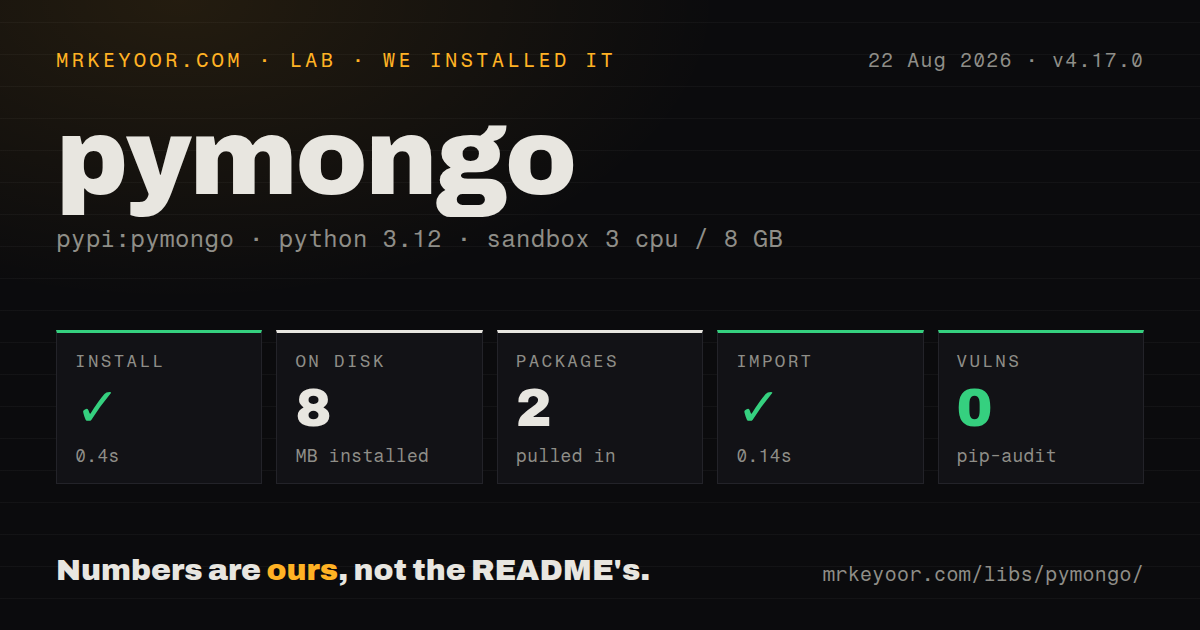
| Install | ✓ · 0.4s | 2 packages on disk · 8 MB |
| Import | ✓ | import bson in 0.14s · compiled extensions · py.typed · requires Python >=3.9 |
| Known vulns | 0 | (pip-audit) |
Answers from our run
Does pymongo install cleanly?
Yes. In a fresh container with an empty cache, pip install pymongo finished in 0.4s, leaving 2 packages and 8 MB on disk. pip-audit reported no known vulnerabilities.
What does pymongo need to run?
Python >=3.9, and a platform wheel with compiled extensions. In our run import bson succeeded in 0.14s, and the package ships py.typed for type checkers.
pymongo or beanie: which should you use?
beanie: Beanie 2.2.0 adds Pydantic document models and query helpers for asyncio services that want an ODM above the MongoDB driver. Our PyMongo 4.17.0 install took 0.4 seconds and 8 MB, but CVE-2026-88029 now places that exact version in the affected range.
When should you not use pymongo?
You cannot upgrade past PyMongo 4.18.0. CVE-2026-88029 affects versions from 1.6.0 up to, but excluding, 4.18.1 and can turn a structured GridFS file ID into a query condition
Use it if
- PyMongo 4.18.1 is the vendor-maintained choice when one service needs the same MongoDB collection API in synchronous code and asyncio workers
- Your application already works with dictionaries and MongoDB operators, with validation handled by your own models or database rules
- You need driver-level features such as sessions, change streams, GridFS, wire compression, or client-side field encryption
- Your deployment uses MongoDB 4.4 through 9.0 and can move directly to PyMongo 4.18.1 or newer
- You cannot upgrade past PyMongo 4.18.0. CVE-2026-88029 affects versions from 1.6.0 up to, but excluding, 4.18.1 and can turn a structured GridFS file ID into a query condition
- Your production database is MongoDB 4.2. PyMongo 4.18 removed support for that server release
- You need field declarations, coercion, and validation on every document operation. PyMongo is a driver and does not supply an ODM model layer
- PyPy support is a fixed platform requirement. The 4.18 changelog deprecates PyPy and says support will be removed in a later release
- Your packaging policy forbids native extensions. The wheel in our Python 3.12 sandbox contained compiled `.so` files
Setup reality
We installed PyMongo 4.17.0 in an unprivileged Python 3.12 Bookworm container on August 22, 2026. It completed in 0.4 seconds and left 2 packages using 8 MB. The package scan counted 23 direct dependencies, found py.typed and compiled .so files, and reported no license value. pip-audit returned 0 known vulnerabilities, and import bson took 0.14 seconds. That audit result predates CVE-2026-88029, whose affected range includes 4.17.0. Use 4.18.1 or newer.
Python 3.9 is the minimum. PyMongo already owns the bson namespace, so installing the separate bson package can break imports. The base client reads a URI and needs no config file. SRV records require dnspython, while AWS auth, GSSAPI, OCSP, compression, and field-level encryption use optional extras. Keep credentials outside the repository and encode reserved URI characters. Current PyPI metadata declares Apache-2.0, although our measured 4.17.0 installation exposed no license value.
MongoClient begins connecting in the background, which means construction can succeed with a bad host or password. Call client.admin.command('ping') during readiness and set serverSelectionTimeoutMS; the documented default is 30 seconds. Reuse one client per process to keep its pool and monitoring threads alive. The client is thread-safe, but a ClientSession is limited to one thread or process and cannot run concurrent operations.
Transactions require a replica set or sharded cluster, so a standalone local server cannot test that code path. with_transaction() may invoke its callback more than once during retries, even though the server commits at most once. Keep email, queue publishing, and other outside effects after the transaction. With AsyncMongoClient, await network calls and close(), then consume find() with async for. One async session cannot be shared across simultaneous tasks.
Patterns
Make startup prove the server is reachable connect-and-verify
import os
from pymongo import MongoClient

client = MongoClient(
    os.environ['MONGODB_URI'],
    serverSelectionTimeoutMS=5_000,
)
client.admin.command('ping')
db = client['shop']
`MongoClient` starts discovery in the background and can return before it finds a usable server. The `ping` operation forces server selection while startup can still fail cleanly.
Insert an order and capture its generated ID insert-one-document
orders = db['orders']
result = orders.insert_one({
    'sku': 'TONER-85A',
    'quantity': 2,
    'status': 'pending',
})
print(result.inserted_id)
`insert_one()` creates `_id` when it is absent and exposes the value on `InsertOneResult`. Add a unique index if `sku` or another business field must also reject duplicates.
Return only the fields a queue worker needs filter-project-and-sort
from pymongo import ASCENDING

cursor = (
    orders.find(
        {'status': 'pending', 'quantity': {'$gte': 2}},
        {'sku': 1, 'quantity': 1, '_id': 0},
    )
    .sort('sku', ASCENDING)
    .limit(50)
)
for order in cursor:
    print(order)
`find()` is lazy, so later cursor batches can trigger more network reads during iteration. Projection trims returned fields but does not check their stored types.
Apply an atomic update with an upsert fallback update-or-create
result = orders.update_one(
    {'sku': 'TONER-85A'},
    {
        '$set': {'status': 'packed'},
        '$inc': {'revision': 1},
    },
    upsert=True,
)
print(result.matched_count, result.upserted_id)
An update document needs operators such as `$set` and `$inc`. Use `replace_one()` when the intent is to replace every field other than `_id`.
Batch independent writes without stopping at the first error write-in-bulk
from pymongo import DeleteOne, InsertOne, UpdateOne
from pymongo.errors import BulkWriteError

ops = [
    InsertOne({'sku': 'PAPER-A4', 'quantity': 10}),
    UpdateOne({'sku': 'TONER-85A'}, {'$inc': {'quantity': 1}}),
    DeleteOne({'status': 'cancelled'}),
]
try:
    result = orders.bulk_write(ops, ordered=False)
except BulkWriteError as exc:
    print(exc.details)
`ordered=False` lets later independent writes run after one operation fails. A `BulkWriteError` can describe partial success, so inspect its details before retrying the batch.
Calculate shipped units by SKU aggregate-documents
pipeline = [
    {'$match': {'status': 'shipped'}},
    {'$group': {'_id': '$sku', 'units': {'$sum': '$quantity'}}},
    {'$sort': {'units': -1}},
    {'$limit': 10},
]
for row in orders.aggregate(pipeline, allowDiskUse=True):
    print(row['_id'], row['units'])
PyMongo 4.18 raises `ConfigurationError` for `aggregate=` or `pipeline=` keyword arguments. Pass the pipeline as the first positional argument, as shown here.
Enforce SKU uniqueness and expire sessions create-safety-indexes
from pymongo import ASCENDING

orders.create_index([('sku', ASCENDING)], unique=True)
db['sessions'].create_index('expires_at', expireAfterSeconds=0)
A unique index build fails if existing documents contain collisions. MongoDB's TTL monitor removes expired records in the background, so the timestamp is not an exact deletion schedule.
Move a balance within one session run-a-transaction
accounts = db['accounts']

def transfer(session):
    accounts.update_one(
        {'_id': 'alice'}, {'$inc': {'balance': -100}}, session=session
    )
    accounts.update_one(
        {'_id': 'bob'}, {'$inc': {'balance': 100}}, session=session
    )

with client.start_session() as session:
    session.with_transaction(transfer)
`with_transaction()` can run the callback more than once while retrying eligible failures, though the server commits at most once. Keep messages and other outside side effects out of the callback.
Use the driver without blocking an asyncio service query-with-asyncio
import asyncio
import os
from pymongo import AsyncMongoClient

async def main():
    client = AsyncMongoClient(os.environ['MONGODB_URI'])
    try:
        await client.admin.command('ping')
        orders = client['shop']['orders']
        async for order in orders.find({'status': 'pending'}):
            print(order)
    finally:
        await client.close()

asyncio.run(main())
`find()` returns an async cursor and is not itself awaited. Await operations that contact the server, await `close()`, and keep each async session within one task at a time.
Process collection changes and save progress resume-a-change-stream
resume_token = load_resume_token()
options = {'full_document': 'updateLookup'}
if resume_token is not None:
    options['resume_after'] = resume_token

with orders.watch([], **options) as changes:
    for change in changes:
        handle(change)
        save_resume_token(change['_id'])
Change streams require a replica set or sharded cluster. Save the `_id` token after handling each event, and expect an old token to fail once the corresponding oplog history has expired.
Stream a file into and out of GridFS store-a-gridfs-file
from gridfs import GridFSBucket

bucket = GridFSBucket(db)
with open('report.pdf', 'rb') as source:
    file_id = bucket.upload_from_stream('report.pdf', source)

with open('report-copy.pdf', 'wb') as target:
    bucket.download_to_stream(file_id, target)
PyMongo 4.18.1 changed GridFS ID handling to an exact match for CVE-2026-88029. Do not run this path on 4.18.0 or any older affected release when callers influence file IDs.
Reject a malformed route ID before querying validate-an-object-id
from bson import ObjectId

def find_order(raw_id):
    if not isinstance(raw_id, str) or not ObjectId.is_valid(raw_id):
        return None
    return orders.find_one({'_id': ObjectId(raw_id)})
`ObjectId(None)` generates a new identifier instead of reporting invalid input. Check the route value and its string form before constructing the query ID.
Alternatives
| Package | Registry | Pick it when |
|---|---|---|
| beanie | PyPI | Beanie 2.2.0 adds Pydantic document models and query helpers for asyncio services that want an ODM above the MongoDB driver |
| mongoengine | PyPI | Choose it for synchronous document classes with declared fields, validation, and reference helpers |
| odmantic | PyPI | Choose it when a Pydantic or FastAPI codebase wants a smaller async ODM and can live within its narrower API |
More data guides
numpy · pandas · fsspec · pyarrow · lxml · sqlalchemy · the whole shelf →
How this guide is made: grounded in the library's documentation, release notes, changelog, and issue history, on a fixed rubric — not a hands-on install of every release. The 50 most-downloaded entries are additionally install-verified in clean containers. Corrections: contact the desk.