pandas-gbq review
pandas-gbq moves data between pandas DataFrames and Google BigQuery. read_gbq runs GoogleSQL or reads a table into local memory; to_gbq creates, appends to, or replaces a table with schema inference and optional overrides. It handles Google credentials, nullable BigQuery types, partitioning, clustering, and optional Storage API downloads. Version 0.35.1 adds an Arrow decoder for read-rows responses and requires a newer Protobuf patch. Our install pulled 36 packages and occupied 301 MB, so this focused API does not mean a light environment.
pandas-gbq is good at one boundary: modest pandas data moving into or out of BigQuery with little code. Its 301 MB measured install, beta label, local-memory reads, and limited job controls make it the wrong default for services or large analytical pipelines.
We installed it
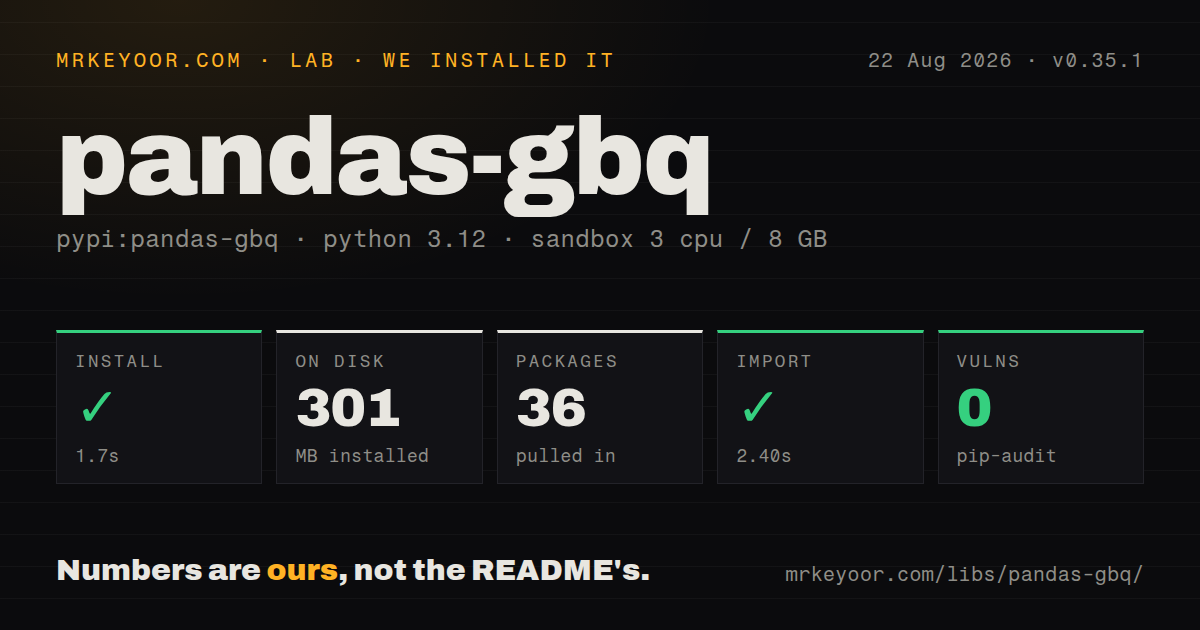
| Install | ✓ · 1.7s | 36 packages on disk · 301 MB |
| Import | ✓ | import pandas_gbq in 2.40s · pure Python · requires Python >=3.10 |
| Known vulns | 0 | (pip-audit) |
Answers from our run
Does pandas-gbq install cleanly?
Yes. In a fresh container with an empty cache, pip install pandas-gbq finished in 2 seconds, leaving 36 packages and 301 MB on disk. pip-audit reported no known vulnerabilities.
What does pandas-gbq need to run?
Python >=3.10, and nothing compiled: it is pure Python. In our run import pandas_gbq succeeded in 2.40s.
pandas-gbq or google-cloud-bigquery: which should you use?
google-cloud-bigquery: Use it for the complete job, table, dataset, load, extract, and administration APIs. pandas-gbq is good at one boundary: modest pandas data moving into or out of BigQuery with little code.
When should you not use pandas-gbq?
Query results are too large for local memory; BigQuery DataFrames or Ibis can keep filtering and aggregation on the service
Use it if
- A notebook or batch step begins or ends with a pandas DataFrame and needs a short BigQuery handoff
- A moderate query result should become local pandas data with BigQuery nullable types mapped sensibly
- A DataFrame upload needs schema overrides, append or replace behavior, and optional partition or cluster settings
- The environment already has Google Application Default Credentials and the full BigQuery job API would add unused surface
- Query results are too large for local memory; BigQuery DataFrames or Ibis can keep filtering and aggregation on the service
- You need job labels, destinations, extracts, routines, models, dataset administration, or detailed retry control; use google-cloud-bigquery directly
- The image must stay small: our install occupied 301 MB and included 36 packages because pandas, NumPy, PyArrow, auth, and Google clients come along
- A beta support label is unacceptable for the workload; PyPI still classifies 0.35.1 as Beta
- You cannot align billing project, dataset location, API enablement, and IAM permissions; each is required beyond a successful pip install
Setup reality
Our clean Python 3.12 install of pandas-gbq 0.35.1 completed in 1.7 seconds. It installed 36 packages using 301 MB on disk, with 17 direct dependencies. The package is pure Python and requires Python 3.10 or newer. import pandas_gbq worked in 2.40 seconds, pip-audit found zero known vulnerabilities, and the wheel did not include py.typed. That missing marker may limit strict type-checker behavior even though annotations exist in parts of the code.
Authentication is the real first run. With no supplied credential, local use can open an OAuth browser flow. Production should use Application Default Credentials or pass a credential object, preferably without a long-lived service-account key file. project_id identifies the billing project and location must match referenced datasets. The caller also needs BigQuery job and data permissions. A successful import proves none of those cloud settings.
read_gbq materializes results in local pandas memory. max_results limits returned rows, while the query itself can still scan more data. The optional bqstorage extra adds the Storage API client; fast downloads also need the API enabled and the correct read-session permission. use_bqstorage_api can add service cost and is ignored in some capped-result paths. For large tables, push filters and aggregation into SQL or use an engine that leaves execution in BigQuery.
to_gbq infers a schema from pandas and PyArrow types. Review nullable integers, timestamps without time zones, decimals, arrays, and object columns before append. if_exists defaults to fail, which is safer than an accidental replacement. Partition and clustering settings apply when creating the destination; they do not remodel an existing table. Appends still have to match its schema. Pass the BigQuery client when you need controlled credentials or reuse, then close the surrounding workflow cleanly.
Patterns
Read a query into pandas run-query
import pandas_gbq

sql = '''
SELECT name, COUNT(*) AS uses
FROM `bigquery-public-data.usa_names.usa_1910_2013`
GROUP BY name ORDER BY uses DESC LIMIT 20
'''
df = pandas_gbq.read_gbq(sql, project_id='billing-project')
project_id pays for the query. Fully qualified table names can still point at datasets in another project.
Read a table with a row cap read-table
df = pandas_gbq.read_gbq(
    'analytics-project.events.daily',
    project_id='billing-project',
    max_results=10_000,
    progress_bar_type=None,
)
max_results limits rows returned to pandas. It does not guarantee a limit on bytes scanned by a SQL query.
Choose nullable pandas dtypes override-dtypes
df = pandas_gbq.read_gbq(
    'SELECT user_id, score FROM `project.dataset.scores`',
    project_id='billing-project',
    dtypes={'user_id': 'string', 'score': 'Float64'},
)
Nullable pandas dtypes can represent BigQuery NULL values that ordinary NumPy integer or boolean dtypes cannot.
Enable faster result downloads use-storage-api
# pip install 'pandas-gbq[bqstorage]'
df = pandas_gbq.read_gbq(
    sql,
    project_id='billing-project',
    use_bqstorage_api=True,
)
Enable the BigQuery Storage API and grant read-session permission. Review its billing before making this a default.
Disable the BigQuery result cache configure-query
df = pandas_gbq.read_gbq(
    sql,
    project_id='billing-project',
    location='EU',
    configuration={'query': {'useQueryCache': False}},
)
configuration uses BigQuery REST job fields. location must agree with every dataset used by the query.
Inspect a query without execution dry-run-query
stats = pandas_gbq.read_gbq(
    sql,
    project_id='billing-project',
    location='US',
    dry_run=True,
)
print(stats)
A dry run returns job statistics rather than the result DataFrame. Use it to inspect cost before the real read.
Supply service-account credentials pass-credentials
from google.oauth2 import service_account
import pandas_gbq

creds = service_account.Credentials.from_service_account_file('service-account.json')
df = pandas_gbq.read_gbq(sql, project_id='billing-project', credentials=creds)
Keep the key file out of source control. Workloads on Google Cloud should prefer Application Default Credentials without exported keys.
Pass an existing BigQuery client reuse-bigquery-client
from google.cloud import bigquery
import pandas_gbq

client = bigquery.Client(project='billing-project')
df = pandas_gbq.read_gbq(sql, bigquery_client=client)
Client injection lets the surrounding application control credentials, project defaults, and client reuse.
Upload to a new table safely create-table
pandas_gbq.to_gbq(
    dataframe=df,
    destination_table='analytics.daily_scores',
    project_id='data-project',
    location='US',
    if_exists='fail',
)
fail is the safe default. Choose append or replace only when that data-management action is intentional.
Append with selected field types append-with-schema
schema = [
    {'name': 'user_id', 'type': 'STRING'},
    {'name': 'event_time', 'type': 'TIMESTAMP'},
]
pandas_gbq.to_gbq(df, 'analytics.events', project_id='data-project', if_exists='append', table_schema=schema)
Overrides affect named fields, but an existing destination schema still decides whether the append is compatible.
Create a partitioned table partition-table
pandas_gbq.to_gbq(
    df,
    'analytics.events_partitioned',
    project_id='data-project',
    if_exists='fail',
    time_partitioning_column='event_time',
    time_partitioning_type='DAY',
    clustering_columns=['customer_id'],
)
These settings describe table creation. Appending to an existing table does not change its partition or clustering design.
Replace a destination explicitly replace-table
pandas_gbq.to_gbq(
    df,
    'staging.daily_import',
    project_id='data-project',
    if_exists='replace',
    progress_bar=False,
)
replace is destructive for the destination table's data. Restrict it to a staging or otherwise replaceable target.
Alternatives
| Package | Registry | Pick it when |
|---|---|---|
| google-cloud-bigquery | PyPI | Use it for the complete job, table, dataset, load, extract, and administration APIs |
| bigframes | PyPI | Use it when DataFrame operations should execute remotely because the data does not fit local pandas |
| ibis-framework | PyPI | Use it for dataframe-like expressions that can target BigQuery and other analytical engines |
More data guides
numpy · pandas · fsspec · lxml · pyarrow · sqlalchemy · the whole shelf →
How this guide is made: grounded in the library's documentation, release notes, changelog, and issue history, on a fixed rubric — not a hands-on install of every release. The 50 most-downloaded entries are additionally install-verified in clean containers. Corrections: contact the desk.