openapi-fetch review
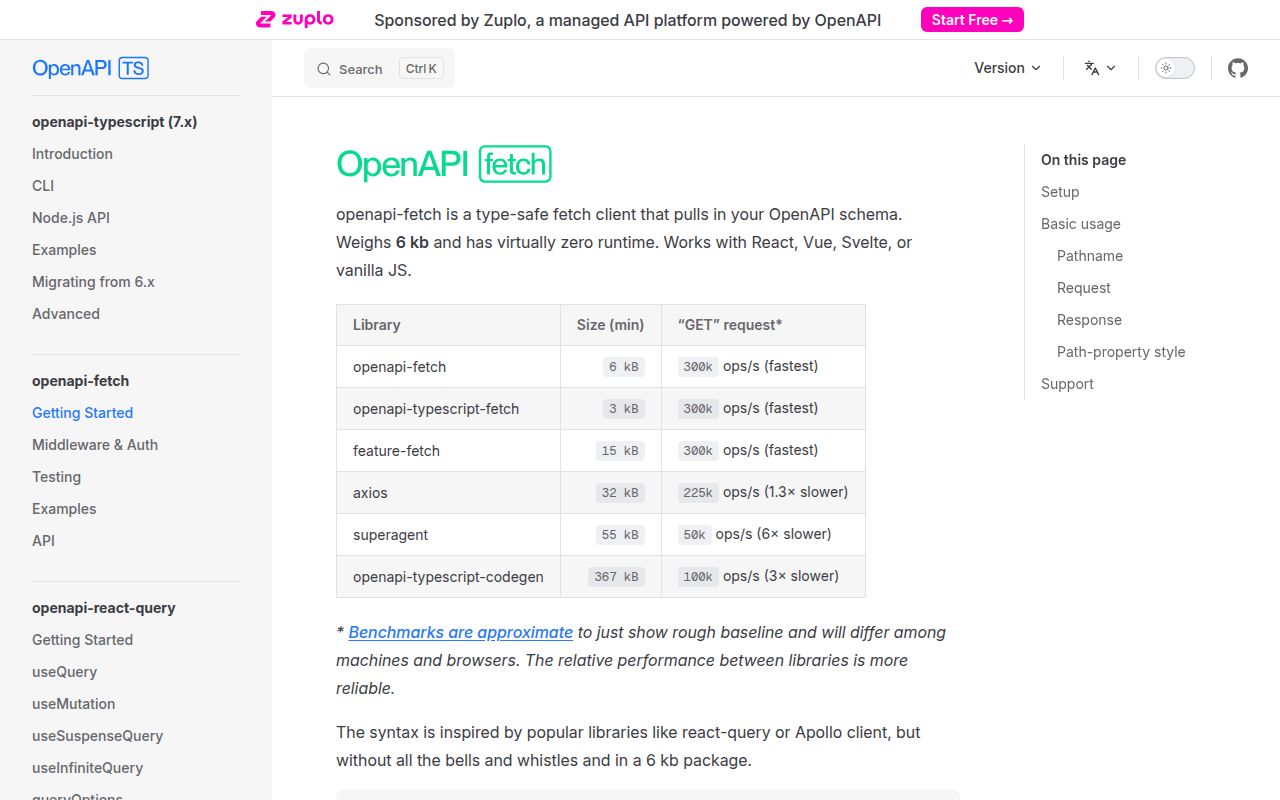
openapi-fetch wraps the native Fetch API with TypeScript types generated from an OpenAPI document. Give `createClient` a generated `paths` type, then `GET('/users/{id}')` knows the allowed URL templates, parameters, body, success payload, and documented error payload. Runtime code still builds a normal `Request` and returns a normal `Response` alongside parsed `data` or `error`. It does not generate endpoint classes or validate server data at runtime. Version 0.17.0 adds read-only and write-only markers shared with openapi-typescript, so generated response and request shapes can exclude the wrong side of those fields. It also stops treating `Content-Length: 0` as empty when a response uses chunked transfer encoding.
openapi-fetch gives schema-disciplined TypeScript teams a 2.9 KB gzipped client with little runtime ceremony. Do not install it to compensate for an unreliable schema or when runtime validation and a post-1.0 contract are required.
We installed it
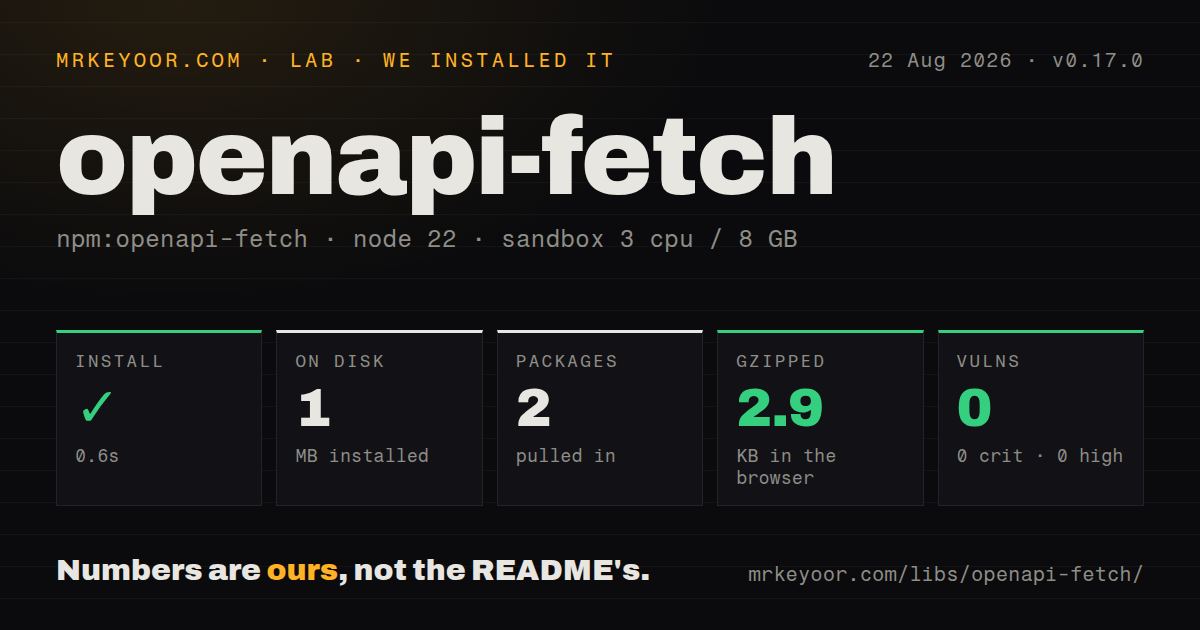
| Install | ✓ · 0.6s | 2 packages on disk · 1 MB |
| Import | ✓ | ESM import works · require() works · ESM package with exports map |
| Browser | 2.9 KB | gzipped (7.4 KB minified), bundled with esbuild |
| Types | — | no TypeScript types found |
| Known vulns | 0 | 0 critical · 0 high · 0 moderate · 0 low (npm audit) |
Answers from our run
Does openapi-fetch install cleanly?
Yes. In a fresh container with an empty cache, npm install openapi-fetch finished in 0.6s, leaving 2 packages and 1 MB on disk. npm audit reported no known vulnerabilities.
How much does openapi-fetch add to a browser bundle?
2.9 KB gzipped (7.4 KB minified) when the whole package is bundled for the browser with esbuild. Importing only part of it is usually smaller.
Does openapi-fetch work with both ESM and CommonJS?
Yes. Both import 'openapi-fetch' and require('openapi-fetch') worked in Node 22 in our run. The package is published as ESM with an exports map.
Does openapi-fetch include TypeScript types?
No type declarations were found in our install, so TypeScript users need their own declarations.
openapi-fetch or openapi-client-axios: which should you use?
openapi-client-axios: Choose it when operation lookup should sit on Axios and use its interceptors and response model. openapi-fetch gives schema-disciplined TypeScript teams a 2.9 KB gzipped client with little runtime ceremony.
When should you not use openapi-fetch?
The schema is stale or aspirational. openapi-fetch will turn an incorrect contract into convincing editor completions and compile-time checks.
Use it if
- Your OpenAPI 3 document is reviewed with the service and is accurate enough to be a TypeScript build input.
- A typed client should stay close to `fetch` instead of generating one runtime function or class per operation.
- Browser, Node, and framework loaders need the same path and payload inference with swappable Fetch implementations.
- Authentication, logging, caching, or response policy can be expressed as middleware over native Request and Response objects.
- The schema is stale or aspirational. openapi-fetch will turn an incorrect contract into convincing editor completions and compile-time checks.
- Runtime payload validation is mandatory. Generated TypeScript types disappear after compilation, and parsed JSON is not checked against the OpenAPI schema.
- You want an install-only client. The useful workflow also needs openapi-typescript, a pinned schema artifact, a generation script, and `tsc --noEmit` in CI.
- Every non-2xx response should throw automatically. Documented HTTP failures arrive as typed `error` data unless your middleware enforces another policy.
- A pre-1.0 API is unacceptable. The package is at 0.17.0, and recent minors changed middleware results, serialization, path clients, and read/write typing.
Setup reality
We installed openapi-fetch 0.17.0 in a clean Node 22 Bookworm container. npm finished in 0.6 seconds and left two packages using 1 MB. The package has one direct dependency and no peers, is 272 KB unpacked, and uses MIT. npm audit found no known vulnerabilities. It is ESM with an exports map, though both CommonJS require() and ESM import worked in our checks. Our package scan found no TypeScript types. The measured browser bundle was 7.4 KB minified and 2.9 KB gzipped.
The client becomes useful after a separate generation step. Install openapi-typescript and TypeScript as development tools, then generate a paths declaration from a checked-in or pinned schema. Put that command in package.json, decide whether generated output is committed, and have CI run tsc --noEmit; a transpiler may never report schema drift. Version 0.17.0's read/write separation needs openapi-typescript --read-write-markers and the matching helper types. Without the flag, those schema markers do not change request and response shapes.
At runtime, set a baseUrl and pass the request context's Fetch implementation when a framework supplies one. That preserves cookies, tracing, mocks, or server-specific behavior. Calls resolve with data, error, and response; a 404 is an HTTP response, so onError middleware does not see it. Add onResponse policy if callers should receive thrown errors. Request middleware runs in registration order and response middleware runs in reverse. Clone a response before reading its body in middleware because Fetch bodies can be consumed once.
The default body serializer uses JSON. Multipart requests need a bodySerializer that returns FormData; let the runtime add the boundary instead of forcing Content-Type. Query arrays default to form style with explode enabled, while objects use deepObject with explode enabled. Legacy backends often disagree, so configure querySerializer and cover exact URLs in tests. Generated types offer no runtime guard against a server that violates the schema, so validate at trust boundaries when bad payloads could corrupt state.
Patterns
Generate the paths declaration generate-schema-types
npx openapi-typescript ./openapi.yaml -o ./src/api/schema.d.tsPin the schema source and generator version. Run `tsc --noEmit` after generation to catch contract drift.
Create a typed Fetch client create-api-client
import createClient from 'openapi-fetch'
import type { paths } from './schema'

export const api = createClient<paths>({
  baseUrl: 'https://api.example.com/v1',
})
The generic comes from openapi-typescript output. `baseUrl` still follows normal URL and browser CORS rules.
Fetch one typed resource get-with-path-param
const { data, error, response } = await api.GET('/users/{user_id}', {
  params: { path: { user_id: 'u_42' } },
})
if (error) throw new Error(`request failed: ${response.status}`)
console.log(data.email)
The schema controls the path key, parameter name, and data and error shapes.
Post a schema-checked body send-json-body
const result = await api.POST('/orders', {
  body: { sku: 'TONER-42', quantity: 2 },
})
if (result.error) return { ok: false, issue: result.error }
return { ok: true, order: result.data }
The default body serializer uses JSON. Required fields and documented errors come from the schema.
Read the current token per request attach-auth-middleware
import type { Middleware } from 'openapi-fetch'

const auth: Middleware = {
  onRequest({ request }) {
    const token = readAccessToken()
    if (token) request.headers.set('Authorization', `Bearer ${token}`)
    return request
  },
}
api.use(auth)
Resolve the token inside the hook so refreshes are visible. Avoid shared module token state in multi-user servers.
Enforce a throwing response policy throw-on-http-error
const requireOk = {
  onResponse({ response }: { response: Response }) {
    if (!response.ok) throw new Error(`HTTP ${response.status}`)
    return response
  },
}
api.use(requireOk)
`onError` handles Fetch exceptions, not 4xx or 5xx responses. Use `onResponse` for HTTP status policy.
Translate Fetch failures handle-network-error
api.use({
  onError({ error }) {
    return new Error('API transport failed', { cause: error })
  },
})
Network failures, CORS errors, and aborts can reach this hook. Preserve the original cause for diagnosis.
Choose query array syntax serialize-query-arrays
const api = createClient<paths>({
  baseUrl: 'https://api.example.com',
  querySerializer: {
    array: { style: 'form', explode: false },
    object: { style: 'deepObject', explode: true },
  },
})
With `explode: false`, an array becomes a comma-separated value. Match the OpenAPI parameter definition and real server parser.
Serialize a multipart body upload-multipart
await api.POST('/documents', {
  body: { file, title: 'Invoice' },
  bodySerializer(body) {
    const form = new FormData()
    form.set('file', body.file)
    form.set('title', body.title)
    return form
  },
})
Do not set the multipart Content-Type header manually; Fetch adds the boundary for FormData.
Request text instead of JSON parse-text-response
const { data, error } = await api.GET('/reports/{id}/text', {
  params: { path: { id: 'r_7' } },
  parseAs: 'text',
})
Other built-in modes include arrayBuffer, blob, and stream. The schema and chosen parser still need to agree.
Keep request context in a server loader inject-framework-fetch
export function makeApi(fetchForRequest: typeof fetch) {
  return createClient<paths>({
    baseUrl: 'https://api.example.com',
    fetch: fetchForRequest,
  })
}
Use the framework-provided Fetch when it carries cookies, tracing, mocks, or platform behavior.
Inspect a generated Request unit-test-request
const mockFetch = vi.fn().mockResolvedValue(
  new Response(JSON.stringify({ id: 'u_1' }), {
    status: 200,
    headers: { 'Content-Type': 'application/json' },
  }),
)
const client = createClient<paths>({ baseUrl: 'https://api.test', fetch: mockFetch })
await client.GET('/users/{user_id}', { params: { path: { user_id: 'u_1' } } })
expect(mockFetch.mock.calls[0][0]).toBeInstanceOf(Request)
Injecting Fetch tests URL and request construction without a live service. Use MSW when response behavior matters across more of the app.
Alternatives
| Package | Registry | Pick it when |
|---|---|---|
| openapi-client-axios | npm | Choose it when operation lookup should sit on Axios and use its interceptors and response model. |
| openapi-typescript-fetch | npm | Choose it for an older generator-led Fetch client with operation functions. |
| swagger-client | npm | Choose it when the application must load and execute an OpenAPI document at runtime rather than compile generated types. |
More web frontend guides
postcss · react · react-dom · tailwindcss · clsx · htmlparser2 · the whole shelf →
How this guide is made: grounded in the library's documentation, release notes, changelog, and issue history, on a fixed rubric — not a hands-on install of every release. The 50 most-downloaded entries are additionally install-verified in clean containers. Corrections: contact the desk.