numba review
Numba 0.67.0 turns a supported subset of numerical Python into machine code through LLVM. Decorators such as `@njit` specialize a function for the concrete NumPy dtypes and shapes that reach it, while `prange`, `vectorize`, `guvectorize`, `cfunc`, typed containers, and CUDA support cover parallel loops and lower-level integration. The speedup happens inside numeric kernels, not around pandas objects, arbitrary classes, network calls, or Python-heavy orchestration. This release supports NumPy 2.5, adds runtime `axis` arguments to `np.sum` and `np.cumsum`, adds flattened `np.insert` support, supplies Windows ARM64 wheels for Python 3.14, and makes several `pycc` outputs reproducible.
Numba 0.67.0 installed in 1.3 seconds but occupied 246 MB for 3 packages, and importing it took 0.96 seconds in our sandbox. Add it only after profiling finds a supported numeric kernel; keep dataframe, I/O, and request orchestration in ordinary Python.
We installed it
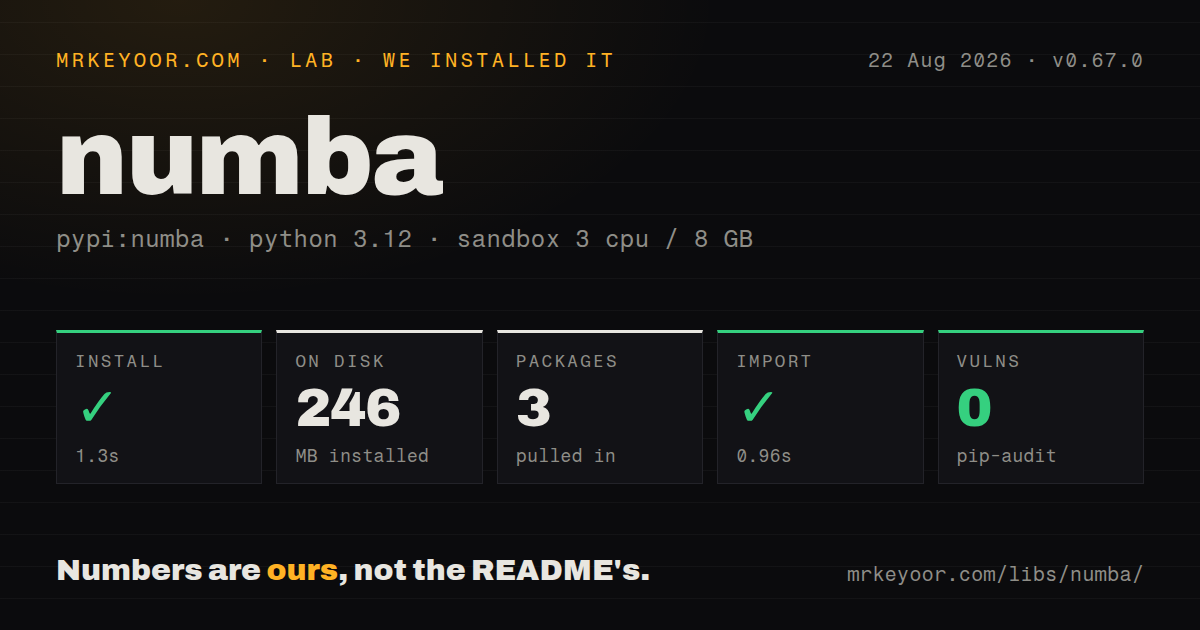
| Install | ✓ · 1.3s | 3 packages on disk · 246 MB |
| Import | ✓ | import numba in 0.96s · compiled extensions · py.typed · requires Python >=3.10 |
| Known vulns | 0 | (pip-audit) |
Answers from our run
Does numba install cleanly?
Yes. In a fresh container with an empty cache, pip install numba finished in 1 seconds, leaving 3 packages and 246 MB on disk. pip-audit reported no known vulnerabilities.
What does numba need to run?
Python >=3.10, and a platform wheel with compiled extensions. In our run import numba succeeded in 0.96s, and the package ships py.typed for type checkers.
numba or cython: which should you use?
cython: Use it for ahead-of-time extension wheels, direct C integration, and code that intentionally mixes Python and native sections. Numba 0.67.0 installed in 1.3 seconds but occupied 246 MB for 3 packages, and importing it took 0.96 seconds in our sandbox.
When should you not use numba?
The hot path already consists of NumPy operations that execute in native code. JIT setup will not improve loops NumPy has already removed from Python.
Use it if
- Profiling points to a numeric Python loop over NumPy arrays that is awkward to express as one vectorized operation.
- Independent iterations can write to separate output slots through `prange` and avoid process-level copies.
- A scalar numeric rule should become a broadcasting ufunc with fixed dtypes.
- Native code needs a C-callable function pointer without maintaining a separate extension project.
- The hot path already consists of NumPy operations that execute in native code. JIT setup will not improve loops NumPy has already removed from Python.
- Most work lives in pandas DataFrames, object arrays, file I/O, HTTP requests, or Python class graphs. Those objects fall outside useful nopython compilation.
- Every new process must serve its first request immediately. Each unseen signature can compile on first call, and disk caching is not available for every function shape.
- Consumers need an ahead-of-time wheel rather than a runtime compiler. Cython, Pythran, or a Rust extension fits that distribution model better.
- The environment cannot honor `numpy>=1.22,<2.6` together with `llvmlite>=0.49.0dev0,<0.50`. Numba 0.67.0 pins both dependency families.
Setup reality
We installed Numba 0.67.0 in a fresh Python 3.12 Bookworm container in 1.3 seconds. Only 3 packages were present afterward, but they used 246 MB because NumPy and llvmlite carry native code and LLVM components. Numba declares 2 direct dependencies, requires Python 3.10 or newer, ships compiled .so extensions, and includes py.typed. pip-audit found 0 known vulnerabilities. import numba completed in 0.96 seconds in our sandbox.
Dependency compatibility is part of setup. This release accepts NumPy from 1.22 through versions below 2.6 and the llvmlite 0.49 line. A supported wheel made our install quick; a platform without one faces native build requirements or no viable install. Successful import also proves little about a target function. Numba discovers unsupported objects and calls only when it compiles a concrete signature, usually on that function's first invocation.
First-call latency must be measured separately from steady-state speed. cache=True can write reusable artifacts for file-backed functions, but interactive definitions, closures, changed source, read-only module paths, and incompatible machines limit reuse. An explicit signature compiles earlier, often at import time, which merely moves the pause. Keep a plain Python result as the correctness oracle and compare the compiled result across the real dtype and special-value range.
Parallel compilation needs both parallel=True and suitable operations or prange; independent iterations can still race if they update shared memory. Set NUMBA_NUM_THREADS before import when worker CPU limits must be fixed. CUDA kernels also need a compatible NVIDIA driver and explicit device transfers. Numba's error output can be long, but the first unsupported operation or imprecise type usually identifies the actual Python boundary.
Patterns
JIT-compile a distance loop compile-numeric-loop
import numpy as np
from numba import njit

@njit
def minimum_distance(xs, ys):
    best = np.inf
    for i in range(xs.size):
        for j in range(ys.size):
            distance = abs(xs[i] - ys[j])
            if distance < best:
                best = distance
    return best

minimum_distance(a, b)  # compiles this signature
result = minimum_distance(a, b)
The first call for a new signature includes compilation. Time a warmed second call when measuring steady-state execution.
Compile a known signature at import compile-explicit-signature
from numba import float64, njit

@njit(float64(float64[:], float64[:]), cache=True)
def dot(a, b):
    total = 0.0
    for i in range(a.size):
        total += a[i] * b[i]
    return total
An explicit signature compiles before the first call, often during import. `cache=True` still needs a cacheable file-backed function and writable storage.
Use threads across independent rows parallelize-independent-rows
import numpy as np
from numba import njit, prange

@njit(parallel=True)
def row_sums(matrix):
    output = np.empty(matrix.shape[0])
    for row in prange(matrix.shape[0]):
        total = 0.0
        for column in range(matrix.shape[1]):
            total += matrix[row, column]
        output[row] = total
    return output
`prange` schedules parallel work only under `parallel=True`. Each iteration owns one output position here, avoiding shared writes.
Choose a reduction axis at runtime sum-dynamic-axis
import numpy as np
from numba import njit

@njit
def reduce_axis(values, axis):
    return np.sum(values, axis=axis)

columns = reduce_axis(matrix, 0)
rows = reduce_axis(matrix, 1)
Numba 0.67.0 adds dynamic `axis` support for `np.sum` and removes the earlier static-axis ceiling.
Compute cumulative sums on a chosen axis cumsum-dynamic-axis
import numpy as np
from numba import njit

@njit
def cumulative(values, axis):
    return np.cumsum(values, axis=axis)

by_row = cumulative(matrix, 1)
Runtime `axis` for `np.cumsum` is new in 0.67.0. Test the result dtype and overflow behavior against the NumPy version you pin.
Insert into a flattened array insert-flat-values
import numpy as np
from numba import njit

@njit
def add_markers(values, positions, markers):
    return np.insert(values, positions, markers)

result = add_markers(matrix, np.array([0, 3]), np.array([-1, -2]))
Version 0.67.0 supports `np.insert` without its `axis` argument. Multidimensional input is flattened before insertion.
Generate a typed broadcasting ufunc create-vectorized-ufunc
from numba import float32, float64, vectorize

@vectorize([float32(float32, float32), float64(float64, float64)])
def safe_ratio(numerator, denominator):
    return 0.0 if denominator == 0 else numerator / denominator

ratios = safe_ratio(left, right)
Declared signatures compile eagerly and restrict accepted dtypes. The returned callable broadcasts like a NumPy ufunc.
Vectorize a dot product over rows create-generalized-ufunc
from numba import guvectorize

@guvectorize(['void(float64[:], float64[:], float64[:])'], '(n),(n)->()')
def row_dot(left, right, output):
    total = 0.0
    for i in range(left.size):
        total += left[i] * right[i]
    output[0] = total

values = row_dot(matrix, vector)
The layout signature controls broadcasting over outer dimensions. Scalar outputs are written to `output[0]`, not returned.
Pass a fixed-type dictionary use-typed-dictionary
from numba import njit, types
from numba.typed import Dict

counts = Dict.empty(types.unicode_type, types.int64)

@njit
def tally(words, output):
    for word in words:
        output[word] = output.get(word, 0) + 1
    return output

result = tally(words, counts)
`numba.typed.Dict` fixes key and value types. It is intended for compiled code, not as a general replacement for a Python dict.
Compare compiled and Python paths inspect-compiled-types
from numba import njit

@njit
def total(values):
    return values.sum()

compiled = total(array)
python_result = total.py_func(array)
print(total.signatures)
total.inspect_types()
`py_func` calls the original Python body. `inspect_types()` becomes useful after at least one signature has compiled successfully.
Enable fast math deliberately relax-floating-point
from numba import njit

@njit(fastmath=True)
def squared_norm(values):
    total = 0.0
    for value in values:
        total += value * value
    return total
`fastmath=True` permits floating-point reassociation and related transformations. Compare NaN, infinity, and boundary behavior with strict mode.
Create a C-callable numeric function export-c-callback
import math
from numba import cfunc, types

@cfunc(types.float64(types.float64), cache=True)
def density(x):
    return math.exp(-(x * x))

callback = density.ctypes
address = density.address
`cfunc` needs an explicit native signature. Normal Python exceptions cannot safely cross the C callback boundary.
Alternatives
| Package | Registry | Pick it when |
|---|---|---|
| cython | PyPI | Use it for ahead-of-time extension wheels, direct C integration, and code that intentionally mixes Python and native sections. |
| jax | PyPI | Use it for automatic differentiation and staged array programs intended for XLA-backed CPU or accelerator execution. |
| pythran | PyPI | Use it to compile annotated numerical Python ahead of time into an importable extension module. |
| numpy | PyPI | Use NumPy alone when vectorized array operations already express the whole computation clearly. |
More data guides
numpy · pandas · fsspec · pyarrow · lxml · sqlalchemy · the whole shelf →
How this guide is made: grounded in the library's documentation, release notes, changelog, and issue history, on a fixed rubric — not a hands-on install of every release. The 50 most-downloaded entries are additionally install-verified in clean containers. Corrections: contact the desk.