mysql2 review
mysql2 3.24.2 is a pure-JavaScript MySQL and MariaDB wire-protocol driver for Node. It provides callback and promise connections, pools, parameter escaping, server-side prepared statements, streaming rows, TLS, compression, non-UTF8 encodings, and binary-log access. It deliberately resembles the older mysql package, but adds a promise entry point and execute() for prepared statements. The current patch corrects length-coded numbers in the 3-byte range and makes every promise method honor trace: false. It does not define schemas, create migrations, or infer row types from SQL.
mysql2 3.23.4 installed in 1.8 seconds and used 6 MB in our sandbox, with working require and ESM import paths plus 0 audit findings. Use it when a Node service owns its MySQL SQL, but decide numeric conversion, pool size, prepared-statement use, and TLS policy before production traffic.
We installed it
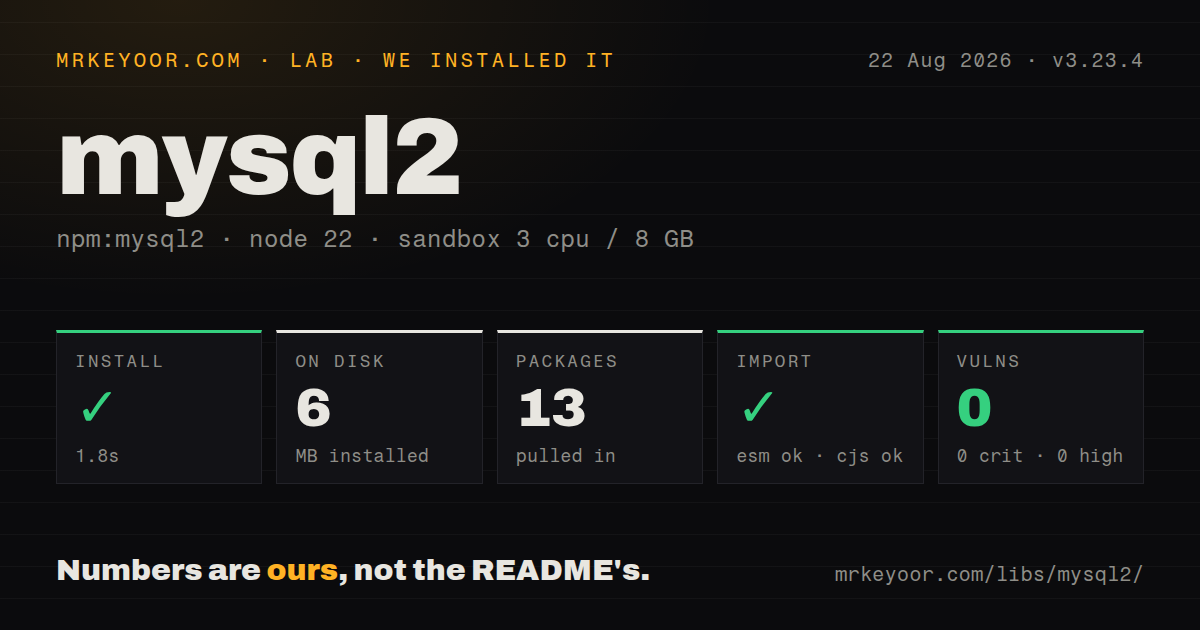
| Install | ✓ · 1.8s | 13 packages on disk · 6 MB |
| Import | ✓ | ESM import works · require() works · CommonJS package with exports map |
| Browser | n/a | could not be bundled for the browser (Node-only code, most likely) |
| Types | ✓ | TypeScript types bundled |
| Known vulns | 0 | 0 critical · 0 high · 0 moderate · 0 low (npm audit) |
Answers from our run
Does mysql2 install cleanly?
Yes. In a fresh container with an empty cache, npm install mysql2 finished in 2 seconds, leaving 13 packages and 6 MB on disk. npm audit reported no known vulnerabilities.
Can mysql2 run in a browser?
Not directly: esbuild could not bundle it for the browser in our run, which normally means it depends on Node built-ins. Use it on the server, or find a browser-targeted alternative.
Does mysql2 work with both ESM and CommonJS?
Yes. Both import 'mysql2' and require('mysql2') worked in Node 22 in our run. The package is published as CommonJS with an exports map.
Does mysql2 include TypeScript types?
Yes, type declarations ship inside the package, so no @types install is needed.
mysql2 or mariadb: which should you use?
mariadb: Use the vendor-backed driver when MariaDB-specific behavior and features are the main target. mysql2 3.23.4 installed in 1.8 seconds and used 6 MB in our sandbox, with working require and ESM import paths plus 0 audit findings.
When should you not use mysql2?
The application needs compile-time row shapes generated from the database. mysql2 accepts user-supplied TypeScript generics, but it does not check that a SELECT list matches them.
Use it if
- A Node service needs direct SQL access to MySQL or MariaDB without an ORM deciding how queries are expressed.
- Repeated queries should use server-side prepared statements through execute() and a per-connection statement cache.
- The deployment cannot compile native bindings and needs the same driver package across Linux, macOS, and Windows.
- Knex, Sequelize, Kysely, Drizzle, or another data layer expects mysql2 as its MySQL transport.
- The application needs compile-time row shapes generated from the database. mysql2 accepts user-supplied TypeScript generics, but it does not check that a SELECT list matches them.
- A serverless deployment can create hundreds of isolated pools. Each instance opens its own TCP connections, which can exhaust the database's max_connections limit without a provider pooler or proxy.
- DECIMAL and BIGINT values must become JavaScript numbers automatically. Exact values are commonly returned as strings because Number cannot represent every database value safely.
- The query code expects execute() to expand arrays or identifiers. Server-side parameters represent values, so IN (?) arrays and identifier substitution require different SQL or the client-side query() formatter.
- The package must run in a browser or edge isolate without Node sockets. Our esbuild browser bundle failed, matching a Node-only database driver.
Setup reality
We installed mysql2 3.23.4 in a fresh unprivileged Node 22 Bookworm container with no cache on 2026-08-22. npm finished in 1.8 seconds, left 13 packages using 6 MB, and reported zero known vulnerabilities. That package had 7 direct dependencies, 1 peer dependency, 1008 KB unpacked, bundled TypeScript declarations, and a CommonJS layout with an exports map. require() and ESM import both worked. esbuild could not create a browser bundle, which is consistent with Node socket code.
The registry now lists 3.24.2. Pick either mysql2/promise or the callback entry point and keep that choice clear at module boundaries. A callback pool can expose .promise(), but objects from the APIs have different method contracts. TypeScript users also need @types/node. Result promises resolve to [rows, fields], so returning the whole tuple from an HTTP handler produces the wrong response shape.
Set connection behavior before production traffic. timezone or dateStrings controls temporal conversion. DECIMAL stays exact as text unless decimalNumbers trades that precision for Number. supportBigNumbers with bigNumberStrings avoids rounding unsafe integers. Managed database services need a trusted CA through ssl; disabling certificate verification protects only against passive observation. Keep multipleStatements off for request paths because injected SQL can otherwise append more statements.
Use a pool for long-running servers and count its connectionLimit across every process and replica. Transactions require one checked-out connection from beginTransaction through commit or rollback, followed by release in finally. query() formats arrays and objects on the client, while execute() binds values through prepared statements. Dynamic SQL strings create distinct prepared statements and can churn the per-connection cache. Streamed rows hold their connection until the stream ends or is destroyed.
Patterns
Open one promise connection connect-with-promises
import mysql from 'mysql2/promise';

const connection = await mysql.createConnection({
  host: process.env.DB_HOST,
  user: process.env.DB_USER,
  password: process.env.DB_PASSWORD,
  database: 'shop',
});

const [rows] = await connection.execute(
  'SELECT id, email FROM users WHERE id = ?',
  [userId],
);
await connection.end();
A promise query resolves to [rows, fields]. end waits for queued work; destroy closes the socket immediately.
Share a bounded pool create-connection-pool
import mysql from 'mysql2/promise';

export const pool = mysql.createPool({
  uri: process.env.DATABASE_URL,
  connectionLimit: 10,
  waitForConnections: true,
  queueLimit: 100,
  enableKeepAlive: true,
});

const [rows] = await pool.query('SELECT 1 AS ok');
connectionLimit applies per process. A finite queue prevents a database stall from accumulating unlimited waiting requests in application memory.
Bind scalar values in a prepared statement execute-prepared-query
const [rows] = await pool.execute(
  'SELECT id, total FROM orders WHERE account_id = ? AND state = ?',
  [accountId, 'open'],
);
execute sends parameters separately and caches the statement per connection. Keep the SQL string stable to avoid filling the statement cache with one-off variants.
Expand an array with the client formatter query-in-list
const ids = [4, 7, 9];
const [rows] = await pool.query(
  'SELECT id, email FROM users WHERE id IN (?)',
  [ids],
);
Array expansion is a query() feature. execute() treats the array as one server parameter and cannot substitute a variable number of placeholders.
Insert several rows in one statement bulk-insert-rows
const values = [
  ['A-1', 2],
  ['B-4', 5],
];

const [result] = await pool.query(
  'INSERT INTO stock (sku, quantity) VALUES ?',
  [values],
);

console.log(result.affectedRows);
Nested-array expansion uses query(), with one bare placeholder after VALUES. Validate the row width before sending the batch.
Enable named parameters on a query use-named-placeholders
const [rows] = await pool.execute({
  sql: 'SELECT * FROM users WHERE country = :country AND age >= :age',
  namedPlaceholders: true,
  values: { country: 'IN', age: 21 },
});
The driver rewrites names to positional parameters. A missing property throws rather than binding NULL.
Keep a transaction on one pooled connection run-transaction
const connection = await pool.getConnection();
try {
  await connection.beginTransaction();
  await connection.execute(
    'UPDATE accounts SET balance = balance - ? WHERE id = ?',
    [amount, fromId],
  );
  await connection.execute(
    'UPDATE accounts SET balance = balance + ? WHERE id = ?',
    [amount, toId],
  );
  await connection.commit();
} catch (error) {
  await connection.rollback();
  throw error;
} finally {
  connection.release();
}
Pool-level calls may use different sessions. Always check out one connection and release it in finally.
Describe rows in TypeScript type-query-result
import type { RowDataPacket, ResultSetHeader } from 'mysql2';

interface UserRow extends RowDataPacket {
  id: number;
  email: string;
}

const [users] = await pool.execute<UserRow[]>(
  'SELECT id, email FROM users WHERE id = ?',
  [id],
);

const [result] = await pool.execute<ResultSetHeader>(
  'DELETE FROM users WHERE id = ?',
  [id],
);
The generic is an assertion, not runtime validation or SQL inference. Keep the interface synchronized with the SELECT list.
Choose temporal and numeric conversions preserve-date-number-values
const connection = await mysql.createConnection({
  uri: process.env.DATABASE_URL,
  timezone: 'Z',
  dateStrings: ['DATE'],
  supportBigNumbers: true,
  bigNumberStrings: true,
  decimalNumbers: false,
});
Keeping BIGINT and DECIMAL as strings avoids silent precision loss. Convert money with a decimal library instead of Number.
Verify a managed database certificate connect-with-tls
import { readFileSync } from 'node:fs';

const connection = await mysql.createConnection({
  uri: process.env.DATABASE_URL,
  ssl: {
    ca: readFileSync('/run/secrets/mysql-ca.pem'),
    rejectUnauthorized: true,
  },
});
Do not set rejectUnauthorized to false in production. Encryption without certificate verification does not authenticate the database endpoint.
Match stable database error codes handle-driver-error
try {
  await pool.execute(
    'INSERT INTO users (email) VALUES (?)',
    [email],
  );
} catch (error) {
  if (error.code === 'ER_DUP_ENTRY') {
    throw new Error('email already exists');
  }
  if (error.code === 'ER_LOCK_DEADLOCK') {
    return retryTransaction();
  }
  throw error;
}
Use code rather than sqlMessage text, which differs between MySQL, MariaDB, and server versions. Retry a deadlocked transaction as a whole.
Process rows without buffering the full result stream-large-query
const connection = await callbackPool.getConnection();
const stream = connection
  .query('SELECT * FROM events ORDER BY id')
  .stream({ highWaterMark: 200 });

try {
  for await (const row of stream) {
    await consume(row);
  }
} finally {
  connection.release();
}
Streaming uses the callback query object. The connection remains occupied until the stream finishes or is destroyed, so clean up after early termination.
Alternatives
| Package | Registry | Pick it when |
|---|---|---|
| mariadb | npm | Use the vendor-backed driver when MariaDB-specific behavior and features are the main target. |
| mysql | npm | Keep it only for legacy mysqljs applications that cannot yet move to mysql2's maintained promise and prepared-statement support. |
| knex | npm | Use it when SQL construction and migrations should sit above a driver without adopting model classes. |
| sequelize | npm | Use it when the application wants model definitions, associations, hooks, and an ORM query layer. |
More data guides
numpy · pandas · fsspec · pyarrow · lxml · sqlalchemy · the whole shelf →
How this guide is made: grounded in the library's documentation, release notes, changelog, and issue history, on a fixed rubric — not a hands-on install of every release. The 50 most-downloaded entries are additionally install-verified in clean containers. Corrections: contact the desk.