mermaid review
Mermaid 11.17.2 parses text definitions for flowcharts, sequence diagrams, class models, ER diagrams, state machines, Gantt charts, and other technical drawings, then produces SVG. The source can live beside Markdown and GitHub renders Mermaid code fences itself. The 11.17 line moved class diagrams to the unified v2 renderer and added collapsible flowchart subgraphs; 11.17.2 restores the edgePaths class used by flowchart, block, and user-journey styling.
Mermaid 11.17.0 pulled 108 packages and produced a 925.2 KB gzipped browser bundle in our sandbox, so client-side rendering is a deliberate product cost, not a casual Markdown enhancement. Use 11.17.2 for editable diagram source, but pre-render SVG when readers do not need live generation and isolate untrusted diagrams.
We installed it
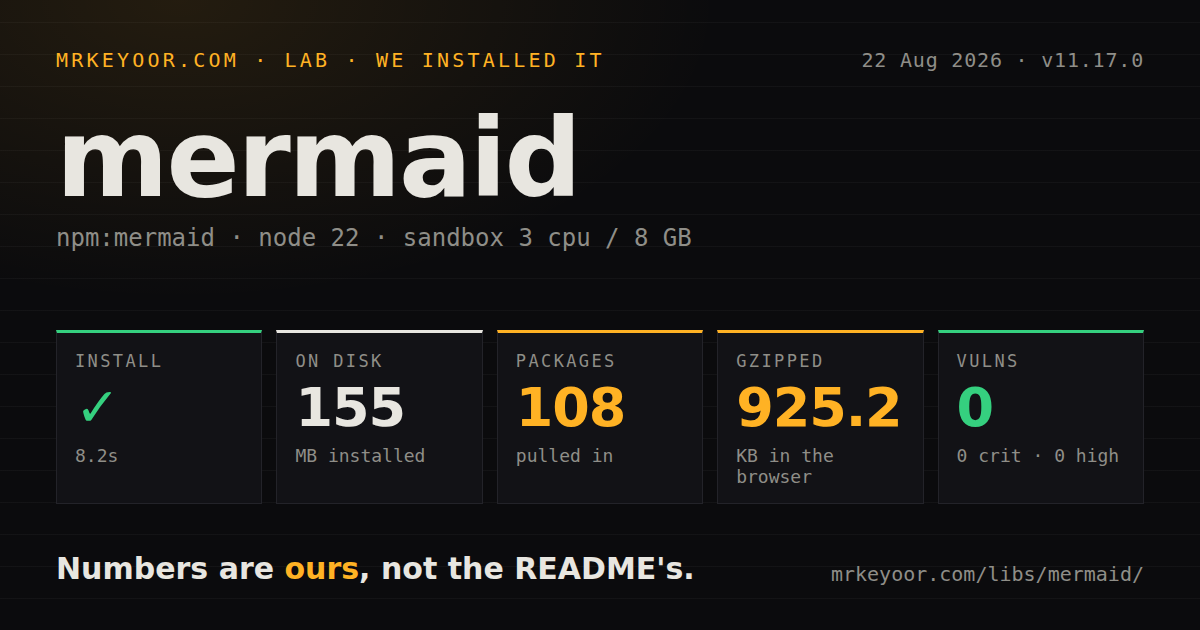
| Install | ✓ · 8.2s | 108 packages on disk · 155 MB |
| Import | ✓ | ESM import works · require() works · ESM package with exports map |
| Browser | 925.2 KB | gzipped (3371 KB minified), bundled with esbuild |
| Types | ✓ | TypeScript types bundled |
| Known vulns | 0 | 0 critical · 0 high · 0 moderate · 0 low (npm audit) |
Answers from our run
Does mermaid install cleanly?
Yes. In a fresh container with an empty cache, npm install mermaid finished in 8 seconds, leaving 108 packages and 155 MB on disk. npm audit reported no known vulnerabilities.
How much does mermaid add to a browser bundle?
925.2 KB gzipped (3371 KB minified) when the whole package is bundled for the browser with esbuild. Importing only part of it is usually smaller.
Does mermaid work with both ESM and CommonJS?
Yes. Both import 'mermaid' and require('mermaid') worked in Node 22 in our run. The package is published as ESM with an exports map.
Does mermaid include TypeScript types?
Yes, type declarations ship inside the package, so no @types install is needed.
mermaid or cytoscape: which should you use?
cytoscape: Use it for interactive graph exploration with direct control over elements, events, and layouts. Mermaid 11.17.0 pulled 108 packages and produced a 925.2 KB gzipped browser bundle in our sandbox, so client-side rendering is a deliberate product cost, not a casual Markdown enhancement.
When should you not use mermaid?
Static SVG can be produced during the build; our broad 11.17.0 browser import measured 925.2 KB gzipped, which is expensive for readers who only view a diagram
Use it if
- Diagram source should be diffed and reviewed in the same repository as the documentation
- A documentation system needs several diagram grammars behind one renderer
- Authors already publish Mermaid code fences through GitHub or another compatible Markdown host
- The application needs generated SVG and can control the theme, source, and rendering lifecycle
- Static SVG can be produced during the build; our broad 11.17.0 browser import measured 925.2 KB gzipped, which is expensive for readers who only view a diagram
- Designers require exact node coordinates or hand-tuned edge routes; Mermaid delegates placement to layout engines
- Server and browser output must match pixel for pixel; SVG geometry depends on DOM measurement, available fonts, and the chosen renderer
- Untrusted diagram text cannot run inside an isolated iframe; Mermaid's own security guidance recommends sandboxing external content because sanitization cannot close every script path with certainty
- A very large graph must render without blocking the main thread; parsing, layout, and SVG construction happen in the page and are subject to text and edge limits
- Visual snapshots cannot absorb an upgrade review; the 11.17 line changed the default class-diagram renderer and 11.17.2 changed edge-group CSS hooks
Setup reality
We installed Mermaid 11.17.0 in 8.2 seconds under Node 22. The clean environment contained 108 packages using 155 MB, and npm audit reported 0 vulnerabilities at every severity. Mermaid declared 22 direct dependencies and 0 peers, occupied 85,796 KB unpacked, and included TypeScript declarations. It is an ESM package with an exports map; both require() and ESM import worked in our sandbox.
Mermaid needs no credentials. Call initialize once with startOnLoad, securityLevel, theme, and size limits chosen for the application. Per-diagram directives can change settings. Treat that ability as part of the input surface and do not combine unknown user diagrams with loose security. The project recommends sandboxed iframe rendering for externally supplied text.
render() measures text through the DOM, so missing fonts and display:none containers can produce bad node boxes. React code belongs in a client component with a unique SVG ID and a stale-promise guard because StrictMode may repeat an effect. The CLI uses a headless browser for build-time SVG, which also means CI must provide consistent fonts for stable snapshots.
Our full namespace esbuild import of 11.17.0 produced 3,371 KB minified and 925.2 KB gzipped. Lazy loading delays that cost but does not erase rendering work. Version 11.17.2 is now current and restores the edgePaths class used by several stylesheets. Test CSS selectors and visual snapshots when moving within 11.17, especially if the application depended on the previous class-diagram renderer.
Patterns
Render source into one container render-svg
import mermaid from 'mermaid';

mermaid.initialize({ startOnLoad: false, securityLevel: 'strict' });
const host = document.querySelector('#graph');
const { svg, bindFunctions } = await mermaid.render(
  'graph-1',
  'flowchart LR\n  a[Start] --> b{Ok?}\n  b -->|yes| c[Done]',
);
host.innerHTML = svg;
bindFunctions?.(host);
Each render needs a unique ID. Insert the returned SVG before bindFunctions attaches any generated interactions.
Process existing Mermaid elements render-page-blocks
import mermaid from 'mermaid';

mermaid.initialize({ startOnLoad: false });
await mermaid.run({ querySelector: '.mermaid' });

await mermaid.run({
  nodes: document.querySelectorAll('.mermaid:not([data-processed])'),
});
run marks successful nodes with data-processed. To rerender changed source, restore the text and clear that marker first.
Validate grammar before rendering parse-source
const parsed = await mermaid.parse(source, { suppressErrors: true });
if (parsed === false) {
  showEditorError('Invalid Mermaid source');
} else {
  console.log(parsed.diagramType);
}
suppressErrors returns false for a parse failure. Configure error rendering separately if the application must own all failure UI.
Render inside a React client component render-react
'use client';
import { useEffect, useId, useState } from 'react';
import mermaid from 'mermaid';

export function Diagram({ chart }) {
  const id = useId().replace(/:/g, '');
  const [svg, setSvg] = useState('');
  useEffect(() => {
    let stale = false;
    mermaid.render('m-' + id, chart).then((result) => {
      if (!stale) setSvg(result.svg);
    });
    return () => { stale = true; };
  }, [chart, id]);
  return <div dangerouslySetInnerHTML={{ __html: svg }} />;
}
StrictMode can begin 2 renders in development. A stable ID and stale-result guard keep the older promise from replacing new source.
Configure one base theme set-theme
mermaid.initialize({
  startOnLoad: false,
  theme: 'base',
  themeVariables: {
    primaryColor: '#101418',
    primaryTextColor: '#e6e6e6',
    lineColor: '#5b6472',
    fontFamily: 'ui-sans-serif, system-ui, sans-serif',
  },
  flowchart: { curve: 'basis', htmlLabels: true },
});
Theme variables are designed around the base theme. Initialize once so later calls do not leave global configuration in an uncertain state.
Apply a per-diagram directive configure-diagram
const chart = "%%{init: {'theme':'base','themeVariables':{'lineColor':'#ff6b6b'}}}%%\nsequenceDiagram\n  Client->>Server: subscribe\n  Server-->>Client: ack";
const { svg } = await mermaid.render('seq-1', chart);
An init directive changes rendering configuration from source text. Permit it only where the author is allowed to control those options.
Bind a flowchart node action add-click-action
mermaid.initialize({ startOnLoad: false, securityLevel: 'loose' });
window.openService = (id) => router.push('/services/' + id);

const chart = "flowchart TD\n  api[API] --> db[(Postgres)]\n  click api call openService('api')";
const { svg, bindFunctions } = await mermaid.render('svc', chart);
Callbacks require loose security and a function on window. Do not enable this mode for diagrams supplied by unknown users.
Bound source and edge work limit-input
mermaid.initialize({
  startOnLoad: false,
  maxTextSize: 50_000,
  maxEdges: 500,
});

if (source.length > 50_000) {
  throw new Error('Diagram source is too large');
}
Layout can occupy the main thread. Split an oversized graph or pre-render it instead of raising limits until the page stalls.
Register ELK layouts load-elk
import mermaid from 'mermaid';
import elkLayouts from '@mermaid-js/layout-elk';

mermaid.registerLayoutLoaders(elkLayouts);
mermaid.initialize({ startOnLoad: false, layout: 'elk' });
ELK adds code and layout work, and only supported diagram families use it. Compare the graph you actually publish.
Register architecture icons lazily load-icon-pack
mermaid.registerIconPacks([{
  name: 'logos',
  loader: () =>
    fetch('/icons/logos.json').then((response) => response.json()),
}]);
Rendering waits for the icon loader. Self-host or cache the JSON when a remote failure must not leave placeholders.
Make generated IDs repeatable stabilize-snapshots
mermaid.initialize({
  startOnLoad: false,
  deterministicIds: true,
  deterministicIDSeed: 'snapshot',
});

const { svg } = await mermaid.render('fixture', chart);
A fixed seed stabilizes internal IDs. Fonts, layout engines, and Mermaid patches can still change the SVG geometry.
Generate SVG during the build render-cli
npx -p @mermaid-js/mermaid-cli mmdc \
  -i docs/architecture.mmd \
  -o docs/architecture.svg \
  -b transparent -t dark
The CLI launches headless Chromium for DOM measurement. Pin its package and browser, then install the same fonts in CI for repeatable output.
Alternatives
| Package | Registry | Pick it when |
|---|---|---|
| cytoscape | npm | Use it for interactive graph exploration with direct control over elements, events, and layouts |
| dagre-d3 | npm | Use it when one directed-graph layout plus D3 rendering is enough and Mermaid's many grammars are excess |
| plantuml-encoder | npm | Use it when PlantUML source and an existing external rendering service define the documentation flow |
More web frontend guides
postcss · react · react-dom · tailwindcss · clsx · htmlparser2 · the whole shelf →
How this guide is made: grounded in the library's documentation, release notes, changelog, and issue history, on a fixed rubric — not a hands-on install of every release. The 50 most-downloaded entries are additionally install-verified in clean containers. Corrections: contact the desk.