markdownify review
markdownify 1.2.3 turns an HTML string or a selected Beautiful Soup node into Markdown. Its converters cover headings, emphasis, links, lists, images, fenced code, line breaks, and ordinary tables. Options choose heading markers, bullet rotation, escaping, paragraph wrapping, parser features, and which tags participate. A subclass can override output for a particular HTML element. Version 1.2.3 fixes text placed inside `br` when using `html.parser` and corrects the declared `None` types for `strip_pre` and `wrap_width`. It converts structure; it does not identify the useful article inside a full page.
markdownify 1.2.3 installed in 0.2 seconds and occupied 1 MB in our sandbox, with 0 audit findings. Install it for selected HTML fragments; pair it with extraction for whole pages and reject structures that Markdown cannot represent.
We installed it
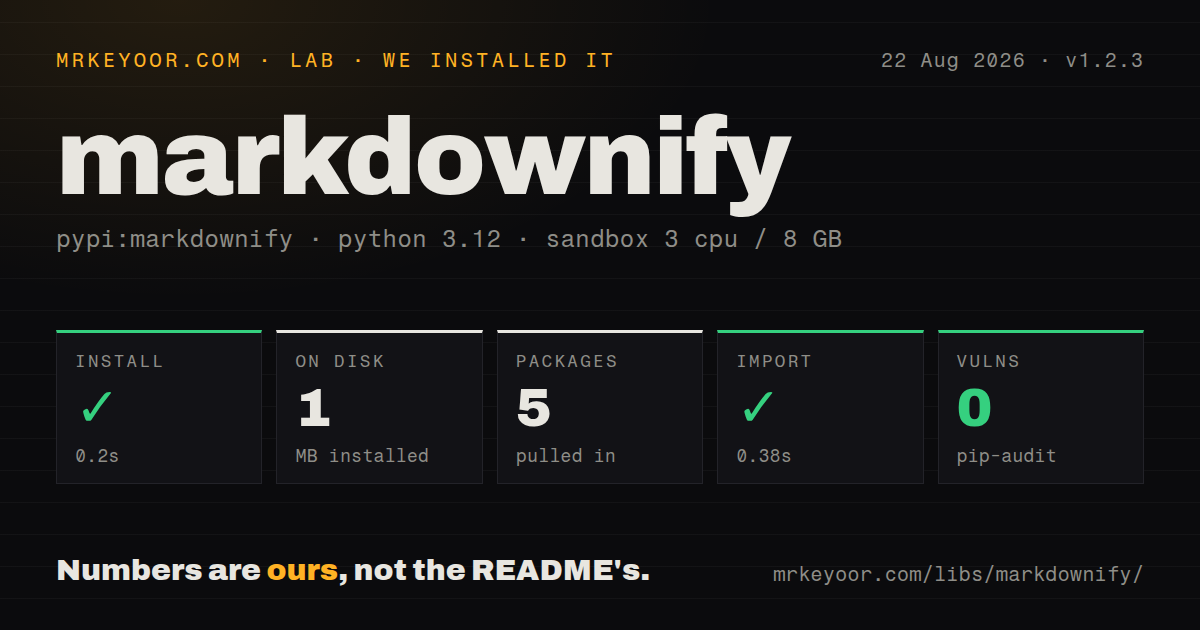
| Install | ✓ · 0.2s | 5 packages on disk · 1 MB |
| Import | ✓ | import markdownify in 0.38s · pure Python · py.typed |
| Known vulns | 0 | (pip-audit) |
Answers from our run
Does markdownify install cleanly?
Yes. In a fresh container with an empty cache, pip install markdownify finished in 0.2s, leaving 5 packages and 1 MB on disk. pip-audit reported no known vulnerabilities.
What does markdownify need to run?
Python 3.x, and nothing compiled: it is pure Python. In our run import markdownify succeeded in 0.38s, and the package ships py.typed for type checkers.
markdownify or html2text: which should you use?
html2text: Pick it for readable plain-text output with established wrapping, reference-link, and image switches. markdownify 1.2.3 installed in 0.2 seconds and occupied 1 MB in our sandbox, with 0 audit findings.
When should you not use markdownify?
A complete web page must be reduced to its article automatically. Menus, banners, cookie notices, and footers remain unless another step removes them.
Use it if
- The article or content fragment is already selected and its headings, links, lists, code, and simple tables should survive as Markdown.
- A CMS import needs one pinned policy for heading syntax, emphasis markers, bullets, escaping, and line wrapping.
- A site-specific HTML element can be handled by overriding one `MarkdownConverter.convert_*` method.
- The scraper already has a BeautifulSoup subtree and can pass it to `convert_soup()` without parsing the document again.
- A complete web page must be reduced to its article automatically. Menus, banners, cookie notices, and footers remain unless another step removes them.
- Nested tables, forms, iframes, and interactive widgets must round-trip. Markdown has no faithful representation for those structures.
- The input set includes Word, PDF, spreadsheets, or slides. This package only reads HTML and BeautifulSoup trees.
- The desired result is plain text with mature reference-link and wrapping controls. `html2text` is designed around that style.
- Unknown elements must remain as raw HTML. By default markdownify usually retains their text while discarding the surrounding tag.
Setup reality
Our fresh Python 3.12 install of markdownify 1.2.3 took 0.2 seconds, created 5 packages, and occupied 1 MB. pip-audit found 0 known vulnerabilities. The pure-Python distribution has 2 direct dependencies, includes py.typed, carries an MIT license, and declares no Python version constraint in package metadata. import markdownify succeeded in 0.38 seconds. Optional parsers were outside that measurement.
Beautiful Soup uses the built-in html.parser unless bs4_options selects something else. Malformed markup may build a different tree under lxml or html5lib, so install and pin the chosen parser when output is snapshot-tested. Pass only the article node to convert_soup(). Feeding the root document also converts navigation, cookie copy, and footer text. Clean or sanitize HTML in a separate stage.
Defaults are visible in diffs: H1 and H2 use Setext underlines, unordered-list bullets rotate through *+- by depth, and literal asterisks and underscores are escaped. A br emits 2 trailing spaces plus newline unless BACKSLASH is selected. Formatters often remove those spaces. strip and convert are mutually exclusive. Current custom overrides accept (self, el, text, parent_tags); extensions written for the old convert_as_inline argument will break when that tag appears.
Patterns
Translate a short HTML fragment convert-html
from markdownify import markdownify as md

md('<b>Yay</b> <a href="http://github.com">GitHub</a>')
# '**Yay** [GitHub](http://github.com)'

md('<h1>Title</h1><p>Hello <b>world</b></p>')
# 'Title\n=====\n\nHello **world**'
The return value is text. Version 1.2.3 removes separator newlines at both outer edges by default while preserving spacing inside the document.
Emit hash-prefixed headings atx-headings
from markdownify import markdownify as md, ATX, ATX_CLOSED

md('<h1>Title</h1>', heading_style=ATX)         # '# Title'
md('<h2>Title</h2>', heading_style=ATX_CLOSED)  # '## Title ##'
md('<h1>Title</h1>')                            # 'Title\n====='
H1 and H2 default to underlined Setext output. Select `ATX` when every heading level should use hashes.
Suppress selected tag formatting strip-or-keep-tags
md('<b>Yay</b> <a href="http://github.com">GitHub</a>', strip=['a'])
# '**Yay** GitHub'

md('<b>Yay</b> <a href="http://github.com">GitHub</a>', convert=['b'])
# '**Yay** GitHub'
`strip` and `convert` cannot appear together; version 1.2.3 raises `ValueError`. Both retain child text while controlling which tags add Markdown syntax.
Control literal Markdown punctuation control-escaping
md('<p>a_b*c</p>')
# 'a\\_b\\*c'

md('<p>a_b*c</p>', escape_asterisks=False, escape_underscores=False)
# 'a_b*c'

md('<p>see - and # in text</p>', escape_misc=True)
Literal `*` and `_` are protected by default. Turn off an escape only after testing the destination renderer with real content.
Add a language to code fences code-blocks
md('<pre><code>x = 1</code></pre>', code_language='python')
# '```python\nx = 1\n```'

def lang_from_pre(el):
    code = el.find('code')
    if code and code.has_attr('class'):
        return code['class'][0].removeprefix('language-')
    return None

md(html, code_language_callback=lang_from_pre)
The callback receives `<pre>`, even when the syntax class lives on its child `<code>`. Inspect that nested node before returning a language.
Promote the first table row to a header tables
html = '<table><tr><td>1</td><td>2</td></tr><tr><td>3</td><td>4</td></tr></table>'

md(html)
# '|  |  |\n| --- | --- |\n| 1 | 2 |\n| 3 | 4 |'

md(html, table_infer_header=True)
# '| 1 | 2 |\n| --- | --- |\n| 3 | 4 |'
Without `<th>` or `<thead>`, the default inserts an empty header row. Inference consumes the first body row as headings; nested tables remain lossy.
Convert only the selected article node convert-soup
import requests
from bs4 import BeautifulSoup
from markdownify import MarkdownConverter, ATX

soup = BeautifulSoup(requests.get(url, timeout=10).content, 'html.parser')
article = soup.select_one('article') or soup.body

markdown = MarkdownConverter(heading_style=ATX).convert_soup(article)
DOM selection is the extraction step. Call `convert_soup()` for an existing node; `convert()` expects HTML text and parses it again.
Override output for site-specific elements custom-converter
from markdownify import MarkdownConverter

class ImageBlockConverter(MarkdownConverter):
    def convert_img(self, el, text, parent_tags):
        return super().convert_img(el, text, parent_tags) + '\n\n'

    def convert_p(self, el, text, parent_tags):
        if 'callout' in (el.get('class') or []):
            return f'\n> {text.strip()}\n\n'
        return super().convert_p(el, text, parent_tags)

markdown = ImageBlockConverter(heading_style='ATX').convert(html)
The 1.x override signature ends with `parent_tags`. A 0.x subclass using `convert_as_inline` fails only when its overridden element is converted.
Choose visible hard breaks and wrapping line-breaks-and-wrapping
md('a<br>b')                            # 'a  \nb'   two trailing spaces
md('a<br>b', newline_style='BACKSLASH') # 'a\\\nb'

md(long_html, wrap=True, wrap_width=80)
md(long_html, wrap=True, wrap_width=None)   # reflow to one long line
Default hard breaks depend on 2 trailing spaces that formatters may strip. `BACKSLASH` survives diffs but is an extended Markdown convention.
Lock the parser used for HTML repair choose-parser
md(html, bs4_options='lxml')
md(html, bs4_options=['html5lib'])
md(html, bs4_options={'features': 'lxml', 'from_encoding': 'iso-8859-8'})
lxml and html5lib are optional installs. A string or list selects parser features; a dictionary passes BeautifulSoup constructor options such as encoding.
Use one bullet marker at every depth bullets-and-lists
md('<ul><li>a<ul><li>b</li></ul></li></ul>')
# '* a\n  + b'

md('<ul><li>a<ul><li>b</li></ul></li></ul>', bullets='-')
# '- a\n  - b'

md('<ol><li>a</li><li>b</li></ol>')
# '1. a\n2. b'
The default `*+-` rotates by nesting depth. Supplying one character keeps every unordered list on the same marker.
Convert a file or stdin from the shell cli-usage
$ markdownify example.html > example.md
$ cat example.html | markdownify --heading-style ATX > example.md
$ markdownify -h
No input path means stdin. CLI flags use dashed forms of the same option names accepted by the Python function.
Alternatives
| Package | Registry | Pick it when |
|---|---|---|
| html2text | PyPI | Pick it for readable plain-text output with established wrapping, reference-link, and image switches. |
| pypandoc | PyPI | Pick it when HTML is only one of several input formats and a Pandoc installation is acceptable. |
| beautifulsoup4 | PyPI | Pick it alone when you only need DOM selection and cleanup, without Markdown generation. |
| trafilatura | PyPI | Pick it when locating article content and metadata in a complete page is the primary job. |
More utils guides
lru-cache · type-fest · ajv · zod · p-limit · find-up · the whole shelf →
How this guide is made: grounded in the library's documentation, release notes, changelog, and issue history, on a fixed rubric — not a hands-on install of every release. The 50 most-downloaded entries are additionally install-verified in clean containers. Corrections: contact the desk.