lz-string review
lz-string 1.5.0 is a synchronous text compressor built around an LZ-family dictionary format. Its paired functions produce UTF-16 strings for browser storage, URI-safe strings for links, Base64 text, raw compressed strings, or Uint8Array values. Objects must be serialized first, usually with JSON. The 1.5.0 release updated the minified build, while the repository's main README now describes an unreleased version 2 file layout. Our installed 1.5.0 package remained CommonJS without an exports map and built to 1.6 KB gzipped for the browser.
lz-string 1.5.0 added 1.6 KB gzipped in our browser build and installed as one 1 MB package, so it remains cheap for synchronous browser storage and old share-link formats. New cross-language or large-payload work should use a standard format or an asynchronous native API instead.
We installed it
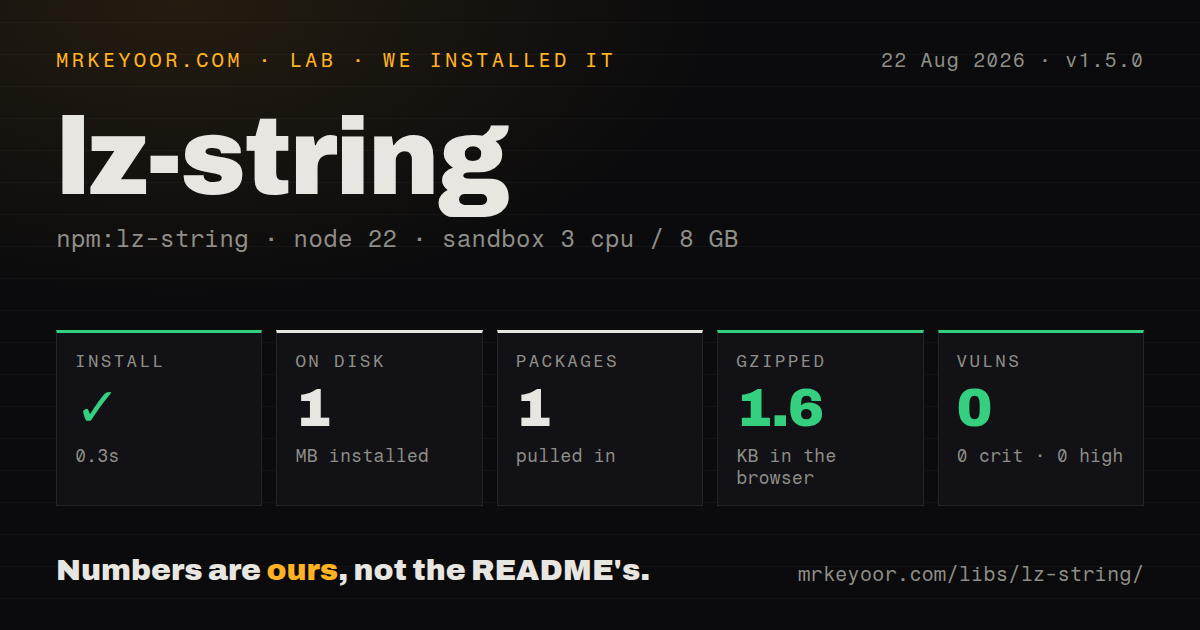
| Install | ✓ · 0.3s | 1 package on disk · 1 MB |
| Import | ✓ | ESM import works · require() works · CommonJS package |
| Browser | 1.6 KB | gzipped (5.2 KB minified), bundled with esbuild |
| Types | ✓ | TypeScript types bundled |
| Known vulns | 0 | 0 critical · 0 high · 0 moderate · 0 low (npm audit) |
Answers from our run
Does lz-string install cleanly?
Yes. In a fresh container with an empty cache, npm install lz-string finished in 0.3s, leaving 1 package and 1 MB on disk. npm audit reported no known vulnerabilities.
How much does lz-string add to a browser bundle?
1.6 KB gzipped (5.2 KB minified) when the whole package is bundled for the browser with esbuild. Importing only part of it is usually smaller.
Does lz-string work with both ESM and CommonJS?
Yes. Both import 'lz-string' and require('lz-string') worked in Node 22 in our run. The package is published as CommonJS.
Does lz-string include TypeScript types?
Yes, type declarations ship inside the package, so no @types install is needed.
lz-string or fflate: which should you use?
fflate: Use it when gzip, DEFLATE, or ZIP compatibility matters and consumers already understand those standard formats. lz-string 1.5.0 added 1.6 KB gzipped in our browser build and installed as one 1 MB package, so it remains cheap for synchronous browser storage and old share-link formats.
When should you not use lz-string?
Large compression jobs would run on the browser main thread; every lz-string operation is synchronous and can block interaction
Discussed on
- hnLz-string: Fast JavaScript compression12 points
- hnLz-string: JavaScript compression, fast8 points
- hnLZ-string: JavaScript compression, fast3 points
Use it if
- Repetitive JSON is close to a localStorage or sessionStorage quota and the read path must stay synchronous
- Shareable application state needs a compact URI-component-safe string with a matching JavaScript decoder
- An existing product already stores lz-string values and migration would break old drafts or links
- A small browser and Node dependency is preferable to native code or a worker-based compression pipeline
- Large compression jobs would run on the browser main thread; every lz-string operation is synchronous and can block interaction
- Your payload is already binary or compressed; this API accepts strings, and another conversion step can erase any size win
- Most inputs are short or unpredictable; dictionary overhead can make the stored value longer, so representative measurements are mandatory
- Another language must decode the data without shared fixtures; the README says ports are independent and calls out a compatibility change in 1.3.8
- You need the repository's advertised version 2 module layout from npm; the stable registry package is still 1.5.0 and CommonJS
Setup reality
We installed lz-string 1.5.0 in a clean Node 22 sandbox in 0.3 seconds. It left one package and 1 MB on disk. The package has zero direct dependencies, zero peer dependencies, 248 KB unpacked, and an MIT license. npm audit found zero known vulnerabilities. Bundled TypeScript declarations were present. The module is CommonJS with no exports map, but require() and ESM import both loaded. Our full esbuild import measured 5.2 KB minified and 1.6 KB gzipped.
No credentials or config file are required. Select the encoding at the data boundary and use its exact inverse: UTF16 for browser string storage, EncodedURIComponent for a query value, Base64 for ASCII-only channels, or Uint8Array for bytes. Raw compress() output is easy to corrupt in UTF-8 or JSON transport. lz-string does not serialize objects, so JSON.stringify and JSON.parse remain your responsibility.
All work is synchronous. A large document can freeze rendering even though the browser payload is only 1.6 KB gzipped. Compare packed and original lengths before saving, especially for small or high-entropy input. Damaged data may decompress to null, an empty string, or invalid text instead of producing one predictable exception. Check the returned value before JSON.parse, and put a format version beside data that must survive application upgrades.
The 1.5.0 tarball and the version 2 README describe different module layouts. Code against the installed declarations, not a path copied from the main branch. Cross-language implementations are maintained separately, and the project notes that version 1.3.8 changed encoding behavior. Run shared fixtures through both ends before using this as a protocol. The CLI's encoder option must also match during compression and decompression.
Patterns
Compress a browser draft store-json-in-localstorage
import { compressToUTF16, decompressFromUTF16 } from 'lz-string'

localStorage.setItem('draft:v1', compressToUTF16(JSON.stringify(draft)))
const packed = localStorage.getItem('draft:v1')
const draft = packed ? JSON.parse(decompressFromUTF16(packed)) : null
Use the UTF16 pair for browser string storage; raw compress() output can be damaged by a UTF-8 boundary.
Put filters in a query parameter encode-url-state
import { compressToEncodedURIComponent, decompressFromEncodedURIComponent } from 'lz-string'

const state = compressToEncodedURIComponent(JSON.stringify(filters))
const url = new URL(location.href)
url.searchParams.set('state', state)
history.replaceState(null, '', url)

const packed = new URL(location.href).searchParams.get('state')
const filters = packed ? JSON.parse(decompressFromEncodedURIComponent(packed)) : {}
EncodedURIComponent output already uses a URL-safe alphabet; decode it with the matching lz-string function.
Produce an ASCII-only value emit-base64-text
import { compressToBase64, decompressFromBase64 } from 'lz-string'

const packed = compressToBase64(JSON.stringify(message))
const message = JSON.parse(decompressFromBase64(packed))
Base64 is convenient for text-only fields but usually takes more characters than the UTF16 storage form.
Transfer a Uint8Array send-byte-array
import { compressToUint8Array, decompressFromUint8Array } from 'lz-string'

const bytes = compressToUint8Array(JSON.stringify(payload))
socket.send(bytes)

const text = decompressFromUint8Array(new Uint8Array(event.data))
Test this representation with the receiving implementation, especially when another language or a pre-1.3.8 format is involved.
Keep the shorter representation avoid-negative-compression
import { compressToUTF16 } from 'lz-string'

function pack(text) {
  const compressed = compressToUTF16(text)
  return compressed.length < text.length
    ? { encoding: 'lz-utf16', value: compressed }
    : { encoding: 'plain', value: text }
}
Short or high-entropy strings can grow; store an encoding label so the read path knows which branch won.
Reject a bad stored value handle-damaged-input
import { decompressFromUTF16 } from 'lz-string'

function readJson(packed) {
  try {
    const text = decompressFromUTF16(packed)
    if (!text) return null
    return JSON.parse(text)
  } catch {
    return null
  }
}
Decompression and JSON parsing fail differently; check the returned text before parsing it.
Migrate an older storage key version-persisted-format
const key = 'editor-draft:v2'
const previous = localStorage.getItem('editor-draft:v1')
if (!localStorage.getItem(key) && previous) {
  const value = decompressFromUTF16(previous)
  localStorage.setItem(key, compressToUTF16(upgrade(value)))
}
A versioned key gives future code a place to migrate encoding or schema changes without guessing what old bytes mean.
Measure a real state object measure-storage-ratio
import { compressToUTF16 } from 'lz-string'

const source = JSON.stringify(applicationState)
const packed = compressToUTF16(source)
console.log({
  sourceCharacters: source.length,
  packedCharacters: packed.length,
  ratio: packed.length / source.length,
})
Character count matches browser string storage more closely than network bytes; measure the actual wire encoding for HTTP comparisons.
Load the stable package with require import-commonjs
const LZString = require('lz-string')

const packed = LZString.compressToUTF16('repeat repeat repeat')
console.log(LZString.decompressFromUTF16(packed))
The 1.5.0 package is CommonJS and has no exports map, although our ESM import check also succeeded.
Follow the bundled declarations use-named-typescript-imports
import { compress, decompress } from 'lz-string'

const packed = compress(input)
const restored = decompress(packed)
Named imports match the 1.5.0 declarations; a default import depends on compiler interop settings.
Encode a file as Base64 compress-file-from-cli
npm install --global lz-string
lz-string -e base64 input.txt -o input.lz.txt
lz-string -d -e base64 input.lz.txt -o restored.txt
Both CLI calls must specify the same encoder; raw, Base64, UTF16, URI-safe, and Uint8Array forms are not interchangeable.
Try the browser's gzip stream compare-native-gzip
async function gzip(text) {
  const input = new Blob([text]).stream()
  const output = input.pipeThrough(new CompressionStream('gzip'))
  return new Uint8Array(await new Response(output).arrayBuffer())
}
CompressionStream is asynchronous and adds zero package bytes, but it produces gzip rather than the lz-string format.
Alternatives
| Package | Registry | Pick it when |
|---|---|---|
| fflate | npm | Use it when gzip, DEFLATE, or ZIP compatibility matters and consumers already understand those standard formats |
| pako | npm | Use it for zlib-compatible data and streaming controls when a larger browser implementation is acceptable |
| lzutf8 | npm | Use it when UTF-8 text, asynchronous calls, or web-worker execution fits the application better |
More utils guides
lru-cache · type-fest · ajv · zod · p-limit · find-up · the whole shelf →
How this guide is made: grounded in the library's documentation, release notes, changelog, and issue history, on a fixed rubric — not a hands-on install of every release. The 50 most-downloaded entries are additionally install-verified in clean containers. Corrections: contact the desk.