jsonpath review
jsonpath 1.3.0 queries and edits JavaScript object graphs with the original Goessner-style JSONPath language. It understands child access, recursive descent, wildcards, unions, array slices, filters, and script subscripts. The API can return values, concrete key paths, or both, and it includes first-match reads, writes, parent lookup, bulk replacement, parsing, and stringification. Version 1.3.0 changed expression handling in response to CVE-2026-1615, following prototype-key blocks added in 1.2.0. Our audit still found 2 high-severity vulnerabilities in the installed tree.
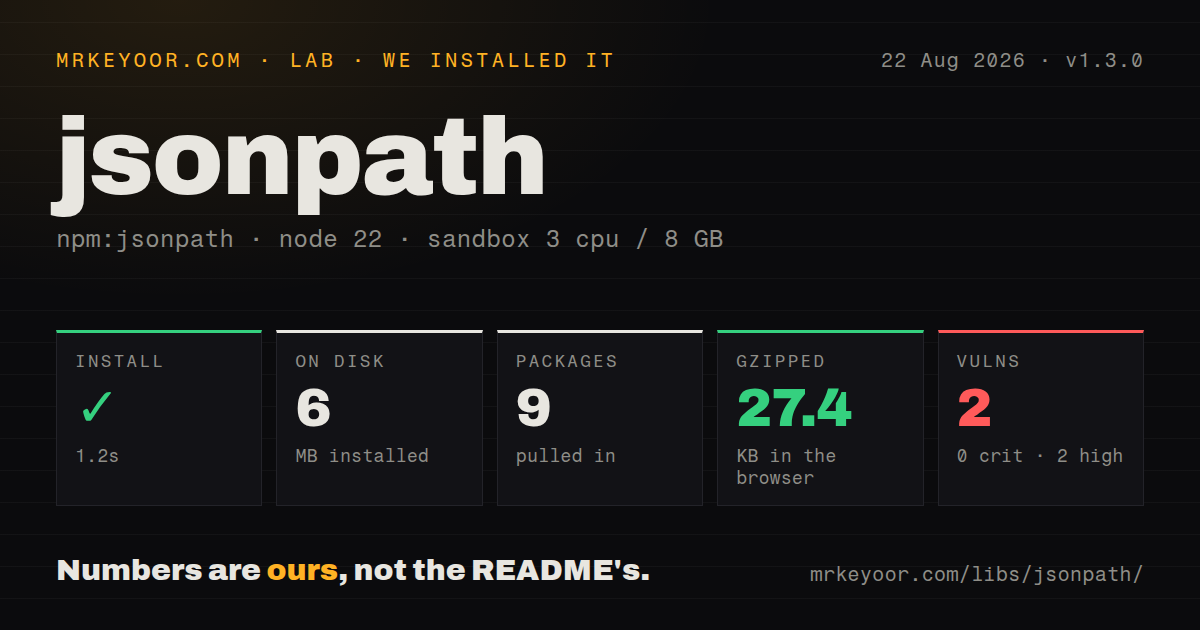
jsonpath 1.3.0 installed nine packages and 6 MB in 1.2 seconds, but our npm audit returned 2 high-severity findings, so do not add it to a new project until that result is clean. Existing users should pin 1.3.0, restrict expressions, and plan a standards-focused replacement if paths cross system boundaries.
We installed it
| Install | ✓ · 1.2s | 9 packages on disk · 6 MB |
| Import | ✓ | ESM import works · require() works · CommonJS package |
| Browser | 27.4 KB | gzipped (91.7 KB minified), bundled with esbuild |
| Types | — | no TypeScript types found |
| Known vulns | 2 | 0 critical · 2 high · 0 moderate · 0 low (npm audit) |
Answers from our run
Does jsonpath install cleanly?
Yes. In a fresh container with an empty cache, npm install jsonpath finished in 1 seconds, leaving 9 packages and 6 MB on disk. npm audit reported 2 known vulnerabilities.
How much does jsonpath add to a browser bundle?
27.4 KB gzipped (91.7 KB minified) when the whole package is bundled for the browser with esbuild. Importing only part of it is usually smaller.
Does jsonpath work with both ESM and CommonJS?
Yes. Both import 'jsonpath' and require('jsonpath') worked in Node 22 in our run. The package is published as CommonJS.
Does jsonpath include TypeScript types?
No type declarations were found in our install, so TypeScript users need their own declarations.
jsonpath or jsonpath-plus: which should you use?
jsonpath-plus: Choose it for a newer JSONPath implementation with configurable result types and modern module packaging. jsonpath 1.3.0 installed nine packages and 6 MB in 1.2 seconds, but our npm audit returned 2 high-severity findings, so do not add it to a new project until that result is clean.
When should you not use jsonpath?
Security policy rejects known high findings: npm audit reported 2 high-severity vulnerabilities after our fresh 1.3.0 install
Use it if
- An existing Node application already stores Goessner-style JSONPath expressions and needs the 1.3.0 security changes
- You need concrete key arrays alongside matched values for editors, diagnostics, or patch generation
- The application needs query and in-place mutation methods from one CommonJS API
- Filters only compare data under @ and do not need application globals or arbitrary JavaScript calls
- Security policy rejects known high findings: npm audit reported 2 high-severity vulnerabilities after our fresh 1.3.0 install
- You need RFC 9535 compatibility across languages: the README documents a Goessner-derived grammar with its own parsing and union behavior
- Expressions come from untrusted users: filters and script subscripts increase attack surface, and the current release followed two security-response releases in 2026
- You need a small browser query helper: our import bundle measured 91.7 KB minified and 27.4 KB gzipped
- You require bundled TypeScript declarations, streaming matches, or immutable updates: version 1.3.0 provides none of those
Setup reality
Our install of jsonpath 1.3.0 finished in 1.2 seconds and left nine packages using 6 MB on disk. npm audit reported 2 known vulnerabilities, both high severity. The package is 532 KB unpacked, declares three direct dependencies and no peers, and has no native compilation step.
No credentials or config files are required. The package is CommonJS without an exports map; require() and ESM import both worked in our Node 22 sandbox. We found no bundled TypeScript declarations. Its expression evaluator depends on esprima 1.2.5 and static-eval 2.1.1. Version 1.3.0 changed handling for CVE-2026-1615, but the clean audit result is still 2 high findings.
Syntax compatibility needs a deliberate choice. This library follows the 2007 Goessner family, not RFC 9535. Its grammar rejects some strings accepted by regex-based engines, and keys with punctuation or non-ASCII characters belong in quoted brackets. Filters use static-eval with @ as their data scope. Simple comparisons work; globals such as process are outside the documented scope. Treat user-supplied expressions as hostile despite that restriction.
Our browser bundle measured 91.7 KB minified and 27.4 KB gzipped. query(), paths(), and nodes() materialize arrays, while their optional count argument can stop after a chosen number of matches. value() can replace the first match, and apply() rewrites every match in the original object. Clone inputs when callers expect immutability, and avoid recursive descent on large untrusted graphs when a narrower path will do.
Patterns
Collect all matching values query-values
const jp = require('jsonpath');

const authors = jp.query(data, '$.store.book[*].author');
query() always returns an array; an expression with 0 matches produces [].
Search for one field at any depth recursive-descent
const jp = require('jsonpath');

const prices = jp.query(data, '$..price');
$..price walks every nested branch and may collect unrelated price fields, so use a structural path when the schema is known.
Filter array entries by two fields filter-array
const jp = require('jsonpath');

const books = jp.query(
  data,
  '$.store.book[?(@.price < 30 && @.category == "fiction")]'
);
Filter expressions are evaluated with @ as the documented data scope; application globals such as process are unavailable.
Return only the first two matches limit-results
const jp = require('jsonpath');

const firstTwo = jp.query(data, '$..author', 2);
The third query() argument caps results at 2, which avoids collecting every later match.
Select an array slice slice-array
const jp = require('jsonpath');

const firstTwo = jp.query(data, '$.store.book[:2]');
const last = jp.query(data, '$.store.book[-1:]');
Slices use start:end:step notation and can use negative positions; string values are not treated as character arrays.
Select two positions with a union select-union
const jp = require('jsonpath');

const selected = jp.query(data, '$.store.book[0,2]');
This implementation removes duplicate union results, a documented difference from engines that concatenate every selected branch.
Address a key that is not an identifier quote-property-name
const jp = require('jsonpath');

const label = jp.query(record, '$["display-name"]');
const currency = jp.query(record, '$["€"]');
Punctuation and non-ASCII keys require quoted bracket syntax; version 1.3.0 also rejects unsafe prototype-related keys.
Return locations instead of values get-match-paths
const jp = require('jsonpath');

const paths = jp.paths(data, '$..author');
// ['$', 'store', 'book', 0, 'author']
Each paths() result starts with '$' and keeps array positions as numbers for later use with value() or stringify().
Pair each price with its location get-nodes
const jp = require('jsonpath');

for (const {path, value} of jp.nodes(data, '$.store.book[*].price')) {
  console.log(jp.stringify(path), value);
}
nodes() retains both a concrete path and the matched value, which distinguishes equal values stored at different locations.
Read and replace the first match read-write-value
const jp = require('jsonpath');

const oldPrice = jp.value(data, '$.store.book[0].price');
const newPrice = jp.value(data, '$.store.book[0].price', 9.5);
Passing a third argument mutates the original graph and changes only the first matching location.
Rewrite every matched number transform-matches
const jp = require('jsonpath');

const changed = jp.apply(data, '$.store.book[*].price', (price) => {
  return Math.round(price * 100);
});
apply() updates data in place and returns node records containing the replaced values.
Inspect and rebuild an expression parse-stringify-path
const jp = require('jsonpath');

const parsed = jp.parse('$..author');
const sameExpression = jp.stringify(parsed);
const concrete = jp.stringify(['$', 'store', 'book', 0, 'author']);
stringify() accepts parsed components or a concrete key array, which is handy for logging paths returned by paths() and nodes().
Alternatives
| Package | Registry | Pick it when |
|---|---|---|
| jsonpath-plus | npm | Choose it for a newer JSONPath implementation with configurable result types and modern module packaging. |
| jmespath | npm | Choose it for a cross-language projection language that reads and reshapes data without mutation helpers. |
| jsonata | npm | Choose it when queries also need expressions, aggregation, calculations, and structural transformation. |
| object-path | npm | Choose it for direct property get, set, delete, and coalesce operations without a query language. |
More utils guides
lru-cache · type-fest · ajv · zod · p-limit · find-up · the whole shelf →
How this guide is made: grounded in the library's documentation, release notes, changelog, and issue history, on a fixed rubric — not a hands-on install of every release. The 50 most-downloaded entries are additionally install-verified in clean containers. Corrections: contact the desk.