jsonpath-python review
jsonpath-python 1.1.6 selects, sorts, projects, and updates values inside Python dictionaries and lists using an extended JSONPath expression. It understands child access, recursive descent, wildcards, Python-style slices, Boolean filters, membership tests, regex matching, multi-field sorting, and path output. The import name is jsonpath, and repeated expressions can use compile() or the module's cached search() helper. This is the project's own Goessner-derived dialect, not an RFC 9535 implementation. Version 1.1.6 closes regex filter injection after 1.1.5 replaced unsafe eval-based filter handling. Our Python 3.12 sandbox imported the pure-Python package in 0.24 seconds, but the distribution does not include py.typed.
jsonpath-python 1.1.6 installed in 0.2 seconds, used 1 MB, imported in 0.24 seconds, and returned 0 pip-audit findings in our sandbox, but it also brought 5 direct dependencies and no py.typed marker. Use it when you own the query dialect and need sorting or mutation; use an RFC 9535 implementation when expressions are a shared contract.
We installed it
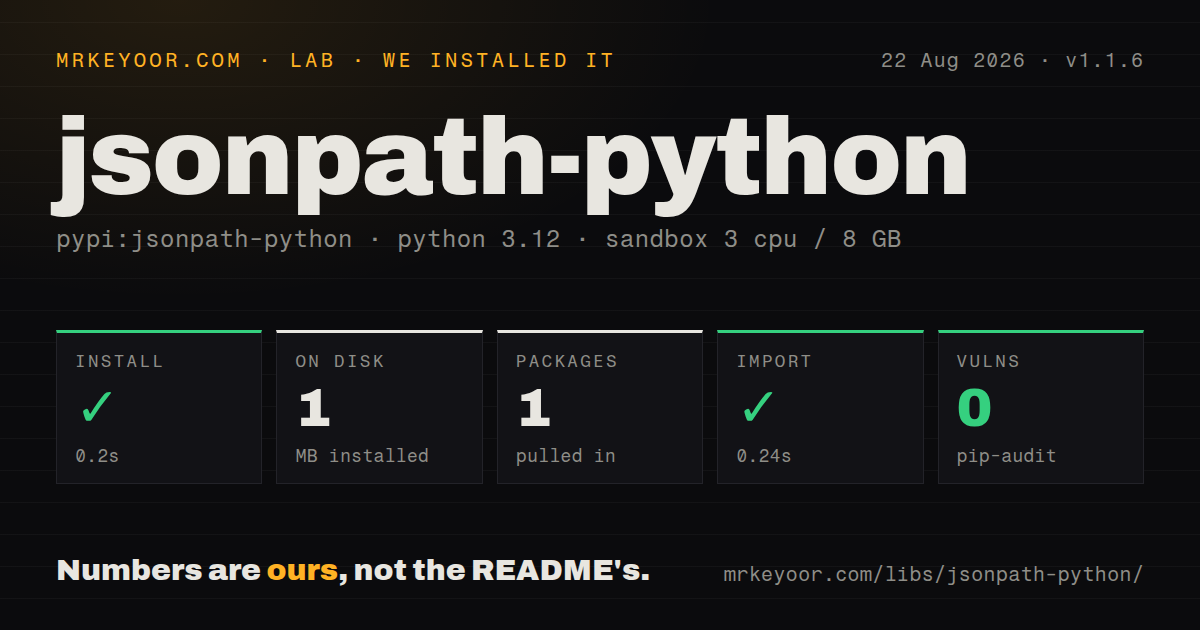
| Install | ✓ · 0.2s | 1 package on disk · 1 MB |
| Import | ✓ | import jsonpath in 0.24s · pure Python · requires Python >=3.8 |
| Known vulns | 0 | (pip-audit) |
Answers from our run
Does jsonpath-python install cleanly?
Yes. In a fresh container with an empty cache, pip install jsonpath-python finished in 0.2s, leaving 1 package and 1 MB on disk. pip-audit reported no known vulnerabilities.
What does jsonpath-python need to run?
Python >=3.8, and nothing compiled: it is pure Python. In our run import jsonpath succeeded in 0.24s.
jsonpath-python or jsonpath-ng: which should you use?
jsonpath-ng: Use it when an AST-oriented JSONPath implementation, named operators, and a larger Python user base fit better than this package's compact dialect. jsonpath-python 1.1.6 installed in 0.2 seconds, used 1 MB, imported in 0.24 seconds, and returned 0 pip-audit findings in our sandbox, but it also brought 5 direct dependencies and no py.typed marker.
When should you not use jsonpath-python?
Expressions cross service or vendor boundaries. The README says the syntax is modified and extended, and recommends another implementation for strict RFC 9535 behavior.
Use it if
- Your program owns both the expressions and the Python data, and it needs selection plus in-place updates from one small API.
- Queries need this package's sorter /(...), field extractor (...), regex =~, or membership operators beyond basic JSONPath navigation.
- The same expressions run repeatedly, so the 128-entry module cache or a compiled JSONPath object can avoid reparsing them.
- Callers need either matched values or concrete JSONPath strings that identify the matching locations.
- Expressions cross service or vendor boundaries. The README says the syntax is modified and extended, and recommends another implementation for strict RFC 9535 behavior.
- Users can submit arbitrary expressions against large documents. Recursive descent, regex filters, wide sorts, and update callbacks need application limits even though 1.1.5 and 1.1.6 fixed code and regex injection paths.
- Static type checking must recognize the package without local configuration. Our installed distribution had no py.typed marker, so type checkers may treat the import as untyped.
- Transformations must leave their input untouched. JSONPath.update() writes into the original dictionaries and lists and returns that same object.
- Queries must move unchanged between JSONPath engines. Sorter syntax, extractor syntax, single-quoted special fields, and the update API are local extensions.
Setup reality
Our fresh Python 3.12 sandbox installed jsonpath-python 1.1.6 in 0.2 seconds. The environment contained 1 package using 1 MB, and import jsonpath completed in 0.24 seconds. pip-audit found 0 known vulnerabilities. The measured package has 5 direct dependencies, requires Python 3.8 or newer, is pure Python, and uses the MIT license. It does not ship py.typed, so typed projects may need a stub or missing-import rule.
No credential or config file is required. Install name and import name differ: pip installs jsonpath-python, while code imports JSONPath, search, or compile from jsonpath. The larger commitment is expression syntax. Filters borrow Python comparison, logical, membership, and regex forms. Compared string values use double quotes because single quotes mark field names containing dots or spaces in this dialect.
search() and compile() share a module-level LRU cache capped at 128 expressions. A compiled JSONPath object can parse many documents, but parse() stores the requested VALUE or PATH result mode on that object. Avoid sharing one cached instance across concurrent calls that mix result modes; construct separate JSONPath objects or serialize those calls. Invalid expressions raise ExprSyntaxError, and incompatible operations such as mixed-type sorting can raise JSONPathTypeError.
update() finds matching paths and mutates the supplied dictionary or list, using either a fixed value or a callback result. Copy the document first when callers expect an immutable transform. Version 1.1.5 removed arbitrary code execution through eval in filters, and 1.1.6 blocked regex filter injection. Those fixes make 1.1.6 the minimum sensible pin, while CPU and memory limits remain your responsibility for recursive descent, regex, and sorting on untrusted input.
Patterns
Read one nested field select-field
from jsonpath import JSONPath

data = {"store": {"book": [{"title": "Dune"}]}}
titles = JSONPath("$.store.book[*].title").parse(data)
assert titles == ["Dune"]
parse() returns a list even when the expression has one match. A missing match returns an empty list.
Find a field at any depth recursive-descent
from jsonpath import search

prices = search("$..price", catalog)
Recursive descent walks every reachable branch under the root. Put a size limit around externally supplied documents.
Select every second item slice-array
from jsonpath import JSONPath

odd_positions = JSONPath("$.items[1::2]").parse(data)
Array slices follow Python start:end:step rules, including omitted and negative bounds.
Combine numeric filter conditions filter-numbers
from jsonpath import JSONPath

midrange = JSONPath("$.items[?(@.price >= 10 and @.price < 20)]").parse(data)
Filters accept Python-style comparison and logical operators. Mixed or missing value types need tests against your real documents.
Match a value inside a list filter-membership
from jsonpath import JSONPath

fruit = JSONPath("$.items[?('fruit' in @.tags)]").parse(data)
Single quotes delimit the literal on the left of this membership expression. Compared strings after == or != use double quotes in this dialect.
Filter a string with a regular expression filter-regex
from jsonpath import JSONPath

books = JSONPath(r"$.books[?(@.title =~ /^The /)]").parse(data)
Version 1.1.6 fixed regex filter injection. Regex evaluation can still be expensive, so expressions from users need length and complexity limits.
Read a key containing punctuation access-special-key
from jsonpath import JSONPath

data = {"build.version": "1.4.0"}
value = JSONPath("$.'build.version'").parse(data)
assert value == ["1.4.0"]
Single-quoted field notation is marked experimental in the README and is specific to this implementation.
Sort by two fields sort-results
from jsonpath import JSONPath

ordered = JSONPath("$.books[/(category,price)]").parse(data)
descending = JSONPath("$.books[/(~price)]").parse(data)
/(...) is this package's sorter extension. A tilde reverses a field, and incompatible field types can raise JSONPathTypeError.
Project selected fields extract-fields
from jsonpath import JSONPath

rows = JSONPath("$.books[*].(title,price)").parse(data)
The extractor returns dictionaries containing the named fields. Missing keys are omitted after the 1.1 field-extraction fix.
Return locations instead of values return-paths
from jsonpath import JSONPath

query = JSONPath("$.books[*].price")
paths = query.parse(data, result_type="PATH")
PATH mode changes each result into a JSONPath location. parse() stores the mode on the JSONPath object, so do not mix modes concurrently on one instance.
Change every matched value update-values
from jsonpath import JSONPath

JSONPath("$.books[*].price").update(
    data,
    lambda price: round(price * 0.9, 2),
)
update() mutates data in place and returns the same root object. Copy the structure first if other callers retain it.
Compile a query for repeated use reuse-expression
from jsonpath import compile

find_ids = compile("$.records[*].id")
first = find_ids.parse(batch_one)
second = find_ids.parse(batch_two)
compile() uses the module's 128-entry LRU cache. Construct JSONPath directly when a shared cached instance is undesirable.
Alternatives
| Package | Registry | Pick it when |
|---|---|---|
| jsonpath-ng | PyPI | Use it when an AST-oriented JSONPath implementation, named operators, and a larger Python user base fit better than this package's compact dialect. |
| jsonpath2 | PyPI | Use it when its parser and expression behavior match an existing query corpus; verify the exact operators before migrating. |
| jmespath | PyPI | Use it when you can choose a specified projection language instead of preserving JSONPath syntax or in-place update behavior. |
More utils guides
lru-cache · type-fest · ajv · zod · p-limit · find-up · the whole shelf →
How this guide is made: grounded in the library's documentation, release notes, changelog, and issue history, on a fixed rubric — not a hands-on install of every release. The 50 most-downloaded entries are additionally install-verified in clean containers. Corrections: contact the desk.