joi review
Joi 18.2.5 is a runtime validator for JavaScript values, built around immutable schemas and chained rules. Our Node 22 install found bundled TypeScript declarations, although Joi does not infer an application type from the schema. validate() returns both an error and a possibly changed value because conversion and defaults are enabled unless preferences turn them off. Object, array, alternative, and reference APIs cover nested data and relationships between fields. Release 18.2.5 blocks prototype injection through localized message keys, accepts allowUnderscore in email options, and documents how to bound array.unique() work. The major also requires Node 20 and exposes Standard Schema plus JSON Schema views.
Our Joi 18.2.5 install took 2.3 seconds and 3 MB with no audit findings, but its browser build reached 55.3 KB gzipped, so it fits Node APIs with coercion and cross-field rules better than lean client forms. Choose Zod or Valibot when schema-derived types or browser weight drives the decision.
We installed it
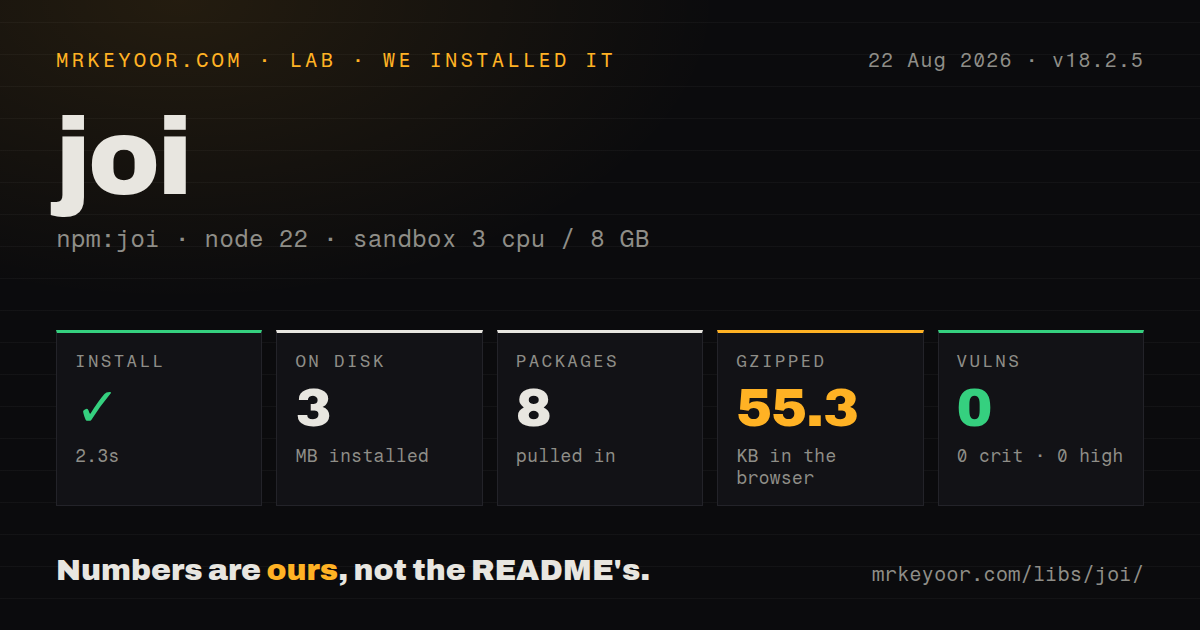
| Install | ✓ · 2.3s | 8 packages on disk · 3 MB |
| Import | ✓ | ESM import works · require() works · CommonJS package |
| Browser | 55.3 KB | gzipped (172.9 KB minified), bundled with esbuild |
| Types | ✓ | TypeScript types bundled |
| Known vulns | 0 | 0 critical · 0 high · 0 moderate · 0 low (npm audit) |
Answers from our run
Does joi install cleanly?
Yes. In a fresh container with an empty cache, npm install joi finished in 2 seconds, leaving 8 packages and 3 MB on disk. npm audit reported no known vulnerabilities.
How much does joi add to a browser bundle?
55.3 KB gzipped (172.9 KB minified) when the whole package is bundled for the browser with esbuild. Importing only part of it is usually smaller.
Does joi work with both ESM and CommonJS?
Yes. Both import 'joi' and require('joi') worked in Node 22 in our run. The package is published as CommonJS.
Does joi include TypeScript types?
Yes, type declarations ship inside the package, so no @types install is needed.
joi or zod: which should you use?
zod: Choose it when TypeScript inference from the schema outweighs Joi's relationship rules. Our Joi 18.2.5 install took 2.3 seconds and 3 MB with no audit findings, but its browser build reached 55.3 KB gzipped, so it fits Node APIs with coercion and cross-field rules better than lean client forms.
When should you not use joi?
A TypeScript type must come directly from the validation schema; Joi ships declarations but keeps the domain interface separate, while Zod or Valibot can infer it
Use it if
- Joi 18 can coerce query strings or form fields and return a validated value under one server-side contract
- xor(), with(), when(), and Joi.ref() are needed for credentials or fields whose rules depend on sibling values
- A hapi application already shares Joi schemas between route params, payloads, and query validation
- error.details must provide stable rule codes and paths for a client-facing validation response
- A TypeScript type must come directly from the validation schema; Joi ships declarations but keeps the domain interface separate, while Zod or Valibot can infer it
- Our full browser import was 172.9 KB minified and 55.3 KB gzipped, which is hard to justify for a small client form
- Joi 18.2.5 declares Node >=20, excluding production deployments that remain on Node 18
- Conversion starts enabled and can change numeric strings, dates, case, whitespace, and defaults; set convert:false when retaining input types is a hard requirement
- Ajv directly consumes an existing JSON Schema or OpenAPI contract, whereas Joi begins with its own schema API and exports a representation afterward
Setup reality
We installed Joi 18.2.5 in 2.3 seconds in a fresh, unprivileged Node 22 Bookworm sandbox with 3 CPUs and 8 GB of RAM. Eight packages used 3 MB on disk, and npm audit returned zero findings at all severities. Joi declares 7 direct dependencies, 0 peers, and Node >=20; the package itself is 1,936 KB unpacked. It is CommonJS with no exports map, but require() and ESM import both worked. The package includes TypeScript declarations.
Our esbuild browser test produced 172.9 KB minified and 55.3 KB gzipped. Joi needs no credentials or config file. The first application choice is conversion: validate() can turn "42" into 42, apply case or whitespace rules, and insert defaults. Pass its returned value forward. Objects reject unknown keys by default; choose rejection, stripUnknown, or unknown(true) at each boundary so a later client field does not disappear unexpectedly.
Validation stops on the first problem unless abortEarly:false is supplied. Map error.details by path and type instead of parsing the combined message. Release 18.2.5 fixes prototype injection through language names such as proto and constructor in custom messages. Keep message templates free of secrets. For object arrays, place max(1000) before unique(); the 18.2.5 docs state that object and function uniqueness comparisons are quadratic and rule order determines whether the length check short-circuits them.
external() rules run after local validation and force validateAsync(); synchronous validate() throws if externals remain enabled. A database lookup in an external rule still races another request, so a uniqueness constraint must enforce the final write. Schemas are immutable, making fork() and keys() safe for shared bases. Conditional when() variants may be compiled at runtime, so reuse schemas rather than rebuilding a different 55.3 KB rule graph inside every request.
Patterns
Validate a signup payload validate-an-object
const Joi = require('joi');

const schema = Joi.object({
    name: Joi.string().min(3).max(30).required(),
    email: Joi.string().email({ minDomainSegments: 2 }).required(),
    age: Joi.number().integer().min(18),
});

const { error, value } = schema.validate(input);
if (error) return res.status(400).json({ error: error.message });
saveUser(value);   // use value, not input
value contains Joi's conversions and defaults; saving input would discard those validated changes.
Return every invalid field collect-all-errors
const { error } = schema.validate(input, { abortEarly: false });

if (error) {
    const fields = error.details.map((d) => ({
        path: d.path.join('.'),
        type: d.type,          // e.g. 'string.min'
        message: d.message,
    }));
    return res.status(400).json({ fields });
}
abortEarly defaults to true; false fills error.details with paths, rule codes, and messages for every detected failure.
Reject, remove, or retain unknown keys handle-unknown-keys
// Reject anything not declared (the default)
schema.validate(body);

// Silently drop extra keys
schema.validate(body, { stripUnknown: true });

// Allow and keep them
schema.unknown(true).validate(body);
Joi.object() rejects undeclared keys by default; stripUnknown removes them and unknown(true) keeps them.
Require companyName for business accounts conditional-requirements
const schema = Joi.object({
    type: Joi.string().valid('personal', 'business').required(),
    companyName: Joi.when('type', {
        is: 'business',
        then: Joi.string().required(),
        otherwise: Joi.forbidden(),
    }),
});
otherwise: Joi.forbidden() rejects companyName on personal accounts instead of silently accepting an irrelevant field.
Choose one credential and confirm passwords cross-field-rules
const schema = Joi.object({
    password: Joi.string().min(12),
    repeatPassword: Joi.any().valid(Joi.ref('password')).required()
        .messages({ 'any.only': 'Passwords must match' }),
    apiKey: Joi.string(),
})
    .xor('password', 'apiKey')
    .with('password', 'repeatPassword');
xor requires exactly one listed credential, while with makes repeatPassword mandatory whenever password exists.
Attach messages to rule codes custom-error-messages
const password = Joi.string().min(12).pattern(/[0-9]/, 'a digit')
    .label('Password')
    .messages({
        'string.min': '{{#label}} must be at least {{#limit}} characters',
        'string.pattern.name': '{{#label}} must contain {{#name}}',
        'any.required': '{{#label}} is required',
    });
A named pattern emits string.pattern.name and supplies its name to the message without exposing the regular expression.
Check line items and unique tags arrays-and-nesting
const schema = Joi.object({
    items: Joi.array()
        .items(Joi.object({
            sku: Joi.string().pattern(/^[A-Z]{3}-\d{4}$/).required(),
            qty: Joi.number().integer().min(1).max(99).required(),
        }))
        .min(1).max(50).required(),
    tags: Joi.array().items(Joi.string()).unique().default([]),
});
A bad fourth quantity appears at items.3.qty in error.details; unique() rejects a repeated tag.
Derive POST, PATCH, and response schemas reuse-and-extend-schemas
const user = Joi.object({
    name: Joi.string().required(),
    email: Joi.string().email().required(),
    role: Joi.string().valid('admin', 'member').default('member'),
});

const createUser = user;
const updateUser = user.fork(['name', 'email'], (s) => s.optional());
const publicUser = user.keys({ id: Joi.string().uuid().required() });
fork() and keys() return new schemas, leaving the required fields on the original user contract unchanged.
Reject numeric strings control-coercion
// Default: strings become numbers
Joi.object({ n: Joi.number() }).validate({ n: '42' });
// -> { value: { n: 42 } }

// Strict: the input type has to be right
Joi.object({ n: Joi.number() }).validate({ n: '42' }, { convert: false });
// -> error: "n" must be a number
convert:false keeps '42' as invalid input and also prevents transforms and default insertion.
Check an email after local validation async-external-checks
const schema = Joi.object({
    email: Joi.string().email().required().external(async (value, helpers) => {
        if (await users.existsByEmail(value)) {
            throw new Error('is already registered');
        }
        return value.toLowerCase();
    }),
});

const value = await schema.validateAsync(input);
external() requires validateAsync(), runs after local rules pass, and can replace the field with its returned value.
Define an objectId type custom-type
const CustomJoi = Joi.extend((joi) => ({
    type: 'objectId',
    base: joi.string(),
    messages: { 'objectId.base': '{{#label}} must be a 24-character hex id' },
    validate(value, helpers) {
        if (!/^[0-9a-f]{24}$/.test(value)) {
            return { value, errors: helpers.error('objectId.base') };
        }
    },
}));

CustomJoi.objectId().validate('nope');
extend() returns a separate Joi instance; importing the original Joi elsewhere will not include objectId().
Expose Standard Schema validation and JSON Schema standard-schema-and-json-schema
const schema = Joi.object({ a: Joi.number() });

const std = schema['~standard'];
std.validate({ a: '5' });          // { value: { a: 5 } }
std.validate({ a: 'x' });          // { issues: [{ message, path }] }

std.jsonSchema.input();
// { type: 'object', properties: { a: { type: 'number' } }, additionalProperties: false }
Joi 18 exposes draft 2020-12 JSON Schema; input and output views can differ when conversion or defaults change the value.
Alternatives
More utils guides
lru-cache · type-fest · ajv · zod · p-limit · find-up · the whole shelf →
How this guide is made: grounded in the library's documentation, release notes, changelog, and issue history, on a fixed rubric — not a hands-on install of every release. The 50 most-downloaded entries are additionally install-verified in clean containers. Corrections: contact the desk.