javascript-stringify review
Javascript-stringify 2.1.0 turns JavaScript values into JavaScript source expressions, and our browser build measured 9 KB minified. Unlike JSON.stringify, it can represent undefined, BigInt, symbols, functions, regular expressions, dates, maps, sets, boxed primitives, errors, and Node buffers. An optional references mode emits an immediately invoked function that rebuilds circular and shared object identity. Version 2.1.0 replaced deprecated new Buffer() output and preserves property order while restoring references. The result is executable text for trusted fixture or module generation. It is a poor wire format and becomes arbitrary code execution if an application evaluates output shaped by an attacker.
Javascript-stringify 2.1.0 installed in 0.4 seconds, left 1 MB on our box, and bundled to 3.5 KB gzipped with no audit findings. Use it only for trusted JavaScript source generation; choose JSON or an explicit data decoder for APIs, storage, browser state, and user-controlled values.
We installed it
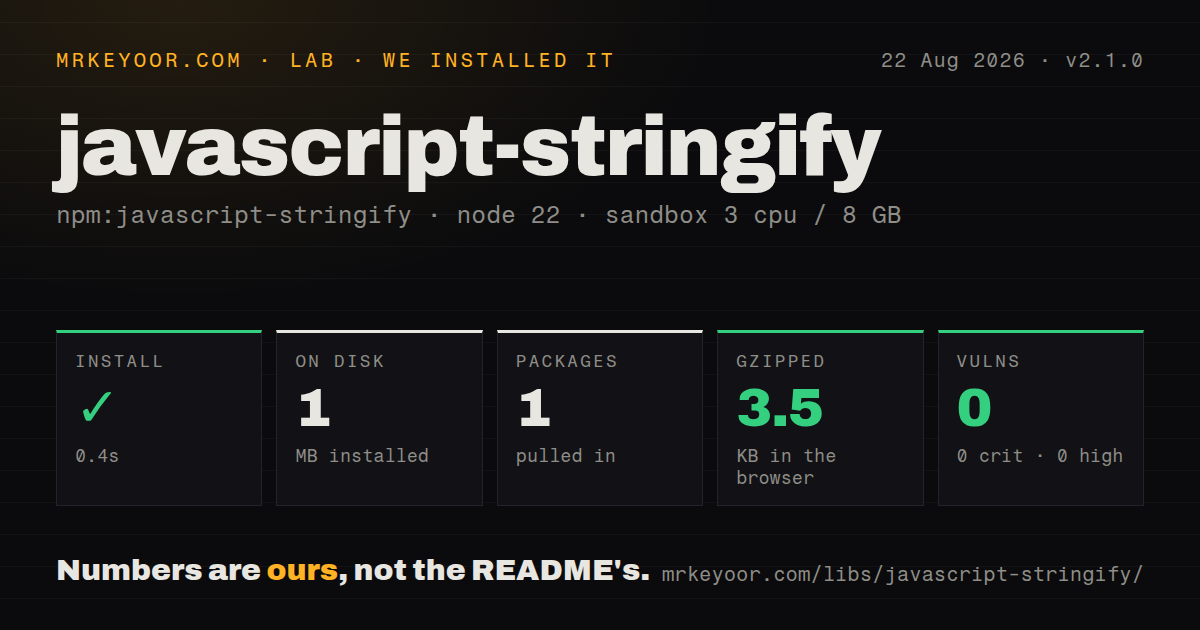
| Install | ✓ · 0.4s | 1 package on disk · 1 MB |
| Import | ✓ | ESM import works · require() works · CommonJS package |
| Browser | 3.5 KB | gzipped (9 KB minified), bundled with esbuild |
| Types | ✓ | TypeScript types bundled |
| Known vulns | 0 | 0 critical · 0 high · 0 moderate · 0 low (npm audit) |
Answers from our run
Does javascript-stringify install cleanly?
Yes. In a fresh container with an empty cache, npm install javascript-stringify finished in 0.4s, leaving 1 package and 1 MB on disk. npm audit reported no known vulnerabilities.
How much does javascript-stringify add to a browser bundle?
3.5 KB gzipped (9 KB minified) when the whole package is bundled for the browser with esbuild. Importing only part of it is usually smaller.
Does javascript-stringify work with both ESM and CommonJS?
Yes. Both import 'javascript-stringify' and require('javascript-stringify') worked in Node 22 in our run. The package is published as CommonJS.
Does javascript-stringify include TypeScript types?
Yes, type declarations ship inside the package, so no @types install is needed.
javascript-stringify or serialize-javascript: which should you use?
serialize-javascript: Use it when trusted server state must be embedded into JavaScript or HTML with serialization controls designed for that boundary. Javascript-stringify 2.1.0 installed in 0.4 seconds, left 1 MB on our box, and bundled to 3.5 KB gzipped with no audit findings.
When should you not use javascript-stringify?
Serialized values can come from users or other untrusted systems. Restoring the output with eval or Function executes JavaScript rather than parsing inert data.
Use it if
- A trusted build tool generates JavaScript fixtures or config modules containing values JSON cannot represent.
- Readable source must preserve Date, RegExp, Map, Set, BigInt, Symbol, Buffer, or function values.
- Generated code needs circular and repeated object references reconstructed through an IIFE.
- A custom replacer must control source expressions while the package enforces depth and value-count caps.
- Serialized values can come from users or other untrusted systems. Restoring the output with eval or Function executes JavaScript rather than parsing inert data.
- You need JSON, deterministic hashes, or cross-language interchange. Output can depend on JavaScript constructors, Buffer, functions, and object insertion order.
- Class prototypes, descriptors, non-enumerable fields, symbol keys, or Error stacks must survive. Ordinary objects are traversed through Object.keys and rebuilt as object literals.
- Functions must keep closure state. Their source may be printed, but captured variables are absent from the serialized result.
- A strict Content Security Policy forbids unsafe evaluation. references mode emits an IIFE, and restoring any source expression requires JavaScript evaluation or module loading.
Setup reality
We installed javascript-stringify 2.1.0 in a fresh unprivileged Node 22 Bookworm sandbox. npm completed in 0.4 seconds and left 1 package using 1 MB on disk. The package is 140 KB unpacked and declares 0 direct dependencies and 0 peers. npm audit found 0 known vulnerabilities. Both require() and ESM import worked against the CommonJS package, which has no exports map. TypeScript declarations are bundled. Our browser build measured 9 KB minified and 3.5 KB gzipped.
There are no credentials, native builds, or config files. Import the named stringify function. Its arguments are value, replacer, indentation, and options. The replacer receives the current value, indentation text, a fallback stringify function, and the property key; this is different from JSON.stringify's key-and-value callback. Version 2.1.0 changed Buffer output away from deprecated new Buffer() and fixed key order when references mode reconstructs shared values.
maxDepth defaults to 100 and maxValues to 100000. Crossing a cap does not throw. An object property may disappear, an array position may become undefined, and an unsupported root can yield undefined, so callers must check the return value. Circular references are omitted by default. With references: true, the package tracks repeated objects and emits an IIFE plus assignments, producing executable JavaScript that JSON.parse cannot read.
Traversal reads enumerable properties after Object.keys, so getters run during stringification. Recreated functions do not retain closures. Buffer source calls Buffer.from and needs a Buffer global when evaluated; maps, sets, dates, regexes, and boxed primitives rely on their constructors. Custom class instances usually collapse to enumerable object data. Never evaluate attacker-influenced output. Function and eval are also blocked by strict browser CSP unless unsafe evaluation is allowed.
Patterns
Generate a JavaScript object expression stringify-object-expression
import { stringify } from 'javascript-stringify';

const source = stringify({
  enabled: true,
  retries: 3,
  label: 'worker',
  missing: undefined,
});
Undefined object properties are emitted by default, unlike JSON.stringify. Check for an undefined return before writing generated code.
Indent generated source pretty-print-expression
const source = stringify(
  { server: { host: 'localhost', port: 3000 } },
  null,
  2
);
The third argument controls indentation as a space count or literal string. It changes formatting without changing the restored value.
Limit nested traversal cap-recursion-depth
const source = stringify(
  deeplyNestedValue,
  null,
  2,
  { maxDepth: 20 }
);
The default depth is 100. Crossing the cap omits an object property or leaves undefined in an array instead of throwing.
Limit the number of visited values cap-visited-values
const source = stringify(largeValue, null, null, {
  maxValues: 10_000,
});
The default cap is 100000 values. Treat this as a work limit because the returned expression may represent only part of the input.
Drop undefined object properties omit-undefined-properties
const source = stringify(
  { present: 1, optional: undefined },
  null,
  null,
  { skipUndefinedProperties: true }
);
The option affects object properties. Array positions still need an expression and can appear as undefined when a nested result is omitted.
Emit double-quoted strings replace-string-format
const source = stringify(value, (current, indent, fallback) => {
  if (typeof current === 'string') return JSON.stringify(current);
  return fallback(current);
});
The callback receives value, indentation, fallback, and key. Reusing a JSON.stringify replacer here gives the wrong argument contract.
Preserve a self-reference restore-circular-object
const value = { name: 'root' };
value.self = value;

const source = stringify(value, null, 2, { references: true });
References mode emits an IIFE with assignment statements. Without it, the circular property is omitted.
Preserve one shared object restore-shared-identity
const shared = { id: 1 };
const value = { first: shared, second: shared };

const source = stringify(value, null, null, { references: true });
Version 2.1.0 preserves key order while assigning the repeated reference. The result is JavaScript, not valid JSON.
Generate source for built-in types stringify-builtins
const source = stringify({
  createdAt: new Date('2026-01-01T00:00:00Z'),
  roles: new Set(['admin', 'editor']),
  lookup: new Map([['x', 1]]),
  pattern: /hello/gi,
  count: 12n,
});
Restoration needs Date, Set, Map, RegExp, and BigInt in scope. Custom class prototypes are not preserved by this pattern.
Write a trusted config expression generate-trusted-module
const expression = stringify(trustedConfig, null, 2, {
  references: true,
});
if (expression === undefined) {
  throw new Error('config is not serializable');
}
const moduleSource = 'export default ' + expression + ';\n';
Only feed controlled values into generated code. Importing attacker-shaped output gives that attacker JavaScript execution.
Alternatives
| Package | Registry | Pick it when |
|---|---|---|
| serialize-javascript | npm | Use it when trusted server state must be embedded into JavaScript or HTML with serialization controls designed for that boundary. |
| devalue | npm | Use it for cyclic JavaScript data with explicit stringify and parse APIs when function serialization is unnecessary. |
| safe-stable-stringify | npm | Use it for deterministic, circular-safe JSON in logs, cache keys, and snapshots without executable output. |
More utils guides
lru-cache · type-fest · ajv · zod · p-limit · find-up · the whole shelf →
How this guide is made: grounded in the library's documentation, release notes, changelog, and issue history, on a fixed rubric — not a hands-on install of every release. The 50 most-downloaded entries are additionally install-verified in clean containers. Corrections: contact the desk.