ipykernel review
ipykernel 7.3.0 is the Python process a Jupyter frontend talks to over ZeroMQ. It accepts execute, inspect, complete, interrupt, and debugger messages, then publishes stream output and rich display data back to the client. You normally install it in each virtual environment and register that interpreter as a kernelspec; application code rarely imports it. The current release adds ZMQ Curve transport encryption and display-hook registration, forwards cell metadata into execution, and correctly fails a cell when output formatting raises an exception.
ipykernel 7.3.0 added 29 packages and 71 MB in our sandbox, although installation finished in 2.2 seconds with no audit findings. Install it only in environments that must execute notebooks, register the intended interpreter explicitly, and use IPython alone for terminal-only work.
We installed it
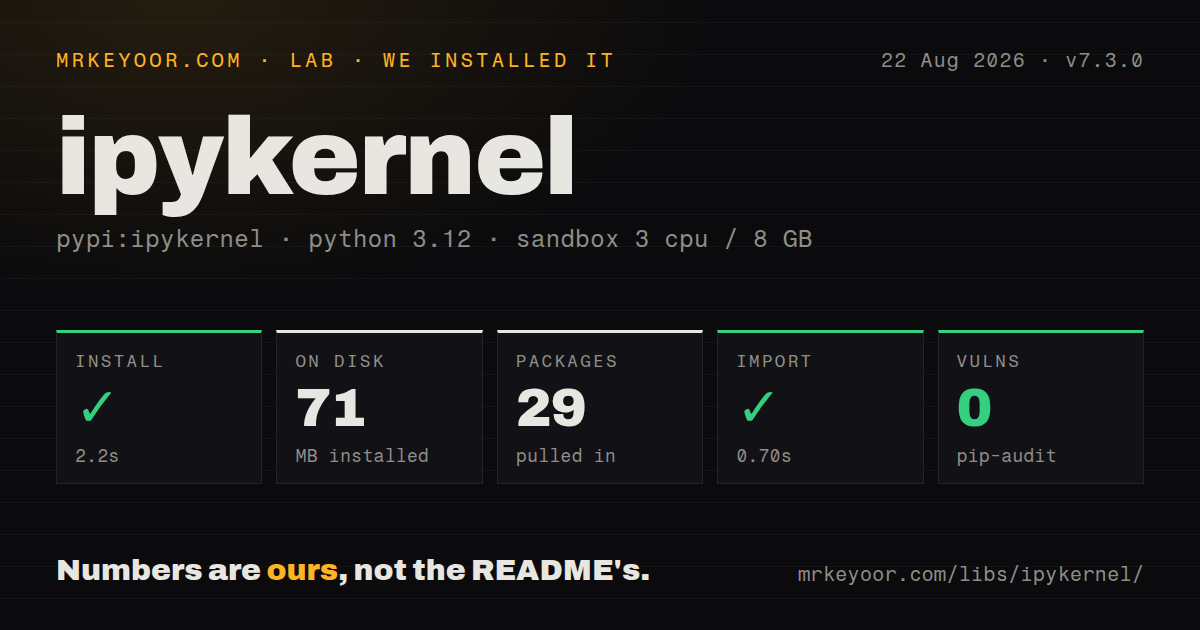
| Install | ✓ · 2.2s | 29 packages on disk · 71 MB |
| Import | ✓ | import ipykernel in 0.70s · pure Python · py.typed · requires Python >=3.10 |
| Known vulns | 0 | (pip-audit) |
Answers from our run
Does ipykernel install cleanly?
Yes. In a fresh container with an empty cache, pip install ipykernel finished in 2 seconds, leaving 29 packages and 71 MB on disk. pip-audit reported no known vulnerabilities.
What does ipykernel need to run?
Python >=3.10, and nothing compiled: it is pure Python. In our run import ipykernel succeeded in 0.70s, and the package ships py.typed for type checkers.
ipykernel or jupyter-console: which should you use?
jupyter-console: Choose it when you need a terminal client for an existing Jupyter kernel, without a browser notebook. ipykernel 7.3.0 added 29 packages and 71 MB in our sandbox, although installation finished in 2.2 seconds with no audit findings.
When should you not use ipykernel?
You only want a terminal REPL. IPython gives you completion, history, magics, and top-level await without a kernelspec, ZeroMQ channels, or a separate frontend.
Use it if
- A Python virtualenv or conda environment must appear by name in JupyterLab, VS Code, or another Jupyter client.
- Notebook jobs run in CI through nbclient, papermill, or nbconvert and need a repeatable kernel identity.
- The frontend needs Python debugging through ipykernel's debugpy integration.
- You are building or testing a client that speaks the Jupyter messaging protocol to a Python kernel.
- You only want a terminal REPL. IPython gives you completion, history, magics, and top-level await without a kernelspec, ZeroMQ channels, or a separate frontend.
- A compact environment matters. Our empty Python 3.12 sandbox grew by 29 packages and 71 MB after installing ipykernel 7.3.0.
- Python 3.9 must remain supported. The 7.x line requires Python 3.10 or newer, so older interpreters need an earlier ipykernel release.
- A downstream tool reaches into 6.x kernel internals. The 7.0 subshell architecture came with a compatibility warning for projects that depend on private behavior.
- You specifically need the xeus embedding model. xeus-python implements a Python kernel on the C++ xeus stack instead of ipykernel's Python process.
Setup reality
We installed ipykernel 7.3.0 in a fresh, unprivileged Python 3.12 Bookworm container. pip completed in 2.2 seconds, left 29 packages, and used 71 MB. The metadata declares 34 direct requirements and Python 3.10 or newer. This is pure Python, includes py.typed, and imported in 0.70 seconds. pip-audit found zero known vulnerabilities. The package metadata did not provide a license value, so do not infer one from that field alone.
Installation and discovery are separate steps. Run python -m ipykernel install with the interpreter notebooks should use, then choose a stable --name and either --sys-prefix or --user. The resulting kernel.json stores an executable path in argv. If notebook imports disagree with the activated shell, inspect that file and print sys.executable in a cell. The frontend follows the kernelspec, not the terminal's currently activated environment.
Kernelspecs are ordinary files and can remain after their virtualenv is deleted. Remove stale entries with jupyter kernelspec uninstall. Values passed through --env are written in plain text, which is suitable for thread counts or device selection but unsafe for tokens. Runtime connection files include ports and the HMAC signing key. Shared machines need restrictive permissions on the Jupyter runtime directory; version 7.3.0 adds Curve support when transport encryption is required.
A running kernel already manages an event loop. Top-level await works, while asyncio.run() inside a cell can fail because another loop is active. Matplotlib widget and GUI modes need their backend packages and event-loop integration. Code that subclasses Kernel must test the 7.x async handler signatures, keyword-only cell metadata, debugger behavior, and subshell changes rather than assuming a notebook picker upgrade is the whole migration.
Patterns
Expose the current interpreter to Jupyter register-active-environment
python -m pip install ipykernel
python -m ipykernel install --sys-prefix \
  --name analytics \
  --display-name 'Python (analytics)'
--sys-prefix writes the kernelspec under the active environment. Its argv entry records this environment's Python executable.
Create a user-level kernel entry register-user-kernel
python -m ipykernel install --user \
  --name project-a \
  --display-name 'Python (project-a)'
A --user kernelspec is visible to that user's Jupyter installations and can outlive the virtualenv. Use a unique internal name to avoid replacement.
Find the executable a kernel will start inspect-kernel-paths
jupyter kernelspec list

# Then inspect the selected file:
python -m json.tool /path/to/kernels/project-a/kernel.json
The first argv value in kernel.json decides which Python starts. The display name shown in a frontend does not prove that path is correct.
Confirm the environment from a cell verify-notebook-interpreter
import sys

print(sys.executable)
print(sys.prefix)

%pip install requests
%pip targets the running kernel's interpreter. A !pip shell command can resolve a different executable from the spawned shell's PATH.
Set device and thread limits before startup set-kernel-environment
python -m ipykernel install --sys-prefix \
  --name gpu-job \
  --display-name 'Python (GPU 0)' \
  --env CUDA_VISIBLE_DEVICES 0 \
  --env OMP_NUM_THREADS 4
These values are stored as readable text in kernel.json. Use them for runtime selection, never for passwords or API tokens.
Delete a dead environment entry remove-stale-kernelspec
jupyter kernelspec list
jupyter kernelspec uninstall project-a
jupyter kernelspec list
Removing ipykernel from a virtualenv does not remove a user-level kernelspec. Uninstall the named entry when its argv path no longer exists.
Run a notebook with one named kernel execute-notebook-in-ci
import nbformat
from nbclient import NotebookClient

notebook = nbformat.read('report.ipynb', as_version=4)
NotebookClient(
    notebook,
    timeout=600,
    kernel_name='analytics',
).execute()
nbformat.write(notebook, 'report.executed.ipynb')
kernel_name is the internal --name value, not the display label. CI must register it before nbclient starts or execution raises NoSuchKernel.
Use the kernel's existing event loop await-in-cell
import asyncio

async def load():
    await asyncio.sleep(0.1)
    return 42

value = await load()
Top-level await is supported. Calling asyncio.run(load()) in the same cell can raise because ipykernel already has an active loop.
Select static or widget plots choose-matplotlib-backend
%matplotlib inline

# For an interactive widget after installing ipympl:
%matplotlib widget
The widget backend requires ipympl in the environment used by this kernel. Installing it in the frontend's environment is insufficient.
Attach a console to an existing process connect-console-to-kernel
jupyter console --existing kernel-12345.jsonThe connection file contains ports and a message-signing key. Only attach to files from a trusted, permission-protected runtime directory.
Inspect the active connection file read-connection-details
from ipykernel.connect import get_connection_file, get_connection_info

print(get_connection_file())
info = get_connection_info(unpack=True)
print(info['transport'], info['shell_port'])
Do not log the full info mapping because it includes the HMAC key. Version 7.3.0 also supports ZMQ Curve for encrypted transport.
Keep Python 3.9 on the 6.x line pin-older-major
# requirements.txt
ipykernel<7
ipykernel 7 requires Python 3.10 or newer. A 6.x pin can also buy time for tools that still depend on the previous subshell or handler internals.
Alternatives
| Package | Registry | Pick it when |
|---|---|---|
| jupyter-console | PyPI | Choose it when you need a terminal client for an existing Jupyter kernel, without a browser notebook. |
| xeus-python | PyPI | Choose it for the xeus C++ kernel architecture and its different embedding tradeoffs. |
| ptpython | PyPI | Choose it for a polished local Python REPL when the Jupyter protocol is irrelevant. |
More data guides
numpy · pandas · fsspec · pyarrow · lxml · sqlalchemy · the whole shelf →
How this guide is made: grounded in the library's documentation, release notes, changelog, and issue history, on a fixed rubric — not a hands-on install of every release. The 50 most-downloaded entries are additionally install-verified in clean containers. Corrections: contact the desk.