image-q review
image-q 4.0.0 reduces decoded RGBA pixels to a smaller palette in JavaScript. Our browser build was 50.9 KB minified and 13.6 KB gzipped. The package includes WuQuant, RGBQuant, two NeuQuant variants, several color-distance formulas, nearest-color mapping, error-diffusion kernels, yielding async wrappers, and an SSIM comparison function. It accepts pixel containers such as `ImageData`, canvas data, typed arrays, and Node buffers. It does not decode or encode PNG, JPEG, GIF, or WebP files.
image-q 4.0.0 installed in 0.7 seconds and its browser build measured 50.9 KB minified and 13.6 KB gzipped in our sandbox. Choose it for algorithm-level control over decoded RGBA quantization; choose an image codec or full processor when the input and output are files.
We installed it
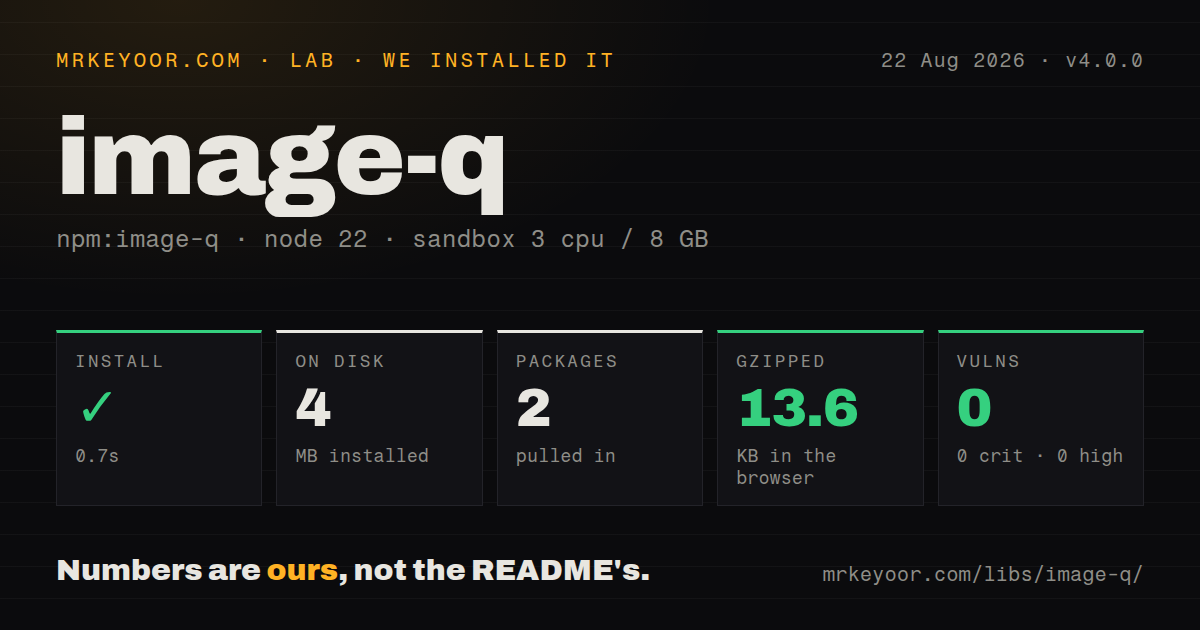
| Install | ✓ · 0.7s | 2 packages on disk · 4 MB |
| Import | ✓ | ESM import works · require() works · CommonJS package with exports map |
| Browser | 13.6 KB | gzipped (50.9 KB minified), bundled with esbuild |
| Types | ✓ | TypeScript types bundled |
| Known vulns | 0 | 0 critical · 0 high · 0 moderate · 0 low (npm audit) |
Answers from our run
Does image-q install cleanly?
Yes. In a fresh container with an empty cache, npm install image-q finished in 0.7s, leaving 2 packages and 4 MB on disk. npm audit reported no known vulnerabilities.
How much does image-q add to a browser bundle?
13.6 KB gzipped (50.9 KB minified) when the whole package is bundled for the browser with esbuild. Importing only part of it is usually smaller.
Does image-q work with both ESM and CommonJS?
Yes. Both import 'image-q' and require('image-q') worked in Node 22 in our run. The package is published as CommonJS with an exports map.
Does image-q include TypeScript types?
Yes, type declarations ship inside the package, so no @types install is needed.
image-q or sharp: which should you use?
sharp: Use it in Node when decoding, resizing, palette reduction, and encoding should happen in one native pipeline. image-q 4.0.0 installed in 0.7 seconds and its browser build measured 50.9 KB minified and 13.6 KB gzipped in our sandbox.
When should you not use image-q?
The input is an image filename or compressed file buffer: image-q only accepts decoded pixel data and returns decoded pixel data
Use it if
- Decoded RGBA data needs a palette of 256 colors or fewer in Node or a browser
- You need to compare WuQuant, RGBQuant, and NeuQuant under the same API
- Alpha-aware matching and selectable dithering kernels matter for the output
- The same typed JavaScript quantizer must run on both browser pixels and Node buffers
- The input is an image filename or compressed file buffer: image-q only accepts decoded pixel data and returns decoded pixel data
- You also need resize, crop, rotation, metadata, or file conversion: none of those operations are part of this package
- Async work must leave the main CPU free: promise methods yield between generator steps but do not create a worker thread
- A browser bundle cannot absorb 50.9 KB minified and 13.6 KB gzipped for palette work alone
- Large images require low-latency perceptual matching: the README labels CIEDE2000 very slow, and dithering adds pure JavaScript work per pixel
Setup reality
Our fresh install of image-q 4.0.0 completed in 0.7 seconds. It left 2 packages and 4 MB on disk, with one direct dependency, no peers, bundled TypeScript types, and 0 known audit vulnerabilities. The MIT tarball is 1,372 KB unpacked.
The package is CommonJS with an exports map, and both require() and ESM import worked in our Node 22 sandbox. esbuild produced a browser bundle of 50.9 KB minified and 13.6 KB gzipped. There are no credentials, native builds, or config files. Its runtime dependency is @types/node, even though those definitions are compile-time material and can add Node globals to a browser-oriented TypeScript project.
Decode images elsewhere. Construct a PointContainer from RGBA ImageData, canvas pixels, a Uint8Array, Uint32Array, or Node Buffer plus width and height. Four bytes represent each pixel, so the byte length and dimensions must agree. Quantization returns a palette and another pixel container, not a downloadable image. A separate codec must turn toUint8Array() into PNG, GIF, or another format. Cross-origin images can taint a canvas and make its pixel read throw.
buildPalette() and applyPalette() yield between generator steps through a scheduler, which can let timers run but does not move calculation to another core. There is no AbortSignal or built-in memory limit. Use a Web Worker or worker thread when CPU isolation matters. Defaults choose WuQuant, 256 colors, BT.709 Euclidean distance with alpha, and Floyd-Steinberg dithering. Keep the same distance formula for palette building and application unless the mismatch is deliberate.
Patterns
Reduce decoded pixels to 64 colors quantize-rgba-sync
import * as iq from 'image-q'

const input = iq.utils.PointContainer.fromUint8Array(rgba, width, height)
const palette = iq.buildPaletteSync([input], { colors: 64 })
const output = iq.applyPaletteSync(input, palette)
const quantizedRgba = output.toUint8Array()
`rgba` needs four bytes per pixel. The returned array is still raw RGBA and requires a separate encoder.
Yield between quantization steps report-progress
const palette = await iq.buildPalette([input], {
  colors: 128,
  onProgress: (value) => console.log('palette', value),
})
const output = await iq.applyPalette(input, palette, {
  onProgress: (value) => console.log('image', value),
})
These promises yield on the same JavaScript thread. Put the work in a worker when another CPU must handle it.
Remap browser ImageData quantize-image-data
const source = iq.utils.PointContainer.fromImageData(imageData)
const palette = iq.buildPaletteSync([source], { colors: 32 })
const result = iq.applyPaletteSync(source, palette)
const next = new ImageData(
  new Uint8ClampedArray(result.toUint8Array()),
  result.getWidth(), result.getHeight()
)
`ImageData` contains decoded pixels. Constructing it does not create PNG or JPEG bytes.
Quantize a browser canvas read-canvas-pixels
const pixels = iq.utils.PointContainer.fromHTMLCanvasElement(canvas)
const palette = iq.buildPaletteSync([pixels], { colors: 16 })
const reduced = iq.applyPaletteSync(pixels, palette, {
  imageQuantization: 'nearest',
})
A canvas tainted by an image without suitable CORS permission will reject the underlying pixel read.
Wrap a decoded Node buffer read-node-rgba
const pixels = iq.utils.PointContainer.fromBuffer(
  decodedRgbaBuffer, width, height
)
const palette = iq.buildPaletteSync([pixels], { colors: 256 })
Pass RGBA pixel bytes, not compressed PNG or JPEG file bytes. Buffer length must match the dimensions.
Build one palette for every frame share-animation-palette
const palette = iq.buildPaletteSync(frames, {
  colors: 128,
  paletteQuantization: 'wuquant',
})
const reduced = frames.map((frame) =>
  iq.applyPaletteSync(frame, palette)
)
A shared palette can reduce color flicker across frames, while retaining all supplied containers increases memory use.
Select RGBQuant and ignore alpha choose-rgbquant
const palette = iq.buildPaletteSync([input], {
  colors: 32,
  paletteQuantization: 'rgbquant',
  colorDistanceFormula: 'euclidean-bt709-noalpha',
})
Ignoring alpha is appropriate only when transparency should have no effect on color matching.
Apply Atkinson error diffusion choose-dithering
const output = iq.applyPaletteSync(input, palette, {
  colorDistanceFormula: 'euclidean-bt709',
  imageQuantization: 'atkinson',
})
Use the same distance formula during palette creation and pixel mapping unless you have tested a deliberate difference.
Map straight to the nearest color disable-dithering
const flat = iq.applyPaletteSync(input, palette, {
  imageQuantization: 'nearest',
})
Nearest mapping avoids diffusion artifacts and work, though smooth gradients can show stronger bands.
Read sorted palette bytes export-palette
palette.sort()
const paletteRgba = palette.getPointContainer().toUint8Array()
`sort()` changes palette order and clears its nearest-color cache. Export uses four RGBA bytes for each entry.
Compare the remapped image measure-ssim
const score = iq.quality.ssim(input, output)
console.log({ score })
Both point containers must have identical dimensions. The function throws when their widths or heights differ.
Alternatives
| Package | Registry | Pick it when |
|---|---|---|
| sharp | npm | Use it in Node when decoding, resizing, palette reduction, and encoding should happen in one native pipeline |
| pngquant-bin | npm | Use it when the job is specifically command-line PNG quantization with the pngquant binary |
| color-thief-node | npm | Use it when you only need a dominant color or small palette from an image rather than remapped pixels |
More utils guides
lru-cache · type-fest · ajv · zod · p-limit · find-up · the whole shelf →
How this guide is made: grounded in the library's documentation, release notes, changelog, and issue history, on a fixed rubric — not a hands-on install of every release. The 50 most-downloaded entries are additionally install-verified in clean containers. Corrections: contact the desk.