idb-keyval review
`idb-keyval` wraps IndexedDB as an asynchronous key-value store. Its named functions cover single and batch reads, writes, deletes, atomic updates, iteration, clearing, and custom database or object-store names without exposing transactions in ordinary use. Version 6.3.0 fixes database connection caching after a connection closes and follows recent 6.2 patches that corrected missing-value types, a hanging `update()` error path, declaration output, and the `entries()` fallback transaction. Our browser build of the full package was 2 KB minified and 0.8 KB gzipped. It is a good cache or settings layer; it is the wrong abstraction for indexes, range queries, joins, migrations, or server-side persistence.
Our idb-keyval 6.3.0 install left 1 package and 1 MB on disk, the full browser import was 0.8 KB gzipped, and npm audit found 0 vulnerabilities. Use it for small browser caches and settings keyed by ID; install a real IndexedDB wrapper when the first index, migration, or cross-store transaction appears.
We installed it
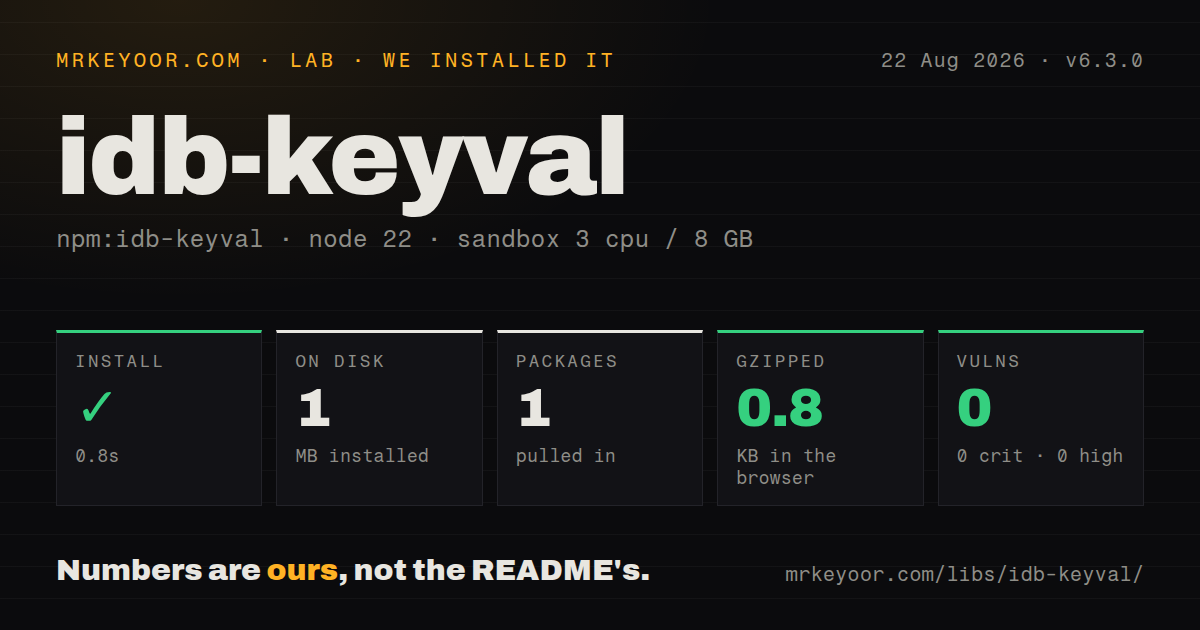
| Install | ✓ · 0.8s | 1 package on disk · 1 MB |
| Import | ✓ | ESM import works · require() works · ESM package with exports map |
| Browser | 0.8 KB | gzipped (2 KB minified), bundled with esbuild |
| Types | ✓ | TypeScript types bundled |
| Known vulns | 0 | 0 critical · 0 high · 0 moderate · 0 low (npm audit) |
Answers from our run
Does idb-keyval install cleanly?
Yes. In a fresh container with an empty cache, npm install idb-keyval finished in 0.8s, leaving 1 package and 1 MB on disk. npm audit reported no known vulnerabilities.
How much does idb-keyval add to a browser bundle?
0.8 KB gzipped (2 KB minified) when the whole package is bundled for the browser with esbuild. Importing only part of it is usually smaller.
Does idb-keyval work with both ESM and CommonJS?
Yes. Both import 'idb-keyval' and require('idb-keyval') worked in Node 22 in our run. The package is published as ESM with an exports map.
Does idb-keyval include TypeScript types?
Yes, type declarations ship inside the package, so no @types install is needed.
idb-keyval or idb: which should you use?
idb: Choose it when IndexedDB stores, indexes, cursors, upgrade callbacks, and explicit transactions must remain available. Our idb-keyval 6.3.0 install left 1 package and 1 MB on disk, the full browser import was 0.8 KB gzipped, and npm audit found 0 vulnerabilities.
When should you not use idb-keyval?
Queries need indexes, prefixes, ranges, cursors, schema upgrades, or transactions spanning stores. Use idb, Dexie, or IndexedDB directly so those concepts remain accessible.
Use it if
- A browser feature needs to persist structured-clone values such as objects, arrays, dates, blobs, or numbers under known keys.
- The data model is genuinely key-value and does not need secondary indexes, cursor ranges, or multi-store transactions.
- Atomic batch writes and queued read-modify-write updates are enough to prevent the races in your offline cache or local settings.
- Bundle cost matters and a dependency-free 0.8 KB gzipped full import is easier to justify than a larger browser database wrapper.
- Queries need indexes, prefixes, ranges, cursors, schema upgrades, or transactions spanning stores. Use `idb`, Dexie, or IndexedDB directly so those concepts remain accessible.
- The application must run during server rendering or inside Node without an IndexedDB implementation. This package targets browser storage even though our Node module import checks succeeded.
- The stored data is authoritative or must synchronize across users. Browsers can evict origin storage, private modes vary, and idb-keyval has no replication or conflict protocol.
- Every write must be encrypted from someone with local browser access. IndexedDB data is origin-scoped, not encrypted by this library; encrypt sensitive values before storage and manage keys elsewhere.
- You plan to implement read-modify-write with separate `get()` and `set()` calls. Those operations are not atomic, while `update()` serializes changes only through its own queue and store.
Setup reality
We installed idb-keyval 6.3.0 in a fresh Node 22 Bookworm container. npm completed in 0.8 seconds and left 1 package using 1 MB on disk. npm audit found 0 vulnerabilities across critical, high, moderate, and low severities. The package has 0 direct and 0 peer dependencies and is 92 KB unpacked. It ships TypeScript declarations, uses ESM with an exports map, and passed both our require() and ESM import checks.
No credential or config file is needed, but the default store is real shared state: database keyval-store, object store keyval. Use createStore() when tests, tenants, or unrelated features need isolation. Opening the module in Node does not prove database operations will work there; a browser, worker with IndexedDB, or an explicit test shim must supply indexedDB. Server-rendered modules should defer storage calls until a browser context exists.
The full esbuild browser import measured 2 KB minified and 0.8 KB gzipped in our sandbox. Values use the structured clone algorithm, so functions, DOM nodes, and some class instances are not portable storage records. A missing key resolves to undefined; version 6.2.6 corrected getMany() types to admit missing entries. Batch writes are atomic. Batch reads preserve input order, including undefined slots.
IndexedDB transactions can be blocked by another tab holding an old database connection, and browsers may evict non-persistent origin data under pressure. Version 6.3.0 repairs the package's cached connection after closure, but it cannot define your schema migration or cross-tab conflict policy. Use update() for increments because separate reads and writes can lose an update. Catch promise rejections for quota, serialization, permission, and invalid-key failures rather than assuming local storage cannot fail.
Patterns
Persist one structured value store-value
import { set } from 'idb-keyval';

await set('draft:42', { title: 'Notes', editedAt: new Date() });
IndexedDB accepts structured-clone data such as dates, arrays, objects, and blobs. Functions and DOM nodes cannot be cloned.
Read a value by key read-value
import { get } from 'idb-keyval';

const draft = await get('draft:42');
if (draft === undefined) {
  console.log('No saved draft');
}
A missing key resolves to `undefined`; it is not an exception and may need a separate branch from a stored null value.
Remove a single record delete-value
import { del } from 'idb-keyval';

await del('draft:42');
Deleting a missing key resolves successfully, which makes repeated cleanup calls safe.
Commit several values atomically write-batch
import { setMany } from 'idb-keyval';

await setMany([
  ['profile', profile],
  ['preferences', preferences],
]);
`setMany()` uses one transaction. If one item cannot be stored, none of the batch is committed.
Fetch several keys in one transaction read-batch
import { getMany } from 'idb-keyval';

const [profile, preferences] = await getMany([
  'profile',
  'preferences',
]);
Results follow the requested key order. Since 6.2.6, TypeScript reflects that a missing entry can be `undefined`.
Increment without a lost update update-atomically
import { update } from 'idb-keyval';

await update('launch-count', current => (current ?? 0) + 1);
Use `update()` instead of separate `get()` and `set()` calls when concurrent callers could read the same old value.
Delete related keys together delete-batch
import { delMany } from 'idb-keyval';

await delMany(['profile', 'preferences', 'draft:42']);
A single transaction avoids opening one write transaction for every key.
Erase the active object store clear-store
import { clear } from 'idb-keyval';

await clear();
With no custom store argument, this clears the shared default `keyval` object store. It does not remove other IndexedDB databases.
Enumerate all key-value pairs list-entries
import { entries } from 'idb-keyval';

for (const [key, value] of await entries()) {
  console.log(key, value);
}
`entries()` materializes the store contents in memory. A cursor-based wrapper is a better fit for a large dataset.
Isolate one feature's data create-custom-store
import { createStore, get, set } from 'idb-keyval';

const drafts = createStore('editor-cache', 'drafts');
await set('42', draft, drafts);
const saved = await get('42', drafts);
Custom database and object-store names prevent unrelated features from sharing the package defaults.
Surface a failed local write handle-storage-failure
import { set } from 'idb-keyval';

try {
  await set('large-export', blob);
} catch (error) {
  showStorageWarning(error);
}
Quota, permissions, invalid keys, and cloning can reject the promise. Local persistence still needs an error path.
Avoid IndexedDB during SSR guard-browser-runtime
export async function loadDraft(id) {
  if (typeof indexedDB === 'undefined') return undefined;
  const { get } = await import('idb-keyval');
  return get(`draft:${id}`);
}
Our Node import check passed, but actual storage calls require an IndexedDB implementation. Defer them until the browser runtime exists.
Alternatives
| Package | Registry | Pick it when |
|---|---|---|
| idb | npm | Choose it when IndexedDB stores, indexes, cursors, upgrade callbacks, and explicit transactions must remain available. |
| dexie | npm | Choose it for indexed queries, versioned schemas, transactions, hooks, and a larger browser database model. |
| localforage | npm | Choose it when fallback support for browsers with absent or broken IndexedDB is more important than bundle size. |
| fake-indexeddb | npm | Choose it in Node tests that need an IndexedDB implementation; it complements browser storage code rather than replacing it in production. |
More web frontend guides
postcss · react · react-dom · tailwindcss · clsx · htmlparser2 · the whole shelf →
How this guide is made: grounded in the library's documentation, release notes, changelog, and issue history, on a fixed rubric — not a hands-on install of every release. The 50 most-downloaded entries are additionally install-verified in clean containers. Corrections: contact the desk.