humanize review
humanize 4.16.0 turns Python numbers and dates into display text such as `an hour ago`, `1.0 MiB`, `1.2 million`, `1002nd`, and multi-unit durations. The module exposes small formatting functions for relative time, calendar labels, file sizes, fractions, SI prefixes, number grouping, and short lists. Version 4.16.0 adds Latvian, translates `naturalsize()`, fixes rounding into the next size or metric unit, repairs negative mixed fractions, and handles timezone-aware values in `naturalday()` and `naturaldate()`. Our Python 3.12 package was pure Python, included `py.typed`, and imported in 0.09 seconds.
humanize 4.16.0 installed in 0.3 seconds and used 1 MB as a single package, with typed pure-Python code and no audit findings in our sandbox. It fits English-first or synchronous display formatting; use Babel when per-request locale correctness matters.
We installed it
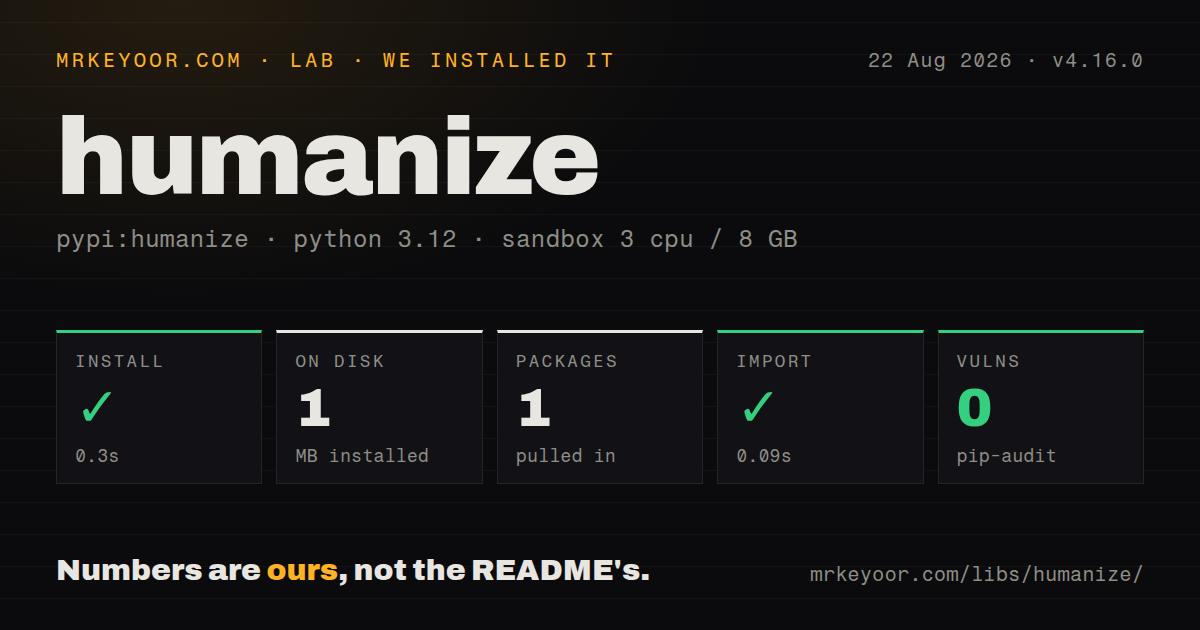
| Install | ✓ · 0.3s | 1 package on disk · 1 MB |
| Import | ✓ | import humanize in 0.09s · pure Python · py.typed · requires Python >=3.10 |
| Known vulns | 0 | (pip-audit) |
Answers from our run
Does humanize install cleanly?
Yes. In a fresh container with an empty cache, pip install humanize finished in 0.3s, leaving 1 package and 1 MB on disk. pip-audit reported no known vulnerabilities.
What does humanize need to run?
Python >=3.10, and nothing compiled: it is pure Python. In our run import humanize succeeded in 0.09s, and the package ships py.typed for type checkers.
humanize or babel: which should you use?
babel: Choose it for CLDR-backed currencies, decimal formats, dates, plural rules, and broad locale coverage. humanize 4.16.0 installed in 0.3 seconds and used 1 MB as a single package, with typed pure-Python code and no audit findings in our sandbox.
When should you not use humanize?
Currencies, dates, plural rules, and numbers must follow CLDR data across many locales. Babel is built for that wider internationalization job.
Use it if
- A CLI, notification, or server-rendered view needs readable ages, durations, sizes, ordinals, or large counts without a formatting framework.
- File sizes must switch explicitly between decimal SI, binary IEC, and compact GNU conventions.
- A report needs a duration split into chosen units through `precisedelta()` rather than one rounded unit.
- A synchronous renderer can choose one of the gettext catalogs packaged with the distribution.
- Currencies, dates, plural rules, and numbers must follow CLDR data across many locales. Babel is built for that wider internationalization job.
- Each asyncio request needs a different active language. humanize stores the translator by thread, so coroutines on one event-loop thread can change each other's output.
- Relative time must be independent of the host timezone. Aware datetimes can pass through the process's local timezone unless your code supplies a controlled reference.
- The product needs exactly one trivial formatter whose desired edge cases are already settled; a local function may be easier to test than another dependency.
- Bad input must raise immediately. Some helpers fall back to string conversion, which can expose `None` or an unexpected object in user-facing output.
Setup reality
We installed humanize 4.16.0 in a fresh unprivileged Python 3.12 Bookworm sandbox. The install completed in 0.3 seconds and left one package occupying 1 MB. import humanize worked in 0.09 seconds. Our package check counted five direct dependencies, found pure Python code and py.typed, and confirmed a Python 3.10+ requirement. pip-audit reported zero known vulnerabilities. The package metadata did not identify a license.
The wheel contains its gettext catalogs, so no service or config file is required. humanize.i18n.activate("de_DE") selects a catalog; a missing catalog raises FileNotFoundError, and a custom one needs an explicit path. Activation changes ambient state. Save the previous choice or call deactivate() in finally so a failed render does not leave later output in the wrong language.
That locale state belongs to a thread, not an asyncio task. Two requests running as coroutines on the same loop thread can overwrite one another's translator. Do not wrap individual async responses with activate() and deactivate() unless access is serialized. Use Babel, preselected functions, or another request-local design when concurrent users can ask for different languages.
Time helpers also depend on context outside their arguments. Calls without when= read the current clock, and aware values may be compared through the process timezone. Normalize timestamps to the viewer's timezone first and pass a fixed reference in tests. Version 4.16.0 repairs aware values in naturalday() and naturaldate(), but labels such as today can still change at midnight according to the timezone your application chose.
Patterns
Describe past and future instants format-relative-time
import datetime as dt
import humanize

now = dt.datetime.now()
humanize.naturaltime(now - dt.timedelta(seconds=1))
humanize.naturaltime(now - dt.timedelta(hours=1))
humanize.naturaltime(now + dt.timedelta(days=2))
Datetime and timedelta inputs determine tense from their sign. A bare numeric value is treated as seconds and uses the `future` flag for direction.
Make a relative-time test repeatable fix-reference-clock
import datetime as dt
import humanize

created = dt.datetime(2026, 8, 1, 12, 0, tzinfo=dt.timezone.utc)
reference = dt.datetime(2026, 8, 1, 15, 0, tzinfo=dt.timezone.utc)
assert humanize.naturaltime(created, when=reference) == "3 hours ago"
Supplying `when` removes the live clock from the result. Normalize both values before comparison so the host timezone cannot shift the phrase.
Choose decimal, binary, or GNU sizes format-byte-count
import humanize

humanize.naturalsize(1_000_000)
humanize.naturalsize(1_000_000, binary=True)
humanize.naturalsize(1_000_000, gnu=True)
humanize.naturalsize(1_000_000, format="%.2f")
Default SI output uses powers of 1,000; binary output uses 1,024. Pick one convention for a product so the same byte count does not appear inconsistent.
Group, scale, and ordinalize integers format-large-count
import humanize

humanize.intcomma(1_234_567)
humanize.intword(1_200_000)
humanize.apnumber(4)
humanize.ordinal(1002)
`intword` keeps values below one thousand unscaled. Table columns may need a separate alignment rule for mixed scaled and unscaled results.
Reduce a duration to readable units round-duration
import datetime as dt
import humanize

humanize.naturaldelta(dt.timedelta(seconds=1001))
humanize.naturaldelta(dt.timedelta(milliseconds=4))
humanize.naturaldelta(
    dt.timedelta(milliseconds=4), minimum_unit="milliseconds"
)
Subsecond values become `a moment` unless `minimum_unit` permits a smaller unit. Month conversion is approximate and should not drive billing dates.
Retain several parts of a timedelta show-precise-duration
import datetime as dt
import humanize

delta = dt.timedelta(days=2, seconds=3633, microseconds=123_000)
humanize.precisedelta(delta)
humanize.precisedelta(delta, minimum_unit="microseconds")
humanize.precisedelta(delta, suppress=["days"], format="%0.4f")
Suppressing a unit rolls its value into another displayed unit. `minimum_unit` selects the smallest part and may leave a fractional remainder.
Name dates near today label-calendar-day
import datetime as dt
import humanize

today = dt.date.today()
humanize.naturalday(today)
humanize.naturalday(today - dt.timedelta(days=1))
humanize.naturaldate(dt.date(2007, 6, 5))
`naturalday` may omit the year for its fallback format, while `naturaldate` keeps it. Convert instants into the viewer's timezone before deriving a date.
Select and then clear a gettext catalog activate-translation
import datetime as dt
import humanize

humanize.activate("de_DE")
try:
    label = humanize.naturaltime(dt.timedelta(seconds=3))
finally:
    humanize.deactivate()
The selected translator is thread-local. `finally` prevents a formatter exception from leaking that language into later synchronous work on the same thread.
Render a short natural-language list join-short-list
import humanize

humanize.natural_list(["one"])
humanize.natural_list(["one", "two"])
humanize.natural_list(["one", "two", "three"])
humanize.natural_list([])
Items are converted with `str()`, and an empty input returns an empty string in 4.16.0. Map objects to deliberate labels before calling it.
Clamp a value and attach an SI prefix format-si-value
import humanize

humanize.clamp(0.0001, floor=0.01)
humanize.clamp(1.0, format="{:.0%}", ceil=0.99)
humanize.metric(1500, "V")
humanize.metric(0.0002, "F")
`clamp` uses `str.format` syntax, unlike helpers that take percent-style formats. `metric` may emit Unicode symbols such as micro, which matters in ASCII-only exports.
Expose selected helpers to Jinja register-jinja-filters
from jinja2 import Environment
import humanize

env = Environment()
env.filters["naturaltime"] = humanize.naturaltime
env.filters["naturalsize"] = humanize.naturalsize
env.filters["intcomma"] = humanize.intcomma

text = env.from_string("{{ n|intcomma }} bytes").render(n=1234567)
The module functions can be registered directly. Check nullable fields before rendering because permissive string conversion can turn `None` into visible text.
Alternatives
| Package | Registry | Pick it when |
|---|---|---|
| babel | PyPI | Choose it for CLDR-backed currencies, decimal formats, dates, plural rules, and broad locale coverage. |
| inflect | PyPI | Choose it for English articles, plurals, number words, and grammar-oriented text generation. |
| naturalsize | PyPI | Choose it when readable byte counts are the only feature required. |
| arrow | PyPI | Choose it when datetime parsing, timezone conversion, ranges, and humanized relative time should share one date library. |
More utils guides
lru-cache · type-fest · ajv · zod · p-limit · find-up · the whole shelf →
How this guide is made: grounded in the library's documentation, release notes, changelog, and issue history, on a fixed rubric — not a hands-on install of every release. The 50 most-downloaded entries are additionally install-verified in clean containers. Corrections: contact the desk.