arrow review
Arrow 1.4.0 is a pure-Python layer over datetime for creating aware timestamps, parsing ISO 8601 input, changing time zones, shifting calendar values, building spans and ranges, and writing relative phrases such as '2 hours ago.' This release replaces pytz with ZoneInfo for named zones, lets floor() and ceil() choose the first weekday, and adds a strict RFC 3339 format constant. Our Python 3.12 import took 0.17 seconds, and the distribution carries a py.typed marker. Arrow makes sense when the same service repeatedly crosses the boundary between stored instants and dates shown to people.
Arrow 1.4.0 installed in 0.4 seconds and used 4 MB in our sandbox, with a 0.17-second import and no pip-audit findings. Install it when zone conversion, calendar boundaries, and localized relative time recur in one codebase; keep datetime and zoneinfo when you only store UTC and add timedeltas.
We installed it
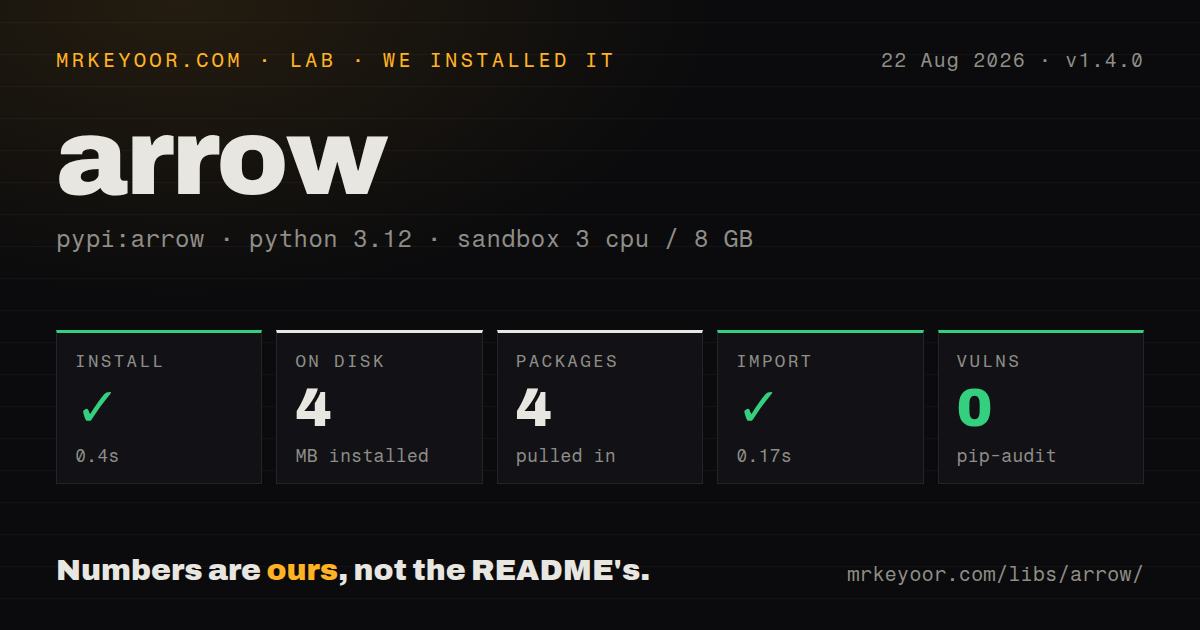
| Install | ✓ · 0.4s | 4 packages on disk · 4 MB |
| Import | ✓ | import arrow in 0.17s · pure Python · py.typed · requires Python >=3.8 |
| Known vulns | 0 | (pip-audit) |
Answers from our run
Does arrow install cleanly?
Yes. In a fresh container with an empty cache, pip install arrow finished in 0.4s, leaving 4 packages and 4 MB on disk. pip-audit reported no known vulnerabilities.
What does arrow need to run?
Python >=3.8, and nothing compiled: it is pure Python. In our run import arrow succeeded in 0.17s, and the package ships py.typed for type checkers.
arrow or python-dateutil: which should you use?
python-dateutil: Choose it for parsing and relativedelta while keeping datetime as the value passed through the application. Arrow 1.4.0 installed in 0.4 seconds and used 4 MB in our sandbox, with a 0.17-second import and no pip-audit findings.
When should you not use arrow?
The job only records UTC instants and adds fixed timedeltas. datetime and zoneinfo already do that, while Arrow installs 4 packages and occupies 4 MB in our sandbox.
Use it if
- Request handlers repeatedly parse offset-bearing timestamps, convert them to a user's named zone, and format the result for display.
- Reporting code needs calendar floors, ceilings, spans, or ranges and those rules have started to spread across home-grown datetime helpers.
- The product displays relative time in several supported locales and can treat that text as presentation rather than stored data.
- Your type checker should recognize the date wrapper without installing a separate stub package.
- The job only records UTC instants and adds fixed timedeltas. datetime and zoneinfo already do that, while Arrow installs 4 packages and occupies 4 MB in our sandbox.
- Input contains free-form phrases such as 'Friday after next.' Arrow documents ISO strings and explicit format tokens; dateparser is built for natural-language input.
- Existing code relies on pytz-specific localization behavior. Arrow 1.4.0 moved named zones to ZoneInfo, so repeated and missing wall times can behave differently at DST boundaries.
- Schedules must exclude holidays, follow an exchange calendar, or count business days. Arrow supplies calendar arithmetic, not those domain calendars.
- You need a distinct duration type with duration formatting and arithmetic rules. Pendulum exposes that model directly, while Arrow's shift() returns another point in time.
Setup reality
We installed Arrow 1.4.0 in a fresh Python 3.12 Bookworm sandbox. Installation finished in 0.4 seconds, leaving 4 packages and 4 MB on disk. pip-audit reported 0 known vulnerabilities. The pure-Python distribution declares 15 direct dependencies, requires Python 3.8 or later, includes py.typed, and imported in 0.17 seconds. Its package metadata identifies the license as Apache Software License.
Arrow asks for no credentials and creates no config file. Decide how each integration treats a datetime without an offset. Use arrow.utcnow() or arrow.now('Europe/Paris') when your code creates the value, and pass an exact token format when a vendor sends a non-ISO string. A shared parser that silently assigns one zone to every feed is hard to audit.
Named zones in version 1.4.0 go through ZoneInfo. The package declares tzdata for Python 3.9 and later, so those names do not have to depend only on the operating system's zone files. Still test the two awkward clock changes: a local time that occurs twice and one that does not occur at all. shift(hours=1), shift(months=1), and replace(hour=...) express different rules. Billing and appointment code should choose deliberately.
Methods such as to(), shift(), floor(), and replace() return a new Arrow value. A range includes the endpoint when it falls exactly on the requested frame, which can add one more item than a half-open database interval. humanize() depends on both locale and reference time, so store an ISO timestamp and generate the phrase at display time. Pass a fixed reference in tests; otherwise assertions will age as the clock moves.
Patterns
Parse and normalize an ISO timestamp parse-offset-timestamp
import arrow

received = arrow.get('2026-08-26T09:15:00+05:30')
stored = received.to('UTC').isoformat()
The +05:30 offset fixes the instant. Keep the offset in vendor input or supply the missing zone as an explicit application rule.
Parse a vendor-specific date format parse-known-format
import arrow

issued = arrow.get('26/08/2026 09:15', 'DD/MM/YYYY HH:mm', tzinfo='Asia/Kolkata')
The format token order is explicit, so 03/04 cannot silently switch between March 4 and April 3.
Create a wall time in a named zone create-zoned-time
import arrow

appointment = arrow.get(2026, 10, 27, 9, 0, tzinfo='Europe/Berlin')
print(appointment.to('Asia/Kolkata'))
Arrow 1.4.0 resolves named zones with ZoneInfo. Add tests when a local time touches a daylight-saving transition.
Move a due date by one month shift-calendar-month
import arrow

due = arrow.get('2026-01-31T10:00:00Z')
next_due = due.shift(months=1)
Calendar-month shifts can land on a different day when the target month is shorter. Write the expected month-end rule into billing tests.
Get Monday-based week boundaries round-custom-week
import arrow

value = arrow.get('2026-08-26T09:15:00Z')
week_start = value.floor('week', week_start=1)
week_end = value.ceil('week', week_start=1)
The week_start option arrived in 1.4.0 and uses ISO weekday numbers, where Monday is 1.
Build a half-open day interval build-half-open-day
import arrow

day = arrow.get('2026-08-26', 'YYYY-MM-DD', tzinfo='UTC')
start = day.floor('day')
stop = start.shift(days=1)
Use start <= timestamp < stop for database filters. span('day') returns an inclusive final microsecond instead.
Walk an hourly reporting range iterate-hourly-range
import arrow

start = arrow.get('2026-08-26T00:00:00Z')
end = arrow.get('2026-08-26T06:00:00Z')
for hour in arrow.Arrow.range('hour', start, end):
    aggregate(hour)
Arrow includes end when it sits on the frame, so this example yields 7 hourly values. Validate user-controlled bounds before materializing a range.
Render deterministic relative text render-relative-time
import arrow

event = arrow.get('2026-08-26T07:00:00Z')
reference = arrow.get('2026-08-26T09:00:00Z')
label = event.humanize(reference, locale='en-us')
Supplying the reference makes the result stable in tests. The phrase belongs in the UI, not in a stored record or cache key.
Emit strict RFC 3339 text format-strict-rfc3339
import arrow
from arrow import FORMAT_RFC3339_STRICT

value = arrow.get('2026-08-26T09:15:00Z')
wire_value = value.format(FORMAT_RFC3339_STRICT)
FORMAT_RFC3339_STRICT was added in 1.4.0 and places T between the date and time.
Show one instant in two zones preserve-source-value
import arrow

instant = arrow.get('2026-08-26T03:45:00Z')
india = instant.to('Asia/Kolkata')
california = instant.to('America/Los_Angeles')
to() returns a new Arrow object. The original value stays in UTC for another presentation or comparison.
Wrap a standard-library datetime wrap-aware-datetime
from datetime import datetime, timezone
import arrow

native = datetime(2026, 8, 26, 9, 0, tzinfo=timezone.utc)
wrapped = arrow.get(native)
restored = wrapped.datetime
An aware datetime carries its instant into Arrow. Reject or normalize naive values before this boundary if their zone is unknown.
Set clock fields without elapsed arithmetic replace-clock-fields
import arrow

value = arrow.get('2026-08-26T09:15:42+05:30')
midnight = value.replace(hour=0, minute=0, second=0, microsecond=0)
replace() changes named wall-clock fields and retains the zone. shift(hours=...) answers an elapsed-time question instead.
Alternatives
| Package | Registry | Pick it when |
|---|---|---|
| python-dateutil | PyPI | Choose it for parsing and relativedelta while keeping datetime as the value passed through the application. |
| pendulum | PyPI | Choose it when an explicit duration type and its formatting API are part of the application model. |
| whenever | PyPI | Choose it when separate types for UTC instants, offset datetimes, and local calendar values should prevent accidental mixing. |
More utils guides
lru-cache · type-fest · ajv · zod · p-limit · find-up · the whole shelf →
How this guide is made: grounded in the library's documentation, release notes, changelog, and issue history, on a fixed rubric — not a hands-on install of every release. The 50 most-downloaded entries are additionally install-verified in clean containers. Corrections: contact the desk.