h5py review
h5py 3.16.0 maps an HDF5 file to Python groups, datasets, attributes, and links. Groups behave much like nested dictionaries; datasets expose shape, dtype, and NumPy-style slicing while leaving untouched regions on disk. We measured a working import of its native extension. It fits large scientific arrays and file exchange with programs that already use HDF5. The 3.16.0 wheels move to HDF5 2.0, fix an object-registry memory leak, and allow lists of references when creating datasets.
h5py 3.16.0 imported successfully in 1.17 seconds after our 0.5-second install, but the 2-package environment consumed 74 MB and includes native extensions. Install it when HDF5 compatibility or local multidimensional slicing is the requirement; choose Zarr for object-store chunks and PyArrow for analytical tables.
We installed it
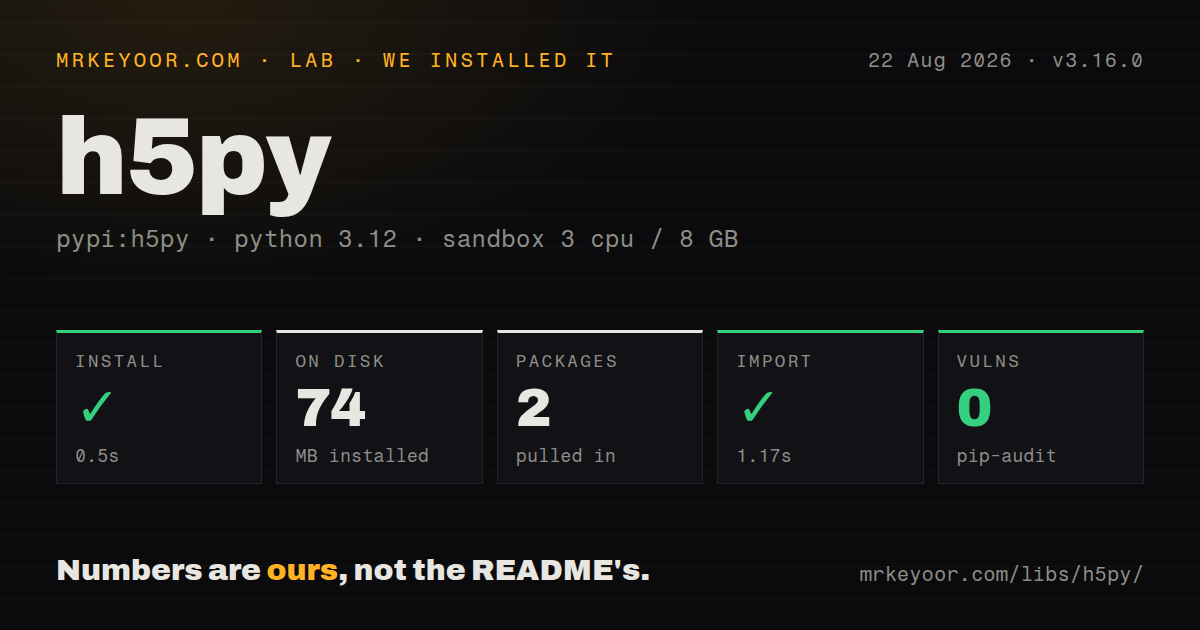
| Install | ✓ · 0.5s | 2 packages on disk · 74 MB |
| Import | ✓ | import h5py in 1.17s · compiled extensions · requires Python >=3.10 |
| Known vulns | 0 | (pip-audit) |
Answers from our run
Does h5py install cleanly?
Yes. In a fresh container with an empty cache, pip install h5py finished in 0.5s, leaving 2 packages and 74 MB on disk. pip-audit reported no known vulnerabilities.
What does h5py need to run?
Python >=3.10, and a platform wheel with compiled extensions. In our run import h5py succeeded in 1.17s.
h5py or zarr: which should you use?
zarr: Use it for chunked arrays on object storage or workers writing separate chunks. h5py 3.16.0 imported successfully in 1.17 seconds after our 0.5-second install, but the 2-package environment consumed 74 MB and includes native extensions.
When should you not use h5py?
Chunks will live primarily in S3 or another object store; HDF5's seek-oriented file format can turn slices into many remote range reads, while Zarr stores chunks as separate objects
Use it if
- A lab instrument, MATLAB program, model checkpoint, or archive already defines HDF5 as the interchange format
- A multidimensional array is larger than memory and callers read bounded slices from local storage
- One file must keep arrays, hierarchy, attributes, and typed references together
- An HPC job can build against parallel HDF5 and coordinate writers through MPI
- Chunks will live primarily in S3 or another object store; HDF5's seek-oriented file format can turn slices into many remote range reads, while Zarr stores chunks as separate objects
- Independent processes must write freely at the same time; normal HDF5 allows one writer and SWMR has a single writer with strict flush and object-creation rules
- The workload is an analytical table that needs column pruning and predicate pushdown; Parquet through PyArrow matches that access pattern
- Python threads are expected to run HDF5 calls in parallel; h5py protects the HDF5 API with a process-wide lock even for separate files
- Deployment needs MPI or a nonstandard HDF5 build but cannot compile against and ship the matching native library
Setup reality
Our h5py 3.16.0 install finished in 0.5 seconds on Python 3.12. Two packages occupied 74 MB, pip-audit reported 0 known vulnerabilities, and import h5py completed in 1.17 seconds. The wheel contains compiled .so extensions, declares 1 direct dependency, requires Python 3.10 or newer, and does not ship py.typed. Its installed package metadata did not identify a license.
Published wheels include native HDF5 support for ordinary local files, and version 3.16.0 updates that bundled library to HDF5 2.0. MPI is a separate build: first install parallel HDF5, set CC=mpicc and HDF5_MPI=ON, then compile h5py. A custom HDF5 location uses HDF5_DIR or related build variables. Mixing conda and pip libraries that load different HDF5 builds can fail before a file is opened.
Always open files with a context manager. Mode w truncates an existing path; mode x refuses to overwrite it. A Dataset object is only a handle, while dataset[...] reads the entire array. Chunk dimensions should match common slices because reading 1 value still loads and decompresses its containing chunk. Resizing, filters, and checksums all require chunked storage.
Standard HDF5 does not offer general multi-writer access. SWMR supports 1 writer appending to objects created before SWMR starts; that writer must flush, and readers must refresh. h5py's global lock also serializes HDF5 API calls across Python threads. Use parallel HDF5 with MPI for coordinated HPC writes, or choose Zarr when separate workers own independent chunks in object storage.
Patterns
Create a typed dataset without overwriting create-array
import h5py
import numpy as np

with h5py.File('run.h5', 'x') as f:
    f.create_dataset('temperature', data=np.zeros((1000, 64), dtype='f4'))
Mode x raises an error if run.h5 exists. Mode w would truncate the existing file immediately.
Read only the required rows and columns read-window
with h5py.File('run.h5', 'r') as f:
    ds = f['temperature']
    window = ds[100:200, :8]
    print(ds.shape, window.shape)
The Dataset handle is lazy. Using ds[...] instead would materialize every element in memory.
Chunk an image stack by frame choose-chunks
with h5py.File('frames.h5', 'x') as f:
    frames = f.create_dataset(
        'frames', shape=(1000, 512, 512), dtype='u2',
        chunks=(1, 512, 512), compression='gzip',
        compression_opts=4, shuffle=True,
    )
This shape favors whole-frame reads. Reading 1 pixel through time would decompress 1,000 large chunks and needs another layout.
Grow one dataset axis append-batch
with h5py.File('events.h5', 'a') as f:
    ds = f.require_dataset(
        'events', shape=(0, 4), maxshape=(None, 4),
        dtype='f4', chunks=(1024, 4),
    )
    start = ds.shape[0]
    ds.resize(start + len(batch), axis=0)
    ds[start:] = batch
The unlimited axis must exist in maxshape at creation time. A contiguous fixed-size dataset cannot be made appendable later.
Attach small attributes store-metadata
with h5py.File('run.h5', 'a') as f:
    ds = f['temperature']
    ds.attrs['units'] = 'celsius'
    ds.attrs['sample_rate_hz'] = 250.0
Attributes are meant for small metadata. Store a large array as a dataset so callers can slice and chunk it.
Decode a string dataset decode-text
with h5py.File('labels.h5', 'r') as f:
    labels = f['labels'].asstr()[:]
    first = f['labels'].asstr()[0]
Ordinary indexing can return bytes for HDF5 strings. asstr() creates a decoding view without rewriting stored values.
Walk every object in a file inspect-tree
def show(name, obj):
    if isinstance(obj, h5py.Dataset):
        print(name, obj.shape, obj.dtype)
    else:
        print(name + '/')

with h5py.File('unknown.h5', 'r') as f:
    f.visititems(show)
Complete inspection inside the with block. Handles kept after File closes cannot perform later reads.
Refresh an append-only stream reader read-swmr
with h5py.File('live.h5', 'r', libver='latest', swmr=True) as f:
    stream = f['stream']
    stream.refresh()
    latest = stream[-100:]
The single writer must create stream before enabling SWMR and call flush after appending data.
Flush appended rows for SWMR readers write-swmr
with h5py.File('live.h5', 'a', libver='latest') as f:
    stream = f['stream']
    f.swmr_mode = True
    old = stream.shape[0]
    stream.resize(old + len(batch), axis=0)
    stream[old:] = batch
    stream.flush()
After swmr_mode becomes true, the writer cannot create new groups or datasets. Prepare the complete object structure first.
Store references to other datasets create-reference
with h5py.File('linked.h5', 'x') as f:
    a = f.create_dataset('a', data=[1, 2])
    b = f.create_dataset('b', data=[3, 4])
    refs = f.create_dataset('refs', data=[a.ref, b.ref], dtype=h5py.ref_dtype)
Version 3.16.0 accepts a list of reference objects during dataset creation. References are meaningful only within the HDF5 object graph they target.
Read named fields from a compound dtype select-fields
with h5py.File('records.h5', 'r') as f:
    ids_and_scores = f['records'].fields(['id', 'score'])[:1000]
Selecting fields before slicing avoids constructing unwanted compound fields in the returned NumPy array.
Detect corrupted chunks enable-checksum
with h5py.File('safe.h5', 'x') as f:
    ds = f.create_dataset(
        'samples', shape=(10000,), dtype='f4',
        chunks=(1024,), fletcher32=True,
    )
Fletcher32 checks each chunk during reads. It detects corruption but does not recover a damaged chunk or replace a backup.
Alternatives
| Package | Registry | Pick it when |
|---|---|---|
| zarr | PyPI | Use it for chunked arrays on object storage or workers writing separate chunks |
| netCDF4 | PyPI | Use it when named dimensions and climate or geoscience conventions define the file contract |
| tables | PyPI | Use PyTables when HDF5 data also needs table indexes and expression-based row queries |
More data guides
numpy · pandas · fsspec · pyarrow · lxml · sqlalchemy · the whole shelf →
How this guide is made: grounded in the library's documentation, release notes, changelog, and issue history, on a fixed rubric — not a hands-on install of every release. The 50 most-downloaded entries are additionally install-verified in clean containers. Corrections: contact the desk.