globby review
globby 16.2.4 is a Node file-matching layer over fast-glob. It accepts positive and negative pattern lists, expands a directory name into its contents, reads nested `.gitignore` or other ignore files, supports `URL` working directories, and returns matches through asynchronous, synchronous, or stream APIs. It also converts literal paths into safe glob patterns and can expose the tasks sent to fast-glob. The 16.2.4 patch fixes a bug where a separate `ignore` option accidentally disabled `gitignore`. Our esbuild browser build failed, which matches an API centered on Node's file system and Git configuration.
globby 16.2.4 installed in 1.3 seconds and occupied 2 MB across 24 packages in our sandbox, but its browser build failed. Use it in Node tooling when Git-aware matching or mixed patterns earn that dependency tree; use a thinner globber or `fs.glob` for one simple scan.
We installed it
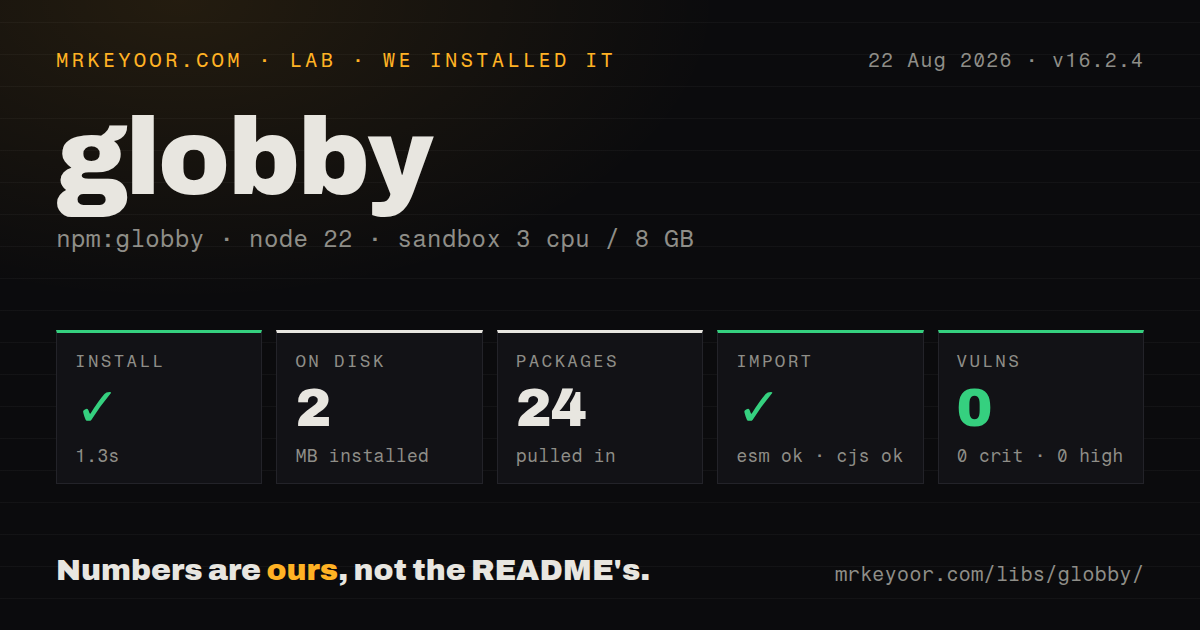
| Install | ✓ · 1.3s | 24 packages on disk · 2 MB |
| Import | ✓ | ESM import works · require() works · ESM package with exports map |
| Browser | n/a | could not be bundled for the browser (Node-only code, most likely) |
| Types | ✓ | TypeScript types bundled |
| Known vulns | 0 | 0 critical · 0 high · 0 moderate · 0 low (npm audit) |
Answers from our run
Does globby install cleanly?
Yes. In a fresh container with an empty cache, npm install globby finished in 1 seconds, leaving 24 packages and 2 MB on disk. npm audit reported no known vulnerabilities.
Can globby run in a browser?
Not directly: esbuild could not bundle it for the browser in our run, which normally means it depends on Node built-ins. Use it on the server, or find a browser-targeted alternative.
Does globby work with both ESM and CommonJS?
Yes. Both import 'globby' and require('globby') worked in Node 22 in our run. The package is published as ESM with an exports map.
Does globby include TypeScript types?
Yes, type declarations ship inside the package, so no @types install is needed.
globby or fast-glob: which should you use?
fast-glob: Choose it for direct access to the traversal engine when ignore-file discovery and directory expansion are unnecessary. globby 16.2.4 installed in 1.3 seconds and occupied 2 MB across 24 packages in our sandbox, but its browser build failed.
When should you not use globby?
The code runs in a browser; our esbuild browser target could not bundle globby's Node-only file-system path
Use it if
- A build or migration script combines several inclusion and exclusion patterns in one file scan
- Selection must honor nested `.gitignore`, a global Git exclude file, or another tool's ignore syntax
- A match set can be large enough that paths should be consumed from a stream
- Windows paths or names containing glob metacharacters need conversion before becoming patterns
- The code runs in a browser; our esbuild browser target could not bundle globby's Node-only file-system path
- One ordinary pattern covers the job; fast-glob exposes the underlying scanner without globby's ignore-file and directory-expansion layer
- Node's built-in `fs.glob` already meets your runtime and pattern requirements, so another 24-package install buys no needed behavior
- The application still supports Node 18; globby 16.2.4 declares Node 20 as its minimum
- Untrusted callers can submit negation-only patterns; the default adds `**/*`, which can walk the whole working tree unless you turn that expansion off
Setup reality
We installed globby 16.2.4 in a clean Node 22 Bookworm container in 1.3 seconds. The install left 24 packages using 2 MB, and npm audit reported 0 known vulnerabilities across all severities. Globby declares 7 direct dependencies and 0 peers; the package is 132 KB unpacked, has an MIT license, and bundles TypeScript declarations. It is marked ESM with an exports map, while both require() and ESM import worked in our checks.
Node 20 or newer is required. Our browser build through esbuild failed, so keep globby behind a Node entry point and away from modules imported by frontend code. It needs no credentials or project config. Its working directory defaults to process.cwd(), which often differs between a local shell, a package script, and CI; set cwd when the scan belongs to a known project directory.
Glob syntax always uses forward slashes. Windows path.join() emits backslashes that can fail silently, so assemble patterns with path.posix.join() or call convertPathToPattern() for a literal path. That conversion also escapes parentheses, brackets, and braces. A returned path is relative to cwd unless the options request absolute results.
Ignore discovery is opt-in: gitignore, globalGitignore, and ignoreFiles cover different sources. A custom file-system adapter needs read and stat functions when those options are active. Version 16.2.4 restores the expected combination of ignore and gitignore. Generated task objects contain a file-system cache, so regenerate them after files change. A globby stream avoids a large result array, but downstream processing still needs its own concurrency limit.
Patterns
Combine extension matching with an exclusion find-files
import {globby} from 'globby';

const files = await globby([
  'src/**/*.{js,ts}',
  '!src/**/*.test.*',
]);
Negative entries remove paths selected by positive patterns. Use `/` inside every glob even on Windows; platform separators belong in literal paths, not pattern syntax.
Apply repository ignore rules to a scan respect-gitignore
const files = await globby('**/*', {
  gitignore: true,
  dot: true,
});
`gitignore` defaults to false. Once enabled, applicable Git rules take priority over user patterns, so a positive pattern cannot pull an ignored file back into the result.
Avoid a recursive ignore-file search read-one-ignore-file
const files = await globby('**/*', {
  ignoreFiles: '.gitignore',
});
A fixed `.gitignore` path reads the root file only. A recursive ignore pattern has to discover and parse files throughout the tree before final filtering.
Consume paths without collecting the full result stream-matches
import {globbyStream} from 'globby';

for await (const file of globbyStream('logs/**/*.json')) {
  await processFile(file);
}
The readable stream emits matches as traversal progresses. Awaiting each handler is serial; add a bounded work queue if processing should overlap without creating unlimited tasks.
Match the package directories themselves return-directories
const directories = await globby('packages/*', {
  onlyFiles: false,
  expandDirectories: false,
});
Directory expansion is on by default and turns a directory match into a content scan. Disable it and allow non-files when the directory path itself is the desired answer.
Convert a Windows directory before adding a wildcard escape-literal-path
import {convertPathToPattern, globby} from 'globby';

const base = convertPathToPattern('C:\Program Files (x86)');
const files = await globby(`${base}/*.txt`);
`convertPathToPattern()` changes backslashes to forward slashes and escapes glob metacharacters in the literal directory. Without it, `(x86)` is interpreted as syntax rather than plain text.
Stop negative-only input from expanding to every file limit-negative-input
const files = await globby(userPatterns, {
  expandNegationOnlyPatterns: false,
});
The default prepends `**/*` when all supplied patterns are negative. Disable that behavior when a caller controls the list, or one exclusion can trigger a repository-wide traversal.
Scan a directory relative to the current module use-url-cwd
const fixtures = await globby('**/*.json', {
  cwd: new URL('./fixtures/', import.meta.url),
});
Globby accepts a `URL` as `cwd`, so ESM code can stay relative to `import.meta.url`. Returned paths remain relative to that directory unless `absolute` is requested.
Distinguish a glob from a literal input detect-pattern
import {globby, isDynamicPattern} from 'globby';

const result = isDynamicPattern(input, options)
  ? await globby(input, options)
  : [input];
Options influence whether syntax is dynamic. Pass the same option object to both calls or the precheck can disagree with the eventual matcher.
Inspect work before calling fast-glob generate-tasks
import fastGlob from 'fast-glob';
import {generateGlobTasks} from 'globby';

for (const task of await generateGlobTasks(patterns, options)) {
  const matches = await fastGlob(task.patterns, task.options);
  console.log(matches);
}
Each task carries a file-system cache. Generate a new task set if earlier processing can create or remove files; rerunning an old object may return stale traversal data.
Build a reusable Git ignore predicate check-gitignored
import {isGitIgnored} from 'globby';

const isIgnored = await isGitIgnored({
  cwd: projectRoot,
  deep: 4,
});

if (!isIgnored(candidate)) {
  await indexFile(candidate);
}
The predicate reads ignore rules from `cwd` within the selected depth. Candidate paths must be interpreted against that same root, and unreadable directories throw unless `suppressErrors` is enabled.
Use the synchronous call during startup use-sync-api
import {globbySync} from 'globby';

const migrations = globbySync('migrations/*.sql', {
  cwd: new URL('.', import.meta.url),
});
`globbySync()` blocks the Node thread until traversal completes. Reserve it for startup or short command-line work; request-serving paths should use the promise or stream API.
Alternatives
| Package | Registry | Pick it when |
|---|---|---|
| fast-glob | npm | Choose it for direct access to the traversal engine when ignore-file discovery and directory expansion are unnecessary. |
| glob | npm | Choose it when an existing codebase depends on the long-running node-glob API and its option semantics. |
| tinyglobby | npm | Choose it when a smaller dependency covers the needed include, exclude, and ignore behavior. |
More utils guides
lru-cache · type-fest · ajv · zod · p-limit · find-up · the whole shelf →
How this guide is made: grounded in the library's documentation, release notes, changelog, and issue history, on a fixed rubric — not a hands-on install of every release. The 50 most-downloaded entries are additionally install-verified in clean containers. Corrections: contact the desk.