glob-stream review
glob-stream 8.0.3 walks a filesystem from one or more glob patterns and emits each match through a `streamx` readable. Every object contains absolute `cwd`, `base`, and `path` values; it does not open the file or create a Vinyl object. Positive patterns decide where traversal starts, negative patterns and `ignore` remove matches, and `uniqueBy` drops duplicates. The current patch fixes a race where the stream could start and finish too early. Our install confirmed a CommonJS, Node-oriented package with no bundled TypeScript declarations and a browser build that fails on filesystem dependencies.
glob-stream 8.0.3 installed 17 packages in 2.8 seconds and used 1 MB in our sandbox, but it shipped no types and could not produce a browser bundle. Use it when path discovery must stay inside a Gulp or streamx object pipeline; use a promise-based glob package for ordinary scripts.
We installed it
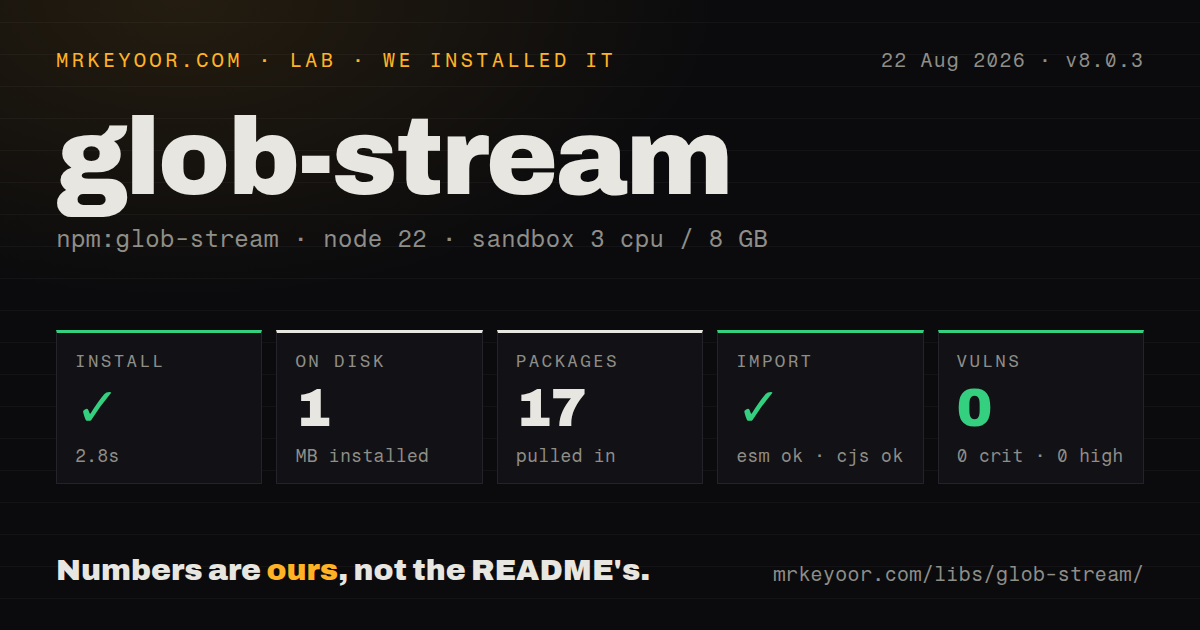
| Install | ✓ · 2.8s | 17 packages on disk · 1 MB |
| Import | ✓ | ESM import works · require() works · CommonJS package |
| Browser | n/a | could not be bundled for the browser (Node-only code, most likely) |
| Types | — | no TypeScript types found |
| Known vulns | 0 | 0 critical · 0 high · 0 moderate · 0 low (npm audit) |
Answers from our run
Does glob-stream install cleanly?
Yes. In a fresh container with an empty cache, npm install glob-stream finished in 3 seconds, leaving 17 packages and 1 MB on disk. npm audit reported no known vulnerabilities.
Can glob-stream run in a browser?
Not directly: esbuild could not bundle it for the browser in our run, which normally means it depends on Node built-ins. Use it on the server, or find a browser-targeted alternative.
Does glob-stream work with both ESM and CommonJS?
Yes. Both import 'glob-stream' and require('glob-stream') worked in Node 22 in our run. The package is published as CommonJS.
Does glob-stream include TypeScript types?
No type declarations were found in our install, so TypeScript users need their own declarations.
glob-stream or fast-glob: which should you use?
fast-glob: Choose it for promise, sync, or stream results with a wider path-oriented API. glob-stream 8.0.3 installed 17 packages in 2.8 seconds and used 1 MB in our sandbox, but it shipped no types and could not produce a browser bundle.
When should you not use glob-stream?
You only need an array or async iterator of path strings. fast-glob, globby, or glob avoids event and stream cleanup code.
Use it if
- A Gulp-style object pipeline should receive path records as the directory walk progresses.
- Downstream code needs `cwd` and `base` attached to each path so it can preserve relative layout.
- Several positive and negative patterns must feed one backpressured stream with duplicate removal.
- Your existing transforms already accept `streamx` or compatible object-mode streams.
- You only need an array or async iterator of path strings. `fast-glob`, `globby`, or `glob` avoids event and stream cleanup code.
- The source step must include file contents, stats, or Vinyl metadata. Version 8 emits only `{cwd, base, path}` records.
- The project requires bundled TypeScript declarations. Our package inspection found none, so local declarations or community types are required.
- Pattern order is part of your inclusion logic. Version 8 removed ordered globs, so use explicit negative patterns or separate passes instead.
- You need file watching or repeat notifications. glob-stream performs one traversal and ends after the initial matches.
Setup reality
We installed glob-stream 8.0.3 in a clean Node 22 Bookworm sandbox. npm completed in 2.8 seconds and left 17 packages occupying 1 MB. The package was 24 KB unpacked with 8 direct dependencies and no peers, and npm audit reported 0 known vulnerabilities. It is CommonJS with no exports map; require() and ESM import both worked. No TypeScript declarations were present.
No credentials, native compilation, or config file are involved. Set cwd explicitly when a task can run from different directories because the default is process.cwd(). Each emitted record contains absolute normalized paths, but no bytes or stat object. If the next stage reads content, open file.path yourself or use vinyl-fs. base is inferred from the non-glob parent unless you set it or enable cwdbase.
At least one positive glob is mandatory. An all-negative list throws before traversal. A wildcard may match nothing, while a missing literal path emits an error unless allowEmpty is true. Dotfiles stay out unless dot is enabled. Version 8 no longer respects ordered pattern semantics, and output order is not promised, so sort collected results before snapshots or reproducible manifests.
The package walks directories through Node filesystem APIs and streamx, and our esbuild browser target failed. Treat it as server or build-process code. Errors destroy the stream, so attach an error listener or consume it through a pipeline that rejects. Version 8.0.3 specifically repairs premature stream start and completion; earlier 8.0 patches also addressed deep queues and circular symlink traversal.
Patterns
Observe matching path records stream-path-records
const globStream = require('glob-stream');

const files = globStream('src/**/*.js');
files.on('data', ({cwd, base, path}) => {
  console.log({cwd, base, path});
});
files.on('error', console.error);
Version 8 emits path metadata only. `cwd`, `base`, and `path` are absolute and normalized with forward slashes.
Combine includes with exclusions exclude-patterns
const files = globStream([
  'src/**/*.{js,ts}',
  '!src/**/*.test.{js,ts}',
  '!src/generated/**',
]);
The list needs at least one positive pattern. An all-negative array throws a `Missing positive glob` error.
Resolve patterns from a fixed root fix-working-directory
const path = require('node:path');

const files = globStream('packages/*/src/**/*.ts', {
  cwd: path.resolve(__dirname, '..'),
});
`cwd` otherwise follows `process.cwd()`. An explicit path prevents CI and local commands from scanning different trees.
Accept an absent literal path allow-optional-file
const config = globStream('config/local.json', {
  allowEmpty: true,
});
A missing singular path errors by default. Wildcard patterns may return zero matches without this option.
Match dotfiles include-hidden-files
const configs = globStream('**/*', {
  cwd: './config',
  dot: true,
});
`dot` defaults to false, which excludes names such as `.env` and files below `.config`.
Apply reusable ignore rules use-ignore-option
const files = globStream('src/**/*.js', {
  ignore: ['src/vendor/**', 'src/**/*.generated.js'],
});
`ignore` accepts one string or an array. Version 8 does not restore ordered glob behavior, so keep inclusion logic explicit.
Control relative output paths set-output-base
const path = require('node:path');

const files = globStream('assets/**/*', {
  cwd: __dirname,
  base: path.join(__dirname, 'assets'),
});
files.on('data', file => console.log(path.relative(file.base, file.path)));
Changing `base` changes the metadata used for relative paths. It does not expand or narrow the matched set.
Use one root for several globs share-cwd-base
const files = globStream(['images/**', 'styles/**'], {
  cwd: './public',
  cwdbase: true,
});
`cwdbase: true` replaces each inferred glob parent with `cwd`, giving separate positive patterns the same relative root.
Drop duplicate basenames deduplicate-custom-key
const path = require('node:path');

const files = globStream(['packages/*/assets/**', 'shared/assets/**'], {
  uniqueBy: file => path.basename(file.path).toLowerCase(),
});
The default key is the full `path`. A basename key deliberately discards distinct files whose names collide.
Emit matching directories match-directories
const directories = globStream('packages/*/', {
  cwd: process.cwd(),
});
A directory match is still a plain path record. It has no Dirent, stat information, or file contents.
Send records into streamx pipe-object-mode
const {Writable} = require('streamx');

const sink = new Writable({
  objectMode: true,
  write(file, done) {
    console.log(file.path);
    done(null);
  },
});
globStream('src/**/*').pipe(sink);
The readable is in object mode. A writable that accepts only Buffer or string chunks will reject these records.
Collect deterministic output collect-and-sort
function collect(globs, options) {
  return new Promise((resolve, reject) => {
    const found = [];
    globStream(globs, options)
      .on('data', item => found.push(item))
      .once('error', reject)
      .once('end', () => resolve(found.sort((a, b) => a.path.localeCompare(b.path))));
  });
}
Traversal order is not a public guarantee. Sort after collection when output feeds snapshots, hashes, or reproducible manifests.
Alternatives
| Package | Registry | Pick it when |
|---|---|---|
| fast-glob | npm | Choose it for promise, sync, or stream results with a wider path-oriented API. |
| globby | npm | Choose it for an ESM promise API, multiple patterns, and gitignore support. |
| glob | npm | Choose it for node-glob compatibility, async iteration, and PathScurry traversal controls. |
| vinyl-fs | npm | Choose it when a Gulp source should emit Vinyl objects with file contents. |
More utils guides
lru-cache · type-fest · ajv · zod · p-limit · find-up · the whole shelf →
How this guide is made: grounded in the library's documentation, release notes, changelog, and issue history, on a fixed rubric — not a hands-on install of every release. The 50 most-downloaded entries are additionally install-verified in clean containers. Corrections: contact the desk.