GitPython review
GitPython 3.1.60 gives Python code object wrappers for repositories, commits, trees, blobs, refs, the index, remotes, and working copies. Most useful operations still call the machine's `git` executable; `gitdb` covers some object reads, and `repo.git` exposes commands missing from the higher-level API. Release 3.1.60 fixes three more command-argument security advisories after the five addressed by the 3.1.59 build we tested. This is a practical wrapper for trusted automation, not an in-process Git implementation or a safe parser for arbitrary user-supplied options.
GitPython 3.1.59 installed in 0.2 seconds and used 2 MB in our sandbox, but current 3.1.60 adds three command-argument security fixes and the project still warns against daemon use. Install it for short-lived automation over trusted repositories; choose another Git implementation when inputs are hostile or the process must stay alive indefinitely.
We installed it
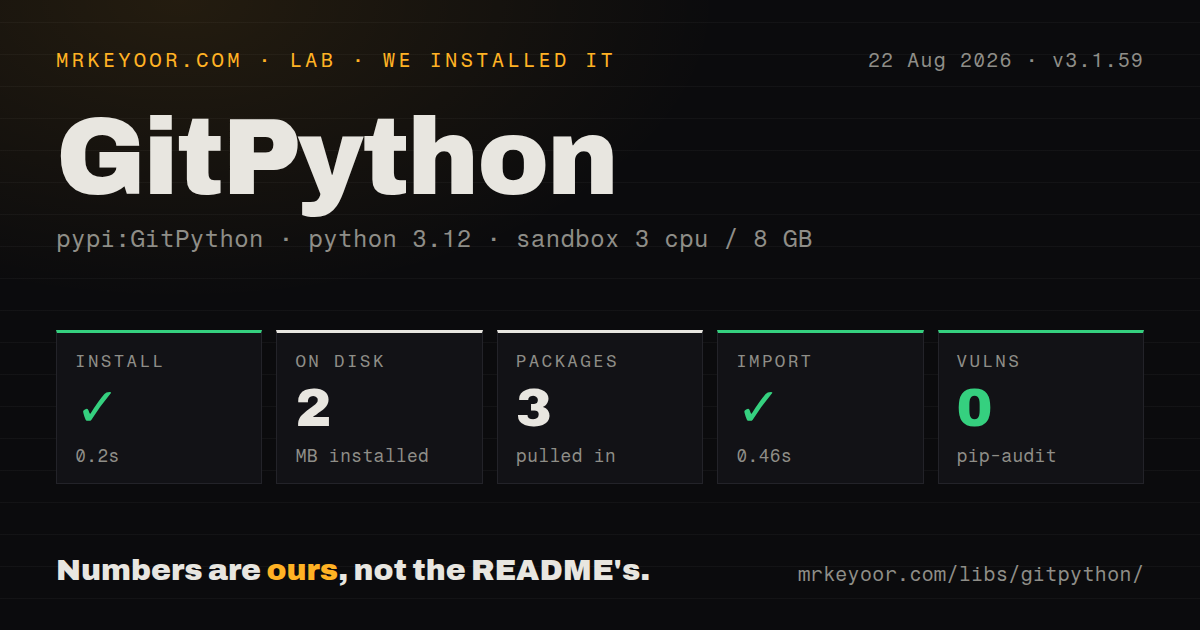
| Install | ✓ · 0.2s | 3 packages on disk · 2 MB |
| Import | ✓ | import git in 0.46s · pure Python · py.typed · requires Python >=3.7 |
| Known vulns | 0 | (pip-audit) |
Answers from our run
Does GitPython install cleanly?
Yes. In a fresh container with an empty cache, pip install GitPython finished in 0.2s, leaving 3 packages and 2 MB on disk. pip-audit reported no known vulnerabilities.
What does GitPython need to run?
Python >=3.7, and nothing compiled: it is pure Python. In our run import git succeeded in 0.46s, and the package ships py.typed for type checkers.
GitPython or dulwich: which should you use?
dulwich: Use it when Git objects and protocols must work without a system Git executable. GitPython 3.1.59 installed in 0.2 seconds and used 2 MB in our sandbox, but current 3.1.60 adds three command-argument security fixes and the project still warns against daemon use.
When should you not use GitPython?
The code runs inside a persistent daemon. The README says GitPython leaks system resources and recommends moving it into a disposable process.
Discussed on
- hnInteract with git from python4 points
Use it if
- A Python release job needs to inspect refs, stage selected files, create commits, fetch, or push through an installed Git client.
- You need to read a blob or walk commits at an older revision without changing the working tree.
- Repository code benefits from `Repo`, `Commit`, `Tree`, `Diff`, and `Remote` objects plus a raw command escape hatch.
- The task is short lived, repository inputs are trusted, and the host already has the required Git executable and credentials.
- The code runs inside a persistent daemon. The README says GitPython leaks system resources and recommends moving it into a disposable process.
- Users can supply repository URLs, ref names, paths, protocols, or Git flags. Versions 3.1.59 and 3.1.60 together address eight security advisories around command arguments.
- The runtime cannot provide the `git` executable. Most operations require it on `PATH` or through `GIT_PYTHON_GIT_EXECUTABLE`.
- You need an actively expanding feature set. Maintainers explicitly label the project maintenance mode and prioritize safety fixes over ordinary feature work.
- Bulk object traversal must avoid subprocess behavior. Compare `pygit2` for libgit2 bindings or Dulwich for a Python implementation of Git objects and protocols.
Setup reality
We installed GitPython 3.1.59 in a fresh Python 3.12 Bookworm sandbox on 2026-08-22. pip finished in 0.2 seconds, leaving three packages and 2 MB on disk. pip-audit found 0 known vulnerabilities. The measured package declared 17 direct dependency entries, required Python 3.7 or newer, contained pure Python code with py.typed, and carried BSD-3-Clause metadata. import git worked in 0.46 seconds. PyPI now serves 3.1.60.
The wheel is only one layer of setup. Most methods locate and execute the system Git binary. Put it on PATH, set GIT_PYTHON_GIT_EXECUTABLE before import, or refresh GitPython with an explicit executable. SSH agents, credential helpers, proxy variables, safe-directory rules, and global configuration remain Git concerns. A container can pass pip install and import git yet fail on its first repository operation because no Git executable exists.
Repository and config objects can keep file descriptors, child processes, or lock files alive. Close Repo explicitly or use it as a context manager. A config writer also belongs in a with block so its lock is released. The project warns that destructor cleanup is unreliable for daemons and suggests isolating GitPython in a process that can be discarded. Windows has a separately documented support limitation.
Arguments are the sharp edge in 3.1.60. repo.git converts Python calls into command-line options, and convenience methods eventually invoke Git too. Allowlist any URL, ref, path, protocol, and flag crossing a trust boundary. Inspect every PushInfo result because a rejected push may be returned as a flag instead of an exception. The 0 audit findings from our 3.1.59 package graph do not make application-built command arguments safe.
Patterns
Open the containing repository open-repository
from git import Repo

with Repo(".", search_parent_directories=True) as repo:
    print(repo.working_tree_dir)
    print(repo.head.commit.hexsha)
    print(repo.head.is_detached)
Upward search can find a parent worktree; the context manager closes resources attached to the repository object.
Create a shallow clone clone-shallow-repository
from git import Repo

repo = Repo.clone_from(
    "https://github.com/example/project.git",
    "/tmp/project",
    branch="main",
    depth=1,
)
repo.close()
Treat the URL and clone options as command inputs. Release 3.1.60 continues security work on unsafe arguments.
Separate staged, unstaged, and untracked paths inspect-working-tree
from git import Repo

with Repo(".") as repo:
    staged = [item.a_path for item in repo.index.diff("HEAD")]
    unstaged = [item.a_path for item in repo.index.diff(None)]
    untracked = repo.untracked_files
    print(staged, unstaged, untracked)
`index.diff("HEAD")` and `index.diff(None)` describe staged and unstaged changes separately; untracked files are a third list.
Add selected files and commit them stage-and-commit
from git import Repo

with Repo("/srv/work") as repo:
    repo.index.add(["README.md", "src/app.py"])
    commit = repo.index.commit("Update application docs")
    print(commit.hexsha)
Use an explicit path list when automation must avoid staging unrelated working-tree changes.
Read recent commits for one path walk-commit-history
from git import Repo

with Repo(".") as repo:
    for commit in repo.iter_commits(
        "main", paths="src/", max_count=25
    ):
        print(commit.committed_datetime, commit.summary)
Objects load attributes lazily, so bound the traversal on repositories with long histories.
Read a blob without changing the checkout read-file-at-revision
from git import Repo

with Repo(".") as repo:
    commit = repo.commit("HEAD~2")
    blob = commit.tree / "pyproject.toml"
    text = blob.data_stream.read().decode("utf-8")
    print(text)
A missing path raises `KeyError`, and reading the blob does not modify the checkout or index.
Create a branch at the current commit create-and-checkout-branch
from git import Repo

with Repo(".") as repo:
    branch = repo.create_head("fix/config", repo.head.commit)
    branch.checkout()
    print(repo.active_branch.name)
`active_branch` is unavailable under a detached HEAD, a common checkout state in CI.
Fetch and prune remote refs fetch-remote
from git import Repo

with Repo(".") as repo:
    origin = repo.remotes.origin
    results = origin.fetch(prune=True)
    for info in results:
        print(info.ref, info.note)
Authentication comes from Git, its credential helpers, the SSH agent, and process environment.
Detect a rejected push check-push-result
from git import Repo
from git.remote import PushInfo

with Repo(".") as repo:
    results = repo.remotes.origin.push("HEAD:refs/heads/main")
    for info in results:
        if info.flags & PushInfo.ERROR:
            raise RuntimeError(info.summary)
GitPython may encode a rejected push in `PushInfo.flags`; successful method return is not enough.
Use the command proxy run-raw-git-command
from git import Repo

with Repo(".") as repo:
    output = repo.git.log(
        "--oneline",
        "--decorate",
        max_count=10,
    )
    print(output)
Keyword names become Git options, so never let untrusted text choose flags or raw positions.
Set repository-local identity safely write-local-config
from git import Repo

with Repo(".") as repo:
    with repo.config_writer(config_level="repository") as writer:
        writer.set_value("user", "name", "Release Bot")
        writer.set_value("user", "email", "bot@example.org")
Leaving the writer open can retain the repository config lock and block a later Git process.
Point GitPython at a nonstandard Git binary select-git-executable
import os
os.environ["GIT_PYTHON_GIT_EXECUTABLE"] = "/opt/git/bin/git"

import git

git.refresh()
print(git.Git().version_info)
Set the variable before importing `git`; a successful import alone does not prove repository commands can run.
Alternatives
| Package | Registry | Pick it when |
|---|---|---|
| dulwich | PyPI | Use it when Git objects and protocols must work without a system Git executable. |
| pygit2 | PyPI | Use it when libgit2-backed object access and fewer command subprocesses fit the deployment. |
| giturlparse | PyPI | Use it when the only job is parsing and normalizing remote URLs. |
More utils guides
lru-cache · type-fest · ajv · zod · p-limit · find-up · the whole shelf →
How this guide is made: grounded in the library's documentation, release notes, changelog, and issue history, on a fixed rubric — not a hands-on install of every release. The 50 most-downloaded entries are additionally install-verified in clean containers. Corrections: contact the desk.