formidable review
Formidable 3.5.4 reads a Node `IncomingMessage` and parses multipart uploads, URL-encoded fields, JSON, or octet-stream bodies. Multipart files go to the operating system's temporary directory by default, though `fileWriteStreamHandler` can send each file into your own Writable stream. The parser enforces separate limits for file count, bytes per file, total file bytes, field count, and field bytes. It returns `[fields, files]` from `parse()`, with arrays for values in the 3.x API. The 3.5.4 release notes describe a switch to pnpm, fewer project dependencies, audit-related dependency fixes, and removal of an `os.machine` call tied to issue 994.
Formidable 3.5.4 installed in 0.9 seconds with 7 packages, 3 MB on disk, and 0 audit findings in our sandbox, but its browser bundle failed and no TypeScript declarations shipped. Install it for controlled Node upload streams; choose framework middleware for `req.file` conventions or a Fetch-native parser at the edge.
We installed it
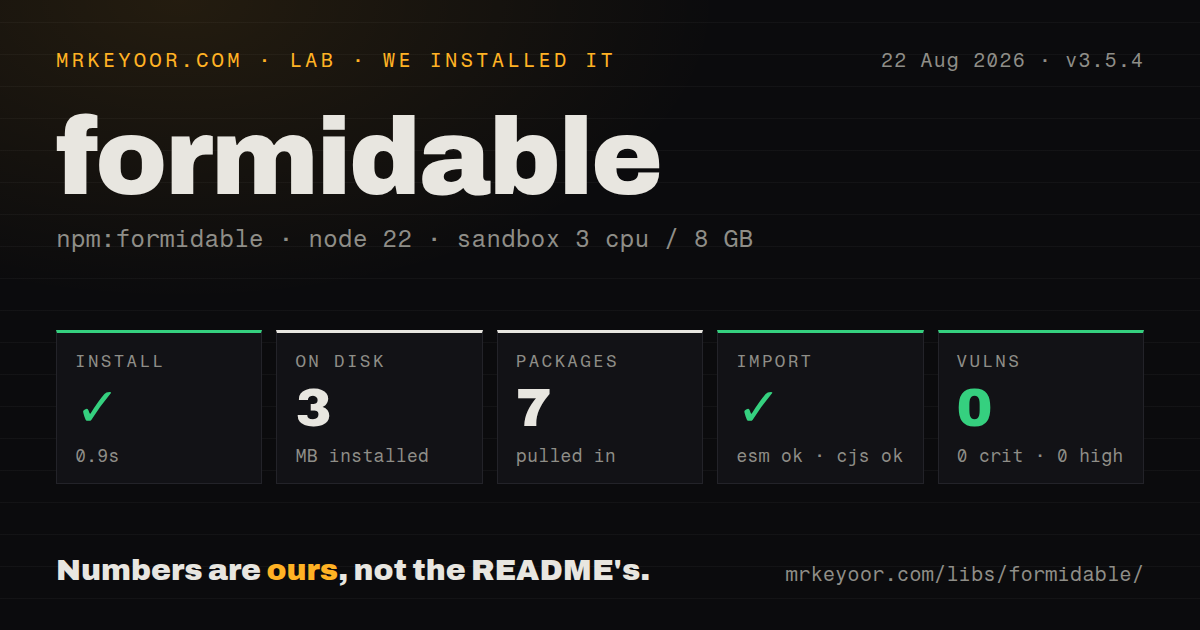
| Install | ✓ · 0.9s | 7 packages on disk · 3 MB |
| Import | ✓ | ESM import works · require() works · ESM package with exports map |
| Browser | n/a | could not be bundled for the browser (Node-only code, most likely) |
| Types | — | no TypeScript types found |
| Known vulns | 0 | 0 critical · 0 high · 0 moderate · 0 low (npm audit) |
Answers from our run
Does formidable install cleanly?
Yes. In a fresh container with an empty cache, npm install formidable finished in 0.9s, leaving 7 packages and 3 MB on disk. npm audit reported no known vulnerabilities.
Can formidable run in a browser?
Not directly: esbuild could not bundle it for the browser in our run, which normally means it depends on Node built-ins. Use it on the server, or find a browser-targeted alternative.
Does formidable work with both ESM and CommonJS?
Yes. Both import 'formidable' and require('formidable') worked in Node 22 in our run. The package is published as ESM with an exports map.
Does formidable include TypeScript types?
No type declarations were found in our install, so TypeScript users need their own declarations.
formidable or busboy: which should you use?
busboy: Use it for lower-level multipart events when you want to build field collection and storage yourself. Formidable 3.5.4 installed in 0.9 seconds with 7 packages, 3 MB on disk, and 0 audit findings in our sandbox, but its browser bundle failed and no TypeScript declarations shipped.
When should you not use formidable?
The runtime exposes only Fetch Request objects, as many edge platforms do. Formidable consumes Node's incoming request stream.
Use it if
- A Node HTTP endpoint must receive large multipart files without buffering the entire request in memory.
- Uploads need to flow into object storage through a Writable returned by `fileWriteStreamHandler`.
- The route needs independent ceilings for each file, the combined file payload, field bytes, file count, and field count.
- You want to enable only selected built-in parsers or attach a custom parser plugin to the form instance.
- The runtime exposes only Fetch `Request` objects, as many edge platforms do. Formidable consumes Node's incoming request stream.
- Your Express app wants middleware that populates `req.file` or `req.files`. Multer owns that convention; Formidable returns its own fields and files result.
- Application code requires declarations shipped by every runtime package. Our 3.5.4 package inspection found no TypeScript types.
- You cannot create and police an upload directory or remove temporary files after processing. Local disk storage is the default and cleanup belongs to the application.
- Existing code assumes the 2.x single-value shape. In 3.x, fields and file keys hold arrays, so call sites must choose which value to use.
Setup reality
We installed formidable 3.5.4 in a fresh Node 22 Bookworm sandbox in 0.9 seconds. It left 7 packages using 3 MB, and npm audit found 0 known vulnerabilities. The package declares 3 direct dependencies, 0 peer dependencies, and 316 KB unpacked. It is marked as ESM with an exports map; both require() and ESM import worked. We found no bundled TypeScript declarations.
No login or service credential is part of Formidable itself. Storage is the first setup choice. The default uploadDir is the operating system's temporary directory. Create a custom directory before parsing because the README warns that files are silently discarded when that directory does not exist. Treat originalFilename and mimetype as untrusted client values, and generate your own destination name.
The request body can be consumed once. Keep other body parsers away from this route, pass ctx.req from Koa, and set limits before calling parse(). Version 3 defaults include 1,000 fields, 1,000 files, 200 MB per file, and a total file limit derived from maxFileSize; production endpoints usually need smaller values chosen for their workload. A false result from filter ignores a file without rejecting the whole form.
Our esbuild browser build failed because the entry depends on Node-only modules. The package metadata accepts Node 14 or newer, while the current README says Node 20 or newer, so deploy against the stricter documented floor. When a custom fileWriteStreamHandler replaces local storage, your code owns stream errors and destination completion. Parsing success alone does not prove that an object-store upload has finished.
Patterns
Await fields and files parse-multipart-request
import formidable from 'formidable';

const form = formidable({ uploadDir: './uploads', keepExtensions: true });
const [fields, files] = await form.parse(req);
console.log(fields.title?.[0], files.avatar?.[0]?.filepath);
Formidable 3 returns arrays under both fields and files, including a form that submitted one value.
Parse an Express request handle-express-route
app.post('/uploads', async (req, res, next) => {
  try {
    const [fields, files] = await formidable().parse(req);
    res.json({ fields, files });
  } catch (error) {
    next(error);
  }
});
The raw request stream is read once. Do not run JSON or URL-encoded body middleware first on this route.
Bound every upload dimension set-upload-limits
const form = formidable({
  maxFiles: 4,
  maxFileSize: 8 * 1024 * 1024,
  maxTotalFileSize: 20 * 1024 * 1024,
  maxFields: 40,
  maxFieldsSize: 512 * 1024,
});
The 3.x parser enforces per-file and total file-byte limits separately; set both for multi-file forms.
Map an oversize file to HTTP 413 classify-size-error
import { errors as formidableErrors } from 'formidable';

try {
  await form.parse(req);
} catch (error) {
  if (error.code === formidableErrors.biggerThanMaxFileSize) {
    res.writeHead(413).end('file too large');
    return;
  }
  throw error;
}
The exported error code for one file exceeding maxFileSize is 1016; Formidable assigns HTTP 413 to that failure.
Ignore unexpected file fields filter-file-parts
const form = formidable({
  filter(part) {
    return part.name === 'avatar' &&
      Boolean(part.mimetype?.startsWith('image/'));
  },
});
Returning false skips the part without failing parse(). The browser-supplied MIME string does not verify the file bytes.
Own the stored filename generate-safe-filename
import { randomUUID } from 'node:crypto';

const form = formidable({
  uploadDir: './uploads',
  keepExtensions: true,
  filename(_name, extension) {
    return `${randomUUID()}${extension}`;
  },
});
Create uploadDir before parsing. The README says an absent directory causes uploaded files to be discarded silently.
Supply a destination Writable stream-to-object-storage
const completions = [];
const form = formidable({
  fileWriteStreamHandler(file) {
    const target = openObjectUpload(file.newFilename);
    completions.push(target.done);
    return target.writable;
  },
});
await form.parse(req);
await Promise.all(completions);
With a custom write handler, wait for the destination's completion signal as well as Formidable's parse promise.
Calculate a SHA-256 digest hash-file-during-upload
const form = formidable({ hashAlgorithm: 'sha256' });
const [, files] = await form.parse(req);
const digest = files.document[0].hash;
The hash is updated while bytes stream in and is available on the completed file object.
Read server-side byte progress observe-server-progress
form.on('progress', (received, expected) => {
  if (expected) console.log(Math.round((received / expected) * 100));
  else console.log(received);
});
bytesExpected depends on a usable Content-Length header and can be null for a chunked request.
Clean files after processing remove-temporary-files
import { unlink } from 'node:fs/promises';

const [, files] = await form.parse(req);
try {
  await inspectUpload(files.document[0]);
} finally {
  const all = Object.values(files).flat();
  await Promise.all(all.map(file => unlink(file.filepath).catch(() => {})));
}
Formidable does not remove local upload files after application processing ends.
Use Koa's Node request parse-koa-request
router.post('/uploads', async (ctx) => {
  const [fields, files] = await formidable().parse(ctx.req);
  ctx.body = { fields, files };
});
Pass `ctx.req`, which is the Node IncomingMessage. `ctx.request` is Koa's wrapper object.
Allow multipart bodies only enable-multipart-parser
import formidable, { multipart } from 'formidable';

const form = formidable({ enabledPlugins: [multipart] });
At least 1 built-in plugin must remain enabled. This list rejects Formidable's JSON, query-string, and octet-stream parsing paths.
Alternatives
| Package | Registry | Pick it when |
|---|---|---|
| busboy | npm | Use it for lower-level multipart events when you want to build field collection and storage yourself. |
| multer | npm | Use it when Express middleware and `req.file` or `req.files` are the desired route interface. |
| multiparty | npm | Use it mainly to maintain code already written around its event and callback model. |
More utils guides
lru-cache · type-fest · ajv · zod · p-limit · find-up · the whole shelf →
How this guide is made: grounded in the library's documentation, release notes, changelog, and issue history, on a fixed rubric — not a hands-on install of every release. The 50 most-downloaded entries are additionally install-verified in clean containers. Corrections: contact the desk.