fontace review
fontace 0.4.1 reads a TTF, WOFF, or WOFF2 file from a Node Buffer and returns the fields needed to compose CSS `@font-face`: embedded family, style, weight or variable weight range, format, Unicode coverage, and a variable-font flag. It is a synchronous metadata extractor, so it does no fetching, rendering, shaping, subsetting, or file rewriting. The only change in 0.4.1 is an update of its `fontkitten` parser dependency to 1.0.2. This is mainly a build-tool helper for web font pipelines, not a UI runtime library.
fontace 0.4.1 installed in 1.1 seconds and used 1 MB in our sandbox, but its full browser import measured 94.4 KB gzipped, so it fits Node-based font build steps better than client bundles. Install it for `@font-face` metadata only; choose a full parser when the task reaches glyphs, shaping, collections, or subsetting.
We installed it
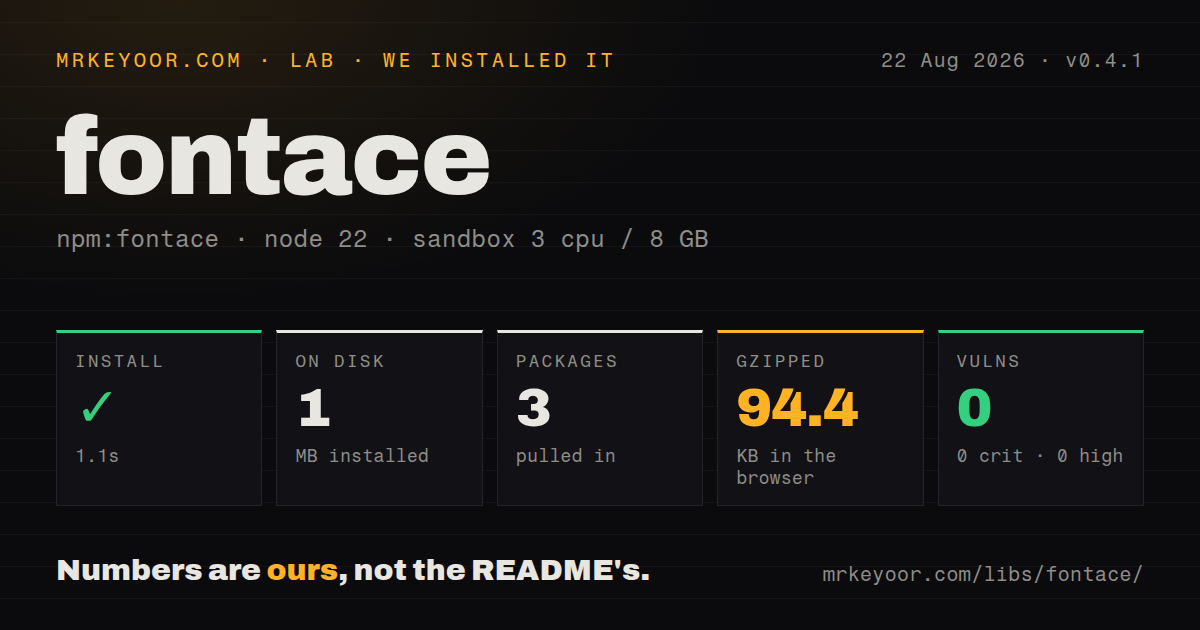
| Install | ✓ · 1.1s | 3 packages on disk · 1 MB |
| Import | ✓ | ESM import works · require() works · ESM package with exports map |
| Browser | 94.4 KB | gzipped (242.2 KB minified), bundled with esbuild |
| Types | — | no TypeScript types found |
| Known vulns | 0 | 0 critical · 0 high · 0 moderate · 0 low (npm audit) |
Answers from our run
Does fontace install cleanly?
Yes. In a fresh container with an empty cache, npm install fontace finished in 1 seconds, leaving 3 packages and 1 MB on disk. npm audit reported no known vulnerabilities.
How much does fontace add to a browser bundle?
94.4 KB gzipped (242.2 KB minified) when the whole package is bundled for the browser with esbuild. Importing only part of it is usually smaller.
Does fontace work with both ESM and CommonJS?
Yes. Both import 'fontace' and require('fontace') worked in Node 22 in our run. The package is published as ESM with an exports map.
Does fontace include TypeScript types?
No type declarations were found in our install, so TypeScript users need their own declarations.
fontace or fontkit: which should you use?
fontkit: Use it when glyph access, shaping, collections, or subsetting is part of the job. fontace 0.4.1 installed in 1.1 seconds and used 1 MB in our sandbox, but its full browser import measured 94.4 KB gzipped, so it fits Node-based font build steps better than client bundles.
When should you not use fontace?
You need glyph paths, shaping, kerning, subsetting, or font generation; the public result contains metadata only
Use it if
- A build step must derive CSS descriptors from the font's tables instead of trusting its filename
- You need both a ready-to-insert `unicode-range` string and an array of individual ranges
- Fixed weights and a variable font's `wght` range must be represented correctly in generated CSS
- Your Node process already holds each TTF, WOFF, or WOFF2 file in a Buffer
- You need glyph paths, shaping, kerning, subsetting, or font generation; the public result contains metadata only
- The input may be a TTC font collection; the implementation rejects collections instead of selecting a face
- You need browser-native `ArrayBuffer` input; the documented API accepts Node Buffer and the remote example converts with `Buffer.from`
- You need package-supplied TypeScript declarations; our 0.4.1 install contained none
- A 94.4 KB gzipped browser contribution is too much for metadata extraction; that is what our full-package esbuild import measured
Setup reality
Our fontace 0.4.1 install completed in 1.1 seconds in a clean Node 22 container. It left 3 packages occupying 1 MB, and npm audit reported 0 known vulnerabilities. The package measured 28 KB unpacked with 1 direct dependency and 0 peers. Both require() and ESM import loaded it, despite the package declaring ESM and exposing an exports map. No TypeScript declaration was present.
There are no credentials or config files. fontace() expects bytes, not a path or URL. fs.readFile gives you a Buffer directly; fetch gives you an ArrayBuffer, which the README converts through Buffer.from. The embedded family can differ from the filename. Your code still owns URL selection, quoting, font-display, CSS output, and any cache key.
Parsing is synchronous and has no streaming API or cache. A directory build should bound parallel file reads and avoid parsing identical content repeatedly. TTF, WOFF, and WOFF2 map to CSS format values; font collections and corrupt input can throw, so an upload pipeline needs a per-file try/catch rather than letting one bad file stop the batch.
Our esbuild browser test succeeded but produced 242.2 KB minified and 94.4 KB gzipped for a full-package import. That is far larger than the 28 KB package itself because the parser is pulled into the bundle. The README still speaks in Node Buffer terms. Keep font inspection in a build step or server unless a browser-only workflow clearly earns that transfer cost. Version 0.4.1 is pre-1.0, so pin the minor range in a production build chain.
Patterns
Inspect bytes read from disk local-font
import { readFile } from 'node:fs/promises';
import { fontace } from 'fontace';

const bytes = await readFile('./public/fonts/Inter-Regular.woff2');
const metadata = fontace(bytes);
`readFile` returns the Buffer expected by 0.4.1. Passing the pathname itself does not trigger file I/O.
Convert a fetched font before parsing remote-font
import { fontace } from 'fontace';

const response = await fetch('https://cdn.example.com/Inter.woff2');
if (!response.ok) throw new Error(`font download failed: ${response.status}`);
const bytes = Buffer.from(await response.arrayBuffer());
const metadata = fontace(bytes);
Check the HTTP response and convert its ArrayBuffer to a Node Buffer. fontace performs neither step.
Build CSS from the returned descriptors font-face-css
function fontFace(url, bytes) {
  const m = fontace(bytes);
  const tech = m.isVariable ? ' tech(variations)' : '';
  return `@font-face {
  font-family: ${JSON.stringify(m.family)};
  font-style: ${m.style};
  font-weight: ${m.weight};
  font-display: swap;
  unicode-range: ${m.unicodeRange};
  src: url(${JSON.stringify(url)}) format('${m.format}')${tech};
}`;
}
The caller supplies the URL and `font-display` policy. `JSON.stringify` quotes ordinary family names and URLs for this generated rule.
Read a fixed weight or variable range variable-weight
const { isVariable, weight } = fontace(fontBytes);

console.log(isVariable
  ? `variable axes present, weight ${weight}`
  : `fixed weight ${weight}`);
`isVariable` covers any variation axis. `weight` becomes a range only when the font includes a `wght` axis.
Process each CSS Unicode range unicode-ranges
const { unicodeRangeArray } = fontace(fontBytes);

for (const range of unicodeRangeArray) {
  console.log(range);
}
The array carries the same information as `unicodeRange`, without splitting the comma-separated CSS value yourself.
Isolate a bad font file parse-errors
function inspect(bytes) {
  try {
    return { ok: true, metadata: fontace(bytes) };
  } catch (error) {
    return { ok: false, error: String(error) };
  }
}
Collections are explicitly refused and malformed files can fail inside the parser. Catch per file in a batch.
Scan supported files in a folder directory-scan
import { readdir, readFile } from 'node:fs/promises';
import { extname, join } from 'node:path';

const allowed = new Set(['.ttf', '.woff', '.woff2']);
const rows = [];
for (const name of await readdir('./public/fonts')) {
  if (!allowed.has(extname(name).toLowerCase())) continue;
  rows.push({ name, ...fontace(await readFile(join('./public/fonts', name))) });
}
Filter to the 3 documented formats and decide whether one parser error should stop or merely annotate the scan.
Group variants by the embedded family family-groups
const families = new Map();
for (const file of fontFiles) {
  const metadata = fontace(file.bytes);
  const variants = families.get(metadata.family) ?? [];
  variants.push({ file: file.name, ...metadata });
  families.set(metadata.family, variants);
}
The internal family is safer than a filename guess because filenames commonly append weight, style, or subset labels.
Enforce an upload format allowlist format-policy
const metadata = fontace(uploadedBytes);
const allowed = new Set(['truetype', 'woff', 'woff2']);
if (!allowed.has(metadata.format)) {
  throw new Error(`unsupported font format: ${metadata.format}`);
}
Version 0.4.1 already returns one of these 3 values. The explicit check documents the surrounding upload policy.
Store a font metadata manifest json-manifest
const manifest = Object.fromEntries(
  fontFiles.map(({ url, bytes }) => [url, fontace(bytes)]),
);

await writeFile(
  './dist/fonts.json',
  JSON.stringify(manifest, null, 2),
);
The result contains strings, a boolean, and a string array, so no Buffer data enters the JSON manifest.
Avoid parsing duplicate font bytes content-cache
import { createHash } from 'node:crypto';

const cache = new Map();
function inspectOnce(bytes) {
  const key = createHash('sha256').update(bytes).digest('hex');
  if (!cache.has(key)) cache.set(key, fontace(bytes));
  return cache.get(key);
}
The package has no cache and parses synchronously. A content hash handles the same file copied under several names.
Order variants by their minimum weight variant-sort
const variants = fontFiles
  .map(({ name, bytes }) => ({ name, ...fontace(bytes) }))
  .sort((a, b) =>
    Number.parseInt(a.weight, 10) - Number.parseInt(b.weight, 10) ||
    a.style.localeCompare(b.style)
  );
For `100 900`, `parseInt` sorts on 100. Keep the full range string when emitting the CSS declaration.
Alternatives
| Package | Registry | Pick it when |
|---|---|---|
| fontkit | npm | Use it when glyph access, shaping, collections, or subsetting is part of the job. |
| opentype.js | npm | Use it for browser-oriented parsing, glyph paths, metrics, kerning, and font construction. |
| fontkitten | npm | Use the underlying parser when raw OpenType tables matter more than ready-made CSS descriptors. |
More web frontend guides
postcss · react · react-dom · tailwindcss · clsx · htmlparser2 · the whole shelf →
How this guide is made: grounded in the library's documentation, release notes, changelog, and issue history, on a fixed rubric — not a hands-on install of every release. The 50 most-downloaded entries are additionally install-verified in clean containers. Corrections: contact the desk.