filetype review
filetype 1.2.0 identifies a binary format from the leading bytes of a file path, bytes object, memoryview, or readable stream. A match returns an object with extension and MIME properties; an unrecognized header returns None. The released matcher table covers common images, audio, video, archives, Office and OpenDocument files, fonts, PDF, SQLite, WebAssembly, and several executables. Version 1.2.0 added AVIF plus nine document formats, fixed DOC and DOCX recognition, moved audio checks ahead of video for M4A, and repaired stream-position restoration. Our import took 0.09 seconds, and the pure Python package had no direct dependencies.
filetype 1.2.0 installed in 0.2 seconds and occupied 1 MB in our sandbox, with 0 dependencies and 0 audit findings; it is cheap enough for coarse binary allowlists when its fixed signature table covers the inputs. Do not install it for text detection, content safety, tenant-specific matcher state, or a project that requires current Python support metadata.
We installed it
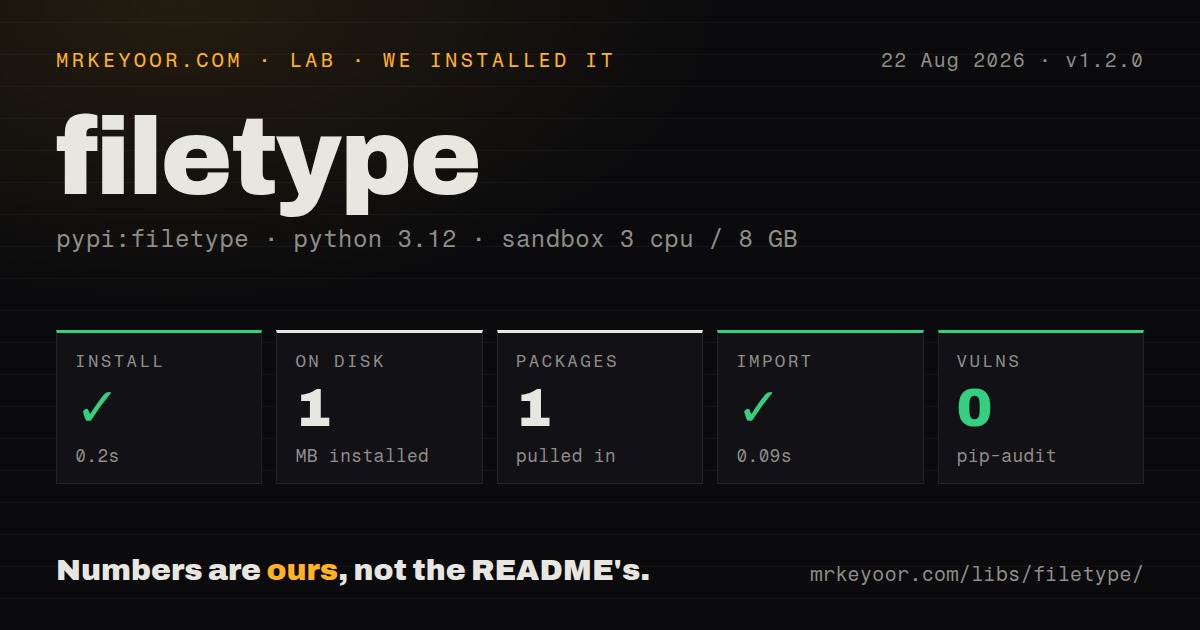
| Install | ✓ · 0.2s | 1 package on disk · 1 MB |
| Import | ✓ | import filetype in 0.09s · pure Python |
| Known vulns | 0 | (pip-audit) |
Answers from our run
Does filetype install cleanly?
Yes. In a fresh container with an empty cache, pip install filetype finished in 0.2s, leaving 1 package and 1 MB on disk. pip-audit reported no known vulnerabilities.
What does filetype need to run?
Python 3.x, and nothing compiled: it is pure Python. In our run import filetype succeeded in 0.09s.
filetype or python-magic: which should you use?
python-magic: Use it when libmagic is available and its larger system signature database or encoding output is required. filetype 1.2.0 installed in 0.2 seconds and occupied 1 MB in our sandbox, with 0 dependencies and 0 audit findings; it is cheap enough for coarse binary allowlists when its fixed signature table covers the inputs.
When should you not use filetype?
Most inputs are JSON, CSV, XML, HTML, SVG, YAML, or source code. The built-in table targets binary signatures and generally returns None for those text formats.
Use it if
- You need a quick MIME-family check on an uploaded binary without trusting its filename or client-supplied Content-Type.
- The deployment cannot provide libmagic, and a pure Python signature table covers every accepted format.
- You can read only the opening range of an object-store file and want a cheap first classification.
- A private binary format has a precise header and can be added through one custom Type matcher at process startup.
- Most inputs are JSON, CSV, XML, HTML, SVG, YAML, or source code. The built-in table targets binary signatures and generally returns None for those text formats.
- You need broad operating-system file identification or character encodings. python-magic uses libmagic's larger signature database and can return descriptive or encoding results.
- A positive result must prove that an upload is safe or fully valid. filetype checks a signature window; it does not decode the payload, inspect every container member, or reject polyglot content.
- Your dependency policy requires a recent release with declared Python compatibility. PyPI lists no requires-python value, and 1.2.0 has been unchanged there since November 2022.
- Different tenants need separate matcher sets. add_type() inserts into one module-level list, and guess() returns the first match seen by every caller in that interpreter.
Setup reality
Our filetype 1.2.0 install finished in 0.2 seconds inside a fresh Python 3.12 Bookworm container. It left one package and 1 MB on disk, with 0 direct dependencies and 0 known vulnerabilities from pip-audit. import filetype succeeded in 0.09 seconds. The wheel is pure Python and MIT licensed. PyPI leaves the supported Python version unspecified, and the distribution has no py.typed marker.
No service, credential, or config file is involved. Pass guess() a path, bytes, bytearray, memoryview, or an object with read(). It returns the first matching Type or None. Empty input also returns None, so callers that care about zero-byte uploads must distinguish them before guessing. A nonexistent path raises its normal I/O exception. This is a classifier, not a parser or malware check.
The README says the first 261 bytes are sufficient, but version 1.2.0's released utils.py reads up to 8,192 bytes. Use bytes 0 through 8191 for an HTTP or object-store range request if you want behavior consistent with a local path. For a seekable stream, the release records its current offset, seeks to the start, reads the signature window, and then seeks back. Non-seekable streams are consumed.
Matcher order affects the answer because match() stops at the first success. Version 1.2.0 moved audio matchers before video to correct M4A detection. add_type() puts a custom Type at index 0 of the shared list, giving it priority over built-ins. Register each custom matcher once during startup. The repository contains newer format work after 1.2.0, but PyPI users do not receive those commits until another package release appears.
Patterns
Classify a file on disk identify-file-path
import filetype

kind = filetype.guess('uploads/item.bin')
if kind is None:
    raise ValueError('unrecognized binary header')

print(kind.extension)
print(kind.mime)
None means that no released matcher accepted the bytes. A missing or unreadable path raises an I/O exception instead.
Classify an in-memory header identify-byte-prefix
import filetype

with open('upload.bin', 'rb') as source:
    prefix = source.read(8192)

kind = filetype.guess(prefix)
mime = kind.mime if kind else None
Version 1.2.0 reads at most 8,192 bytes in its code, despite the README's smaller 261-byte claim.
Apply an upload MIME allowlist allow-image-mimes
import filetype

ALLOWED_MIMES = {'image/jpeg', 'image/png', 'image/webp'}

def accept_image(data):
    kind = filetype.guess(data)
    if kind is None or kind.mime not in ALLOWED_MIMES:
        raise ValueError('unsupported image format')
    return kind
A header match catches simple filename lies. Decode the image with an image library when malformed content is part of the threat model.
Report empty and unknown data separately separate-empty-input
import filetype

def classify(data):
    if len(data) == 0:
        return {'status': 'empty'}
    kind = filetype.guess(data)
    if kind is None:
        return {'status': 'unknown'}
    return {'status': 'matched', 'mime': kind.mime}
guess() returns None for both a falsy input and nonempty bytes that fail every matcher. Check length first when those cases differ.
Search only image signatures match-one-family
from filetype import image_match

kind = image_match(header)
if kind is None:
    raise ValueError('header is not a supported image')
print(kind.extension)
image_match() skips audio, video, archive, document, font, and application matchers but returns the same Type object as guess().
Route one match by MIME prefix route-by-family
import filetype

kind = filetype.guess(header)
if kind is None:
    reject_unknown()
elif kind.mime.startswith('image/'):
    enqueue_thumbnail()
elif kind.mime.startswith('video/'):
    enqueue_transcode()
else:
    store_without_preview()
Call guess() once when you need the MIME value. Repeated is_image() and is_video() calls scan matcher families again.
Classify a remote object from one range read-http-range
from urllib.request import Request, urlopen
import filetype

request = Request(url, headers={'Range': 'bytes=0-8191'})
with urlopen(request) as response:
    header = response.read(8192)

kind = filetype.guess(header)
The server may ignore Range and return a full response. Cap the local read at 8,192 bytes and enforce your own response and timeout limits.
Inspect a stream without changing its offset preserve-seekable-stream
import filetype

upload.seek(128)
before = upload.tell()
kind = filetype.guess(upload)
after = upload.tell()
assert after == before
Version 1.2.0 seeks to byte 0 and restores the saved position when tell() and seek() exist. A non-seekable readable is consumed.
Check whether a MIME is in the table lookup-mime-support
import filetype

kind = filetype.get_type(mime='image/avif')
if kind is None:
    raise RuntimeError('AVIF matcher is unavailable')
print(kind.extension)
get_type() searches declared MIME and extension properties. It does not inspect a file or prove that a supplied MIME is correct.
Audit the active signature table list-built-in-types
import filetype

active = [
    {'extension': kind.extension, 'mime': kind.mime}
    for kind in filetype.types
]
for item in active:
    print(item)
filetype.types is the live module-level list. Custom registrations appear at its front and affect later calls in the process.
Add a private four-byte format register-custom-signature
import filetype
from filetype.types import Type

class AcmeBlob(Type):
    def __init__(self):
        super().__init__('application/x-acme-blob', 'acme')

    def match(self, buf):
        return len(buf) >= 4 and bytes(buf[:4]) == b'ACME'

filetype.add_type(AcmeBlob())
add_type() inserts at position 0, ahead of every built-in matcher. Run this once during startup and make the signature narrow.
Follow signature matching with real decoding verify-image-payload
from io import BytesIO
import filetype
from PIL import Image

kind = filetype.guess(data)
if kind is None or not kind.mime.startswith('image/'):
    raise ValueError('unsupported header')

with Image.open(BytesIO(data)) as image:
    image.verify()
filetype only recognizes the header window. Pillow's verify() checks image structure, though separate resource limits are still needed for hostile uploads.
Alternatives
| Package | Registry | Pick it when |
|---|---|---|
| python-magic | PyPI | Use it when libmagic is available and its larger system signature database or encoding output is required. |
| puremagic | PyPI | Use it for a Python-only detector that can return several candidate matches rather than one first match. |
| mimetypes-magic | PyPI | Use it when you need the python-magic API from a separately maintained distribution and can install libmagic. |
More utils guides
lru-cache · type-fest · ajv · zod · p-limit · find-up · the whole shelf →
How this guide is made: grounded in the library's documentation, release notes, changelog, and issue history, on a fixed rubric — not a hands-on install of every release. The 50 most-downloaded entries are additionally install-verified in clean containers. Corrections: contact the desk.