env-paths review
env-paths 4.0.0 answers one narrow question: where should a Node application put its data, configuration, cache, logs, and temporary files on this operating system? Pass an application name and it returns five strings based on macOS Library folders, Windows APPDATA locations, or Linux XDG variables. It does not touch the filesystem or manage a settings format. Version 4 raises the runtime requirement to Node 20 and validates the application name and optional suffix as safe filename components. Our install found bundled TypeScript types, an ESM package that also loaded through `require()` on Node 22, and no browser-compatible build.
env-paths 4.0.0 installed in 0.8 seconds and occupied 1 MB in our sandbox, with 0 audit findings, but its browser bundle failed. Install it for five OS-aware path strings in Node 20 or newer; choose a settings library if you also need reads, writes, validation, or migrations.
We installed it
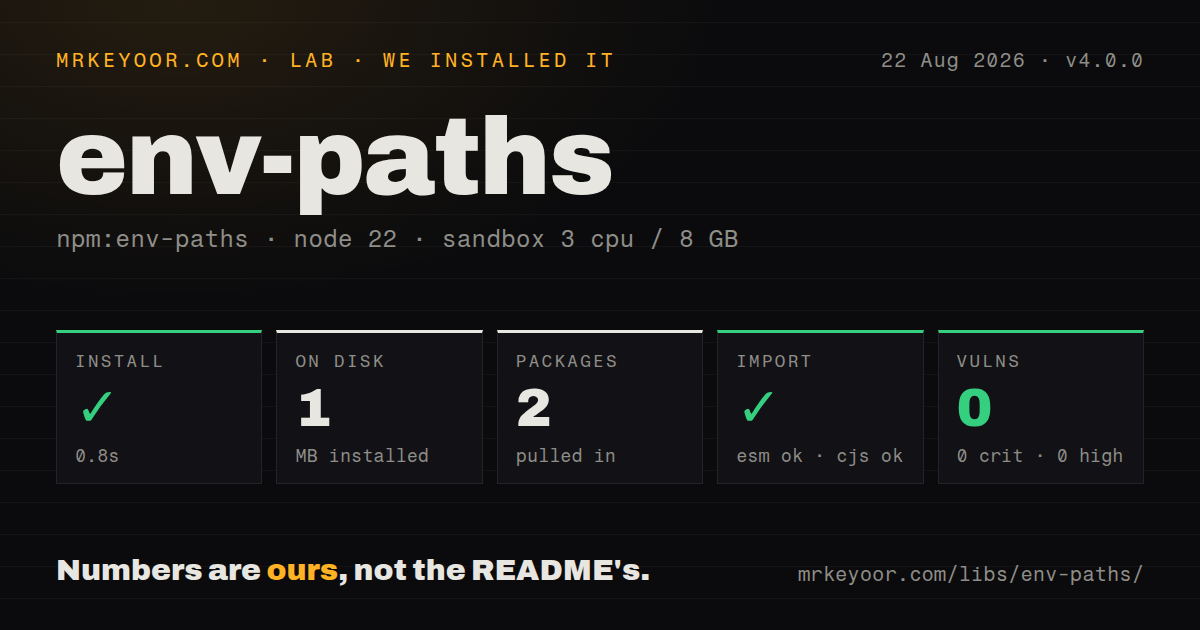
| Install | ✓ · 0.8s | 2 packages on disk · 1 MB |
| Import | ✓ | ESM import works · require() works · ESM package with exports map |
| Browser | n/a | could not be bundled for the browser (Node-only code, most likely) |
| Types | ✓ | TypeScript types bundled |
| Known vulns | 0 | 0 critical · 0 high · 0 moderate · 0 low (npm audit) |
Answers from our run
Does env-paths install cleanly?
Yes. In a fresh container with an empty cache, npm install env-paths finished in 0.8s, leaving 2 packages and 1 MB on disk. npm audit reported no known vulnerabilities.
Can env-paths run in a browser?
Not directly: esbuild could not bundle it for the browser in our run, which normally means it depends on Node built-ins. Use it on the server, or find a browser-targeted alternative.
Does env-paths work with both ESM and CommonJS?
Yes. Both import 'env-paths' and require('env-paths') worked in Node 22 in our run. The package is published as ESM with an exports map.
Does env-paths include TypeScript types?
Yes, type declarations ship inside the package, so no @types install is needed.
env-paths or platform-folders: which should you use?
platform-folders: Use it when you want a different cross-platform folder mapping and its API matches an existing application layout. env-paths 4.0.0 installed in 0.8 seconds and occupied 1 MB in our sandbox, with 0 audit findings, but its browser bundle failed.
When should you not use env-paths?
You expect a configuration store. env-paths returns strings and never creates a directory, validates settings, writes atomically, watches files, or runs migrations.
Use it if
- A Node 20 or newer CLI needs native-looking config, data, cache, log, and temp directories on Linux, macOS, and Windows.
- Linux users must be able to relocate application files through XDG_DATA_HOME, XDG_CONFIG_HOME, XDG_CACHE_HOME, and XDG_STATE_HOME.
- You already own file parsing and writes and only want the operating-system path decision extracted into a small function.
- A desktop application's Node main process needs separate cache and persistent-data locations without hard-coded home-directory paths.
- You expect a configuration store. env-paths returns strings and never creates a directory, validates settings, writes atomically, watches files, or runs migrations.
- Node 18 remains in your support matrix. Version 4 declares Node 20 as its minimum runtime.
- The code runs in a web page. Our browser bundle failed because the implementation imports Node path, OS, and process modules.
- Your application already published paths without the default `-nodejs` suffix. Switching suffix policy points users at different folders unless you migrate their files.
- Only Linux XDG base directories matter. The smaller `xdg-basedir` package exposes those values directly without macOS and Windows mappings.
Setup reality
env-paths 4.0.0 installed in 0.8 seconds in our fresh Node 22 Bookworm sandbox. The result was 2 packages and 1 MB on disk. The published package lists 1 direct dependency, no peers, and 24 KB unpacked. npm audit returned 0 known vulnerabilities. Types are bundled. It is an ESM package with an exports map; ESM import and Node 22 require() both succeeded in our check.
One call returns paths but creates nothing. Before writing settings.json, call mkdir with {recursive: true} on the config path and choose your own file permissions, locking, corruption handling, and atomic-write strategy. The default suffix is nodejs, so Acme becomes Acme-nodejs in all five results. Passing an empty suffix removes it and may collide with an unrelated native application or orphan files written under the earlier name.
On Linux, data, config, cache, and log honor their matching XDG environment variables. Logs default under the XDG state location, not the cache. macOS spreads the five values across Application Support, Preferences, Caches, Logs, and the system temp directory. Windows uses APPDATA for configuration and LOCALAPPDATA for the other persistent locations. Tests that assert one literal path will therefore fail on another OS; test the chosen property or inject environment values in an isolated process.
Version 4 rejects empty names, separators, traversal segments, and unsafe suffixes before returning any path. Keep the name as a fixed application identifier rather than passing user input. The package cannot be bundled for browsers in our esbuild check and has a Node 20 floor, despite require() working on our Node 22 runtime. Treat the ESM default export as the documented contract and test CommonJS interop if an older build pipeline depends on it.
Patterns
Get the five standard locations resolve-application-paths
import envPaths from 'env-paths';

const locations = envPaths('InvoiceTool');
console.log(locations.data);
console.log(locations.config);
console.log(locations.cache);
console.log(locations.log);
console.log(locations.temp);
With default options, each final directory name is `InvoiceTool-nodejs`. The function performs no filesystem IO.
Create a directory before saving config write-config-file
import { mkdir, writeFile } from 'node:fs/promises';
import { join } from 'node:path';
import envPaths from 'env-paths';

const directory = envPaths('InvoiceTool').config;
await mkdir(directory, { recursive: true });
await writeFile(join(directory, 'config.json'), JSON.stringify({ color: 'blue' }));
env-paths only computes the directory. Without the explicit `mkdir`, a first write can fail with ENOENT.
Distinguish a missing file from bad JSON read-optional-config
import { readFile } from 'node:fs/promises';
import { join } from 'node:path';
import envPaths from 'env-paths';

const file = join(envPaths('InvoiceTool').config, 'config.json');
let config = {};
try {
  config = JSON.parse(await readFile(file, 'utf8'));
} catch (error) {
  if (error.code !== 'ENOENT') throw error;
}
Only ENOENT means first run. Re-throw parse and permission errors so a damaged configuration is visible.
Write a disposable cache entry store-rebuildable-cache
import { mkdir, writeFile } from 'node:fs/promises';
import { join } from 'node:path';
import envPaths from 'env-paths';

const directory = envPaths('InvoiceTool').cache;
await mkdir(directory, { recursive: true });
await writeFile(join(directory, 'rates.json'), JSON.stringify(rates));
Operating systems and users may delete cache data. The application must be able to rebuild `rates.json`.
Use the dedicated log location append-log-entry
import { appendFile, mkdir } from 'node:fs/promises';
import { join } from 'node:path';
import envPaths from 'env-paths';

const directory = envPaths('InvoiceTool').log;
await mkdir(directory, { recursive: true });
await appendFile(join(directory, 'run.log'), `${new Date().toISOString()} started\n`);
On Linux, the log path follows XDG_STATE_HOME. It does not share the XDG cache directory.
Give each task a unique temp folder create-temp-workspace
import { mkdir, mkdtemp } from 'node:fs/promises';
import { join } from 'node:path';
import envPaths from 'env-paths';

const base = envPaths('InvoiceTool').temp;
await mkdir(base, { recursive: true });
const taskDirectory = await mkdtemp(join(base, 'render-'));
The application temp path is shared. `mkdtemp` prevents two concurrent tasks from choosing the same child folder.
Remove the default suffix omit-nodejs-suffix
import envPaths from 'env-paths';

const locations = envPaths('InvoiceTool', { suffix: '' });
An empty suffix changes all 5 paths. Move existing files first if an earlier release used `InvoiceTool-nodejs`.
Give preview builds separate folders separate-release-channels
import envPaths from 'env-paths';

const stable = envPaths('InvoiceTool', { suffix: 'stable' });
const preview = envPaths('InvoiceTool', { suffix: 'preview' });
Version 4 checks both suffixes as filename components. Slashes and traversal segments throw before paths are returned.
Set an XDG path in an isolated test test-xdg-location
import { execFile } from 'node:child_process';

execFile(process.execPath, ['print-config-path.mjs'], {
  env: { ...process.env, XDG_CONFIG_HOME: '/tmp/invoice-config' },
}, (error, stdout) => {
  if (error) throw error;
  console.log(stdout);
});
XDG variables affect the Linux branch. A subprocess avoids environment changes leaking between concurrent tests.
Pass the typed result to another module use-bundled-types
import envPaths, { type Paths } from 'env-paths';

function databaseFile(paths: Paths) {
  return `${paths.data}/records.sqlite`;
}

const file = databaseFile(envPaths('InvoiceTool'));
Version 4 exports `Paths` as a type alias whose 5 properties are readonly strings.
Keep user input out of the app name reject-dynamic-name
import envPaths from 'env-paths';

const fixedName = 'InvoiceTool';
const directory = envPaths(fixedName).data;
Version 4 rejects separators and traversal in the name, but a fixed identifier also prevents users from splitting one app across unexpected folders.
Check ESM interop from CommonJS load-from-commonjs
// legacy-cli.cjs
const moduleValue = require('env-paths');
const envPaths = moduleValue.default;

console.log(envPaths('InvoiceTool').config);
This shape worked in our Node 22 sandbox. The published contract is ESM with a default export, so test `require()` on your exact Node floor.
Alternatives
| Package | Registry | Pick it when |
|---|---|---|
| platform-folders | npm | Use it when you want a different cross-platform folder mapping and its API matches an existing application layout. |
| appdirsjs | npm | Use it when an AppDirs-style API better matches code ported from another language or an older Node project. |
| xdg-basedir | npm | Use it when the program is Linux-only and needs the XDG base directories themselves rather than application-specific child paths. |
More utils guides
lru-cache · type-fest · ajv · zod · p-limit · find-up · the whole shelf →
How this guide is made: grounded in the library's documentation, release notes, changelog, and issue history, on a fixed rubric — not a hands-on install of every release. The 50 most-downloaded entries are additionally install-verified in clean containers. Corrections: contact the desk.