dotenv review
dotenv 17.4.2 reads `.env` syntax from one file or an ordered list of files, then copies parsed strings into `process.env` or another object. Existing environment values take precedence unless `override` is enabled. `parse()` handles text without mutating the process, and `populate()` applies an already parsed object. The package belongs at Node startup: our CommonJS and ESM imports worked, while an esbuild browser build failed on its Node facilities. The 17.4.2 release only tightened the repository's coding-agent skill files; it made no parser or runtime change. The default branch now documents unreleased `dotenv run`, `secure`, and `fast` features, so those calls do not belong in code pinned to 17.4.2.
dotenv 17.4.2 installed in 0.4 seconds as a single 1 MB package, had 0 audit findings, and failed our browser build because it is Node startup code. Keep it for explicit file parsing on older or unopinionated Node stacks; remove it when the runtime or framework already loads env files, and do not copy unreleased CLI examples from the default-branch README.
We installed it
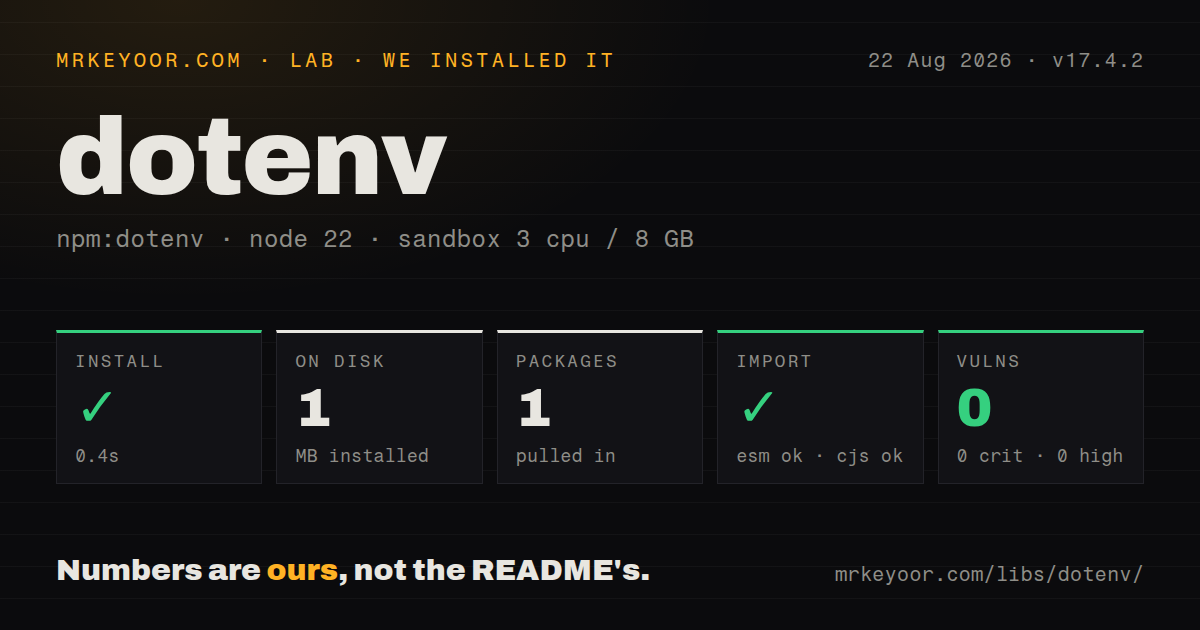
| Install | ✓ · 0.4s | 1 package on disk · 1 MB |
| Import | ✓ | ESM import works · require() works · CommonJS package with exports map |
| Browser | n/a | could not be bundled for the browser (Node-only code, most likely) |
| Types | ✓ | TypeScript types bundled |
| Known vulns | 0 | 0 critical · 0 high · 0 moderate · 0 low (npm audit) |
Answers from our run
Does dotenv install cleanly?
Yes. In a fresh container with an empty cache, npm install dotenv finished in 0.4s, leaving 1 package and 1 MB on disk. npm audit reported no known vulnerabilities.
Can dotenv run in a browser?
Not directly: esbuild could not bundle it for the browser in our run, which normally means it depends on Node built-ins. Use it on the server, or find a browser-targeted alternative.
Does dotenv work with both ESM and CommonJS?
Yes. Both import 'dotenv' and require('dotenv') worked in Node 22 in our run. The package is published as CommonJS with an exports map.
Does dotenv include TypeScript types?
Yes, type declarations ship inside the package, so no @types install is needed.
dotenv or @dotenvx/dotenvx: which should you use?
@dotenvx/dotenvx: Use it for encrypted environment files, expansion, and command-oriented injection across languages. dotenv 17.4.2 installed in 0.4 seconds as a single 1 MB package, had 0 audit findings, and failed our browser build because it is Node startup code.
When should you not use dotenv?
Node's built-in --env-file behavior covers the project. Removing dotenv avoids an early startup import and its default log line.
Discussed on
Use it if
- A Node process needs local `.env` loading and cannot rely on Node's native `--env-file` flag or a framework loader.
- Startup needs an explicit file order, a non-UTF-8 encoding, override control, or a destination other than `process.env`.
- A build tool must parse dotenv text into an object without changing the current process.
- An established application already depends on dotenv's parsing and collision rules, and replacing them would change local setup.
- Node's built-in `--env-file` behavior covers the project. Removing dotenv avoids an early startup import and its default log line.
- Next.js, Vite, Nest, or another framework already owns environment-file precedence and client exposure. A second loader can apply different rules to the same files.
- Production secrets need access control, rotation, or audit logs. Plain dotenv reads local text and is not a secret-management service.
- Values use `${NAME}` expansion or command substitution. Version 17.4.2 leaves those strings untouched; dotenv-expand or dotenvx performs expansion.
- The target code runs in a browser. Our browser bundle failed, and shipping `.env` parsing to a client would expose any included value anyway.
- You plan to use `dotenv run`, `secure: true`, or `fast: true` from the current repository README. Those features sit after the v17.4.2 tag and are absent from the installed stable package.
Setup reality
We installed dotenv 17.4.2 in a fresh Node 22 Bookworm sandbox in 0.4 seconds. It left 1 package and 1 MB on disk. npm audit reported 0 vulnerabilities at all severities. The package has 0 direct and 0 peer dependencies, occupies 156 KB unpacked, requires Node 12 or newer, and uses BSD-2-Clause. TypeScript declarations are bundled. require() and ESM import both worked through its exports map. Our esbuild browser bundle failed, which keeps dotenv on the Node side of an application.
The default lookup is path.resolve(process.cwd(), '.env'), so a process manager's working directory matters. Load it before modules that read configuration during import. For ESM, import 'dotenv/config' executes early enough; calling config() above another static import does not, because imported modules evaluate before the entry module body. Version 17.4.2 also supports node -r dotenv/config app.js and DOTENV_CONFIG_* preload options.
Existing process.env values win by default. With path: ['.env.local', '.env'], the first file's value wins too. Turning on override reverses both choices, so the last file can replace earlier files and file values can replace the deployment environment. Version 17 prints its injected-key message to stdout unless quiet: true is set, which can break a CLI that promises JSON or another machine-readable stream.
A normal .env is plaintext and should stay out of source control. Quoted multiline values and \n inside double quotes are parsed, while # starts a comment unless the value is quoted. All results are strings; dotenv does not check required names, convert booleans, or expand ${OTHER_KEY}. Inspect the returned error when a requested file may be missing, then validate the resulting configuration before starting listeners or workers.
Patterns
Load `.env` before application startup load-default-env
const result = require('dotenv').config({ quiet: true })

if (result.error) throw result.error
startServer({ port: Number(process.env.PORT) })
`config()` resolves `.env` from `process.cwd()` and returns an `error` when loading fails. `quiet: true` suppresses version 17's stdout message.
Initialize dotenv before ESM dependencies preload-esm-env
// index.mjs
import 'dotenv/config'
import { startServer } from './server.mjs'

startServer()
The side-effect import evaluates before `server.mjs`. Calling `config()` in the entry module body can be too late for values read during another module's initialization.
Load configuration without editing the entry file preload-from-node
node -r dotenv/config server.js

# pass preload options
DOTENV_CONFIG_PATH=./config/dev.env \
DOTENV_CONFIG_QUIET=true \
node -r dotenv/config server.js
Version 17.4.2 supports Node's `-r dotenv/config` preload path. The separate `dotenv run` command belongs to unreleased repository code, not this package version.
Resolve a file beside an ESM module load-custom-path
import dotenv from 'dotenv'

const result = dotenv.config({
  path: new URL('../config/service.env', import.meta.url),
  quiet: true,
})
if (result.error) throw result.error
The 17.4.2 declarations accept a string, string array, or URL for `path`. An explicit URL avoids dependence on the launch directory.
Layer a local file ahead of defaults merge-env-files
require('dotenv').config({
  path: ['.env.local', '.env'],
  quiet: true,
})
Without `override`, the first file wins each duplicate key and existing `process.env` values beat both files.
Make later files replace earlier sources override-existing-values
require('dotenv').config({
  path: ['.env', '.env.local'],
  override: true,
  quiet: true,
})
With `override: true`, the last file wins and can also replace values already present in `process.env`. Use this only with a deliberate precedence policy.
Turn dotenv text into an object parse-without-mutation
import { parse } from 'dotenv'

const parsed = parse(Buffer.from([
  'HOST=127.0.0.1',
  'PORT=3000',
].join('\n')))

console.log(parsed) // { HOST: '127.0.0.1', PORT: '3000' }
`parse()` returns strings and does not modify `process.env`. Convert numbers and booleans during a separate validation step.
Keep parsed values out of `process.env` use-custom-target
const dotenv = require('dotenv')
const runtimeConfig = {}

const result = dotenv.config({
  path: '.env.worker',
  processEnv: runtimeConfig,
  quiet: true,
})
if (result.error) throw result.error
`processEnv` changes the destination object. The same collision and `override` rules apply to keys that already exist on that object.
Apply an approved parsed object populate-selected-values
import { parse, populate } from 'dotenv'
import { readFileSync } from 'node:fs'

const parsed = parse(readFileSync('.env'))
const selected = { API_URL: parsed.API_URL }
const applied = populate(process.env, selected)

console.log(Object.keys(applied))
`populate()` returns only the keys it actually wrote. Existing target values remain unchanged unless its options include `override: true`.
Store a multiline secret correctly handle-multiline-value
# .env
PRIVATE_KEY="-----BEGIN PRIVATE KEY-----\nline-one\nline-two\n-----END PRIVATE KEY-----"

# application
const { config } = require('dotenv')
config({ quiet: true })
console.log(process.env.PRIVATE_KEY.split('\n').length)
Double-quoted `\n` sequences become newline characters. Single-quoted and unquoted values do not receive that newline expansion.
Quote values containing a hash preserve-hash-character
# .env
UNQUOTED=value#comment
QUOTED="value#data"
Version 17 treats `#` as the start of a comment outside quotes. The two entries parse as `value` and `value#data` respectively.
Reject missing or malformed settings after loading validate-required-config
import 'dotenv/config'

const port = Number(process.env.PORT)
if (!Number.isInteger(port) || port < 1 || port > 65535) {
  throw new Error('PORT must be an integer from 1 to 65535')
}
if (!process.env.DATABASE_URL) {
  throw new Error('DATABASE_URL is required')
}
dotenv only loads strings; it does not enforce presence, types, URL syntax, or numeric ranges. Validate before starting network listeners.
Alternatives
| Package | Registry | Pick it when |
|---|---|---|
| @dotenvx/dotenvx | npm | Use it for encrypted environment files, expansion, and command-oriented injection across languages. |
| dotenv-flow | npm | Use it when `.env.local` and environment-specific layers should be discovered automatically. |
| dotenv-expand | npm | Use it alongside dotenv when values must interpolate other environment variables. |
| env-cmd | npm | Use it when the main requirement is launching a command with variables from a chosen file. |
More utils guides
lru-cache · type-fest · ajv · zod · p-limit · find-up · the whole shelf →
How this guide is made: grounded in the library's documentation, release notes, changelog, and issue history, on a fixed rubric — not a hands-on install of every release. The 50 most-downloaded entries are additionally install-verified in clean containers. Corrections: contact the desk.