css-declaration-sorter review
css-declaration-sorter 7.4.0 is a PostCSS 8 transform for rearranging property declarations within a rule. Its built-in sequences are alphabetical, SMACSS, Concentric CSS, and the Frakto order introduced in 7.4.0. It also accepts an Array.sort-style comparator. The transform can preserve shorthand and longhand override order with keepOverrides, but it does not lint, prefix, minify values, or provide its own executable. Our bundle test produced 43.2 KB minified and 6 KB gzipped; most projects should keep it in the build toolchain rather than send that code to browsers.
css-declaration-sorter 7.4.0 installed in 0.8 seconds with zero audit findings, while its browser bundle measured 43.2 KB minified and 6 KB gzipped in our sandbox. Install it as a development-only PostCSS step when automatic property rewrites are wanted; choose stylelint-order when violations should be reported instead.
We installed it
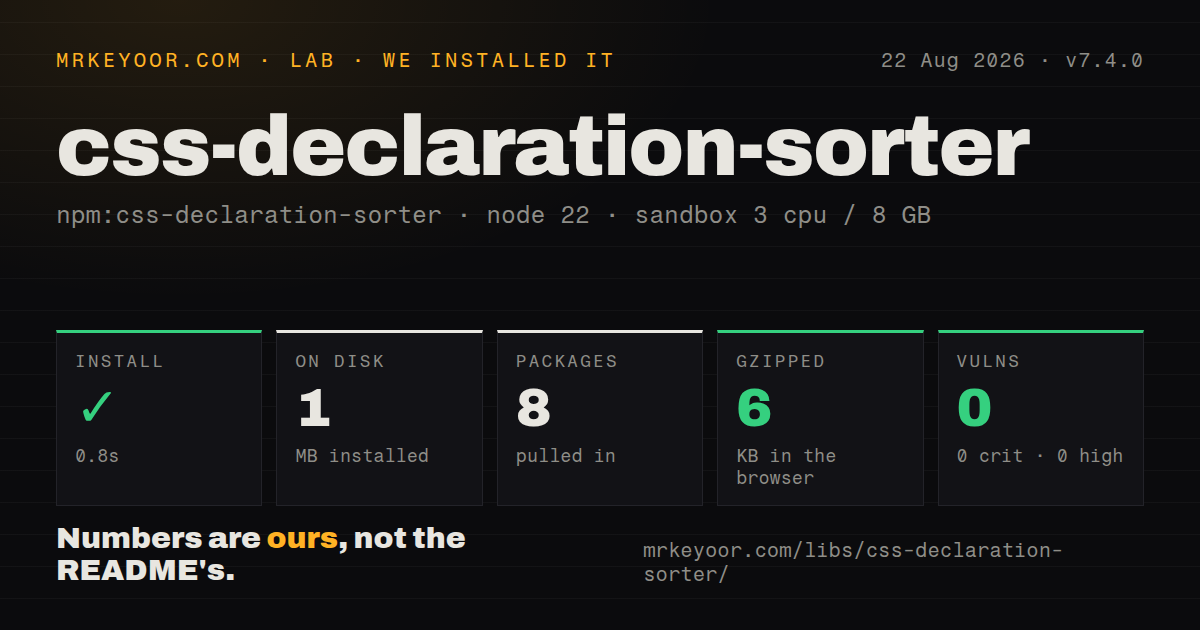
| Install | ✓ · 0.8s | 8 packages on disk · 1 MB |
| Import | ✓ | ESM import works · require() works · ESM package with exports map |
| Browser | 6 KB | gzipped (43.2 KB minified), bundled with esbuild |
| Types | ✓ | TypeScript types bundled |
| Known vulns | 0 | 0 critical · 0 high · 0 moderate · 0 low (npm audit) |
Answers from our run
Does css-declaration-sorter install cleanly?
Yes. In a fresh container with an empty cache, npm install css-declaration-sorter finished in 0.8s, leaving 8 packages and 1 MB on disk. npm audit reported no known vulnerabilities.
How much does css-declaration-sorter add to a browser bundle?
6 KB gzipped (43.2 KB minified) when the whole package is bundled for the browser with esbuild. Importing only part of it is usually smaller.
Does css-declaration-sorter work with both ESM and CommonJS?
Yes. Both import 'css-declaration-sorter' and require('css-declaration-sorter') worked in Node 22 in our run. The package is published as ESM with an exports map.
Does css-declaration-sorter include TypeScript types?
Yes, type declarations ship inside the package, so no @types install is needed.
css-declaration-sorter or postcss-sorting: which should you use?
postcss-sorting: Use it when PostCSS must arrange rules, at-rules, and spacing in addition to declarations. css-declaration-sorter 7.4.0 installed in 0.8 seconds with zero audit findings, while its browser bundle measured 43.2 KB minified and 6 KB gzipped in our sandbox.
When should you not use css-declaration-sorter?
Order mistakes should fail lint or appear in an editor; this plugin changes files instead of reporting violations
Use it if
- PostCSS 8 already processes the project and property-order churn keeps filling review diffs
- The team has chosen alphabetical, SMACSS, Concentric CSS, or Frakto ordering
- CSS, SCSS, or Less files should follow one sequence, with the appropriate external parser for preprocessors
- Old stylesheets mix shorthands and longhands that must retain their override relationship during sorting
- Order mistakes should fail lint or appear in an editor; this plugin changes files instead of reporting violations
- There is no PostCSS 8 stage, so adopting the required peer would add a pipeline for one formatting rule
- Selectors, at-rules, blank lines, and rule groups also need ordering; this package only sorts declarations
- A standalone command is required; command-line use depends on installing postcss-cli separately
- Nobody can inspect the initial bulk rewrite for cascade changes; keepOverrides covers shorthand relationships but cannot prove every source-order dependency safe
Setup reality
We installed css-declaration-sorter 7.4.0 on Node 22 in 0.8 seconds. The clean sandbox contained 8 packages and 1 MB afterward; the package itself is 180 KB unpacked. It declares zero direct dependencies and one peer dependency. npm audit found zero critical, high, moderate, or low vulnerabilities. Bundled TypeScript declarations are present. Both require() and ESM import worked through the exports map even though the package declares type=module.
PostCSS ^8.0.9 is the required peer and must be installed by the application. The default order is alphabetical; pass smacss, concentric-css, frakto, or a comparator to change it. SCSS needs postcss-scss and Less needs postcss-less. No credentials are involved, and configuration normally lives in the existing PostCSS config or package.json rather than a sorter-specific file.
There is no css-declaration-sorter binary. README commands are executed by postcss-cli, so a CLI workflow needs that extra development dependency. The first run can touch most declarations in a stylesheet. Review that diff, especially rules where a shorthand intentionally follows a longhand. keepOverrides=true retains those documented override cases, including vendor-prefixed forms.
The engine range is Node ^14, ^16, or >=18. Our browser-oriented esbuild check succeeded at 43.2 KB minified and 6 KB gzipped, but that figure is a warning about placement: sorting source during a build does not justify a runtime browser dependency. Put the plugin after generators such as Autoprefixer if their added declarations must also be sorted.
Patterns
Run alphabetical sorting in PostCSS configure-postcss
import { cssDeclarationSorter } from 'css-declaration-sorter';

export default { plugins: [cssDeclarationSorter({ order: 'alphabetical' })] };
The application must install PostCSS 8 because npm treats it as a peer rather than a direct dependency.
Apply the bundled SMACSS sequence use-smacss-order
cssDeclarationSorter({ order: 'smacss' });smacss groups flow-affecting box properties before border, background, text, and other declarations.
Order properties from outside inward use-concentric-order
cssDeclarationSorter({ order: 'concentric-css' });concentric-css begins with positioning and visibility, then moves through box model, dimensions, and text.
Use the 7.4 Frakto property list use-frakto-order
cssDeclarationSorter({ order: 'frakto' });Version 7.4.0 added frakto as a built-in value alongside the three older sequences.
Protect shorthand and longhand order preserve-overrides
cssDeclarationSorter({ order: 'alphabetical', keepOverrides: true });keepOverrides retains documented cascade relationships such as animation-name followed by animation.
Supply a project-specific comparator define-custom-order
const first = ['position', 'display', 'color'];
const compare = (a, b) => (first.indexOf(a) < 0 ? 999 : first.indexOf(a)) - (first.indexOf(b) < 0 ? 999 : first.indexOf(b));
cssDeclarationSorter({ order: compare });
The callback receives two property names and must return the same negative, zero, or positive result expected by Array.sort.
Transform CSS held in memory process-css-string
const result = await postcss([cssDeclarationSorter()]).process('a { color: red; display: block; }', { from: undefined });
console.log(result.css);
PostCSS processing is asynchronous here; read result.css only after awaiting the returned promise.
Parse and reorder SCSS process-scss
const result = await postcss([cssDeclarationSorter({ order: 'smacss' })]).process(source, { syntax: scss, from: 'app.scss' });Install and import postcss-scss separately because css-declaration-sorter does not include that syntax parser.
Rewrite CSS files from a shell run-postcss-cli
npm install --save-dev postcss postcss-cli css-declaration-sorter
npx postcss 'src/**/*.css' --use css-declaration-sorter --replace --no-map
postcss-cli supplies the executable. Inspect the resulting cascade changes before accepting the bulk edit.
Sort declarations added by Autoprefixer place-after-prefixer
export default { plugins: [autoprefixer(), cssDeclarationSorter({ order: 'smacss', keepOverrides: true })] };Plugin order matters: placing the sorter second lets it arrange vendor-prefixed declarations created by Autoprefixer.
Alternatives
| Package | Registry | Pick it when |
|---|---|---|
| postcss-sorting | npm | Use it when PostCSS must arrange rules, at-rules, and spacing in addition to declarations. |
| stylelint-order | npm | Use it when incorrect order should become a Stylelint finding instead of an automatic rewrite. |
| prettier-plugin-css-order | npm | Use it when Prettier already formats the relevant file types and should own CSS ordering too. |
More web frontend guides
postcss · react · react-dom · tailwindcss · clsx · htmlparser2 · the whole shelf →
How this guide is made: grounded in the library's documentation, release notes, changelog, and issue history, on a fixed rubric — not a hands-on install of every release. The 50 most-downloaded entries are additionally install-verified in clean containers. Corrections: contact the desk.