@cnakazawa/watch review
@cnakazawa/watch 1.0.4 watches a Node.js directory tree by polling every discovered path with `fs.watchFile`. Its callback distinguishes the initial scan, creation, removal, and modification through the shapes of `file`, `curr`, and `prev`; `createMonitor` wraps those cases as events. The current scoped release keeps the original mikeal/watch API and CLI rather than adding a newer watcher design. Our sandbox confirmed that it is a 48 KB CommonJS package with no type declarations and no browser build, so this belongs in Node maintenance work, not frontend code.
Our @cnakazawa/watch 1.0.4 install took 1.6 seconds, occupied 1 MB across 3 packages, and produced 0 audit findings, but every discovered path is polled. Keep it for compatibility or a deliberate polling setup; start new watcher code with chokidar or @parcel/watcher.
We installed it
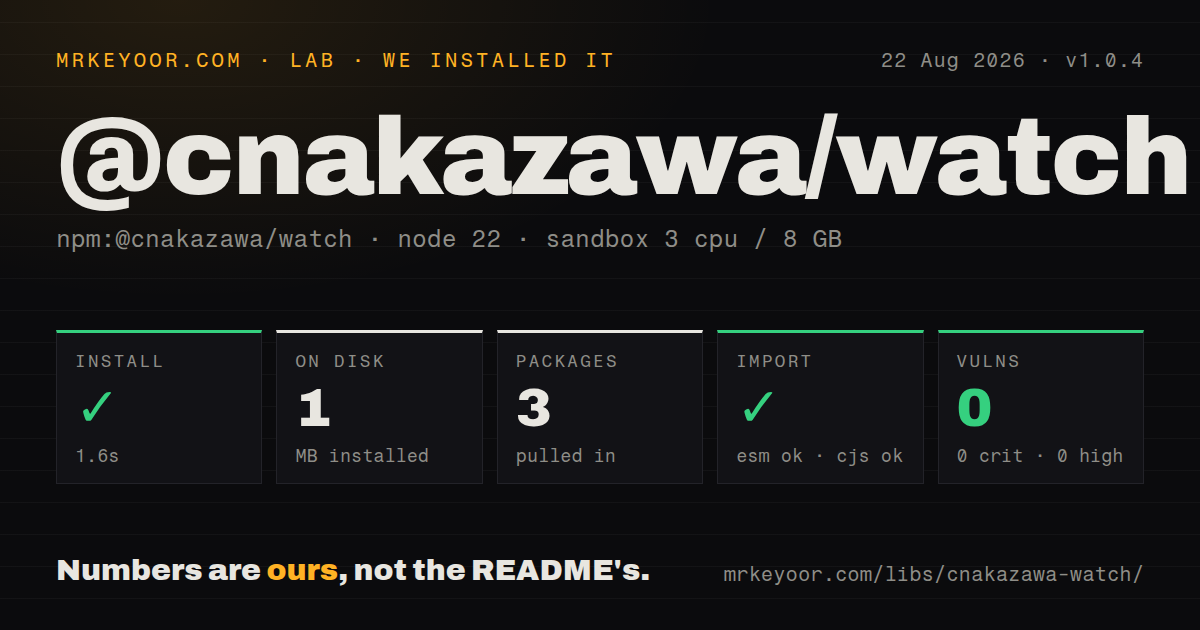
| Install | ✓ · 1.6s | 3 packages on disk · 1 MB |
| Import | ✓ | ESM import works · require() works · CommonJS package |
| Browser | n/a | could not be bundled for the browser (Node-only code, most likely) |
| Types | — | no TypeScript types found |
| Known vulns | 0 | 0 critical · 0 high · 0 moderate · 0 low (npm audit) |
Answers from our run
Does @cnakazawa/watch install cleanly?
Yes. In a fresh container with an empty cache, npm install @cnakazawa/watch finished in 2 seconds, leaving 3 packages and 1 MB on disk. npm audit reported no known vulnerabilities.
Can @cnakazawa/watch run in a browser?
Not directly: esbuild could not bundle it for the browser in our run, which normally means it depends on Node built-ins. Use it on the server, or find a browser-targeted alternative.
Does @cnakazawa/watch work with both ESM and CommonJS?
Yes. Both import '@cnakazawa/watch' and require('@cnakazawa/watch') worked in Node 22 in our run. The package is published as CommonJS.
Does @cnakazawa/watch include TypeScript types?
No type declarations were found in our install, so TypeScript users need their own declarations.
@cnakazawa/watch or chokidar: which should you use?
chokidar: Choose it for maintained cross-platform events, ready signaling, ignored globs, and atomic-write handling. Our @cnakazawa/watch 1.0.4 install took 1.6 seconds, occupied 1 MB across 3 packages, and produced 0 audit findings, but every discovered path is polled.
When should you not use @cnakazawa/watch?
The tree is large or battery use matters: the source registers fs.watchFile polling for every path found during the initial walk.
Use it if
- An existing tool depends on the `watchTree` startup callback and changing watcher semantics would create needless risk.
- Polling is useful on a mounted filesystem where native notification delivery has already proved unreliable.
- You need both current and previous `fs.Stats` objects when a watched file changes.
- A small command-line rerunner with a post-command quiet period covers the whole job.
- The tree is large or battery use matters: the source registers `fs.watchFile` polling for every path found during the initial walk.
- You need recent maintenance: 1.0.4 was published in February 2020 and the repository's last push was January 2023.
- Your TypeScript policy requires declarations from dependencies; our installed package contained no types.
- Errors must reach a normal callback or event: `watchTree` throws a walk error from its asynchronous callback and the documented monitor has no error event.
- You need atomic-write handling, a documented ready event, or native filesystem events; the README offers none of those controls.
Setup reality
Our install of @cnakazawa/watch 1.0.4 completed in 1.6 seconds. It left 3 packages and 1 MB on disk, with 2 direct dependencies, no peers, and 0 findings in npm audit. The package is 48 KB unpacked and has no native build step.
Use require('@cnakazawa/watch') even though the upstream README still shows require('watch'). CommonJS require() and ESM import both worked on Node 22, but there is no exports map and we found no TypeScript declarations. Add a local declaration if typed code has to cross this boundary.
watchTree first walks the entire root. Its readiness callback receives the files map with both stat arguments set to null, so branch on that shape before treating the call as a change. The interval option is expressed in seconds and the source multiplies it by 1,000. Although the README says options pass through to fs.watchFile, the implementation only forwards interval.
Ignore dependency and output directories before starting a large watch. ignoreUnreadableDir handles EACCES from directory reads, while ignoreNotPermitted covers EPERM from stat calls. Stop polling with unwatchTree(root) or monitor.stop(). Our browser bundle failed because the package depends on Node filesystem APIs, which is the expected platform boundary rather than a browser deployment path.
Patterns
Separate readiness from file events watch-tree
const watch = require('@cnakazawa/watch')

watch.watchTree('./src', (file, curr, prev) => {
  if (typeof file === 'object' && curr === null && prev === null) {
    console.log('ready', Object.keys(file).length)
  } else if (prev === null) {
    console.log('created', file)
  } else if (curr.nlink === 0) {
    console.log('removed', file)
  } else {
    console.log('changed', file)
  }
})
The first callback contains the scanned path map and two null stat values; it is the completion signal for the initial walk.
Listen for named monitor events create-monitor
const watch = require('@cnakazawa/watch')

watch.createMonitor('./src', (monitor) => {
  monitor.on('created', (file, stat) => console.log('created', file, stat.size))
  monitor.on('changed', (file, curr, prev) => console.log('changed', file, prev.mtime, curr.mtime))
  monitor.on('removed', (file, stat) => console.log('removed', file, stat.mtime))
})
`createMonitor` calls back after its initial walk, then emits `created`, `changed`, and `removed`; it documents no separate error event.
Read the monitor's scanned paths read-initial-files
const watch = require('@cnakazawa/watch')

watch.createMonitor('./content', (monitor) => {
  for (const [file, stat] of Object.entries(monitor.files)) {
    if (!stat.isDirectory()) console.log(file, stat.size)
  }
})
`monitor.files` contains directories as well as regular files, so check each `fs.Stats` value before treating every entry as file content.
Keep selected extensions in the tree filter-extensions
const path = require('node:path')
const watch = require('@cnakazawa/watch')

watch.createMonitor('./src', {
  filter(file, stat) {
    return stat.isDirectory() || ['.js', '.cjs', '.json'].includes(path.extname(file))
  },
}, (monitor) => {
  monitor.on('changed', (file) => console.log(file))
})
A filter must return true for directories or the walker will reject the directory before visiting matching children.
Omit dependencies and generated output ignore-generated-directories
const watch = require('@cnakazawa/watch')

watch.createMonitor('.', {
  ignoreDirectoryPattern: /(?:^|[\/])(?:node_modules|dist|coverage)(?:[\/]|$)/,
}, (monitor) => {
  monitor.on('changed', (file) => console.log(file))
})
`ignoreDirectoryPattern` receives joined paths, including nested directories; write the expression to match more than a root-level name.
Drop dot-prefixed entries ignore-dotfiles
const watch = require('@cnakazawa/watch')

watch.watchTree('.', { ignoreDotFiles: true }, (file, curr, prev) => {
  if (typeof file === 'string' && curr && prev) console.log(file)
})
This option tests whether a basename starts with a dot, which is a naming rule rather than a portable hidden-file attribute.
Set a two-second polling interval set-poll-interval
const watch = require('@cnakazawa/watch')

watch.createMonitor('./logs', { interval: 2 }, (monitor) => {
  monitor.on('changed', (file) => console.log(file))
})
The public value is seconds. Version 1.0.4 converts it to milliseconds before calling `fs.watchFile`.
Skip two permission failure paths tolerate-permissions
const watch = require('@cnakazawa/watch')

watch.createMonitor('/srv/shared', {
  ignoreUnreadableDir: true,
  ignoreNotPermitted: true,
}, (monitor) => {
  console.log('watching', Object.keys(monitor.files).length, 'paths')
})
The flags cover different operations: `EACCES` while reading a directory and `EPERM` while stating an entry. Other errors can still escape.
Remove pollers on process shutdown stop-monitor
const watch = require('@cnakazawa/watch')

watch.createMonitor('./src', (monitor) => {
  const shutdown = () => {
    monitor.stop()
    process.exit(0)
  }
  process.once('SIGINT', shutdown)
  process.once('SIGTERM', shutdown)
})
`monitor.stop()` calls `unwatchTree` with the original root and removes the `fs.watchFile` registrations stored for that root.
Stop a callback watcher by root unwatch-tree
const watch = require('@cnakazawa/watch')
const root = './src'

watch.watchTree(root, () => {})
setTimeout(() => watch.unwatchTree(root), 30_000)
Use the same root string that started the watcher because the internal map is indexed by that exact value.
Scan once without retaining watchers walk-once
const watch = require('@cnakazawa/watch')

watch.walk('./src', { ignoreDotFiles: true }, (err, files) => {
  if (err) throw err
  const regularFiles = Object.entries(files)
    .filter(([, stat]) => stat.isFile())
    .map(([file]) => file)
  console.log(regularFiles)
})
`walk` is exported in 1.0.4 source but absent from the README's API headings, so it has weaker documentation than the watcher methods.
Rerun tests after a quiet period run-cli-command
npx --package @cnakazawa/watch watch 'npm test' ./src --wait=1 --ignoreDotFiles --ignoreDirectoryPattern='/node_modules|dist/'The installed executable is named `watch` and passes the command to a shell. Quote for the current shell and do not insert untrusted text.
Alternatives
| Package | Registry | Pick it when |
|---|---|---|
| chokidar | npm | Choose it for maintained cross-platform events, ready signaling, ignored globs, and atomic-write handling. |
| node-watch | npm | Choose it for a smaller API built around native `fs.watch` behavior. |
| @parcel/watcher | npm | Choose it for large trees where native binaries are an acceptable trade for throughput. |
More utils guides
lru-cache · type-fest · ajv · zod · p-limit · find-up · the whole shelf →
How this guide is made: grounded in the library's documentation, release notes, changelog, and issue history, on a fixed rubric — not a hands-on install of every release. The 50 most-downloaded entries are additionally install-verified in clean containers. Corrections: contact the desk.