bowser review
Bowser 2.14.1 reads a User-Agent string and returns named browser, operating system, device class, and rendering engine fields. It also checks detected browser versions against rules such as `>=120` or `~20.1`. The current release fixes package contents so files that callers do not need are less likely to enter a bundle. Client Hints can supplement Chromium's reduced User-Agent data, but the parser still reports what the client claims rather than proving which web features work. Our full browser import was 36.4 KB minified and 7.7 KB gzipped.
Bowser 2.14.1 installed in 0.5 seconds and added one package plus 1 MB in our sandbox, with bundled types, zero audit findings, and a 7.7 KB gzipped full browser import. Install it for support reporting or explicit browser-version rules; use capability tests when the actual question is whether a web API works.
We installed it
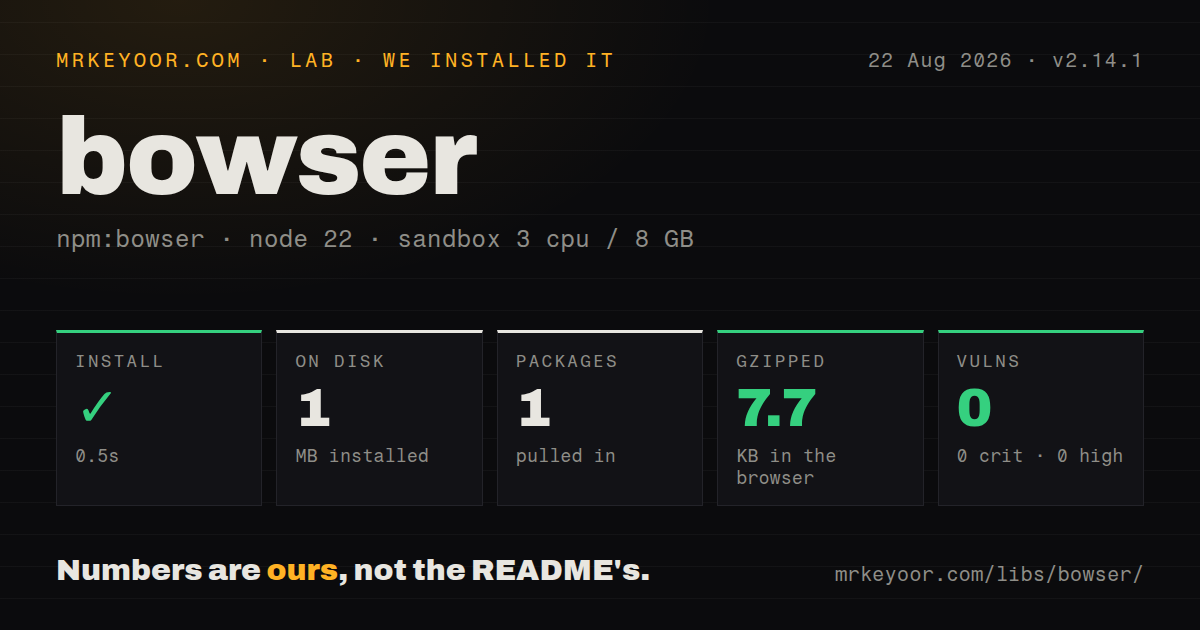
| Install | ✓ · 0.5s | 1 package on disk · 1 MB |
| Import | ✓ | ESM import works · require() works · CommonJS package |
| Browser | 7.7 KB | gzipped (36.4 KB minified), bundled with esbuild |
| Types | ✓ | TypeScript types bundled |
| Known vulns | 0 | 0 critical · 0 high · 0 moderate · 0 low (npm audit) |
Answers from our run
Does bowser install cleanly?
Yes. In a fresh container with an empty cache, npm install bowser finished in 0.5s, leaving 1 package and 1 MB on disk. npm audit reported no known vulnerabilities.
How much does bowser add to a browser bundle?
7.7 KB gzipped (36.4 KB minified) when the whole package is bundled for the browser with esbuild. Importing only part of it is usually smaller.
Does bowser work with both ESM and CommonJS?
Yes. Both import 'bowser' and require('bowser') worked in Node 22 in our run. The package is published as CommonJS.
Does bowser include TypeScript types?
Yes, type declarations ship inside the package, so no @types install is needed.
bowser or ua-parser-js: which should you use?
ua-parser-js: Use it when device vendor, model, CPU, and browser parsing belong in the same result. Bowser 2.14.1 installed in 0.5 seconds and added one package plus 1 MB in our sandbox, with bundled types, zero audit findings, and a 7.7 KB gzipped full browser import.
When should you not use bowser?
Your decision concerns a CSS, DOM, media, or network feature; a direct capability test remains correct when a User-Agent string is spoofed or frozen
Discussed on
- hnNintendo's big piracy case is a sad story312 points
- hnGary Bowser and gaming's most infamous piracy case111 points
- hnU.S. Seeks 5-Year Prison Sentence for Nintendo 'Hacker' Gary Bowser54 points
- hnHacker has to pay Nintendo 25-30% of his salary for the rest of his life36 points
- hnOptimizing typography of insect labels using free fonts and free software (2012) [pdf]35 points
Use it if
- Support logs need the same normalized browser, OS, platform, and engine fields in Node and browser code
- An unsupported-browser notice needs readable per-browser or per-platform version rules through `satisfies()`
- A Chromium client can supply `navigator.userAgentData` to refine the brand information in its reduced User-Agent string
- You want browser identification with zero direct dependencies and TypeScript declarations in the package
- Your decision concerns a CSS, DOM, media, or network feature; a direct capability test remains correct when a User-Agent string is spoofed or frozen
- You require Chrome minor, build, or patch precision from the legacy header; User-Agent Reduction replaces those version components with zeros
- Your policy cannot represent an unknown result; `satisfies()` returns `undefined` when none of its browser rules matches
- You only need a single browser flag and cannot afford our 7.7 KB gzipped full import; Bowser has no exports map for selecting parser families
- A newly released or niche browser must be named on day one; Bowser can recognize only the signatures and Client Hint brands present in its published rules
Setup reality
Our Bowser 2.14.1 install succeeded in 0.5 seconds inside a clean Node 22 sandbox. It left one package and 1 MB on disk. npm audit found zero known vulnerabilities. The package is 292 KB unpacked, declares zero direct and peer dependencies, and bundles its TypeScript declarations. Both require() and ESM import worked even though the published package is CommonJS and has no exports map. A complete esbuild import produced 36.4 KB minified and 7.7 KB gzipped.
No API key or configuration file is involved. The ordinary entry contains ES5 output but no polyfills. Bowser also documents bowser/bundled for an ES5 build with polyfills, which is meant for old targets. TypeScript callers without esModuleInterop should use import * as Bowser from 'bowser'; the default import is documented for projects that enable that compiler option. Release 2.14.1 fixes unwanted package files entering bundles, rather than changing the parser API.
Server code must check the header before calling the parser because bots, health checks, and tests can omit User-Agent. A recognized result may still lack an OS version, device model, or other nested property. Preserve the original header beside parsed telemetry when an unknown result needs investigation. Detection also inherits the limits of its input: clients can lie, and frozen strings cannot describe details that the browser stopped sending.
Client Hints help only when the caller supplies them. Chromium exposes navigator.userAgentData, while Firefox and Safari do not provide that object. Requests for high entropy hint values are asynchronous, so they do not fit directly into Bowser's synchronous second argument. Treat satisfies() as a three-state result in version 2: true matched and passed, false matched and failed, and undefined found no applicable rule. A plain falsy check would reject an unlisted browser.
Patterns
Return every detected category parse-user-agent
import Bowser from 'bowser';

const result = Bowser.parse(navigator.userAgent);
console.log(result.browser);
console.log(result.os);
console.log(result.platform);
console.log(result.engine);
A category or nested value can be absent when version 2.14.1 has no rule for that part of the input. Read optional properties defensively.
Parse once and read several values query-parser
const parser = Bowser.getParser(navigator.userAgent);

const client = {
  browser: parser.getBrowserName(),
  version: parser.getBrowserVersion(),
  os: parser.getOSName(),
  device: parser.getPlatformType(),
};
One parser instance can answer several getters, so repeated fields do not require reparsing the same User-Agent string.
Set browser rules with platform overrides apply-version-policy
const allowed = parser.satisfies({
  macos: { safari: '>=16' },
  mobile: { safari: '>=16' },
  chrome: '>=120',
  firefox: '>=115',
});
OS and platform entries override a general browser entry. Bowser accepts `>`, `>=`, `<`, `<=`, `=`, and `~` comparisons.
Keep unknown browsers out of the failure branch handle-unknown-policy
const allowed = parser.satisfies(rules);

if (allowed === false) {
  showUpgradeNotice();
} else {
  startApplication();
}
`undefined` means no browser rule matched. Checking `!allowed` would treat that unknown state as a confirmed version failure.
Supplement the User-Agent with Client Hints supply-client-hints
const parser = Bowser.getParser(
  navigator.userAgent,
  navigator.userAgentData
);

console.log(parser.getHints());
console.log(parser.getBrandVersion('Google Chrome'));
Firefox and Safari do not expose `navigator.userAgentData`; Bowser falls back to parsing the first argument when hints are missing.
Parse an HTTP header only when it is a string guard-request-header
function identifyRequest(req) {
  const value = req.headers['user-agent'];
  return typeof value === 'string' ? Bowser.parse(value) : null;
}
Automated clients can omit `User-Agent`. `getParser()` expects a string, so middleware should decide how to represent a missing header.
Limit a workaround to one browser check-browser-family
const parser = Bowser.getParser(navigator.userAgent);

if (parser.isBrowser('Safari')) {
  enableSafariWorkaround();
}
Browser identity is self-reported and can be spoofed. Keep the workaround narrow and prefer testing the affected capability when possible.
Test the version of the detected browser compare-current-version
if (
  parser.isBrowser('Safari') &&
  parser.compareVersion('<16')
) {
  loadCompatibilityCode();
}
`compareVersion()` uses whichever browser Bowser detected. Pairing it with `isBrowser()` prevents a Safari threshold from applying to another family.
Branch on a recognized bot signature classify-declared-bot
const result = Bowser.parse(userAgent);

if (result.platform?.type === 'bot') {
  omitAnalyticsEvent();
}
This detects declared crawler strings present in Bowser's rules. It does not expose a bot that sends an ordinary browser identity.
Check a brand from supplied hints inspect-hint-brand
const parser = Bowser.getParser(userAgent, hints);

if (parser.hasBrand('Google Chrome')) {
  console.log(parser.getBrandVersion('Google Chrome'));
}
The answer comes from the supplied `brands` array and may be null when the requested brand is not present.
Use the CommonJS entry in Node load-commonjs
const Bowser = require('bowser');
const result = Bowser.parse(userAgent);
Bowser 2.14.1 is published as CommonJS without an exports map. Our Node 22 sandbox loaded this form successfully.
Choose the TypeScript import form import-typescript
import * as Bowser from 'bowser';

// With esModuleInterop enabled:
// import Bowser from 'bowser';
The package includes declarations. Its README ties the default import form to TypeScript projects with `esModuleInterop` enabled.
Alternatives
| Package | Registry | Pick it when |
|---|---|---|
| ua-parser-js | npm | Use it when device vendor, model, CPU, and browser parsing belong in the same result. |
| detect-browser | npm | Use it when an application only needs a compact browser name and version check. |
| platform | npm | Use it for a human-readable platform description alongside browser and OS fields. |
| useragent | npm | Use it to maintain an older Node service already coupled to its parser objects and update process. |
More utils guides
lru-cache · type-fest · ajv · zod · p-limit · find-up · the whole shelf →
How this guide is made: grounded in the library's documentation, release notes, changelog, and issue history, on a fixed rubric — not a hands-on install of every release. The 50 most-downloaded entries are additionally install-verified in clean containers. Corrections: contact the desk.