binaryornot review
BinaryOrNot 0.6.0 answers one narrow question: does this path or byte sample look binary? It checks a filename against 131 known binary extensions, recognizes 55 header signatures, and otherwise classifies the first 512 bytes using byte distribution, entropy, printable runs, BOMs, and encoding validity. The result is a bool. It does not identify a MIME type, choose a decoder, scan the rest of the file, or prove that an upload is safe. The current release added extension checking, more signatures, public type annotations, pathlib support, and a retrained classifier.
BinaryOrNot 0.6.0 installed in 0.3 seconds and occupied 1 MB in our sandbox, with no dependencies or audit findings. Install it for a cheap binary-versus-text routing hint, but use a format parser when the answer controls trust or safety.
We installed it
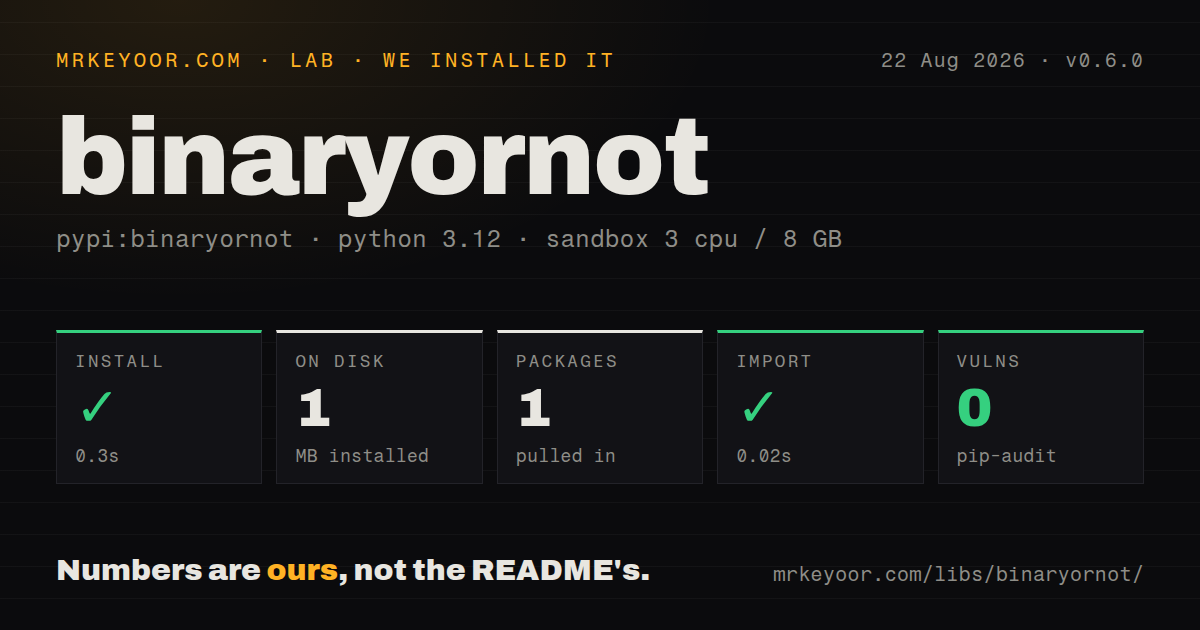
| Install | ✓ · 0.3s | 1 package on disk · 1 MB |
| Import | ✓ | import binaryornot in 0.02s · pure Python · py.typed · requires Python >=3.10 |
| Known vulns | 0 | (pip-audit) |
Answers from our run
Does binaryornot install cleanly?
Yes. In a fresh container with an empty cache, pip install binaryornot finished in 0.3s, leaving 1 package and 1 MB on disk. pip-audit reported no known vulnerabilities.
What does binaryornot need to run?
Python >=3.10, and nothing compiled: it is pure Python. In our run import binaryornot succeeded in 0.02s, and the package ships py.typed for type checkers.
binaryornot or filetype: which should you use?
filetype: Choose it when a pure-Python magic-byte guess of a specific file type is the required output. BinaryOrNot 0.6.0 installed in 0.3 seconds and occupied 1 MB in our sandbox, with no dependencies or audit findings.
When should you not use binaryornot?
You need the actual format or MIME type. BinaryOrNot only returns True or False; filetype, puremagic, or libmagic-based python-magic can identify formats.
Use it if
- You need to keep images, archives, fonts, databases, and executables out of a text-processing path before attempting a decode.
- UTF-16 or CJK text makes a null-byte or high-byte rule too error-prone for your input set.
- A Boolean file-routing hint is enough and you want a pure-Python package with no direct dependencies.
- You already have bytes in memory and can call is_binary_string without creating a temporary file.
- You need the actual format or MIME type. BinaryOrNot only returns True or False; filetype, puremagic, or libmagic-based python-magic can identify formats.
- You need an encoding name for later decoding. The classifier tests whether byte sequences fit several encodings but does not return the winning codec.
- Your decision is security-sensitive. A heuristic result cannot validate hostile content, polyglot files, or whether a claimed document is safe to parse.
- Binary data can begin after a long textual preamble. is_binary reads 512 bytes, so evidence later in a file is outside its decision.
- Your runtime is Python 3.9 or older. Version 0.6.0 declares Python 3.10 as its minimum.
Setup reality
We installed binaryornot 0.6.0 in a fresh, unprivileged Python 3.12 sandbox, and pip finished in 0.3 seconds. It left one package and 1 MB on disk, declared 0 direct dependencies, and pip-audit found 0 known vulnerabilities. import binaryornot completed in 0.02 seconds. This measurement setup used 3 CPUs and 8 GB of RAM with no cache. The wheel is pure Python, includes py.typed, and requires Python 3.10 or newer.
There are no credentials or config files in version 0.6.0. Pass a str, bytes path, or pathlib.Path to is_binary. The default extension check can classify a known suffix without reading the file; set check_extensions=False when a user-controlled or misleading name should not decide the answer. Missing and unreadable paths raise their normal filesystem errors instead of returning False.
Content analysis reads only the first 512 bytes. Known signatures are checked before the trained decision tree, whose inputs include entropy, byte ratios, encoding validity, and printable sequences. An empty byte string is treated as text. ISO-2022-KR and three EBCDIC code pages are listed as gaps in the project coverage data.
The 0.6.0 CLI accepts one path and prints True or False. It has no recursive directory walk, stdin mode, confidence value, or structured output. For batches, open files yourself, limit concurrency to suit the storage device, and treat the classification as routing advice before a real decoder or format parser.
Patterns
Classify a file path classify-path
from binaryornot.check import is_binary

if is_binary("incoming/report.csv"):
    print("binary")
else:
    print("text")
is_binary returns a bool and reads at most 512 bytes when the extension does not settle the result.
Pass a pathlib path classify-pathlib-path
from pathlib import Path
from binaryornot.check import is_binary

path = Path("incoming/archive.zip")
print(is_binary(path))
Version 0.6.0 accepts pathlib.Path as well as str and bytes paths.
Ignore a misleading suffix ignore-extension
from binaryornot.check import is_binary

result = is_binary("uploaded.pyc", check_extensions=False)
check_extensions=False forces content analysis instead of letting a known binary extension decide first.
Classify bytes already in memory classify-bytes
from binaryornot.helpers import is_binary_string

payload = b"name,quantity\nink,2\n"
print(is_binary_string(payload))
is_binary_string takes bytes, so it does not inspect a filename extension.
Read the same bounded prefix read-bounded-sample
from binaryornot.helpers import is_binary_string

with open("mystery.dat", "rb") as file:
    sample = file.read(512)

print(is_binary_string(sample))
The file API bases content classification on 512 bytes. Reading more before is_binary_string does not make it validate the whole format.
Route text before decoding route-text-file
from pathlib import Path
from binaryornot.check import is_binary

def read_text_candidate(path: Path) -> str:
    if is_binary(path):
        raise ValueError(f"binary input: {path}")
    return path.read_text(encoding="utf-8", errors="strict")
A False result does not identify UTF-8. The explicit decode can still raise UnicodeDecodeError.
Handle filesystem errors handle-missing-file
from binaryornot.check import is_binary

try:
    binary = is_binary("incoming/missing.dat")
except (FileNotFoundError, PermissionError) as error:
    print(f"cannot inspect file: {error}")
Version 0.6.0 propagates missing-file and permission failures instead of treating them as text.
Filter a directory for likely text filter-directory
from pathlib import Path
from binaryornot.check import is_binary

text_paths = [
    path for path in Path("incoming").iterdir()
    if path.is_file() and not is_binary(path)
]
The package has no recursive batch API. This loop makes each path decision separately.
Follow the hint with a parser validate-before-parsing
from binaryornot.check import is_binary
import json

def load_json(path: str):
    if is_binary(path):
        raise ValueError("expected text JSON")
    with open(path, encoding="utf-8") as file:
        return json.load(file)
The JSON parser and UTF-8 decoder remain authoritative. BinaryOrNot does not validate either condition.
Check one path from the shell use-cli
binaryornot image.pngThe CLI prints True or False for one filename and does not emit JSON or a confidence score.
Alternatives
| Package | Registry | Pick it when |
|---|---|---|
| filetype | PyPI | Choose it when a pure-Python magic-byte guess of a specific file type is the required output. |
| puremagic | PyPI | Choose it for pure-Python signature matching that returns extension and MIME candidates. |
| python-magic | PyPI | Choose it when installing system libmagic is acceptable and you need its larger format database. |
More utils guides
lru-cache · type-fest · ajv · zod · p-limit · find-up · the whole shelf →
How this guide is made: grounded in the library's documentation, release notes, changelog, and issue history, on a fixed rubric — not a hands-on install of every release. The 50 most-downloaded entries are additionally install-verified in clean containers. Corrections: contact the desk.