apscheduler review
APScheduler 3.11.3 puts cron, interval, calendar-interval, and one-time scheduling inside a Python process. A scheduler submits ordinary callables to thread or process executors, while optional job stores retain schedules across restarts. It is scheduling machinery, not a distributed task queue: it does not supply broker-backed delivery, automatic retries, or remote worker routing. Version 3.11.3 fixes a spring-forward DST stall for sub-minute intervals using ZoneInfo and restores scheduler and job-store links when jobs are imported. Our Python 3.12 install imported successfully, but the package does not ship a py.typed marker.
APScheduler 3.11.3 is a good fit for one controlled Python scheduler process that needs richer timing rules than system cron. Do not install it as a substitute for a distributed queue, and keep production code on the 3.x documentation until 4.0 leaves pre-release status.
We installed it
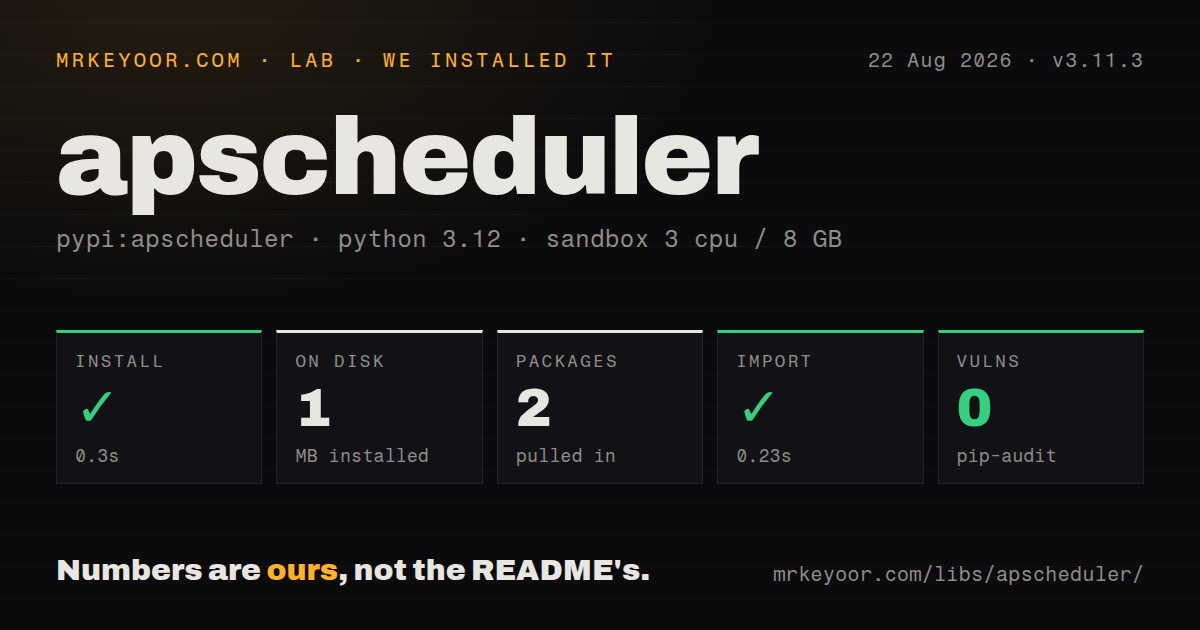
| Install | ✓ · 0.3s | 2 packages on disk · 1 MB |
| Import | ✓ | import apscheduler in 0.23s · pure Python · requires Python >=3.8 |
| Known vulns | 0 | (pip-audit) |
Answers from our run
Does apscheduler install cleanly?
Yes. In a fresh container with an empty cache, pip install apscheduler finished in 0.3s, leaving 2 packages and 1 MB on disk. pip-audit reported no known vulnerabilities.
What does apscheduler need to run?
Python >=3.8, and nothing compiled: it is pure Python. In our run import apscheduler succeeded in 0.23s.
apscheduler or celery: which should you use?
celery: Choose it when retries, broker delivery, routing, and workers on other machines are part of the job contract. APScheduler 3.11.3 is a good fit for one controlled Python scheduler process that needs richer timing rules than system cron.
When should you not use apscheduler?
Several web workers would each start the same scheduler. APScheduler 3.x does not coordinate them, so run one dedicated scheduler process or choose a queue with distributed workers.
Use it if
- One long-running Python service needs cron, fixed-interval, calendar-interval, and date triggers without a separate queue system.
- Jobs must survive restarts through a SQLAlchemy, MongoDB, Redis, or another documented 3.x job store.
- You need explicit controls for overlapping runs, late starts, coalescing, executor choice, and scheduler event listeners.
- An asyncio, gevent, Tornado, Twisted, Qt, or conventional threaded application needs a scheduler matched to its runtime.
- Several web workers would each start the same scheduler. APScheduler 3.x does not coordinate them, so run one dedicated scheduler process or choose a queue with distributed workers.
- Failed jobs must retry automatically or move through broker-backed routing. APScheduler records execution events but has no built-in retry policy or remote delivery contract.
- Stored jobs must survive function moves without a migration. Persistent job stores serialize the callable reference, so changing its import path can make existing rows unloadable.
- Static typing must work from package-owned metadata. Our installed wheel had no py.typed marker, so strict type checking may need third-party stubs or local annotations.
- You want the API described on the repository's default README today. That README covers 4.0 pre-release concepts and warns against production use, while PyPI stable remains the different 3.x API.
Setup reality
We installed APScheduler 3.11.3 in a fresh unprivileged Python 3.12 Bookworm container. Installation succeeded in 0.3 seconds, leaving 2 packages and 1 MB on disk. Our package inspection counted 23 direct dependencies, found pure Python code, and found no py.typed marker. import apscheduler completed in 0.23 seconds. pip-audit reported 0 known vulnerabilities in that environment. Python 3.8 or newer is required.
A memory-only scheduler needs no credentials or configuration file. Persistence changes that. Install the extra for the chosen store, provide its database URL or client settings, and give each startup-defined job a stable ID with replace_existing=True. Otherwise repeated application starts can create duplicate stored schedules. Stored callables need importable module paths; lambdas, nested functions, and renamed functions are poor persistence targets.
Choose the scheduler class that owns the right execution context. BackgroundScheduler creates a thread, BlockingScheduler owns the process, and AsyncIOScheduler uses an asyncio loop. Coroutine jobs must avoid blocking calls. CPU-heavy jobs belong in a process executor, where arguments and return paths must be serializable. Exceptions do not propagate to the code that called add_job; collect them with logging or an EVENT_JOB_ERROR listener.
Time-zone and downtime behavior need deliberate settings. Use aware datetimes and ZoneInfo zones. Set misfire_grace_time, coalesce, and max_instances according to whether a late run should execute, a backlog should collapse, or overlapping work is safe. Version 3.11.3 repairs one ZoneInfo spring-forward stall, but calendar dates and DST folds still deserve schedule-level tests.
Patterns
Run jobs beside application code start-background-scheduler
from apscheduler.schedulers.background import BackgroundScheduler

scheduler = BackgroundScheduler(timezone="UTC")
scheduler.start()
Keep the scheduler reachable and call shutdown during application teardown. Its thread ends with the process.
Run a function every five minutes add-interval-job
scheduler.add_job(
    sync_inventory,
    trigger="interval",
    minutes=5,
    id="sync-inventory",
    replace_existing=True,
)
A fixed ID and replace_existing prevent startup code from adding another persistent copy after each restart.
Schedule a local-time cron job add-cron-job
from apscheduler.triggers.cron import CronTrigger

scheduler.add_job(
    build_report,
    CronTrigger(day_of_week="mon-fri", hour=9, minute=15, timezone="Asia/Kolkata"),
    id="weekday-report",
    replace_existing=True,
)
Put the intended zone on the trigger. Server-local time can change between development and deployment.
Schedule one future execution run-once
from datetime import datetime, timezone

scheduler.add_job(
    close_order,
    trigger="date",
    run_date=datetime(2026, 9, 1, 12, 0, tzinfo=timezone.utc),
    args=[order_id],
)
A date-triggered job is removed after it runs. Use an aware datetime so deployment time zones cannot reinterpret it.
Run coroutine jobs on asyncio schedule-coroutine
import asyncio
from apscheduler.schedulers.asyncio import AsyncIOScheduler

async def main():
    scheduler = AsyncIOScheduler(timezone="UTC")
    scheduler.add_job(poll_feed, "interval", seconds=30)
    scheduler.start()
    await asyncio.Event().wait()

asyncio.run(main())
A blocking call inside poll_feed blocks the event loop. Move blocking I/O to a thread or use an async client.
Store schedules through SQLAlchemy persist-jobs
from apscheduler.jobstores.sqlalchemy import SQLAlchemyJobStore
from apscheduler.schedulers.background import BackgroundScheduler

scheduler = BackgroundScheduler(
    jobstores={"default": SQLAlchemyJobStore(url=DATABASE_URL)},
    timezone="UTC",
)
Install the SQLAlchemy extra and keep scheduled functions at stable import paths. Moving a function requires cleaning or migrating stored jobs.
Set late-run and overlap policy control-overlap
scheduler.add_job(
    refresh_cache,
    "interval",
    minutes=10,
    max_instances=1,
    coalesce=True,
    misfire_grace_time=120,
)
This allows one active copy, collapses multiple missed times, and discards a run that starts more than 120 seconds late.
Send CPU work to a process pool route-cpu-work
from apscheduler.executors.pool import ProcessPoolExecutor

scheduler.configure(executors={
    "default": {"type": "threadpool", "max_workers": 10},
    "cpu": ProcessPoolExecutor(4),
})
scheduler.add_job(rebuild_index, "cron", hour=2, executor="cpu")
Process-pool callables and arguments must be serializable and importable by child processes.
Report failed and missed jobs observe-failures
from apscheduler.events import EVENT_JOB_ERROR, EVENT_JOB_MISSED

def report(event):
    if event.exception:
        logger.error("job %s failed: %s", event.job_id, event.exception)
    else:
        logger.warning("job %s missed its run", event.job_id)

scheduler.add_listener(report, EVENT_JOB_ERROR | EVENT_JOB_MISSED)
Job exceptions stay inside the executor. Without a listener or APScheduler logging, application callers will not see them.
Change a live job schedule reschedule-job
job = scheduler.get_job("sync-inventory")
if job is not None:
    job.reschedule(trigger="interval", minutes=15)
    job.modify(name="inventory refresh")
Use reschedule for trigger changes. modify changes other job properties but does not replace the trigger schedule.
Control an existing job pause-and-remove-job
job = scheduler.get_job("weekday-report")
if job is not None:
    job.pause()
    job.resume()
    scheduler.remove_job(job.id)
Removing a missing ID directly raises JobLookupError, so look it up first when absence is acceptable.
Own scheduling in one process run-dedicated-process
from apscheduler.schedulers.blocking import BlockingScheduler

scheduler = BlockingScheduler(timezone="UTC")
scheduler.add_job(heartbeat, "interval", seconds=60)

try:
    scheduler.start()
except (KeyboardInterrupt, SystemExit):
    scheduler.shutdown(wait=True)
A dedicated BlockingScheduler avoids starting one copy per Gunicorn or uWSGI worker. It still needs process supervision.
Alternatives
| Package | Registry | Pick it when |
|---|---|---|
| celery | PyPI | Choose it when retries, broker delivery, routing, and workers on other machines are part of the job contract. |
| schedule | PyPI | Choose it for a small in-process loop where persistence, executor pools, and detailed misfire controls are unnecessary. |
| arq | PyPI | Choose it for asyncio services that want Redis-backed queued work and cron jobs in the same worker system. |
More web backend guides
ws · urllib3 · requests · undici · anyio · express · the whole shelf →
How this guide is made: grounded in the library's documentation, release notes, changelog, and issue history, on a fixed rubric — not a hands-on install of every release. The 50 most-downloaded entries are additionally install-verified in clean containers. Corrections: contact the desk.