ag-grid-community review
ag-grid-community 36.1.0 is the MIT half of AG Grid: a browser data grid with virtual rows, sorting, filters, editing, selection, pagination, CSV export, themes, and custom cells. Row grouping, pivoting, formulas, Excel export, range selection, master/detail, and the advanced server-side model sit in the paid package. The current 36.1 release keeps the module-based API introduced in recent majors and ships matching React, Angular, and Vue wrappers separately. Our sandbox loaded its CommonJS and ESM entry points and found bundled TypeScript declarations, but importing the whole package produced a 359.8 KB gzipped browser bundle.
Our ag-grid-community 36.1.0 install took 1.6 seconds and bundled to 359.8 KB gzipped, so the cost makes sense for a real editable data grid, not an ordinary sortable table. Install it only after the product list fits the Community feature column or the team accepts a later Enterprise license.
We installed it
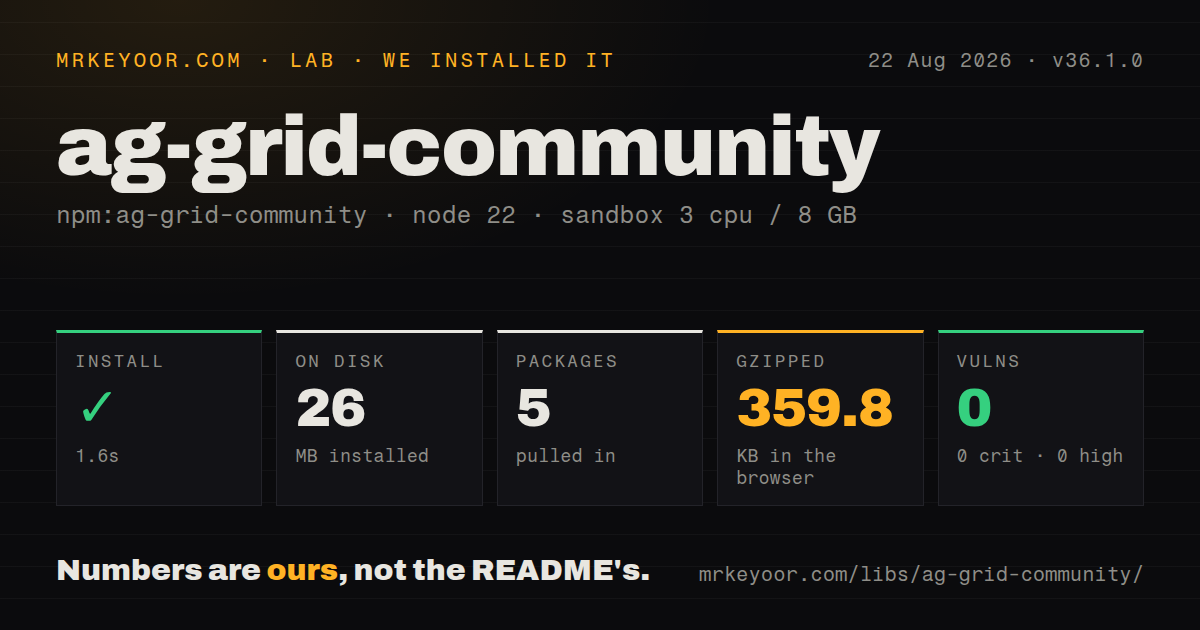
| Install | ✓ · 1.6s | 5 packages on disk · 26 MB |
| Import | ✓ | ESM import works · require() works · CommonJS package with exports map |
| Browser | 359.8 KB | gzipped (1313.7 KB minified), bundled with esbuild |
| Types | ✓ | TypeScript types bundled |
| Known vulns | 0 | 0 critical · 0 high · 0 moderate · 0 low (npm audit) |
Answers from our run
Does ag-grid-community install cleanly?
Yes. In a fresh container with an empty cache, npm install ag-grid-community finished in 2 seconds, leaving 5 packages and 26 MB on disk. npm audit reported no known vulnerabilities.
How much does ag-grid-community add to a browser bundle?
359.8 KB gzipped (1313.7 KB minified) when the whole package is bundled for the browser with esbuild. Importing only part of it is usually smaller.
Does ag-grid-community work with both ESM and CommonJS?
Yes. Both import 'ag-grid-community' and require('ag-grid-community') worked in Node 22 in our run. The package is published as CommonJS with an exports map.
Does ag-grid-community include TypeScript types?
Yes, type declarations ship inside the package, so no @types install is needed.
ag-grid-community or @tanstack/table-core: which should you use?
@tanstack/table-core: Use it when the application should own markup and styling, and you are willing to assemble virtualization and editing separately. Our ag-grid-community 36.1.0 install took 1.6 seconds and bundled to 359.8 KB gzipped, so the cost makes sense for a real editable data grid, not an ordinary sortable table.
When should you not use ag-grid-community?
A few hundred rows only need sorting and a search box; 359.8 KB gzipped for a whole-package import plus AG Grid's configuration model is a poor trade for that screen
Use it if
- A product screen needs editable, filterable, selectable data with virtualized rows rather than a lightly styled HTML table
- You can choose Community features now and have budget approval for Enterprise if grouping, pivoting, Excel files, or integrated charts enter the roadmap
- The same column definitions and row model need to work in plain JavaScript plus an official React, Angular, or Vue wrapper
- You want client-side and block-loaded infinite row models with a documented grid API, state snapshots, and custom cell components
- A few hundred rows only need sorting and a search box; 359.8 KB gzipped for a whole-package import plus AG Grid's configuration model is a poor trade for that screen
- Your requirements include row grouping, aggregation, pivoting, formulas, Excel export, range selection, tree data, or master/detail without a commercial license; the README assigns each feature to Enterprise
- Designers require ownership of table markup and DOM structure; AG Grid renders and manages its own grid, while a headless package such as TanStack Table leaves that layer to the application
- Your backend must perform Enterprise-style grouping and aggregation through Community's infinite model; Community can request blocks, but the advanced server-side row model is paid
- The team avoids major-version integration work; AG Grid has moved module registration, theming, selection options, and framework setup across recent majors, even though migration guides and codemods exist
Setup reality
Our install of ag-grid-community 36.1.0 finished in 1.6 seconds. It left 5 packages and 26 MB on disk; the package itself was 22740 KB unpacked with 2 direct dependencies and no peer dependencies. npm audit reported 0 known vulnerabilities. CommonJS require and ESM import both worked, an exports map was present, and TypeScript declarations were bundled. Importing everything through esbuild measured 1313.7 KB minified and 359.8 KB gzipped.
The first visible failure is often layout, not JavaScript. The grid fills its container, so that element needs an explicit height. Register modules before createGrid; AllCommunityModule is convenient, while selected modules avoid shipping unused grid features. Framework users also install ag-grid-react, ag-grid-angular, or ag-grid-vue3 at a matching 36.x version. A server-rendered app must create the grid on the client because it reads the DOM.
Choose the row model before wiring requests. Client-side mode holds the supplied rows in the browser. Infinite mode asks a datasource for blocks and needs a cache limit such as maxBlocksInCache; it does not turn Community into the paid grouping and aggregation backend. Stable getRowId values matter when updating rows or restoring selections.
Community writes CSV, not .xlsx. Spreadsheet software may treat cells beginning with =, +, -, or @ as formulas, so neutralize untrusted values in processCellCallback. Version 36.1 also retains the newer Theming API. Do not mix its theme objects with a half-migrated legacy CSS theme unless the migration guide specifically calls for that combination.
Patterns
Create a typed Community grid create-grid
import type { GridOptions } from 'ag-grid-community';
import { AllCommunityModule, ModuleRegistry, createGrid } from 'ag-grid-community';

ModuleRegistry.registerModules([AllCommunityModule]);
const options: GridOptions<{ id: number; name: string }> = {
  rowData: [{ id: 1, name: 'Ada' }],
  columnDefs: [{ field: 'id' }, { field: 'name' }],
};
const api = createGrid(document.querySelector('#grid')!, options);
Register the 36.1 modules before creating the grid, and give `#grid` an explicit height or it can render at zero height.
Register selected Community features trim-modules
import { ClientSideRowModelModule, CsvExportModule, ModuleRegistry, PaginationModule, RowSelectionModule, TextFilterModule } from 'ag-grid-community';

ModuleRegistry.registerModules([
  ClientSideRowModelModule, TextFilterModule, PaginationModule,
  RowSelectionModule, CsvExportModule,
]);
A missing feature module causes a runtime configuration error. Whole-package imports measured 359.8 KB gzipped in our esbuild check.
Set reusable column defaults define-columns
const gridOptions = {
  columnDefs: [
    { field: 'name', pinned: 'left' },
    { field: 'country', filter: 'agTextColumnFilter' },
    { field: 'revenue', type: 'numericColumn' },
  ],
  defaultColDef: { sortable: true, filter: true, resizable: true, flex: 1, minWidth: 120 },
};
Manual resizing disables flex behavior for that column, so test saved widths and narrow viewports together.
Roll back a rejected cell edit edit-cell
const gridOptions = {
  columnDefs: [{ field: 'quantity', editable: true }],
  onCellValueChanged: async ({ data, oldValue, newValue, node, api }) => {
    try { await saveQuantity(data.id, newValue); }
    catch {
      node.setDataValue('quantity', oldValue);
      api.flashCells({ rowNodes: [node], columns: ['quantity'] });
    }
  },
};
The client value has changed by the time this event fires. A failed write needs an explicit rollback plus an error message outside the grid.
Read multi-row selection select-rows
const gridOptions = {
  rowSelection: { mode: 'multiRow', checkboxes: true, headerCheckbox: true },
  getRowId: ({ data }) => String(data.id),
};
const selectedRecords = api.getSelectedRows();
Version 36 uses the structured `rowSelection` object. Stable row IDs keep selections attached to records after sorting or refresh.
Wire a client-side search box quick-filter
const input = document.querySelector<HTMLInputElement>('#search')!;
input.addEventListener('input', () => {
  api.setGridOption('quickFilterText', input.value);
});
Quick filter scans client-held display values. It does not query the server, and large row sets may need a debounced input.
Fetch Community rows in blocks load-infinite
const gridOptions = {
  rowModelType: 'infinite', cacheBlockSize: 100, maxBlocksInCache: 5,
  datasource: {
    async getRows(params) {
      try {
        const page = await fetchRows(params.startRow, params.endRow);
        params.successCallback(page.rows, page.totalRows);
      } catch { params.failCallback(); }
    },
  },
};
Register `InfiniteRowModelModule` when selecting modules. Community fetches blocks but does not include paid server-side grouping or aggregation.
Neutralize formulas in CSV output export-csv
api.exportDataAsCsv({
  fileName: 'orders.csv',
  processCellCallback: ({ value }) => {
    const text = String(value ?? '');
    return /^[=+\-@]/.test(text) ? `'${text}` : text;
  },
});
Community exports CSV only. Prefix untrusted formula-like cells because spreadsheet programs may execute them when a user opens the file.
Alternatives
| Package | Registry | Pick it when |
|---|---|---|
| @tanstack/table-core | npm | Use it when the application should own markup and styling, and you are willing to assemble virtualization and editing separately. |
| tabulator-tables | npm | Use it for an open-source visual grid when AG Grid's Community and Enterprise boundary conflicts with the feature list. |
| gridjs | npm | Use it for a smaller searchable and sortable table that does not need spreadsheet-like editing or several row models. |
| handsontable | npm | Compare it for spreadsheet-shaped editing and formulas, after checking whether its license fits the deployment. |
More web frontend guides
postcss · react · react-dom · tailwindcss · clsx · htmlparser2 · the whole shelf →
How this guide is made: grounded in the library's documentation, release notes, changelog, and issue history, on a fixed rubric — not a hands-on install of every release. The 50 most-downloaded entries are additionally install-verified in clean containers. Corrections: contact the desk.