Release 092 adds radio controls beyond the official firmware
Unleashed release 092 is an unofficial Flipper Zero firmware fork, compatible with API 88.4 according to its release notes. It keeps the familiar device interface while changing Sub-GHz behavior, adding protocols, bundling community apps, and extending NFC, infrared, BadUSB, Bluetooth, and GPIO functions. The largest philosophical change is radio access: the README says regional transmit restrictions are removed and additional frequencies can be enabled. That makes the device more flexible and puts more judgment on its owner.
Sub-GHz work is the clearest reason to install it. Unleashed adds protocol decoders and encoders, rolling-code tools, an expanded frequency analyzer, external CC1101 support, remote controls, and file-based brute-force utilities. NFC parsers and community applications widen the device beyond radio testing. Release 092 also moved NFC protocol scenes into plugins to cut resident RAM roughly in half. These are useful additions for experimentation on equipment you own, but they do not promise support for every remote, card, or accessory.
The 199.7 MB checkout assumes a real Flipper Zero
Our checkout occupied 199.7 MB and contained 9,944 files with about 1,966,497 source lines. That scale comes from a full embedded operating environment, applications, assets, build tools, hardware libraries, documentation, and imported submodules. A curious desktop user cannot evaluate the result through a normal app window. The meaningful checks happen after compiling or flashing it onto Flipper Zero hardware, then exercising the radio, NFC, storage, display, and plugin paths that matter.
The repository's 7 CI workflow files provide project automation, and its tests directory shows that firmware testing exists somewhere in the tree. Neither fact substitutes for a hardware check. The contribution queue makes that explicit: recent pull requests often list firmware builds and unit targets separately from physical-device verification, and some say hardware was not tested. If you depend on a particular gate remote, NFC card, or external module, keep the official firmware package and your prior settings available for rollback.
What happened when we ran it
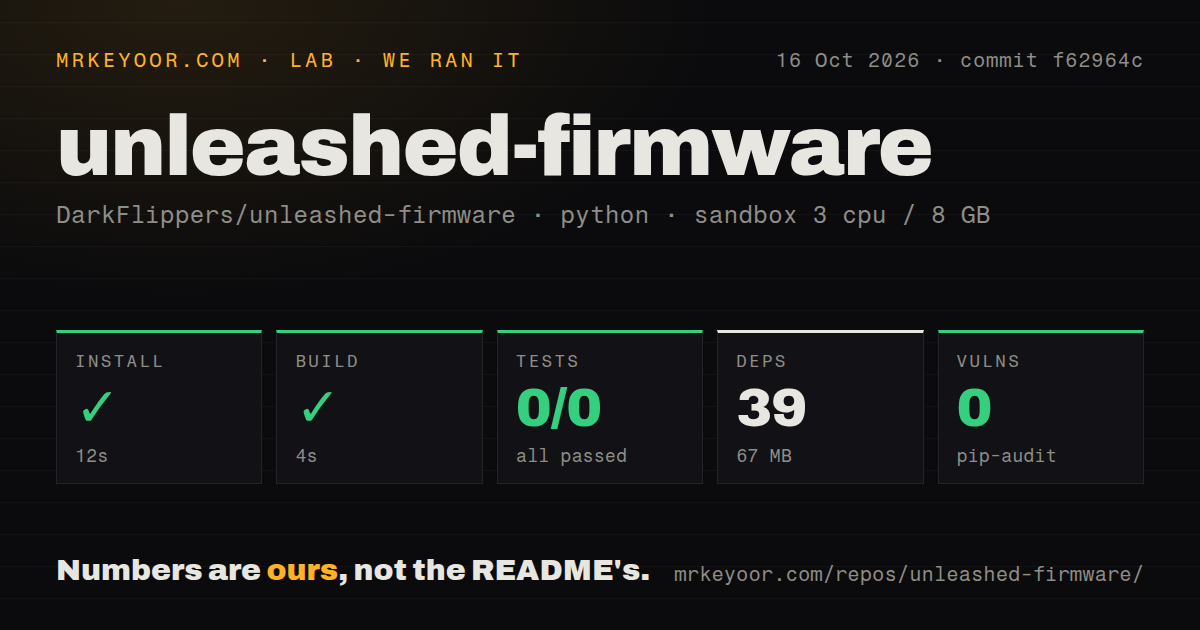
Our sandbox entered lib/nanopb/, a Git submodule pinned by commit 945234a. Its Python environment installed successfully in 47 seconds, adding 39 packages and using 67 MB. The nested build succeeded in 3 seconds. Those results cover the nanopb support project selected by the harness. They do not show that fbt compiled the Flipper firmware, that an updater package was produced, or that any code ran on the device.
Pytest exited with code 5 after 9 seconds. It reported 0 passed and 0 failed out of 0, and the final log line said no tests ran in 0.10s. The useful finding is simply that pytest collected no cases in that selected directory; the log does not establish a deeper cause. Pip-audit found 0 known vulnerabilities in the 39 installed Python packages. Our measurement method never flashed hardware, so radio behavior, update safety, battery use, and plugin stability remain unmeasured.
A first install starts on current official firmware
The installation guide requires first-time users to update their Flipper Zero to the latest official firmware and insert a microSD card. The simplest route is the Unleashed web installer, which requires a Chromium-based browser and a direct device connection. The project also documents Flipper Lab, iOS and Android apps, qFlipper, and a manual microSD update. Stable releases and automatically built development images are separate choices; new users should take the stable branch.
No hosted credential or external service is necessary to flash the documented package. Source builders have more work: the clone must include recursive submodules, and ./fbt COMPACT=1 DEBUG=0 updater_package produces the update artifact. Android can build applications through Termux, but the guide says that route does not build the firmware. The 199.7 MB source tree is therefore optional for ordinary owners and unavoidable for developers changing C code or bundled assets.
API 88.4 shipped fixes for crashes and bad card output
Release 092 was published on August 21, 2026 with API 88.4. Its notes include fixes for out-of-memory crashes in the JavaScript runner and NFC, a crash on a DESFire card with a zero-key application, and an EMV plugin that did not load. Several card parsers also stopped presenting values from unread blocks. That release history is reassuring because the fixes are specific, but it also shows why card output should be checked before anyone treats it as authoritative.
Open reports remain specific too. Issue 910 says captured Manchester-coded Volpe doorbell signals failed to replay at 310, 325, and 433 MHz in the reporter's setup. Issue 1136 collects plugin-loading follow-ups, including a directory-open error reported as success and a possible null entry-point dereference. Unleashed's own dangerous-settings guide warns that extending the CC1101 outside its specified bands can damage hardware. Software unlocks do not change the radio's electrical limits or local transmission law.
The September 10 push and 26 open items show current work
GitHub recorded the last push on September 10, 2026 and listed 22,202 stars. Search results split the 26 open items into 20 issues and 6 pull requests. Issue 1136 was opened and updated on September 8, while Sub-GHz feature issue 827 was updated on September 9. Release 092 arrived less than 3 weeks earlier. Together those dates show active code, release, and triage work rather than a custom firmware frozen after one popular build.
Maintenance concentration still matters. The README says most development and maintenance comes from one lead developer with help from a small named team and community contributors. That is candid and gives buyers a reason to watch releases before upgrading. Unleashed is a sensible stable-channel choice for an experienced Flipper owner who wants its particular Sub-GHz and app changes. The failed 0-test pytest run offers no firmware assurance, so the decision should rest on release notes, a reversible flash, and hands-on checks of the hardware paths you actually use.