A standard library assembled from small parts
JavaScript has built-in numbers, typed arrays, and Math functions, yet serious numerical work quickly needs more. stdlib fills that gap with packages for special functions, probability distributions, pseudorandom generators, ndarrays, BLAS operations, statistics, streams, datasets, plotting, and general utilities. Many implementations are JavaScript, while selected paths have native C or WebAssembly options and JavaScript fallbacks. TypeScript declaration files accompany the functions.
The design choice that matters most is decomposition. A developer can install the full @stdlib/stdlib package, a top-level namespace such as @stdlib/math, or one function published under a hyphenated package name. The README repeatedly recommends the last option for Node and browser applications that use a small slice of the project. That advice is sound. stdlib is easier to justify as a catalog of precise building blocks than as one default dependency.
Its scope reaches beyond an npm library. There is a command-line interface and REPL, browser bundles, separate ESM and Deno builds, custom bundle tooling, benchmarks, and native bindings that can connect to BLAS libraries. This breadth is useful for teams committed to numerical JavaScript. It also produces several ways to consume the same project, each with its own naming and distribution conventions.
What happened when we ran it
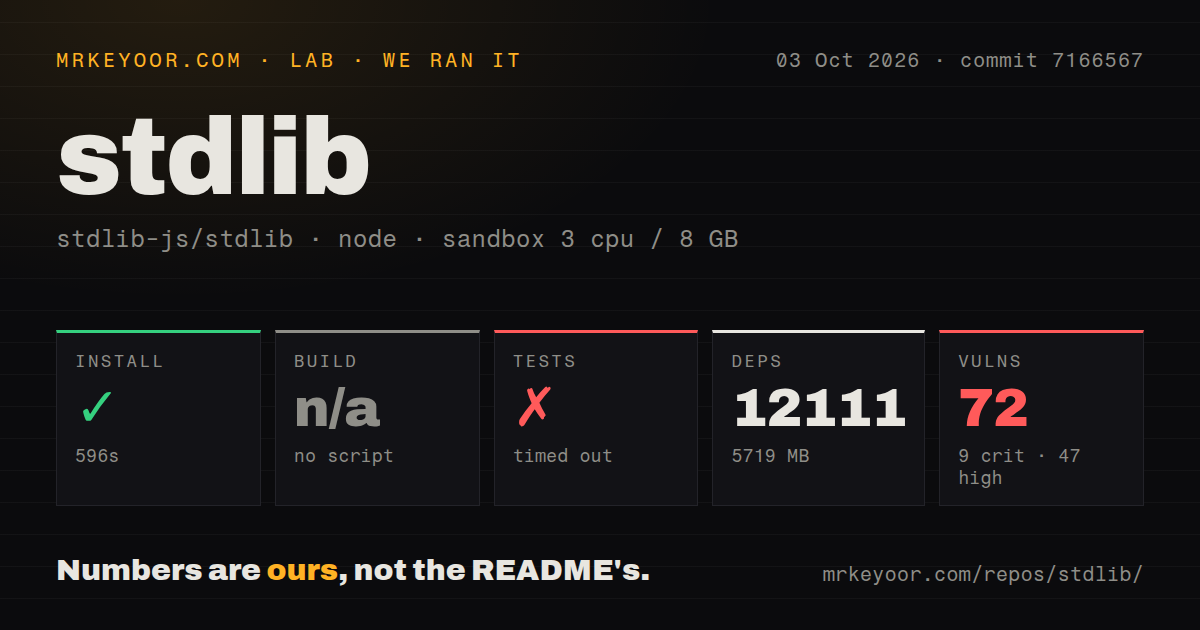
We cloned commit 6fca15c into a fresh unprivileged Node 22 container with 3 CPUs, 8 GB of RAM, and no secrets. The checkout contained 1,350 files, about 32,260 lines of source, and occupied 23.8 MB. Installation succeeded, though it took 509 seconds, installed 12,036 packages, and used 5,684 MB on disk.
There was no generic build script or target for the lab, so that step was skipped. The test command exited with code 2 after 63 seconds. Its final output showed a Node TLS error with code CERT_HAS_EXPIRED, followed by a make failure in the local JavaScript test target. The supplied summary contained separate passing: 327 and passing: 2 lines, then the run stopped. The log does not identify which remote certificate expired, so we cannot assign a cause beyond that error.
The npm audit reported 56 known vulnerabilities: 9 critical, 31 high, 12 moderate, and 4 low. That result describes the full repository installation we tested. It does not establish the audit result for an individual published function, which can have a much smaller dependency graph. Teams should audit the exact packages and versions selected for their application.
Choose the installation boundary first
The full install result makes the README's user stories more than documentation nicety. If an application needs an ndarray constructor and one special function, install those individual packages. Replacing slashes after @stdlib/ with hyphens is slightly unusual, though the examples make it clear. Namespace packages trade fewer manifest entries for installing code the application may never call.
Browser consumption needs another choice. Individual packages have ESM builds on dedicated branches and UMD builds for script tags or vendoring. Deno builds also live on dedicated branches. Bundlers can consume the packages, and custom bundle tooling exists for teams that need a selected collection. This is flexible once understood, but it is less direct than a single package with modern exports for every runtime.
For ordinary library use, most functions need only Node and npm. Native performance work is different. Building add-ons can require GNU make, Bash, C and C++ compilers, gfortran, and external numerical libraries. The development guide names more optional tools for testing and reference work, including Python, R, Julia, CMake, and Emscripten. JavaScript fallbacks keep that toolchain optional for consumers, while contributors working on low-level code will meet it quickly.
Documentation favors precision
stdlib's strongest trait is how much material exists around small functions. The main README maps different user stories to package choices. Package-level documentation, examples, benchmarks, declarations, and REPL help provide the sort of detail numerical APIs need. The development guide covers installation diagnostics, filtered tests, examples, benchmarks, and optional dependencies.
That rigor has a cost. The repository uses GNU make as its main task layer, and its guide warns that spaces or shell metacharacters in the checkout path can break setup. A first contribution involves make install, dependency diagnostics, initialization, Git hooks, and filtered verification commands. This is reasonable for a large numerical project, though far heavier than cloning a typical JavaScript utility.
The issue tracker also exposes unfinished work rather than pretending the catalog is complete. Open tracking issues cover missing C implementations, ndarray variants, machine-learning algorithms, and WebAssembly work. Two recently updated automated issues report JavaScript lint and EditorConfig failures. Those are specific maintenance tasks in a repository with many generated and repeated package surfaces.
Health and the decision
The repository was pushed on August 24, 2026. Release 0.4.1 was published on June 6 with a fix for a full-package installation problem caused by outdated namespace packages. GitHub reported 1,376 open issues and pull requests combined, while an issue-only search returned 418 open issues. The large queue needs context: current pull requests and issue updates were landing throughout August 24, including work on BLAS, statistics, declarations, and documentation.
Use stdlib when JavaScript is the chosen numerical environment and you want functions that can be adopted individually. Math.js is easier for a general math surface, Danfo.js is more direct for data frames, and TensorFlow.js owns the model-and-tensor use case. stdlib wins when exact numerical components, TypeScript declarations, and package-level documentation matter. Its individual packages are the practical entry point; the whole repository is for teams prepared to own its size and tooling.