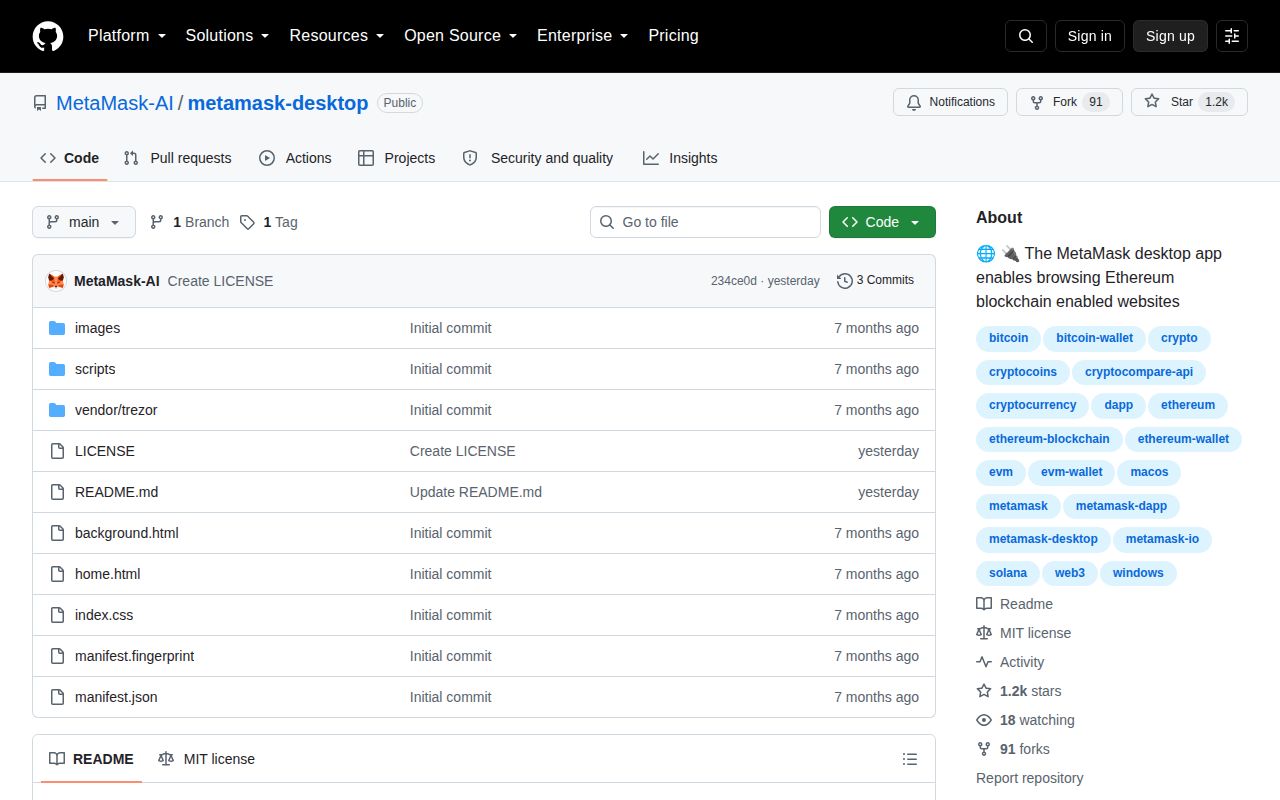
The repository does not establish an official MetaMask connection
MetaMask Desktop uses the wallet's name, fox artwork, extension description, and application screens, but GitHub ownership is the first fact to check. This repository belongs to MetaMask-AI. MetaMask's verified organization is MetaMask, and it publishes its browser wallet at MetaMask/metamask-extension. The official download page points users to browser extension stores, iOS, Android, and an official APK. It does not present these Windows, macOS, or Linux desktop installers. That separation matters because a self-custody wallet can expose the keys controlling every asset in it.
The official MetaMask support page is unusually direct: download only from the appropriate official store, since cloned versions can record a Secret Recovery Phrase. That warning applies squarely here. MetaMask-AI/metamask-desktop asks users to run downloadable executables and says it can import or export seed phrases, yet the repository provides no statement from MetaMask linking the project to the verified organization. A familiar interface is not provenance. For a wallet, an unverified publisher is enough reason to stop before installation.
A 99-file bundle cannot reproduce the three desktop installers
commit faa4d56 contains 99 files, mostly HTML, CSS, images, vendor assets, WebAssembly, and large JavaScript bundles. There is no package.json, Cargo.toml, source directory, Electron builder configuration, Tauri configuration, contributing guide, security policy, or test directory. Those absences are concrete: a developer has no declared dependency graph, compiler command, packaging recipe, or test target with which to connect the checkout to the release binaries.
The README still describes an "Electron / Tauri-based desktop runtime" without choosing one or explaining how either is configured. Electron and Tauri use different toolchains and package formats, so the slash is not a minor documentation shortcut. The checked-in manifest supplies a clearer clue: it declares Chrome Manifest V3, a Chrome update URL, broad web and socket host permissions, browser content scripts, and extension version 13.23.0. That looks like a built browser-extension payload placed inside a different distribution, not an auditable desktop application source tree.
What happened when we ran it
commit faa4d56 gave our sandbox no supported build ecosystem to execute. The lab identified CSS as the primary language and found no Dockerfile. Because the checkout exposes neither a recognized project manifest nor a container recipe, the harness recorded no install, build, or test result. There are no timings, package counts, audit figures, or test totals to report, and we will not substitute numbers from another MetaMask repository.
That result is a product finding. The README's installation path skips the source and sends each user directly to v1.6.0 release assets. A person can make the AppImage executable, open the DMG, or run the EXE, but ease of launching a binary does not answer how it was built. With no source recipe or checksum in the release notes, the user cannot reproduce one artifact and compare it with the download.
Version 1.6.0 offers binaries without release evidence
The sole release, v1.6.0, was published on August 28, 2026. GitHub lists an arm64 DMG of about 125 MB, an AppImage of about 136 MB, and a Windows installer of about 107 MB. The release body is empty. It gives no change list, supported OS detail beyond filenames, cryptographic hashes, code-signing identity, reproducible-build instructions, or explanation for why the embedded extension manifest reports version 13.23.0.
A binary wallet needs a much stronger chain of evidence. A useful release page would tie a reviewed tag to a documented build, publish hashes, name the signing identity, and explain update behavior. This project supplies none of that on the page a user is told to trust. We did not execute the three assets, so this review does not claim what they do after launch. The narrower conclusion is sufficient: their behavior cannot be established from the provided source and release metadata.
Recent pushes do not replace review history
GitHub showed 1,230 stars, 0 open issues and pull requests, and a last push on September 6, 2026. The activity is recent, but the commit history is only three entries: the initial import at faa4d56, a README update, and a license file. There is no visible sequence of feature changes, fixes, review discussions, or release preparation. Zero open reports in such a young repository is not proof of zero defects.
The MIT license answers whether people may reuse the checked-in material. It does not establish who produced the executables, whether every bundled component corresponds to reviewed source, or whether key storage matches the README's promises. Claims such as local encryption and non-transmission of seed phrases deserve tests and inspectable implementation. Here they are unsupported assurances on a short page, which is too little for software entrusted with funds.
Use an official store build or auditable wallet instead
The official MetaMask extension is the direct choice for users who want MetaMask. Its public repository has build instructions, a package manifest, contributor documentation, tests, and a long release history, while the official site routes installation through named browser stores. Rabby is another active browser-wallet option. Frame is closer to the requested desktop form, though its March 2025 last push warrants a fresh maintenance check before adoption.
MetaMask-AI/metamask-desktop asks for the largest possible trust concession while offering the smallest useful verification trail. Do not test it with a spare recovery phrase, because any phrase that has ever controlled funds may become valuable again. Researchers can inspect the bundle in an isolated environment with no secrets or wallet access. Everyone else should leave the v1.6.0 files alone and obtain wallet software through a publisher and channel they can authenticate.