Interstellar is a server-side proxy, not a static website
Interstellar wraps a web proxy in a browser-like interface with tabs, themes, app shortcuts, games, inspect tools, and optional cloaking. Its Node server uses Express alongside Bare Server, Scramjet, Wisp, and transport packages. A user enters a destination through the interface, and the server mediates the connection. This is meant for restricted networks and self-hosted access, not for publishing a conventional collection of static pages.
The measured checkout was small beside many JavaScript applications: 497 files, about 3,173 lines of source, and 8.8 MB. It does not make the job operationally simple, since the useful behavior depends on remote sites continuing to work through rewritten requests, service workers, authentication flows, and browser restrictions that Interstellar does not control.
A 15-second install ends before release verification begins
The README offers pnpm, npm, and Bun commands, and package.json requires Node 16 or newer. Starting the service is one command after dependency installation. A Dockerfile is present and uses a slim Debian Node image, copies package.json, installs with npm, and launches index.js.
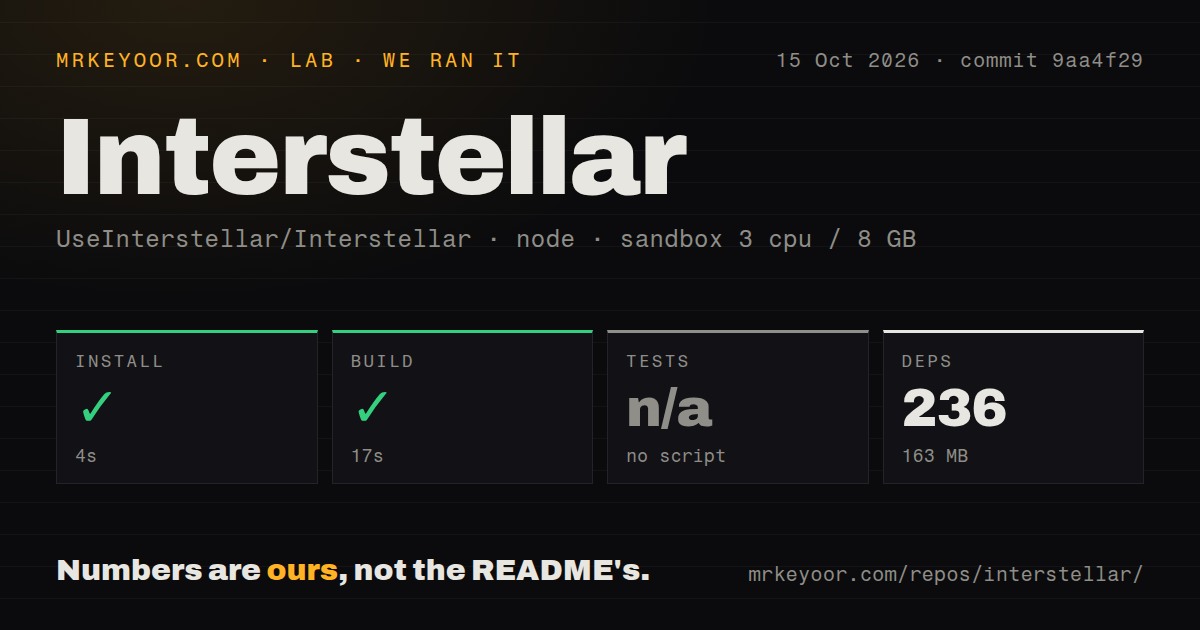
Our pnpm install succeeded in 15 seconds, adding 119 packages and consuming 87 MB. That is a light first step. The package scripts contain start, formatting, precommit, and lint commands, but no build command and no test command.
What happened when we ran it
Our sandbox installed Interstellar in 15 seconds with 119 packages and 87 MB on disk. The run used a fresh unprivileged Debian container with 3 CPUs, 8 GB of RAM, Node 22, and no secrets. Installation exited successfully.
There was no build script or target, so the build step was skipped. There was also no test script or target, so the test step was skipped. Npm audit reported 5 known vulnerabilities: 3 high, 2 moderate, 0 critical, and 0 low. Our scan found 1 CI workflow file, a Dockerfile, and no tests directory. Those are the complete lab findings; they do not establish runtime speed, site compatibility, or proxy safety.
Static hosts cannot run the required Node process
The README explicitly rules out Netlify, Cloudflare Pages, and GitHub Pages because Interstellar needs its server. Codespaces instructions tell the user to make the forwarded port public, and they offer manual port forwarding when the popup fails. That can get a personal instance online, but it also creates a reachable proxy endpoint. Hosting it responsibly means handling process restarts, TLS, updates, logs, abuse, and access control outside the application.
The included Dockerfile gives the 497-file project a repeatable Node base, yet it runs npm install without a lockfile copy in the displayed steps. Our lab used pnpm and installed 119 packages, so its dependency result should not be treated as a Docker-image check. The README's update command includes git pull --force --allow-unrelated-histories and warns that local changes may be overwritten. Operators with local configuration should use a controlled update process and a recoverable copy instead.
Password protection starts disabled in config.js
The configuration file sets challenge to false. It also contains an example username and password, while the README instructs operators to set the challenge flag and enable it through an environment variable. Anyone following the public Codespaces route should change those example values and turn protection on before sharing the URL. The project does not present itself as a multi-tenant identity service, so basic authentication should be viewed as a small-instance barrier rather than an enterprise access system.
That warning matters more with 5 known audit findings, 3 of them high severity, in our installed dependency tree. The lab block does not identify the affected packages or whether a reachable route can exploit them, so we cannot claim either safety or compromise. It does justify stopping before public deployment, reading the full audit report in the target environment, and updating or containing the service according to the actual advisory paths.
Google and GeForce Now logins have open failure reports
A proxy can start normally while the site a user cares about still fails. Open issue 1220 reports that apps opened through a Codespaces deployment return a Response status error with value 0. Issue 1203 reports a 404 during GeForce Now login, and issue 1171 reports that Google sign-in does not work. Other open reports mention CAPTCHA, redirect, and verification problems.
Our 15-second install did not exercise a login, a CAPTCHA, or a streamed game session, and the repository supplied 0 tests for the lab to run. Buyers should make a short acceptance list of required destinations and test each one from the intended browser and network. A passing home page is weak evidence for this kind of software. Remote services change independently, so the same checks belong in routine maintenance after adoption.
A September 9 push is active maintenance, not a quality gate
GitHub recorded the last push on September 9, 2026. Release v5.3.0 was published on May 30, and the repository had 50 open issues and pull requests when fetched: 48 issues and 2 pull requests in the current API listing. Recent issue updates and closures show that maintainers are working through user reports. The queue also shows how much support work a web proxy attracts when individual sites, browsers, and hosts behave differently.
The 8.8 MB checkout and 119-package install make Interstellar easy to inspect and cheap to trial. Missing build and test targets leave adopters to create their own release check, while 5 audit findings demand review before exposure. Its strongest use is a personal, monitored instance for a known set of destinations. A school, company, or public operator that needs dependable authentication and formal change control should choose a narrower proxy component or wait for stronger verification.