Xiaomi's official bridge still uses the cloud for most homes
Xiaomi Home maps MIoT-Spec-V2 devices from a Xiaomi account into Home Assistant, with Xiaomi Cloud carrying traffic for most installations. After OAuth login, you choose homes and devices, then properties appear as sensors, switches, numbers, selects, or text entities. Events and actions map into Home Assistant too. Multiple Xiaomi accounts can feed the same Home Assistant area, which is handy in a household where device ownership is split.
The broad mapping comes with a firm architectural condition. Unless you have a compatible Xiaomi Central Hub Gateway, the integration receives updates through Xiaomi's MQTT broker and sends commands through Xiaomi Cloud's HTTP interface. The README names 6 supported regions: mainland China, Europe, India, Russia, Singapore, and the USA. You choose the region during import because Xiaomi keeps each region's cloud data separate.
MIoT mapping covers many devices, with three category gaps
Xiaomi says the integration supports most smart-device categories, then names Bluetooth, infrared, and virtual devices as exceptions. MIoT-Spec-V2 descriptions decide how device services become Home Assistant entities. General rules cover ordinary writable values, read-only sensors, events, and actions. More specific mappings can change the entity type for a known device or service. That system explains both the integration's reach and why one odd device model can still need a filter or mapping correction.
Action debug mode exposes commands with parameters as a text entity. That is useful when an appliance supports a MIoT action that has no neat dashboard control, such as a speaker directive with ordered inputs. It also asks more of the operator than a normal switch does. You need to supply correctly typed parameters in the expected order, and a bad device specification can create an entity that Home Assistant cannot use as intended.
What happened when we ran it
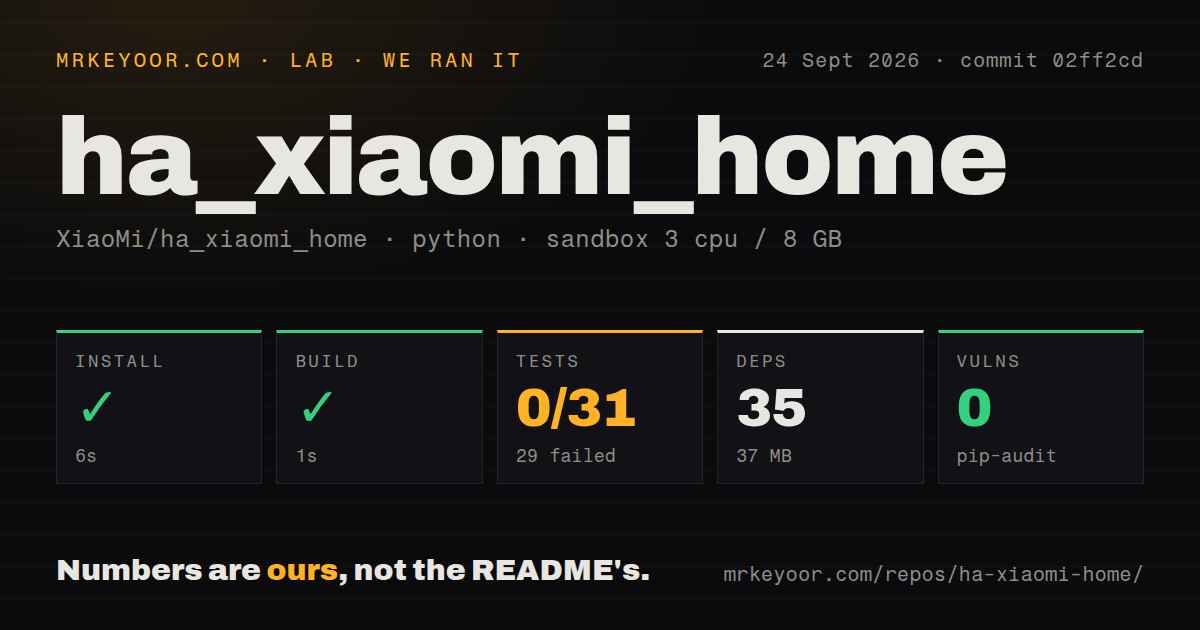
Our measurement setup used commit 02ff2cd in a fresh unprivileged Debian container with 3 CPUs and 8 GB of RAM. In that sandbox, we measured a 1.7 MB checkout holding 104 files and about 20,984 lines of source. Installation succeeded in 6 seconds, adding 35 Python packages and occupying 37 MB. The build succeeded in 1 second. Pip-audit found 0 known vulnerabilities in the installed packages.
The test step failed with exit code 1 after 2 seconds. Pytest reported 0 passed, 29 failed, 3 skipped, and 2 collection or setup errors, with 31 tests in the run record. The repeated message was direct: async functions were not natively supported. It appeared across specification parsing and storage tests. The log tail does not establish why that support was unavailable, so we cannot assign a cause beyond the environment and command that were run.
That result matters because the failure happened before the suite gave us one passing case. It does not prove the Home Assistant integration itself is broken on a configured appliance, since our container had no Xiaomi account or device secrets. It does show that a clean Python environment did not reproduce a passing test setup from the repository as checked out. Treat the 1-second build as a syntax and packaging signal, not a substitute for the failed suite.
Local control has a mainland China hardware boundary
Full local mode depends on Xiaomi Central Hub Gateway firmware 3.3.0_0023 or newer, or a device with built-in central-hub software 0.8.9 or newer. Xiaomi says the required central gateway is available only in mainland China. In other regions, the usual route remains Xiaomi Cloud, even though the Home Assistant server may be sitting beside the device on the same network.
A separate Xiaomi LAN option works in every region, but its scope is smaller. It reaches IP devices connected by Wi-Fi or Ethernet on the same LAN as Home Assistant. It cannot control BLE Mesh or Zigbee devices, and it does nothing when a central gateway is present. The README warns that this mode may cause abnormalities and recommends leaving it off. Anyone buying hardware for offline automations should verify the exact model and route before treating this integration as local-first.
OAuth protects the password, while configuration files hold the session
The OAuth 2.0 flow means Home Assistant does not keep your Xiaomi account password. After login, however, device information, certificates, tokens, and other account data are stored in clear text in Home Assistant's configuration file. Xiaomi warns that exposing that file may let someone act as you. Backups, support bundles, and file-sharing access therefore belong inside the same security boundary as the Xiaomi account.
Xiaomi documents a revocation path in its mobile app if a token leaks. That is useful recovery guidance, though it does not encrypt the stored material. A careful installation restricts access to the Home Assistant config directory and protects its backups. This requirement is especially important on a shared NAS or a host where several administrators can browse application files.
September code activity is ahead of the January release tag
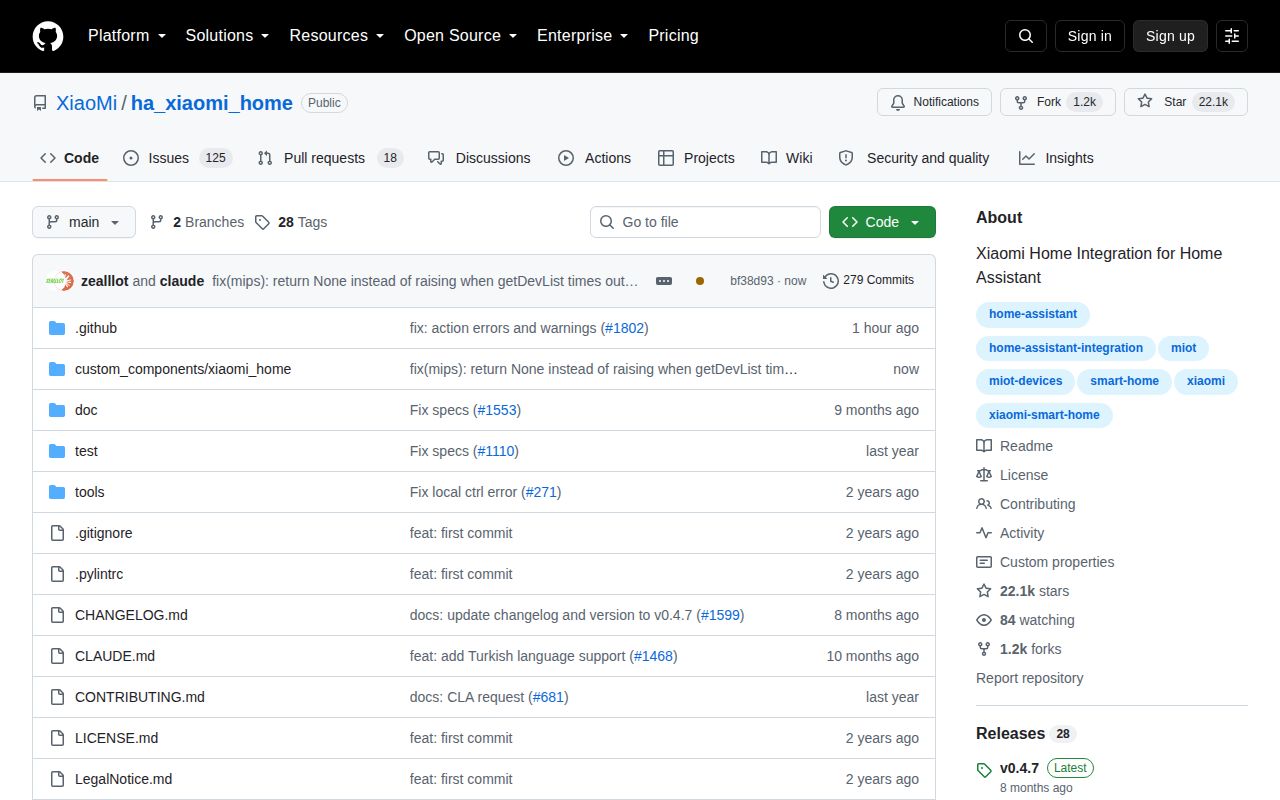
GitHub showed 22,120 stars and 144 open issues and pull requests when fetched on September 24, 2026. The main branch was pushed that day, with recent work closing device-state and entity-ID reports. The latest tagged release was v0.4.7 from January 7, 2026. That gap indicates the release tag is older than the active codebase; it does not indicate an abandoned project.
Compatibility work is still part of ownership. Open issue 1776 reports that v0.4.7 uses concentration constants deprecated in Home Assistant 2026.7 and scheduled for removal in 2027.8. The current activity is reassuring, but a Home Assistant upgrade can expose integration changes before a new Xiaomi Home tag arrives. Pin a known version, read its open compatibility reports, and test your actual device mix before the household depends on it.