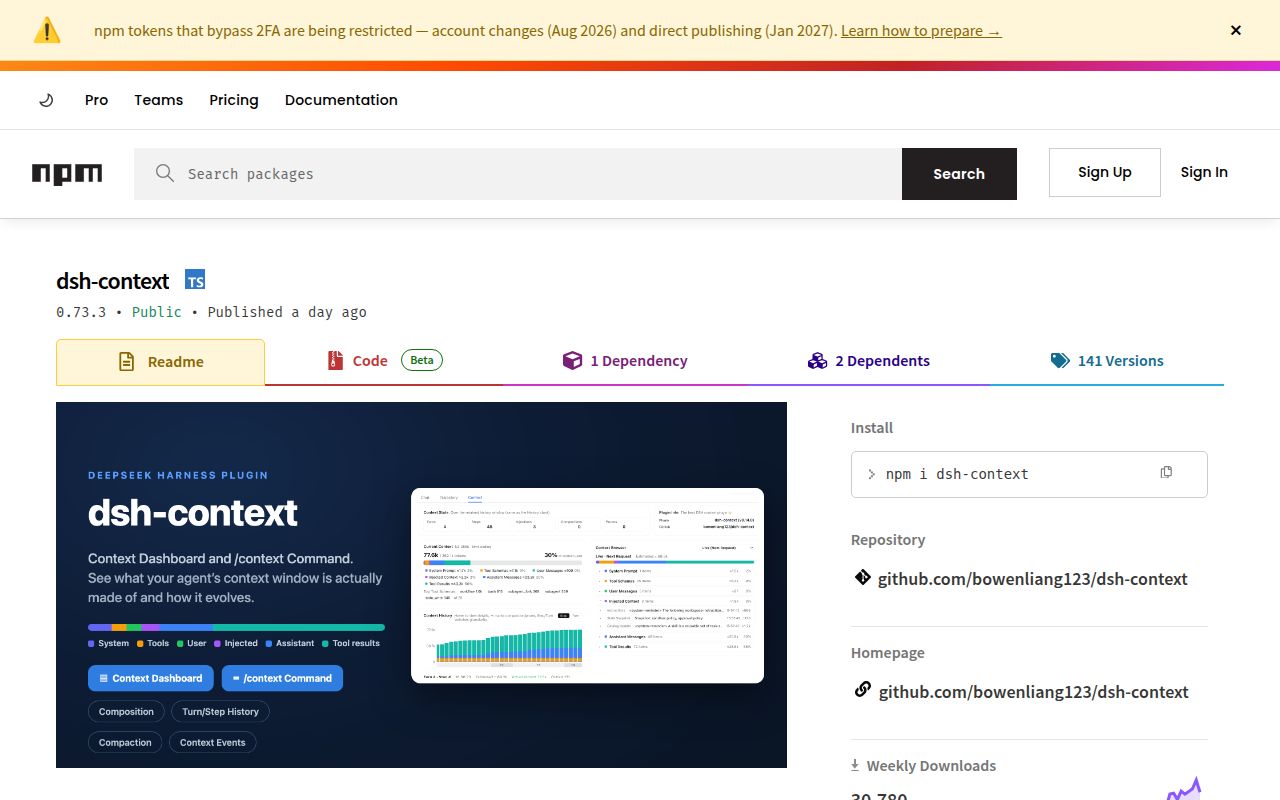
A tool result can fill your agent's context window without making the reason obvious in the conversation. dsh-context gives DeepSeek Harness users a place to inspect what entered each request. Its most useful distinction is also easy to miss: the composition figures are estimates, while provider-reported totals answer a different question about usage.
DeepSeek Harness gets a request-level context browser
The English README describes a Context tab, a sidebar panel, and a /context dialog that expose the makeup of a session. You can inspect system instructions, tool schemas, messages, and tool results. The request trend connects changes in those categories to compaction and pruning events. That is useful when the chat transcript alone cannot explain a crowded context window.
The cross-session Insights page adds usage and estimated cost views, while Fleet follows the agent family. These are documented capabilities, not interactions exercised by our lab run. For a Harness user investigating an unexpectedly large request, I would begin with the Context Browser and one known tool call. Establish what the display is counting before using a cross-session chart to change your workflow.
What happened when we ran it
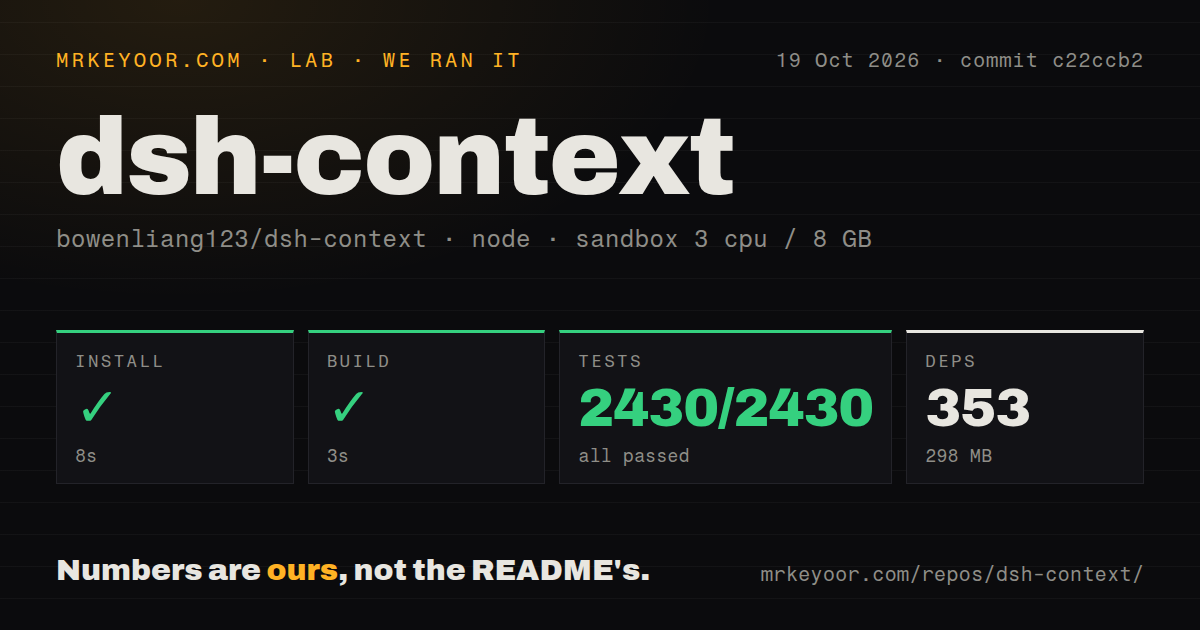
Our sandbox installed dsh-context commit c22ccb2 in 8 seconds and built it in 3 seconds on October 19, 2026. Installation recorded 353 dependencies and 298 MB on disk. The sandbox had 3 CPUs and 8 GB of RAM. Its recorded image, lab-node:22, does not establish the actual Node or operating-system version.
The test command failed with exit code 1 after 97 seconds, although Vitest reported 2,430 passed and 0 failed individual tests. Its file summary showed 1 failed and 163 passed out of 164 test files. The complete command therefore did not pass. Reporting only the individual-test count would hide the result a developer's release gate actually receives.
The supplied tail shows a source line that would print a compatibility-matrix skip warning, followed by the failed-file summary. It does not include enough of the preceding exception to establish why the file failed. We cannot attribute it to a missing Harness checkout, a package problem, or a plugin defect from that excerpt. The checkout contained 399 files, about 72,113 lines of source, and occupied 5.3 MB, with 3 CI workflow files, workspace packaging, and a tests directory. No Dockerfile was found.
Composition estimates cannot settle a provider bill
The README says category figures use Harness's fixed-density heuristic and that pinned request details show provider-reported actuals alongside them. The token card combines estimated composition shares with a provider-exact billed total. That lets you investigate which kind of content dominates a request without pretending every category has an independently exact tokenizer measurement.
Cost adds another qualification. The documented estimate uses models.dev list prices. Your invoice may reflect an arrangement that list prices do not describe, so I would use the cost view to identify sessions worth investigating and reconcile spending against the provider's records. Our sandbox did not validate billing accuracy or measure token savings. Installing a dashboard supplies visibility; changing what the agent reads still requires a decision from you.
Historical detail also has limits. The README says steps older than a compaction are reconstructed from the removed-message archive and labeled when their makeup is approximate. If you are investigating an exact instruction or tool schema, check whether the display is a retained request or a reconstruction. That distinction matters more than the apparent precision of a chart label.
Compatibility is tied to named Harness releases
The compatibility page dated October 20, 2026 names Harness 0.1.7-rc.2, 0.2.0-rc.2, and 0.2.1-rc.2 as its supported set. Read that narrower declaration alongside the README's broader minimum-version wording. A plugin that reads session projections and client interfaces needs more care than matching a major version number. Check the exact host release you intend to keep.
That page describes a compatibility matrix requiring a Harness source checkout and a prior plugin build. It also explicitly limits its verification scope: source seams and statistics do not establish full web-app acceptance on a real profile. These are upstream statements about their process. They help you plan your own trial, but they do not explain our failed test file or turn it into a passing result.
Prompt settings change sessions beyond the dashboard
The preferences include system-prompt prefix and suffix text applied to every session, including subagents, from the next turn. Leave those fields empty if your purpose is observation. Someone expecting every setting to affect only chart presentation could otherwise change the instructions sent to agents. The compatibility page also documents a complete-prompt-section case where those additions are dropped, so the setting is not a universal policy mechanism.
The repository was pushed on October 20, 2026, following the v0.73.3 release on October 19. Current issue activity includes open report 177, which says large agent families can omit running agents from the Fleet display. We did not reproduce that report. It is a reason to compare Fleet with the host's session list during evaluation, especially if following subagents is your main reason to install the plugin.
Choose visibility or output reduction deliberately
dsh-TUI provides a terminal interface with a context bar and live session statistics. Choose it when terminal visibility is enough. Context Mode uses MCP tools to keep raw tool data outside the conversation window. Consider it for a supported client when changing how data enters context is the goal. These alternatives address different jobs, and our lab did not compare their performance.
Our numerical scores are editorial judgments: 5 means little qualification, 3 means material caveats, and 1 means a poor fit for the stated job. dsh-context's explicit estimate boundaries earn documentation credit. The failed command limits confidence in this source snapshot. Try it on a disposable Harness profile, inspect a known request against its tool output, and keep provider records as the authority for spending.