More than 800 channels can arrive through one service
The README says a default deployment can aggregate more than 800 channels, though the actual count changes with source status, region, and enabled modules. iPTV combines direct HLS links, imported M3U or TXT subscriptions, public listings, and extractors for Chinese video and broadcaster sites. It then deduplicates and groups the results, generates an EPG, and serves standard playlists to TVs, phones, or computers. This is a working channel control plane, not merely a large M3U file.
Playback can take 3 routes. Standard playlists leave compatible media on the shortest path. A compatibility option relays manifests when players do not follow redirects, while full proxy mode can send supported video segments through the server. Individual modules may force proxying to add a required request header or refresh a signed address. That design rescues awkward players and upstreams, but it also makes server bandwidth and source-specific failure behavior part of the viewing experience.
Four admin pages separate sources from channel presentation
The browser panel has 4 main pages. Source Management controls platform modules, direct links, web extraction, and imported subscriptions. My Channels handles groups, names, ordering, hidden items, and separate profiles. Settings covers aliases, EPG sources, user tokens, and backup or restore. The final page shows version information. Keeping source acquisition apart from the visible lineup is the project's best idea because one broken extractor need not ruin every television's arrangement.
Credentials raise the stakes. Some free channels need no account, while higher quality or member feeds may ask you to import a cookie or token from an account you own. The README says credentials remain in the deployment and describes source-specific storage, including a dedicated Chromium profile for one login flow. Back up /iptv/data carefully, restrict who can download configuration exports, and assume the persistent directory contains information worth protecting even when a playlist itself looks harmless.
What happened when we ran it
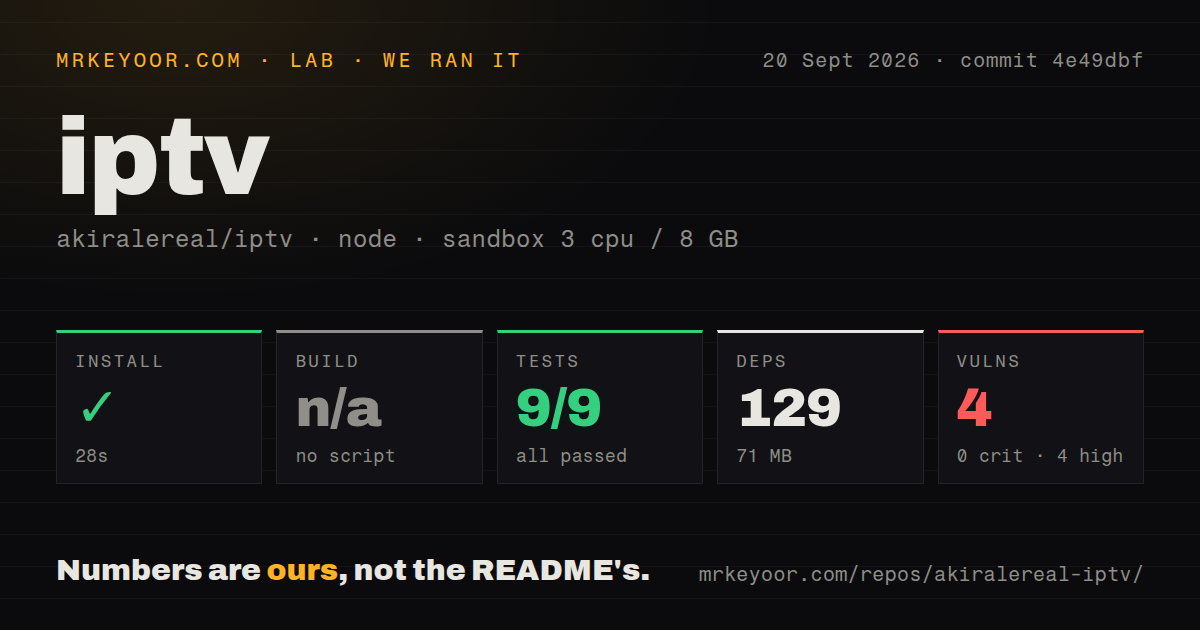
Our sandbox installed commit 4e49dbf in 28 seconds, adding 129 packages and using 71 MB on disk. The checkout contained 266 files, about 44,706 source lines, and occupied 15.3 MB. No build script or target existed, so the harness skipped that step. The project's test command completed in 28 seconds with 9 passed and 0 failed out of 9.
The dependency audit was the bad result: npm reported 4 known vulnerabilities, all high severity, with 0 critical, moderate, or low findings. The supplied measurement does not identify which package caused each advisory, so blaming Puppeteer, QR generation, or an HTTP client would be guesswork. Treat the audit as a deployment stop that needs package-level review and retesting. The repository has 1 CI workflow plus a Dockerfile and Compose file, but no conventional tests directory.
Port 1905 belongs behind a private network or deliberate edge
The sample Compose file publishes port 1905 and leaves mpass blank. Setting it makes every service URL carry a password path and returns 403 when the path is absent. That is better than an open admin panel, though a secret embedded in a URL can appear in browser history, access logs, shared playlists, or reverse-proxy records. For access beyond the LAN, add HTTPS at a controlled edge and decide whether URL-path access control meets your threat model.
Small NAS boxes also need a resource plan. The Compose notes estimate each Chromium process at roughly 200 to 400 MB and suggest reducing browser concurrency to 1 when memory is 2 GB or less. Full proxy mode consumes video bandwidth, while standard mode lets players contact upstream CDNs. Several sources depend on mainland China network reachability, expiring addresses, or player codecs. A green container log cannot prove that a particular TV can decode every channel.
Version 4.15.0 is active, and upstream breakage stays visible
Version 4.15.0 was released on September 13, 2026, and the repository was pushed again on September 19. GitHub showed 796 stars, 254 forks, and 13 open issues when fetched. The latest release added 19 Hong Kong, Taiwan, Heilongjiang, and Yunnan streams, while the next push added line selection for GOOD TV. This is active maintenance at a pace that matches the number of moving upstreams.
Issue activity shows why that pace is needed. Issue 135 says a sports entry plays a different station. Issue 134 reports that Migu playback works only after dropping to 480p, and issue 125 describes Bilibili interruptions that can make a TV app skip ahead. Another NAS report can load channel logos yet never start playback. These are not all core application defects, but that distinction offers little comfort during a failed match. Expect diagnosis, source switching, and occasional updates.
GPL-3.0 covers the code, not the television rights
The repository code uses GPL-3.0-only, while the 800-plus channel claim includes outside media, names, logos, guide data, and URLs with separate owners. The README states that public reachability and a successful availability check do not establish permission to copy, rebroadcast, sell, or use a stream commercially. It also provides mblank=true for an empty deployment, letting you disable bundled material and add only sources whose rights you understand.
For a Chinese-reading home operator, iPTV solves a difficult problem with unusual specificity. It knows when to refresh a signed URL, inject a source header, proxy a manifest, or leave media on the direct path. Those strengths also make it a restless appliance. Start blank or with a small legal lineup, keep port 1905 private, and resolve the 4 high-severity advisories before trusting saved account sessions to it. If you only need to filter one stable playlist, Threadfin or xTeVe asks far less of you.